Overview
Think of the scene program as a stage set with an explicit robot, objects and cameras. Blender supplies a rough animated rehearsal; a video generator adds realistic appearance. Editing the stage is easier than asking a generator to change one hidden part of its imagined world.
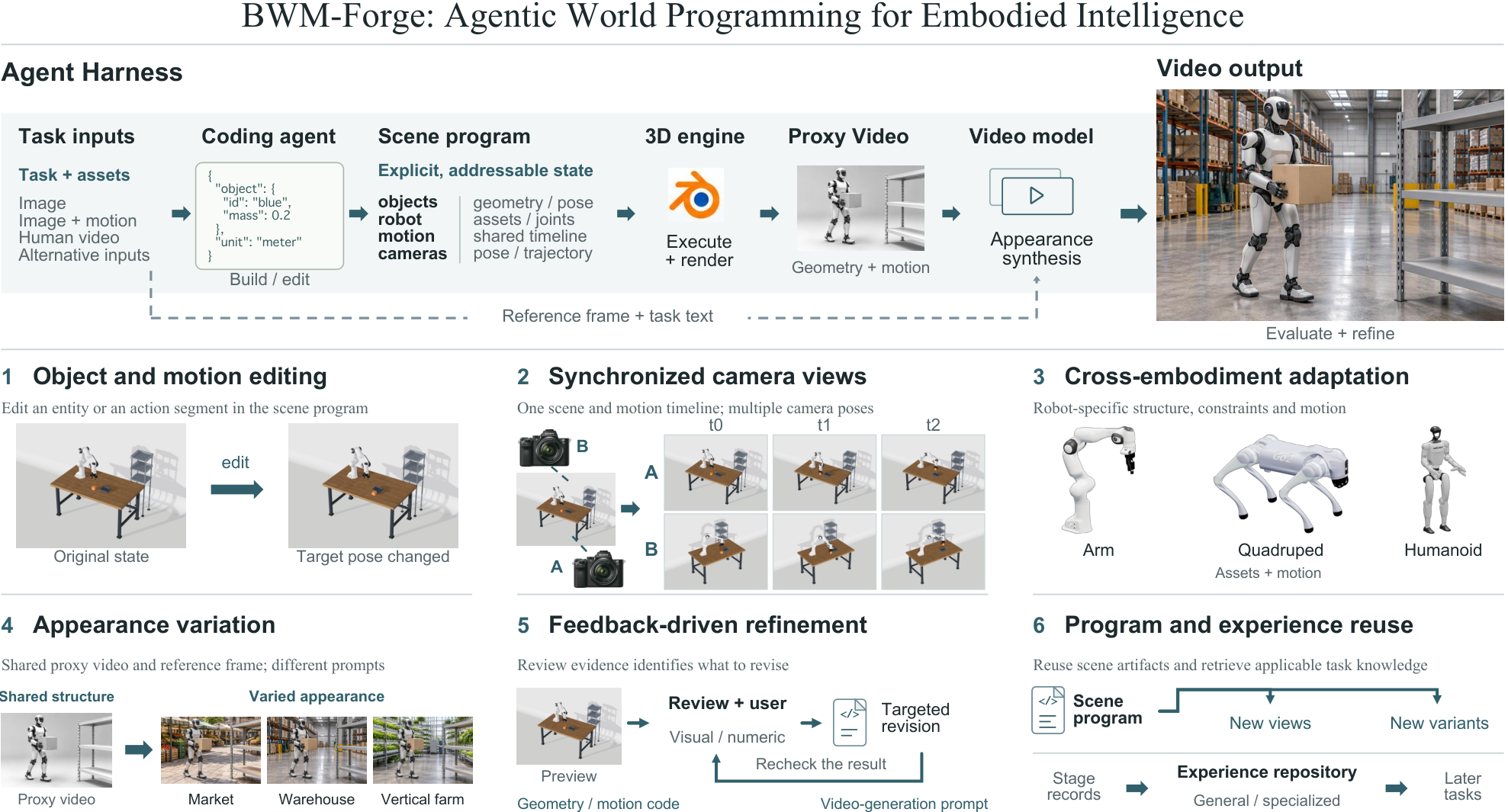
At a glance
BWM-Forge turns robot assets and a task into editable scene code, proxy videos and visually detailed outputs. Four agent roles handle input checks, construction, review and rendering, with human feedback and reusable experience. The evaluation compares complete generation pipelines on 15 selected tasks. It supports controllable video synthesis, while leaving physical execution and downstream robot-policy benefits untested.
1 Introduction
The central problem is control over what a generated video depicts. A pixel-only generator does not expose an object’s position, a robot joint or a camera trajectory as an editable variable. This framework makes them explicit in code, then delegates appearance to a video model. Shared scene geometry and timelines support viewpoint changes and reuse; the final generator can still depart from that structural reference.
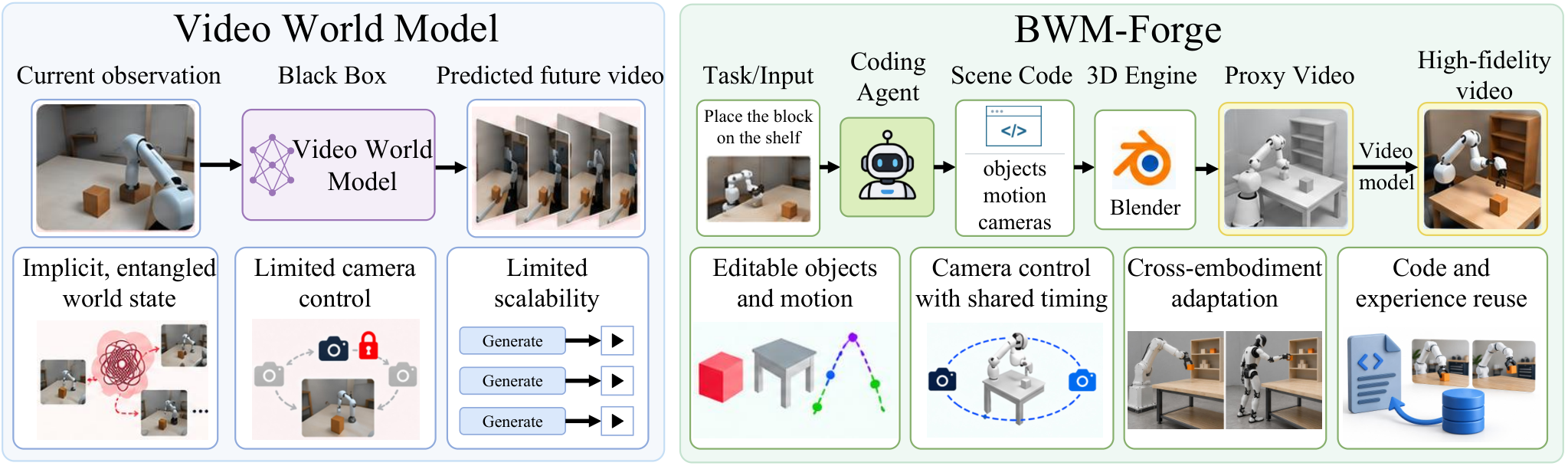
2 Related Work
Related work supplies three ingredients: executable world representations, programmatic robot simulation and diverse training data. Their combination motivates the proposed pipeline; each ingredient has a different kind of validation.
2.1 Code World Model
Earlier code-based world models represent rules, state transitions, scenes or physical mechanisms as executable programs [1] [4] [11]. BWM-Forge focuses on constructing editable robot scenes and rendering their motion into visual conditioning. This is a program-mediated video-generation workflow, rather than a demonstration that a newly learned latent model predicts arbitrary physical dynamics.
2.2 Robotics Simulation
Robot descriptions and rendering provide useful geometric and kinematic structure [13]. The framework combines this structure with agent-written scenes and appearance synthesis. A valid joint hierarchy and plausible rendered contact are useful checks, but neither establishes accurate force, balance or contact dynamics on real hardware.
2.3 Robot Training Data
Synthetic videos could expand scene, embodiment and camera coverage beyond expensive real demonstrations [5] [6]. Here that is a motivation and potential use: the experiments evaluate generated video quality. They do not train a downstream robot policy to measure whether the additional videos improve control or transfer.
3 Method
The method separates the editable scene, its proxy rendering and the final appearance video. Read the equations as definitions of this workflow and its records, rather than convergence or physical-correctness guarantees.
3.1 Preliminary and Task Definition
There are three input modes: an initial image; an image plus recorded motion; or a human demonstration video. All also receive robot assets and a task description. A coding agent produces the scene program, Blender renders its proxy video, and an appearance model generates a detailed video. Saved records support inspection and resuming work. Different input modes supply substantially different information about the intended motion.
Equations 1–5
| (1) |
| (2) |
| (3) |
| (4) |
| (5) |
3.2 Harness System Overview
A harness is the coordinating software around the models. Preprocessing checks evidence, building creates the scene and animation, review diagnoses local defects, and rendering generates and scores appearance. Artifacts, state and feedback pass between these roles. This modular organization helps locate errors; the report does not isolate the benefit of four roles against a matched single-agent alternative.
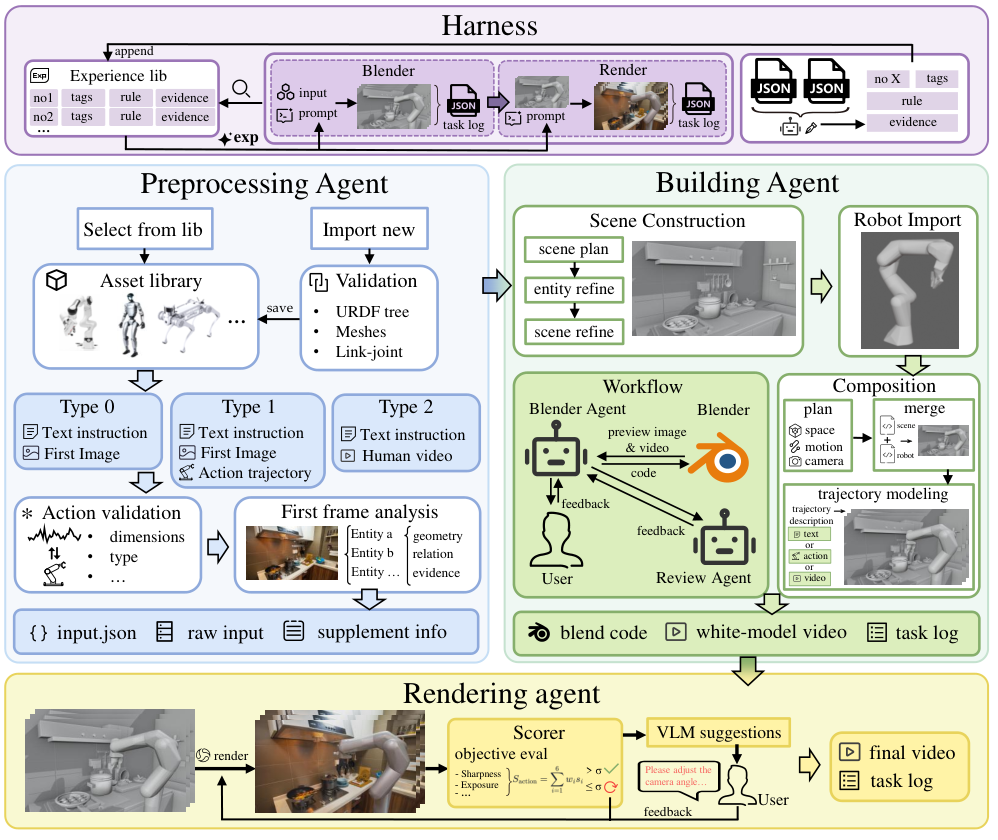
3.3 Preprocessing Agent
Input validation comes before interpretation. This prevents a unit mismatch, broken robot asset or inconsistent trajectory from later looking like a scene-reconstruction failure. Separate validation stages make failures easier to diagnose.
Asset Validation
Check that the robot description has a valid tree, usable meshes and numerical poses; also check video and trajectory formats. These are data-integrity checks. They do not determine whether an animation will be physically executable.
Motion Consistency Validation
Match trajectory channels to robot joints or end-effector coordinates, then establish units, sampling frequency and initial state. A smooth-looking animation can still be wrong if joint names, gripper units or timing conventions were interpreted incorrectly.
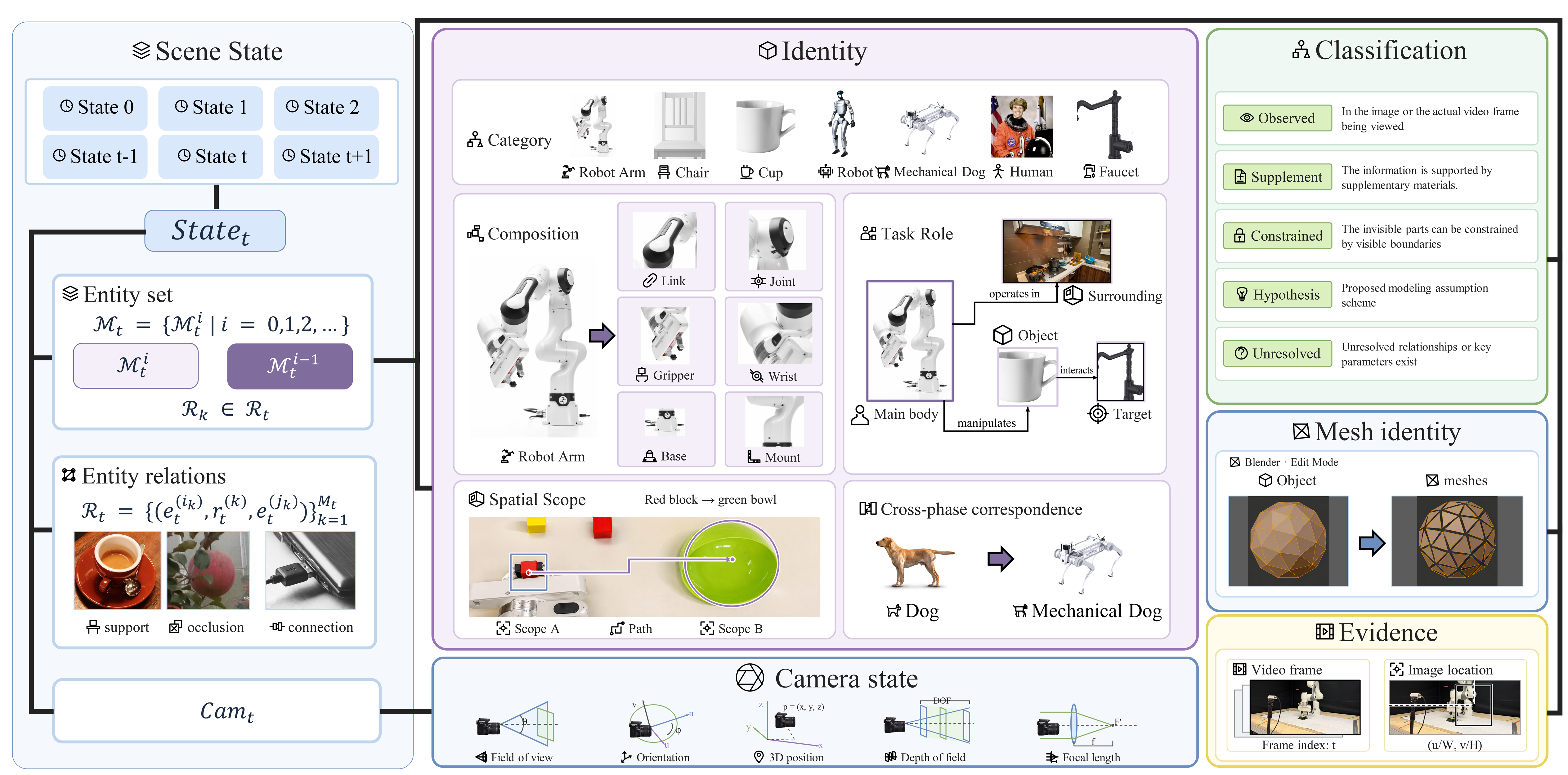
Visual Information Parsing
Visual parsing creates a structured notebook: which entities exist, what is known about each, how they relate, and what the camera sees. Unknown scale or hidden geometry stays explicit as an assumption or editable parameter. The modeling context combines this evidence with instructions, previous artifacts, retrieved experience and feedback. Calling the result a four-dimensional state representation does not mean single-image geometry has been uniquely recovered.
Equations 6–7
| (6) | ||||
| (7) | ||||
3.4 Building Agent
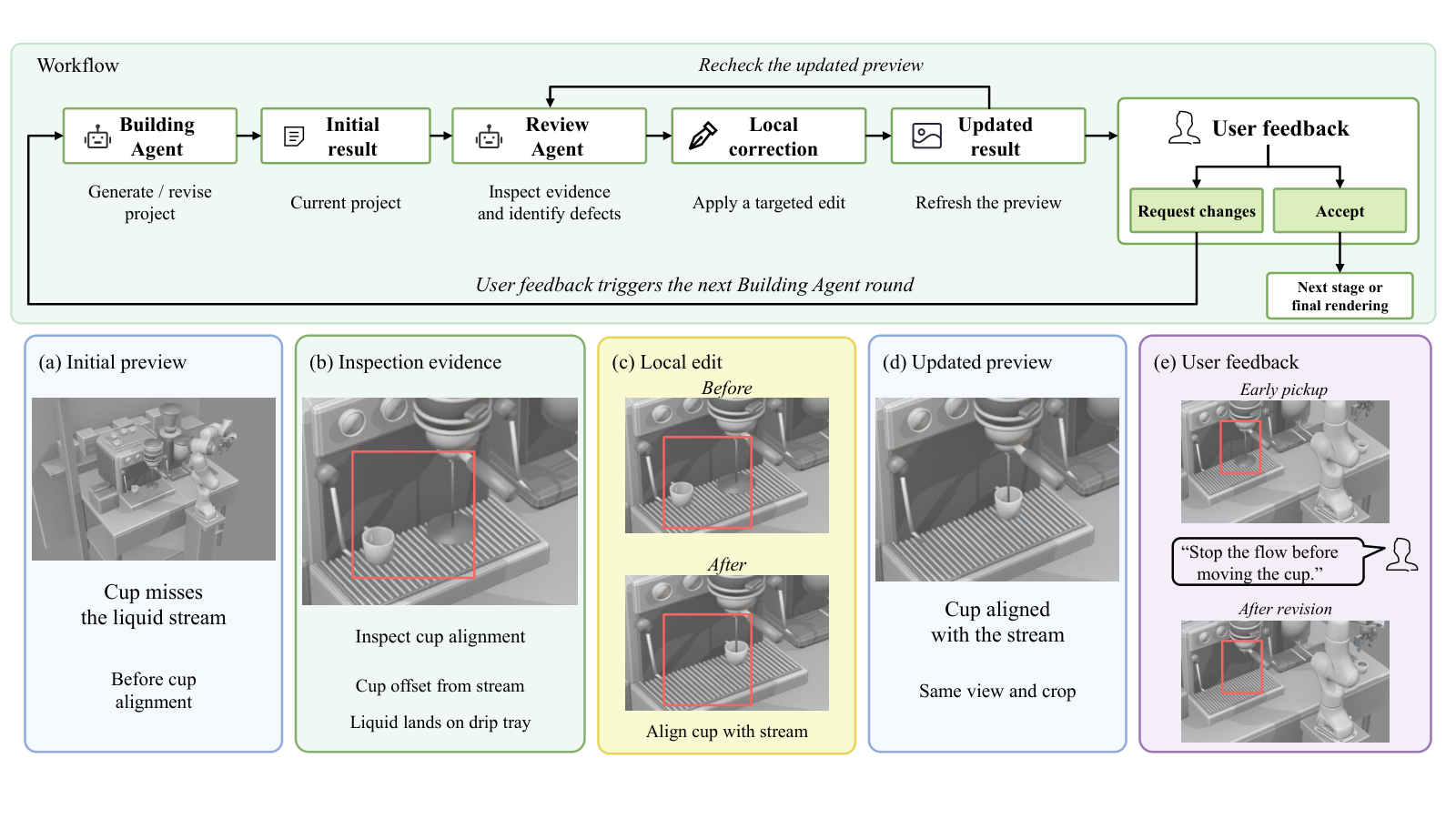
Build the environment and robot separately, then compose them. This coarse-to-fine division makes it easier to distinguish a camera or layout error from an asset-import or motion error. Local revisions can target the relevant project instead of rebuilding everything.
3.4.1 Scene Construction
Start with camera framing and broad scene relationships, then refine task-relevant entities. Keep object identities linked to geometry, and record invented dimensions or completed surfaces as assumptions. Rendered-image overlap can support registration, but matching a silhouette does not uniquely establish the hidden three-dimensional shape.
3.4.2 Robot Import
Import the target robot’s description, visual meshes, transforms and scale into a standalone project. Preserving the complete structure makes later editing more reliable than treating the robot as an unconstrained visual object.
3.4.3 Composition
Composition aligns scene scale, robot placement, joint motion and cameras. Motion may be inferred from instructions, adapted from a trajectory, or reconstructed from a demonstration, depending on the input mode. Inspect key poses and risky intervals, revise local geometry or motion, and render again. Sampled geometric checks and plausible support in an animation remain different from continuous collision guarantees and validated contact dynamics.
|
Mode
|
Motion planning
|
|---|---|
|
|
Where no explicit trajectory is available, the required motion is inferred from .
|
|
|
The input trajectory serves as a motion reference. Limited retargeting or correction is performed based on first-frame correspondences, validity under the URDF specification, and task constraints to compensate for scene modeling errors.
|
|
|
The required motion and timing conventions are inferred from the video , entity states , and .
|
Equation 8
| (8) | ||||
3.4.4 Candidate Experience Summarization
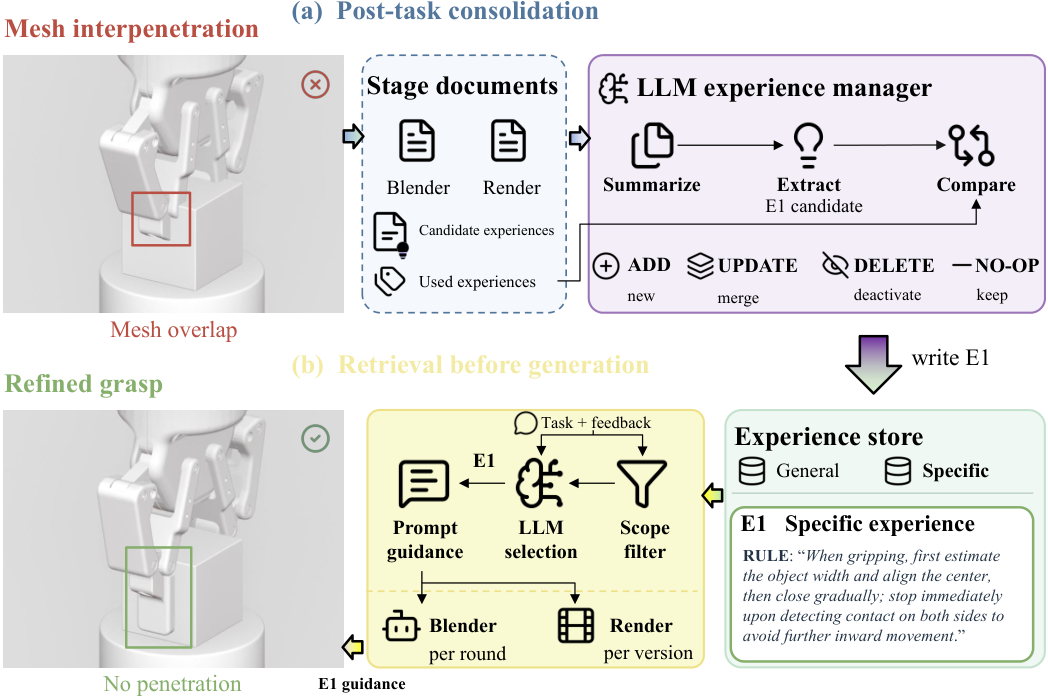
The building stage turns its logs, images, scripts and revisions into candidate experience rules. These are proposals for reuse, with evidence and scope, rather than newly trained model weights or automatically proven general procedures.
3.5 Review Agent
Review combines selected images with numerical logs to locate and repair specific defects. Extra sampled frames can reveal problems missed by fixed keyframes. Optional user feedback remains part of the loop. Unseen intervals and occluded contacts can remain uncertain even when the reviewed frames look correct.
3.6 Rendering Agent
The rendering stage retrieves relevant rules, generates appearance from the proxy and reference image, and records its evaluations and revisions. Keeping the proxy fixed helps separate changes to appearance from changes to the underlying modeled task.
Objective Evaluation
Seven local scores track visual detail, exposure, temporal stability and agreement with reference motion. Action fidelity is a weighted combination of six motion summaries, with the paper’s chosen weights. Such summaries help identify revisions; they are not calibrated probabilities of completing a robot task. The local metrics also differ from the external benchmarks used in the results section.
Equation 9
| (9) | ||||
Automatic Correction: Test-Time Prompt Optimization
Automatic correction is bounded: a low-scoring initial result gets one revised generation. If it still falls below the threshold, it goes to human review instead of looping indefinitely. Later user-driven revision rounds do not repeat that automatic correction step.
Vision-Language Model Evaluation
A vision-language model reviews sampled proxy/output frames, instructions and supporting statistics. Its score is mixed with the local objective score, and users can request revisions. Sparse visual review cannot establish unobserved physical behavior. The main text describes grasp/place-oriented phases, while Appendix A gives the more general initial/task-motion/final-state protocol and applies contact checks only when relevant; this matters for locomotion examples.
Equation 10
| (10) |
3.7 Experience Repository Construction and Evolution
The experience store keeps general and task-specific rules. Scope filtering removes incompatible or inactive entries; a language model selects the remaining rules and proposes creating, updating, deactivating or ignoring candidates. This is retrieval and workflow memory. Its usefulness depends on evidence quality and applicability, rather than every stored rule becoming a universal instruction.
4 Experiments
Separate aggregate video scores from qualitative demonstrations of editing and reuse. The experiments test selected examples, with differences in conditioning and generation resources that limit causal comparisons.
4.1 Experimental Setup
The setup defines the chosen tasks, models and scoring protocols. Inputs, resolution, revision effort and frame conversion all affect what the comparison can establish.
4.1.1 Dataset and Implementation Details
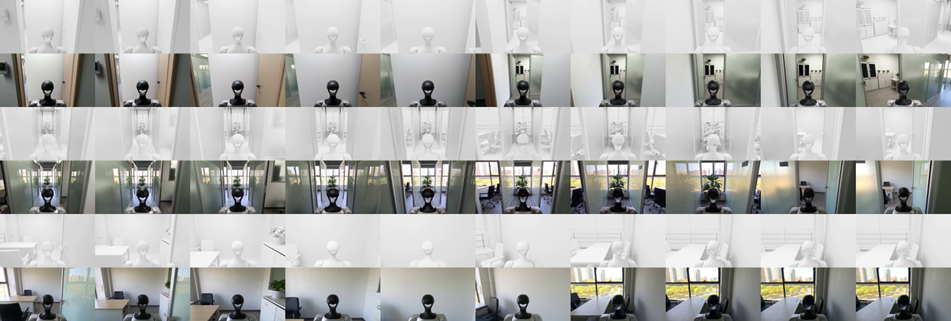
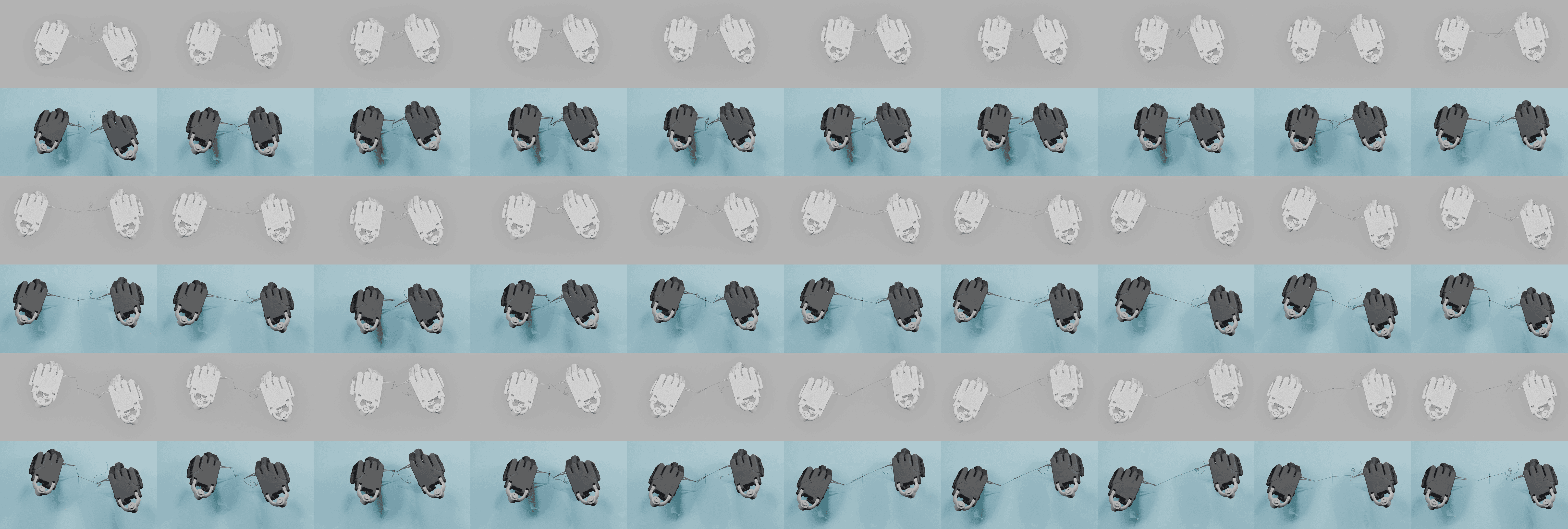
The main evaluation reports 15 tasks spanning five robot types. BWM-Forge receives robot assets and mode-dependent evidence and can use agent review or human revisions; LingBot receives an image and prompt. One dexterous-hand baseline reference is taken from the final BWM-Forge video. The systems therefore have different conditioning and workflows, without a matched end-to-end resource budget. Appendix C documents only seven tasks/configurations, leaving part of the reported 15-task setup unspecified there.
4.1.2 Evaluation Metrics
VBench-Long measures appearance, consistency, smoothness and motion amount. More dynamic content is not the same as more successful action. RoboJudge supplies automatic one-to-five ratings for physical adherence and instruction alignment. These assess rendered videos; they are not measurements of robot execution, continuous contact forces or downstream policy performance.
4.2 Quantitative Results
The two tables compare the original outputs, their 16-frame-per-second re-encodings and the LingBot baseline. Preserve those variants separately rather than combining their best entries into one uniformly superior method.
4.2.1 VBench-Long Results
Both BWM-Forge variants lead on aesthetics, subject consistency, background consistency and smoothness, but trail on motion amount. Native imaging quality is slightly lower: 0.732059 versus 0.734126. Only the re-encoded variant reaches 0.734156, a margin of 0.000030. This tiny change should not be treated as a robust quality improvement. Results are means over selected tasks, without reported uncertainty intervals here.
4.2.2 RoboJudge-9B Results
Native automatic ratings improve from 2.89 to 2.93 for physical adherence and from 2.73 to 3.33 for instruction alignment. The latter gain is much larger. The 16 FPS conversion and re-encoding change these to 3.00 and 3.40, so the combined procedure affects the judge’s ratings. Other models in the table have human ratings on different videos and sample sizes; they are contextual references, not a directly comparable leaderboard.
|
Method or generation model
|
Videos | PA | IA |
|---|---|---|---|
| 15 | 2.93 | 3.33 | |
| 15 | 3.00 | 3.40 | |
|
LingBot-World Base Cam
|
15 | 2.89 | 2.73 |
|
abot_physworld_f113
|
94 | 3.45 | 3.57 |
|
cogvideo_i2v_f113
|
96 | 1.79 | 2.09 |
|
cosmos3
|
107 | 3.44 | 3.61 |
|
gigaworld_gr1_2b_f113
|
105 | 2.74 | 3.03 |
|
happyhorse
|
36 | 3.81 | 4.33 |
|
kling
|
26 | 3.88 | 4.50 |
|
veo31_lite
|
35 | 3.89 | 3.97 |
|
wan22_ti2v5b_1280x704_f169
|
110 | 2.60 | 2.63 |
|
wan26_flash
|
69 | 4.09 | 4.16 |
|
wow_wan14b_f105
|
122 | 2.84 | 2.74 |
4.3 Qualitative Results
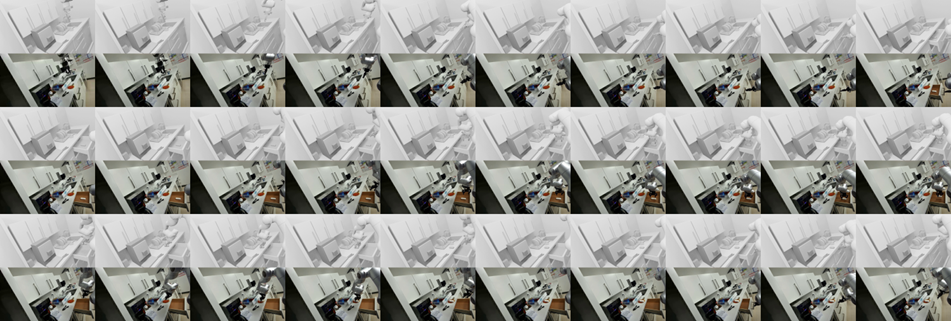
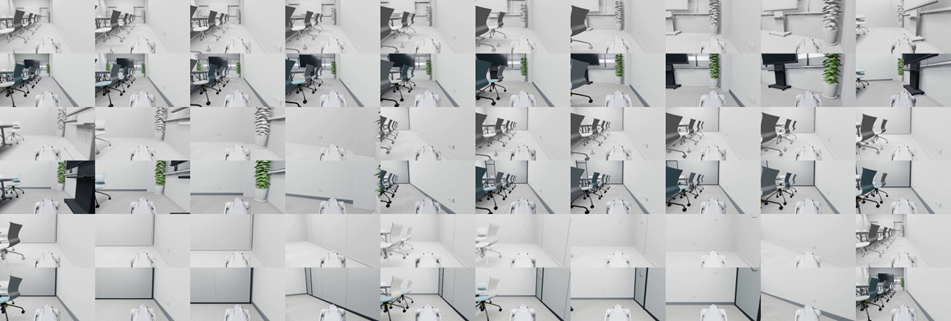
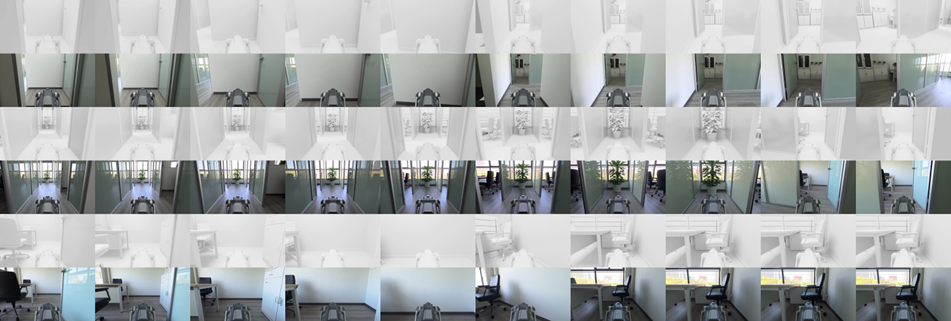
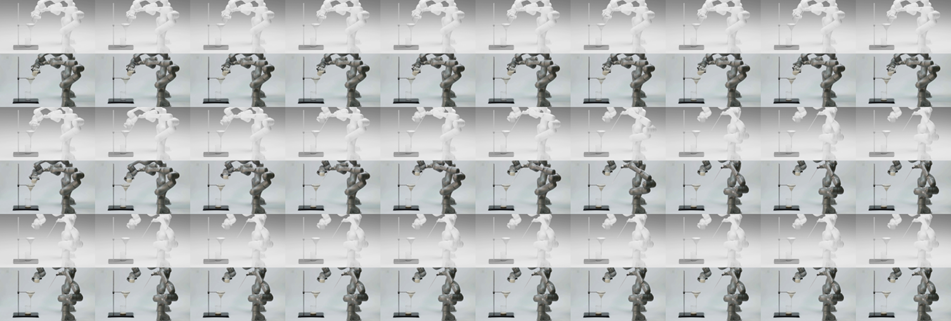
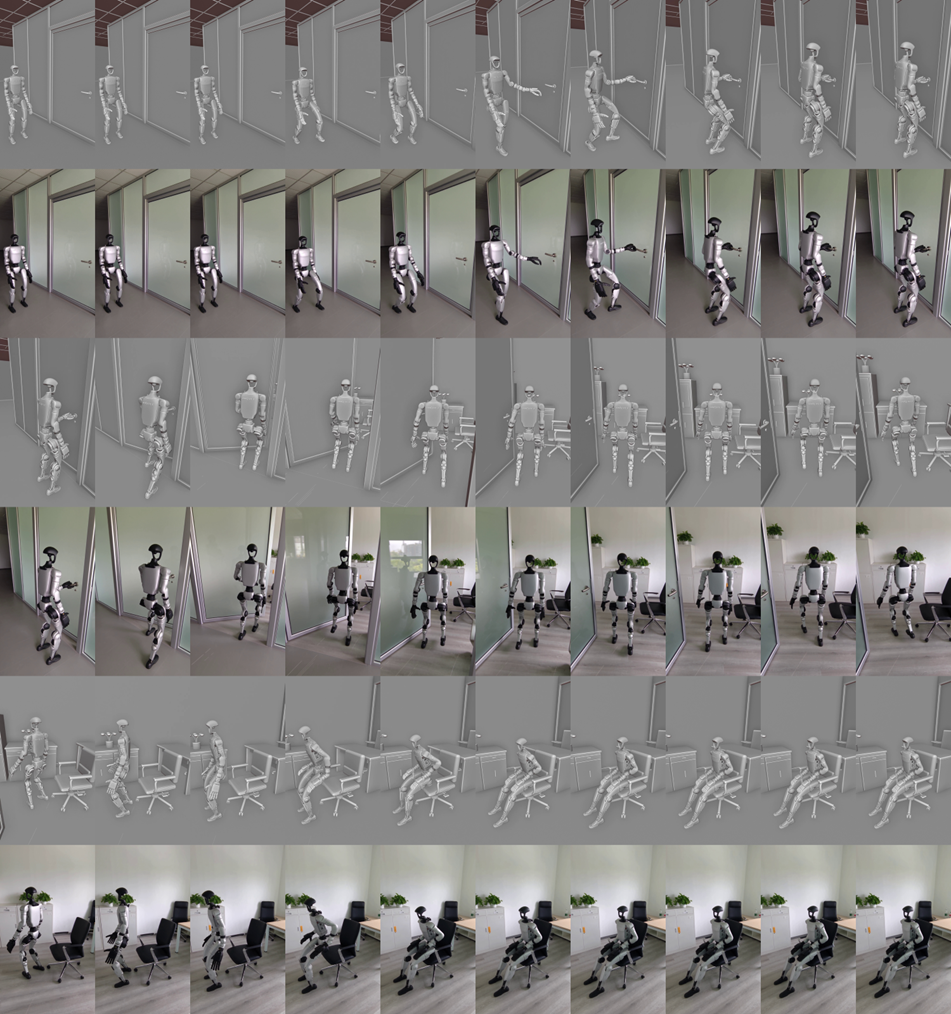
Frame montages show how scene geometry and motion relate to the detailed outputs across seven illustrated tasks. They are useful for inspecting layout, robot identity and appearance changes. Sampled frames cannot fully reveal thin-object contact, brief interpenetration or continuous motion between samples. All original example panels are retained below.
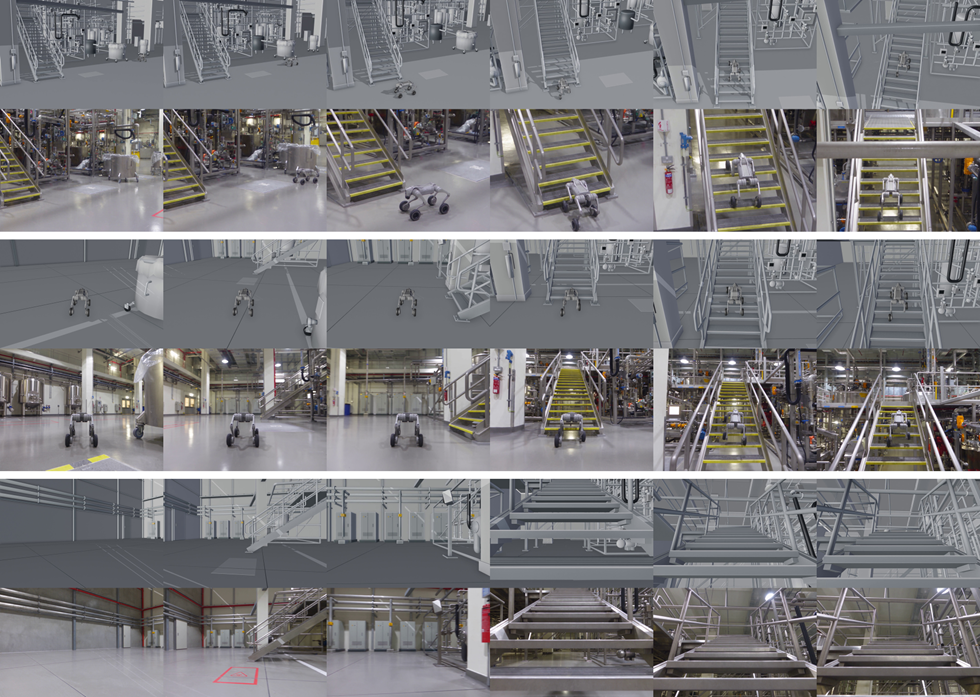
4.3.1 Multiple views of the same task
Three cameras observe one modeled factory task using a shared scene and timeline. This provides explicit viewpoint control and geometric references. The resulting appearance videos are conditioned generations; the example does not quantify perfect cross-view consistency of their synthesized details.
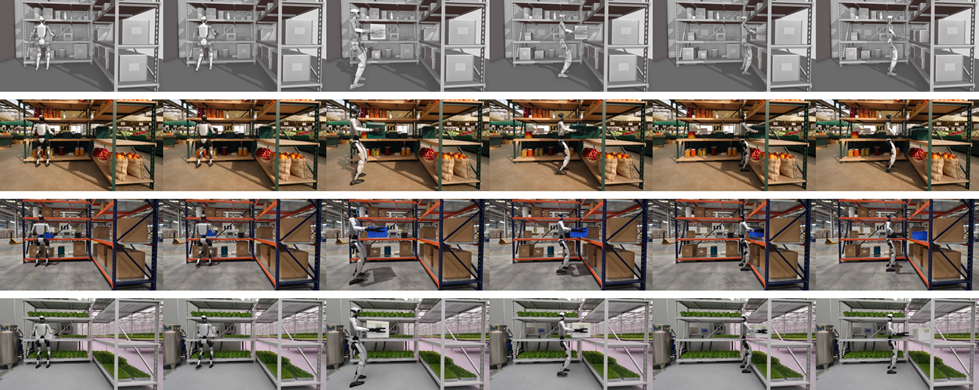
4.3.2 Multiple scene appearances from one proxy video
One proxy sequence is restyled as a market, warehouse or vertical farm. Geometry and action serve as common constraints while the rendering prompt changes appearance. This illustrates controlled variation without rebuilding the modeled task; it does not prove that every generated detail obeys that geometry.
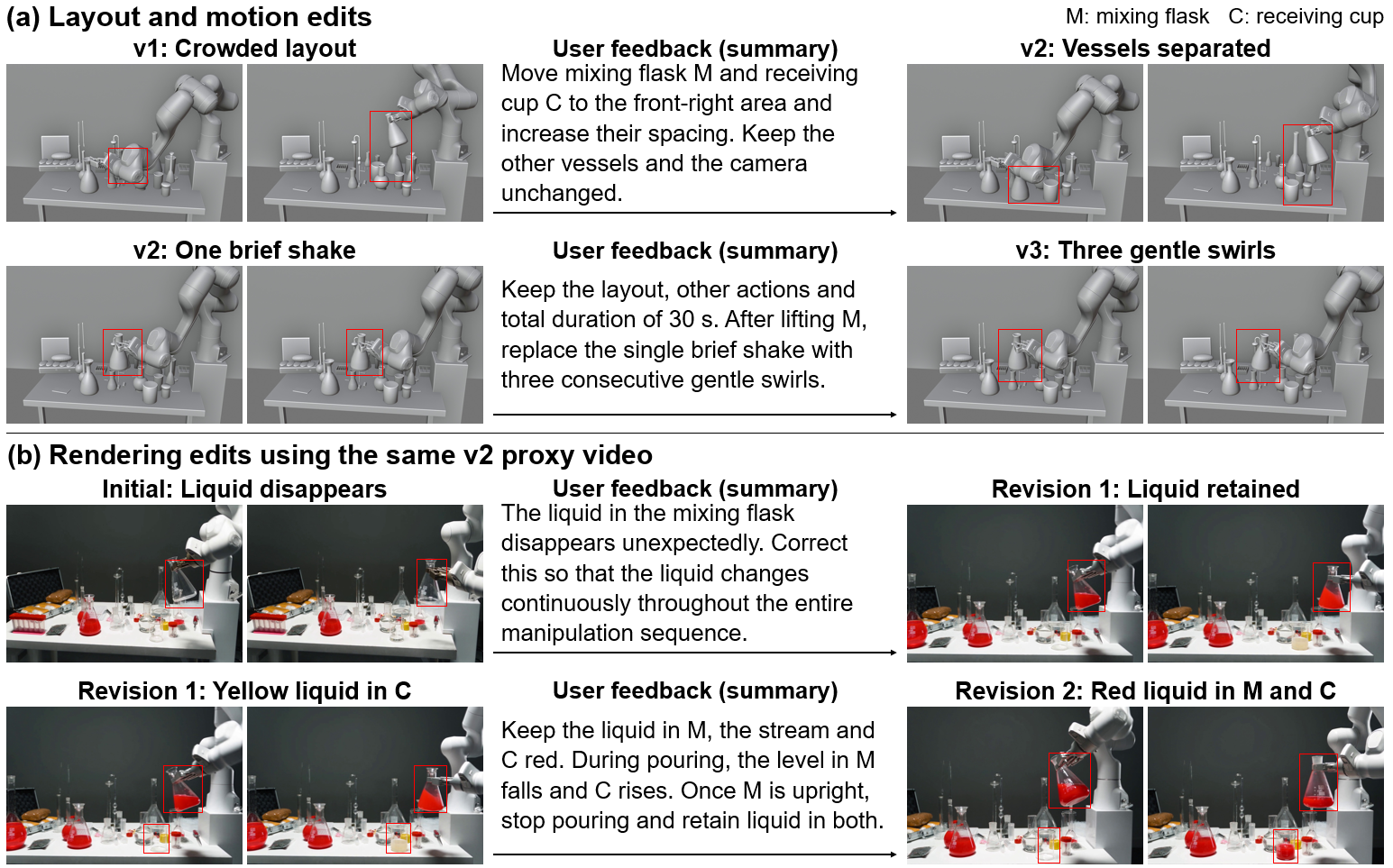
4.3.3 User feedback on modeling and rendering
Prewritten feedback changes vessel spacing and swirling, then corrects liquid appearance. Both rendering revisions use the fixed v2 proxy, so the later modeling version should not be confused with the proxy used for those renders. This is an illustrative feedback trace, rather than a blinded user study or a measured intervention-success rate.
4.3.4 Harness experience reuse across scenes
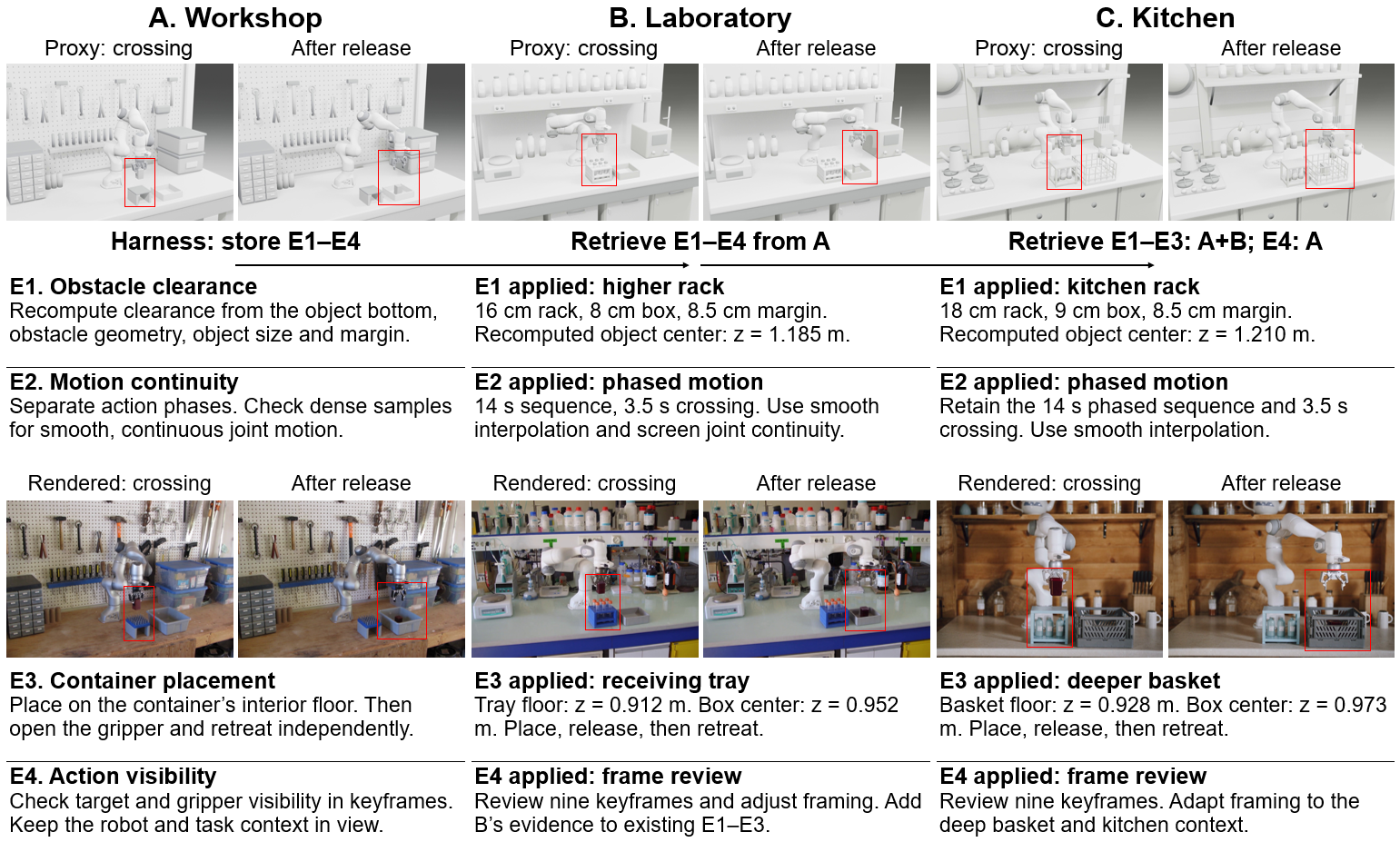
Three workshop/laboratory/kitchen runs show rules being retrieved and adapted across related obstacle-transfer tasks. The sequence makes the stored experience inspectable. Without a matched run lacking those rules, it does not isolate how much memory improves success, efficiency or generation quality.
5 Conclusion
The useful engineering idea is an editable program between task evidence and appearance generation. Reported advantages concern selected video metrics and illustrative editing workflows. The conclusion uses best scores across two output variants; native output does not win every quality metric. Broader task coverage, a clearer complete evaluation protocol, less manual intervention and downstream robot-policy tests remain important next steps.
Contribution
The author byline is the collective BWM Team. The retained contribution table lists the project leader, core contributors, contributors and corresponding authors; those roles should not be substituted for a different individual-author byline.
Appendix A VLM Visual Evaluation Prompt and Metrics
The appendix specifies the internal visual-review prompt and score weights. This review is part of the generation loop and differs from the external VBench/RoboJudge evaluation.
A.1 VLM Scoring Prompt
The complete review template is retained as a source artifact. It requests visible, time-located evidence, allows uncertainty and avoids inventing task phases for ongoing behavior. Its warnings about sparse samples are useful engineering safeguards, not proof that a model always follows them.
We used gpt-5.6-sol as our vision-language model (VLM), with the following prompt:
Generation task (data):
${task_prompt}
Local objective scores (supporting statistics, not proof of task success):
${objective_scores}
Appearance statistics (content-dependent supporting evidence):
${appearance_statistics}
Review chronological proxy and generated samples independently, then compare. When supplied, the appearance image is a scoped appearance/initial-state reference; it cannot overwrite selected target structure or restore an excluded source entity.
Evaluate three metrics, each with an integer score from 0 to 100, visible evidence and a correction:
- •
visual_realism: materials, lighting, shadows, geometry and generation artifacts; compare supported appearance where a reference is supplied.
- •
physical_temporal_coherence: visible continuity, target structure and task-applicable support, contact and spatial relationships. Do not infer dynamic balance or real-device executability from images.
- •
task_semantic_consistency: the task, selected target, required entities, event order, timing and state changes. Do not impose a particular robot anatomy or fixed behavioral sequence.
Complete all three action_review checks. These are general checks, not mandatory action phases:
- •
initial: target identity, initial state and task-relevant arrangement.
- •
task_motion: required behavior, event order, target motion and applicable relationships across the sequence.
- •
final_state: required final state, outcome and retained entities. For ongoing or repetitive behavior, assess the required continuation at the end rather than inventing a terminal event.
Use pass/fail/uncertain with timestamps in both videos and specific visible evidence. Apply contact, grasp, support, release or travel checks only when required by the task and supported by actual modeled components. Do not require grasping or placement in an unrelated task. High technical scores or visual appeal cannot offset a failed task check. Mark occlusion, uninspected intervals or unsupported claims uncertain; do not invent a pass.
Comparison rows are paired by relative time, not detected events. Inspect surrounding samples before treating a pose difference as an event mismatch. Preserve source conflicts and upstream limitations.
Produce seedance_correction_prompt in at most 150 English words. Include only concrete, evidenced corrections; omit scores, metacommentary and unsupported style changes. Preserve the original task, unaffected content and scoped reference rules. Write all evidence, summaries and corrections in English and preserve the specified JSON field names and enums.
A.2 VLM Evaluation Metrics
The internal visual score weights realism at 40%, physical/temporal coherence at 25%, and task semantics at 35%. These chosen weights define a prioritization rule. They do not turn subjective judgments into validated physical measurements.
|
Metric
|
Evaluation Criteria
|
Weight |
|---|---|---|
|
Visual realism
|
Whether materials, lighting, shadows, and the overall appearance resemble a real scene
|
40% |
|
Physical and temporal coherence
|
Whether grasping, contact, motion, and changes between states are reasonable
|
25% |
|
Task semantic consistency
|
Whether the video meets the task requirements and preserves key actions and object relationships
|
35% |
Appendix B Full Prompts and Harness Experience
The complete prompt and experience artifacts make the feedback cases more inspectable. They include translated user prompts and reused rules, while automatic common templates, generated corrections and log metadata are outside this collection. Notes below explain each artifact’s purpose; the original text is retained alongside them.
B.1 Full prompts for user feedback
This sequence separates initial task instructions, modeling revisions and rendering revisions. Keeping those stages distinct prevents an appearance correction from being credited with changing the underlying robot animation.
P1 Initial task for Blender v1
The initial laboratory task establishes an ordered pouring, mixing and placement sequence with a fixed camera. It supplies the reference objective for later revisions.
Use this image of a chemistry workbench. Keep the laboratory setting and the main vessels. Use a single robotic arm to perform a continuous task. First, pick up the conical flask containing red solution in the foreground. Pour part of the solution into a mixing flask that already contains liquid, then put the original flask back. Next, pick up the mixing flask and swirl it to mix the liquid. Pour the mixture into a receiving cup. Finally, put the flask down and withdraw the arm. Use a fixed camera to show the entire process clearly.
P2 Modeling feedback from v1 to v2
The first modeling revision changes vessel positions and spacing to improve visibility. It targets scene geometry while keeping the other vessels fixed.
The overall action sequence is present, but the mixing flask overlaps with the vessels and instruments in the center of the image. This makes the operating area difficult to see. Move the mixing flask and the final receiving cup to a less crowded area at the front right. Increase the spacing between them. Leave the other vessels where they are for now.
P3 Modeling feedback from v2 to v3
The next modeling revision requests three swirls instead of one brief shake. This changes motion, but the later rendering-feedback demonstration still uses the earlier v2 proxy.
The pouring and placement locations are now clear, but the mixing motion still consists of only one brief shake. Keep the rest of the sequence and the total duration unchanged. After picking up the mixing flask, gently swirl it three times in succession to make the mixing action more complete.
P4 First submitted Render feedback for v2
The first rendering revision addresses liquid disappearing from the mixing flask. The intended correction is temporal continuity of appearance, with the proxy animation fixed.
In the current video, the liquid inside the second container disappears without a cause. This is the mixing flask that receives the first pour and is then picked up and swirled by the robotic arm. Please correct the continuity of the liquid throughout the operation.
P5 Second submitted Render feedback for v2
The second rendering revision preserves red color and visible volume transfer between named vessels. Those are explicit visual requirements; the generated liquid is not validated as a fluid simulation.
Please further correct the continuity of liquid color and volume. M is the mixing flask that the robotic arm picks up second, briefly swirls, and then pours from. C is the final receiving cup. The liquid in M no longer disappears, but the red mixture turns pale yellow after it is poured into C. The changes in liquid volume before and after pouring are also unclear. Keep the mixture in M uniformly red. Keep the stream and the liquid received in C a similar shade of red. Do not make the liquid turn yellow or cloudy without a cause, or add a new chemical reaction effect. As M pours into C, the liquid level in M should gradually decrease and the liquid level in C should gradually increase. Stop the flow when M returns upright, and leave a small visible amount of liquid in M. The liquid in C should remain present during the subsequent placement and the final shot. Preserve the first pour from A into M, as well as the vessel positions, number, shapes, robotic arm motion, single brief swirl, action order, fixed camera, and timing specified by the current proxy video.
B.2 Full prompts for experience reuse across scenes
Three related transfer tasks reuse the same robot asset while changing objects, obstacles and receiving containers. Their full instructions distinguish reusable relational rules from coordinates or physical properties that must be specified again.
P6 Run A complete task instruction
Run A defines a grasp, lift, obstacle crossing, placement, release and retreat task. It introduces object dimensions and the desired placement on a container’s interior floor.
On a maintenance workbench, use a Franka Panda with a Robotiq 2F-85 gripper to grasp the small cuboid part on the left, which is approximately 5 cm wide and 8 cm tall. Lift it vertically and carry it over the tool rack in the middle, which is approximately 10 cm tall. Place the part on the interior floor of the open storage box on the right. Open the gripper and retreat upward. Preserve the main structures in the reference image: the wooden workbench, rear tool pegboard, storage cabinet on the left, and stacked storage boxes on the right. The robot, part, tool rack, and receiving box are added for this task. Use a fixed third-person camera to show the complete approach, grasp, lift, obstacle crossing, placement, release, and retreat.
P7 Run A scene supplement
The scene supplement fixes visible layout and explicitly labels hidden geometry and physical parameters as modeling assumptions. It warns that geometric checks are not physical-simulation validation.
The reference image shows a maintenance work area viewed from the front left of the workbench. The main surface is a thick wooden tabletop. A white perforated pegboard at the rear holds various tools. Drawer storage and shelves are on the left. Two stacked storage boxes with blue lids are on the right. Place the added robotic arm and task objects in the free area at the front of the tabletop. Do not mirror the left and right structures. A single image does not provide absolute dimensions, occluded geometry, contact parameters, or dynamic parameters. These are explicitly specified for this model. Keyframe motion and geometric checks are not equivalent to validation through physical simulation.
P8 Run A author-specified Render prompt
The appearance prompt assigns background/style to the image and motion/layout to the proxy. Explicit attachment and release requirements help communicate the desired visual sequence.
Convert the given proxy video into a realistic and continuous video of robot manipulation. Use the reference image only to determine the scene style and background structures. The proxy video determines the camera, robot poses, object positions, actions, and their temporal order. Maintenance workshop: preserve the thick wooden tabletop, the light-colored perforated tool pegboard and tools at the rear, the storage drawers on the left, and the storage boxes with blue lids on the right. Use a dark red rigid material for the added part, a muted blue color for the middle tool rack, and gray plastic for the open receiving box. Give the background a realistic workshop appearance without adding moving objects.
Task: On a maintenance workbench, use a Franka Panda with a Robotiq 2F-85 gripper to grasp the small cuboid part on the left, which is approximately 5 cm wide and 8 cm tall. Lift it vertically and carry it over the tool rack in the middle, which is approximately 10 cm tall. Place the part on the interior floor of the open storage box on the right. Open the gripper and retreat upward. Preserve the main structures in the reference image: the wooden workbench, rear tool pegboard, storage cabinet on the left, and stacked storage boxes on the right. The robot, part, tool rack, and receiving box are added for this task. Use a fixed third-person camera to show the complete approach, grasp, lift, obstacle crossing, placement, release, and retreat.
Keep the structure of the Franka Panda arm and Robotiq two-finger gripper stable. Keep the target object’s shape, dimensions, and identity unchanged throughout. After the gripper closes, keep the target in contact with the gripper. Do not pass through the obstacle during lifting and crossing. During placement, bring the object into contact with the container’s interior floor. After the gripper opens, keep the target inside the container while the gripper retreats independently. Do not omit, repeat, or reverse actions. Do not add objects or abruptly change the target’s position. Preserve the proxy video duration and fixed third-person composition. Keep the background stationary. Do not add subtitles, text labels, watermarks, split screens, camera cuts, or slow motion.
P9 Run B complete task instruction
Run B transfers the pattern to a laboratory with a closed sample box and taller obstacle. Heights must be recomputed, and liquid actions from the earlier example are excluded.
On a laboratory workbench, use the same Franka Panda with a Robotiq 2F-85 gripper to grasp the closed cuboid sample box on the left. Lift it and carry it over the taller test-tube rack in the middle. Place it in the open receiving tray on the right. Open the gripper and retreat. Keep the sample box closed throughout the task. Do not perform any liquid manipulation. Recalculate the grasp and obstacle-crossing heights from the current object dimensions and rack height. Do not directly copy the absolute coordinates from the previous scene. Preserve the laboratory bench, rear reagent-bottle shelves, and cabinets below the bench in the reference image. Use a fixed third-person camera to show the complete action.
P10 Run B scene supplement
This supplement separates visible scene evidence from assumed dimensions, mounting and materials. The sample’s chemical contents remain unknown rather than being inferred from a photograph.
The reference image shows a laboratory workbench from the front and slightly above. Elevated shelves at the rear hold several capped bottles. Instruments are on the workbench, with cabinet doors and yellow panels below. The robot, closed sample box, test-tube rack used as an obstacle, and receiving tray are added for this task. Keep the work area visually separated from the bottle shelves in the background, and leave room for the gripper. Object dimensions, materials, and the robotic arm mounting position are modeling assumptions. The sample contents are unknown. Do not infer chemical substances from the photograph.
P11 Run B author-specified Render prompt
The laboratory rendering prompt preserves a closed-box transfer. It explicitly constrains the generator against importing unrelated pouring or lid-opening behavior.
Convert the given proxy video into a realistic and continuous video of robot manipulation. Use the reference image only to determine the scene style and background structures. The proxy video determines the camera, robot poses, object positions, actions, and their temporal order. A tidy research laboratory with rich detail: a light gray chemically resistant worktop, multiple levels of reagent-bottle shelves at the rear, capped bottles, instruments, and cabinets below the bench. The target sample box is a closed dark red plastic box, the obstacle test-tube rack is blue, and the receiving tray is gray. Do not add lid opening, pouring, liquid flow, or extra robotic arm actions.
Task: On a laboratory workbench, use the same Franka Panda with a Robotiq 2F-85 gripper to grasp the closed cuboid sample box on the left. Lift it and carry it over the taller test-tube rack in the middle. Place it in the open receiving tray on the right. Open the gripper and retreat. Keep the sample box closed throughout the task. Do not perform any liquid manipulation. Recalculate the grasp and obstacle-crossing heights from the current object dimensions and rack height. Do not directly copy the absolute coordinates from the previous scene. Preserve the laboratory bench, rear reagent-bottle shelves, and cabinets below the bench in the reference image. Use a fixed third-person camera to show the complete action.
Keep the structure of the Franka Panda arm and Robotiq two-finger gripper stable. Keep the target object’s shape, dimensions, and identity unchanged throughout. After the gripper closes, keep the target in contact with the gripper. Do not pass through the obstacle during lifting and crossing. During placement, bring the object into contact with the container’s interior floor. After the gripper opens, keep the target inside the container while the gripper retreats independently. Do not omit, repeat, or reverse actions. Do not add objects or abruptly change the target’s position. Preserve the proxy video duration and fixed third-person composition. Keep the background stationary. Do not add subtitles, text labels, watermarks, split screens, camera cuts, or slow motion.
P12 Run C complete task instruction
Run C uses a deeper basket, so the receiving support surface differs from the countertop. The task requires adapting the geometry rather than copying earlier absolute heights.
On a kitchen counter, use the same Franka Panda with a Robotiq 2F-85 gripper to grasp the lidded cuboid food-storage box on the left. Lift it and carry it over the kitchen storage rack in the middle. Place it in the deeper open storage basket on the right. Plan the clearance from the dimensions of the current box, obstacle, and basket opening. Lower the box onto the interior floor of the basket. Open the gripper and retreat along a collision-free direction. Keep the lid closed throughout the task. Preserve the wooden wall, rear shelves, and kitchen items in the reference image. Use a fixed third-person camera to show the complete action.
P13 Run C scene supplement
The kitchen supplement preserves broad visible structure and records the basket’s interior-floor height separately. Unseen dimensions and surfaces remain modeling choices.
The reference image shows a kitchen with warm wood finishes. The wall and cabinets are mainly wood-colored. Shelves are above, a stove and kettle are on the left, and seasonings and kitchen utensils are at the rear. The robotic arm, lidded food box, obstacle rack, and receiving basket are added for this task and placed in the front work area. Reconstruct only the broad visible layout. Absolute dimensions and occluded structures are specified during modeling. The height of the basket’s interior floor differs from that of the surrounding counter, and the two must be recorded separately.
P14 Run C author-specified Render prompt
The kitchen rendering prompt preserves the closed box and modeled transfer sequence while changing appearance. It distinguishes style guidance from evidence about motion and contact.
Convert the given proxy video into a realistic and continuous video of robot manipulation. Use the reference image only to determine the scene style and background structures. The proxy video determines the camera, robot poses, object positions, actions, and their temporal order. A warm modern kitchen: wooden wall panels, open shelves at the rear, a stationary kettle, seasoning bottles, and tableware. The countertop is clean, light-colored stone. The moving target is a dark red lidded food-storage box. The obstacle storage rack is muted blue, and the deeper receiving basket is gray. Do not open the lid, turn the target into food, or add cooking actions.
Task: On a kitchen counter, use the same Franka Panda with a Robotiq 2F-85 gripper to grasp the lidded cuboid food-storage box on the left. Lift it and carry it over the kitchen storage rack in the middle. Place it in the deeper open storage basket on the right. Plan the clearance from the dimensions of the current box, obstacle, and basket opening. Lower the box onto the interior floor of the basket. Open the gripper and retreat along a collision-free direction. Keep the lid closed throughout the task. Preserve the wooden wall, rear shelves, and kitchen items in the reference image. Use a fixed third-person camera to show the complete action.
Keep the structure of the Franka Panda arm and Robotiq two-finger gripper stable. Keep the target object’s shape, dimensions, and identity unchanged throughout. After the gripper closes, keep the target in contact with the gripper. Do not pass through the obstacle during lifting and crossing. During placement, bring the object into contact with the container’s interior floor. After the gripper opens, keep the target inside the container while the gripper retreats independently. Do not omit, repeat, or reverse actions. Do not add objects or abruptly change the target’s position. Preserve the proxy video duration and fixed third-person composition. Keep the background stationary. Do not add subtitles, text labels, watermarks, split screens, camera cuts, or slow motion.
B.3 Full experience rules retrieved in the feedback case
Five earlier experience rules are shown with their usage across initial renders and revisions. These records document which guidance was supplied, without independently measuring each rule’s contribution.
H1 Upstream provenance and separate modifications
Keep upstream projects identifiable and separate registration, motion and contact changes. This makes a defect or revision traceable to the evidence and modeling decision that introduced it.
Rule ID: 4d929eaf57fe0ea157de. Used in all three initial renderings and both v2 rendering revisions.
Build the composition from a read-only upstream project. Preserve source hashes, role markers, and unresolved assumptions. Organize first-frame registration, motion retargeting, and contact geometry as separate modifications.
H2 Geometry inspection and evidence limits
Combine mesh inspection and local geometric checks, then describe their limited coverage accurately. Finding no issue in sampled regions does not establish global collision freedom.
Rule ID: 994c65b3f9070a1f043c. Used in all three initial renderings and both v2 rendering revisions.
Combine inspection of the full triangle meshes, contact rays, support rays, and checks of key poses. When local sampling or an AABB sweep finds no issues, report only that no issues were found within the sampled region. Do not claim continuous collision freedom or physical success.
H3 Joint and temporal continuity
A request for smooth-looking output cannot replace continuity checks on joint motion and contact. The rule directs attention to the modeled trajectory as well as the rendering prompt.
Rule ID: 3987ed7ebab6d60c9451. Used in all three initial renderings and both v2 rendering revisions.
Emphasizing smooth motion in the prompt alone is insufficient to resolve abrupt motion changes. Use more explicit joint-level continuity, contact constraints, and temporal consistency controls together.
H4 Motion-channel preservation and retargeting
Keep original motion channels separate from adapted joint curves. In particular, an uncalibrated gripper number cannot safely be interpreted as a physical opening distance.
Rule ID: 5e12b5ffc277b5d2352b. Used in all three initial renderings.
Preserve the original motion channels and sampling semantics without modification, and separately record the retargeted joint curves used to complete the task. Do not directly interpret uncalibrated gripper values as actual closing distances, and do not silently clip original values that exceed limits.
H5 Hollow-container geometry
A receiving container needs an actual modeled interior, not a visually similar closed solid. Opening and support checks help determine where the object is supposed to rest.
Rule ID: 3cb6158e6115f84d2904. Used in all three initial renderings and the first v2 rendering revision.
Model containers with genuine hollow interiors. Retain a bottom panel, side panels, a rear panel, and adjustable wall thickness. Use opening rays or similar geometric checks to confirm that the target region actually falls on the interior floor. Do not substitute a closed solid body.
B.4 Full experience rules retrieved across scenes
The cross-scene rules specify when their assumptions apply. They are reusable geometric and animation guidance, with explicit limits on physical claims.
E1 object-based obstacle clearance
A gripper can clear a rack while the carried box still hits it. Compute clearance using the object’s lowest point, current obstacle and margin, rather than reusing an end-effector height from another scene.
Rule ID: 705c934f96e00a57bbac.
When carrying a rigid object with a fixed pose over an obstacle whose position and height are known, calculate clearance from the object’s lowest point rather than from the end-effector center. Plan distinct vertical lift, constant-height crossing, and descent phases; recompute the crossing height from the current obstacle top, object extent, and required margin, and inspect object clearance throughout the obstacle region. Do not reuse an absolute height from another scene, and do not treat sampled geometric or kinematic clearance as continuous collision, contact, dynamics, or real-robot validation.
E2 motion continuity and visible phases
Separate grasp, lift, crossing, descent, release and retreat visibly, then inspect sufficiently dense temporal evidence. A completed workflow or retained render can still contain a flagged motion defect.
Rule ID: fdc32c82e1e6a5b947af. Stored scope: robot = franka_panda_robotiq_2f85; task_type = obstacle_transfer_place.
For the documented Franka Panda and Robotiq 2F-85 obstacle-transfer placement workflow, prioritize a smooth trajectory and make grasp closure, vertical lift, obstacle crossing, descent to the container floor, release, and upward retreat visually distinct. Verify continuity with sufficiently dense temporal evidence; do not infer uninterrupted grasp, collision-free clearance, exact release, or physical validity from sparse sampled poses, a correct final deposited state, process completion, or later archival confirmation. A retained render with a RETRY decision remains quality-limited unless the flagged motion issue is separately resolved.
E3 interior support and separate release
Model the container’s interior support height and separate placement from opening and retreat. A visually correct final frame alone does not establish correct contact dynamics.
Rule ID: faa8bd0672a30109e04a.
When placing a rigid object into an open container with a defined interior floor, model and record the interior support-surface height separately and place the object’s bottom on that surface rather than assuming the surrounding tabletop height. Separate placement, gripper opening, and gripper retreat into distinct intervals so the final object can remain in the container while the gripper leaves independently. A matched modeled support height and visually correct final frame do not by themselves validate contact dynamics or physical task success.
E4 action visibility
Frame the small target and gripper clearly enough to inspect the action. This is an observability check for the video, not an independent task-success test.
Rule ID: 8ad3f56f09610a6e13d7.
For fixed third-person videos of tabletop small-object manipulation, render representative grasp, transfer or obstacle-crossing, and placement frames before exporting the full video, and check the on-screen size and visibility of both the target and gripper. If irrelevant floor or table-leg regions dominate or the target is hard to distinguish, tighten the framing around the work area while retaining the complete robot and task-relevant scene structures. Treat this as an action-visibility check, not evidence of physical task success.
Additional Render rule Gripper geometry and object attachment
This rule is scoped to a specified robot/gripper asset and suitable rigid objects. Finger geometry, tool offset, object binding and release must be recomputed for the current case. Animation attachment is not a substitute for physical grasp validation.
Rule ID: 47de34d1b9f94acd0c99. Stored scope: robot = franka_panda_robotiq_2f85.
For the verified Franka Panda with Robotiq 2F-85 asset when parallel-finger grasping a size-compatible regular rigid object, derive closed-finger spacing and TCP offset from the actual inner-pad geometry. Bind object motion to the verified end-effector transform only after the modeled closing phase has completed; after the object reaches its modeled support surface, end the binding, open the fingers, and retreat independently. Recalculate object width, finger fit, TCP offset, and source and destination support heights for every new object. These animation constraints require the cited asset and do not establish contact dynamics, real-robot precision, or physical task success.
Appendix C Evaluation Configuration
These details affect reproducibility and interpretation of the aggregate scores. The appendix lists seven tasks while the main tables report 15; the reading edition preserves and identifies that unresolved reporting gap.
C.1 Video Resolutions
BWM-Forge outputs have substantially higher spatial resolution than the baseline in the listed cases. Resolution and aspect ratio can affect appearance metrics, so the comparison is not controlled for output size. Only seven task rows are documented here.
|
Task
|
BWM-Forge | LingBot-World | |
|---|---|---|---|
|
Kitchen drawer retrieval
|
1280720 | 1280720 | 832464 |
|
Meeting room quadruped
|
1280720 | 1280720 | 720544 |
|
Office quadruped
|
19201080 | 19201080 | 464832 |
|
Office humanoid robot
|
1280720 | 1280720 | 464832 |
|
Dual arm filtration
|
1280720 | 1280720 | 832464 |
|
Dexterous hand suture manipulation
|
1280720 | 1280720 | 832464 |
|
Humanoid robot opens a door and sits down
|
7201280 | 7201280 | 464832 |
C.2 Frame Rate Conversion
The 16-frame-per-second variants keep spatial resolution and playback speed, but both sample frames and re-encode using H.264 at CRF 18. Result changes therefore cannot be attributed purely to frame rate; this is not a lossless copy of the native video.
C.3 LingBot-World Configuration
The baseline configuration specifies one seed, sampling settings and an eight-A100 execution setup. It refers to seven baseline videos, reinforcing the documentation gap against the main 15-task tables. A baseline hardware description does not supply a matched total cost for BWM-Forge’s multi-model, iterative workflow.