At a glance
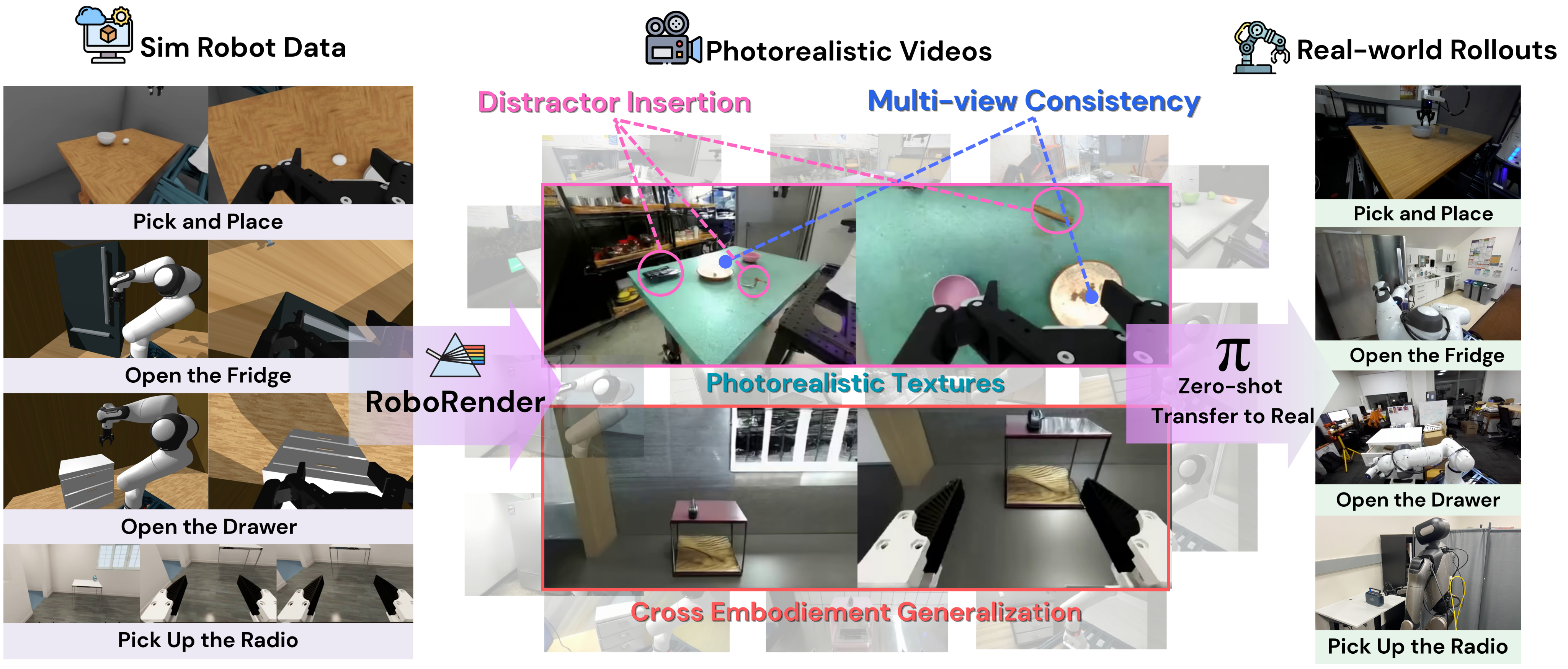
RoboRender converts simulated robot trajectories into photorealistic multi-view videos for policy training. A video diffusion model uses depth, robot RGB masks, language, and optional previous frames to vary appearance while retaining the simulator’s task geometry and action labels. Missing-depth regions can be filled with prompted visual distractors.
Across eight real-robot tasks with ten trials each, the generated-data policies achieve a reported 71% average success rate, versus 10% with simulator images and 20% with conventional visual randomization. “Zero-shot” describes deployment without task-specific real-world policy finetuning: the video model is trained on roughly 130,000 real robot clips, and the policy starts from pretrained π0.5.
I. Introduction
Simulation provides actions, states, and inexpensive repeated task execution, but rendered appearance differs from real camera observations. Figure 1 outlines a pipeline that keeps simulated trajectories and changes their visual presentation with learned video priors.
The method targets visual transfer. It neither corrects inaccurate contact dynamics nor proves that a generated scene always obeys its conditioning. Policy success supplies task-level evidence for the tested settings.
A. Visual sim-to-real transfer
Digital twins can improve realism but require scene-specific capture or assets. Depth and object-state policies reduce reliance on appearance but may lose semantic cues or need perception at deployment. Domain randomization diversifies textures and lighting without necessarily matching realistic images [13]. RoboRender retains RGB policy inputs and moves appearance synthesis into data preparation.
B. Video generation for robot data synthesis
Language-only generated videos need additional action inference, whereas simulated rollouts already carry actions. Other generation methods add motion, masks, edges, geometry, or appearance exemplars. RoboRender emphasizes joint multi-view generation from depth and robot appearance, with language controlling the surrounding scene [14] [19].
III. Method
The pipeline has three stages: train a controllable robot-video generator, collect successful simulator trajectories, and pair generated observations with the original simulator states and actions.
A. Video generation model
The generator adapts Wan2.1-T2V-1.3B to robot videos and variable-length demonstrations [21]. Its training data supplies real visual appearance; simulation supplies controllable downstream trajectories.
Model architecture
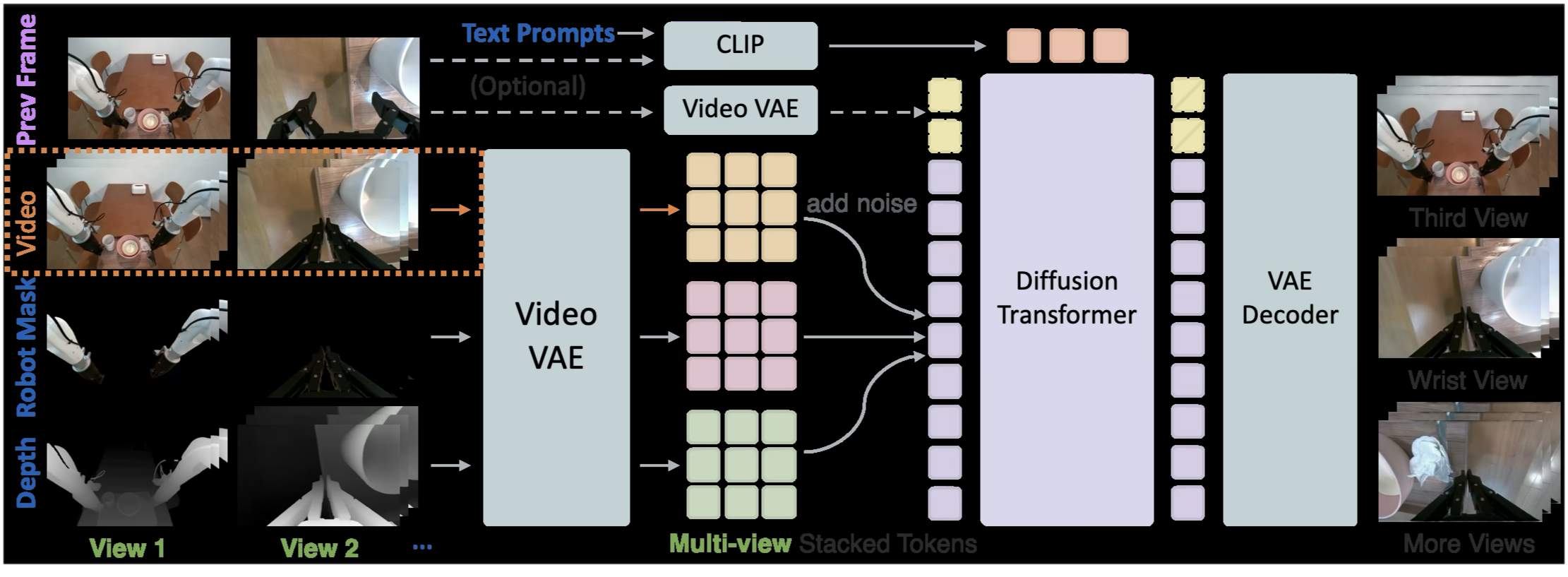
Figure 2 preserves the conditioning and denoising architecture. Encoded depth and robot-mask videos are concatenated with noised RGB latents for each view, then stacked into a joint multi-view latent. Language describes the desired appearance. The model is adapted with LoRA for 12,000 iterations at batch size 16.
The base model generates 81-frame windows. Conditioning on a previous frame permits chained windows; dropping this condition during training also supports an initial window without one. Random depth masking teaches the model to fill unconstrained areas, later enabling distractor insertion. Joint conditioning encourages consistency, while edited regions intentionally relax the original depth constraints.
Training data curation
The training pipeline processes DROID and AgiBot real demonstrations into aligned 81-frame windows. It derives descriptions with Qwen2-VL, depth with Video-Depth-Anything and optional stereo estimation, and robot masks with SAM3 [28] [27]. The model therefore inherits estimation and segmentation errors as well as useful real-world priors.
The precise corpus contains 126,950 paired samples at 416×240 resolution. Appendix A retains the data composition, example conditions, source counts, and reported scene diversity.
B. Robot simulation data generation
MolmoSpaces and CuRobo support a scripted task-and-motion planner [33] [34]. Candidate grasps are ranked, collision-filtered, and checked for inverse-kinematics feasibility. Task-specific primitives perform pick-and-place, articulated opening, or navigation followed by pickup.
Only successful trajectories are retained. Failed attempts trigger replanning and eventually terminate at retry limits or a 300-step timeout. Simulation supplies synchronized camera observations, proprioception, actions, and robot masks.
C. RoboRender data generation
Scene prompts, simulated depth, and rendered robot masks condition the video generator. The robot appearance is supplied directly from the simulator, while language varies materials, lighting, backgrounds, and scene objects.
Temporally consistent depth crops and added object descriptions produce distractors. These are visual augmentations: the corresponding objects are absent from the original simulator dynamics and action planning. The method relies on preserving task-relevant regions so that the original action labels remain useful.
IV. Video generation experiments
Video evaluation separately measures distributional realism, paired reconstruction under temporal anchoring, multi-view preferences, and longer autoregressive continuation.
Evaluation setup
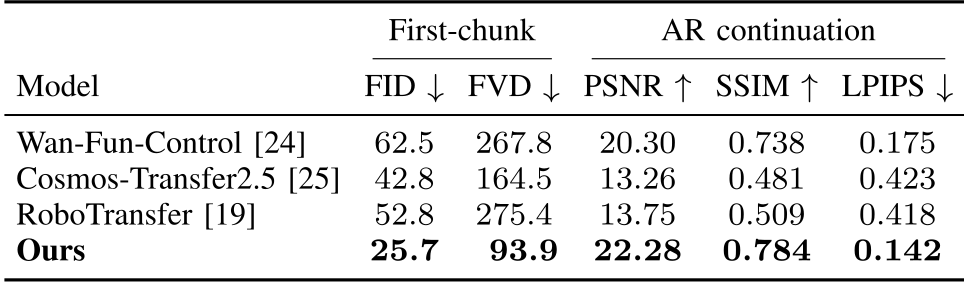
The comparison uses Wan-Fun-Control, Cosmos-Transfer2.5, and RoboTransfer. Five hundred held-out DROID/AgiBot clips support first-window generation and continuation from a ground-truth previous frame. Cosmos runs at 480p and is downsampled because it fails at the shared 416×240 resolution.
FID and FVD evaluate first-window distributions. PSNR, SSIM, and LPIPS compare temporally anchored continuations to reference video. These measure different settings; low distributional distance is not the same claim as pixel-accurate unrestricted generation.
Comparison with baselines
Table I retains every baseline and metric. RoboRender obtains first-window FID/FVD of 25.7/93.9, versus 42.8/164.5 for Cosmos and 62.5/267.8 for Wan. Its continuation PSNR/SSIM/LPIPS is 22.28/0.784/0.142, best among the listed models.
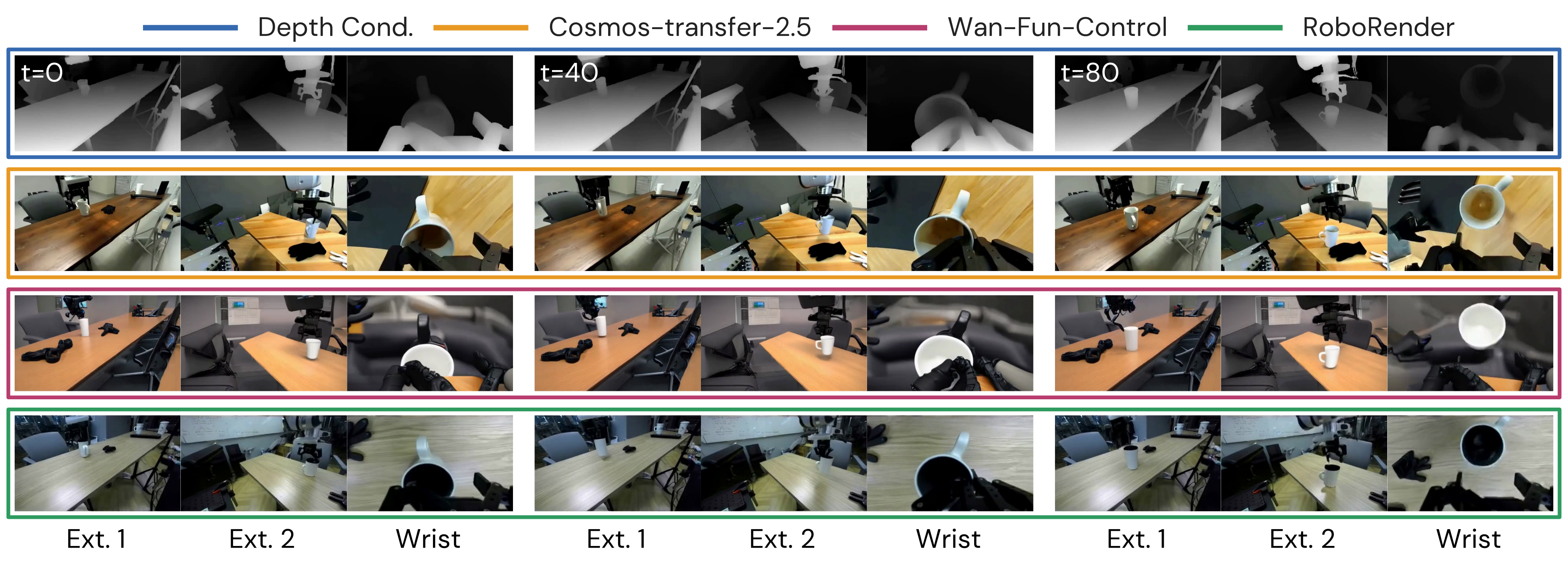
Figure 3 shows time steps and three views under shared depth conditions. Qualitative examples support more consistent objects and robot appearance, while aggregate image/video scores do not directly measure contact accuracy or action-label validity.
Multi-chunk autoregressive rollouts
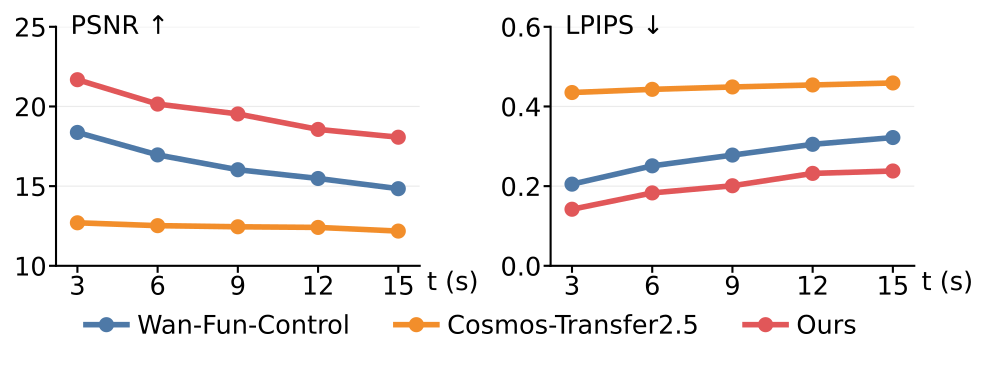
Figure 4 evaluates 15-second continuations on 200 long real clips. After initialization with a real previous frame, each new chunk uses the model’s preceding output. RoboRender has better PSNR and LPIPS than the two plotted baselines at all sampled times, but quality still degrades with rollout length. These tests use real-clip depth conditions, not unconstrained imagined futures.
Multi-view consistency
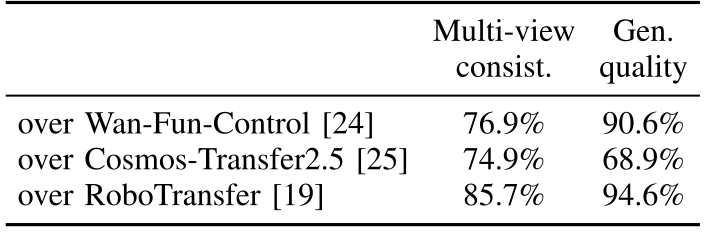
Fifty raters each compare twenty randomized video pairs for visual quality and cross-view consistency. Table II reports RoboRender preferences of 76.9%, 74.9%, and 85.7% for consistency over Wan, Cosmos, and RoboTransfer; corresponding generation-quality preferences are 90.6%, 68.9%, and 94.6%.
The study supplies perceptual evidence where simulated depth lacks a real RGB reference. It does not establish that every view pair is geometrically exact.
Accelerated inference
DMD2 distillation reduces sampling from fifty denoising steps to six and reports 4.29 seconds for a three-view clip on one H200 GPU [40]. This is offline data-generation time, not policy control latency. Appendix C separately compares TeaCache acceleration and discusses the quality evidence available for each route.
V. Robot physical experiments
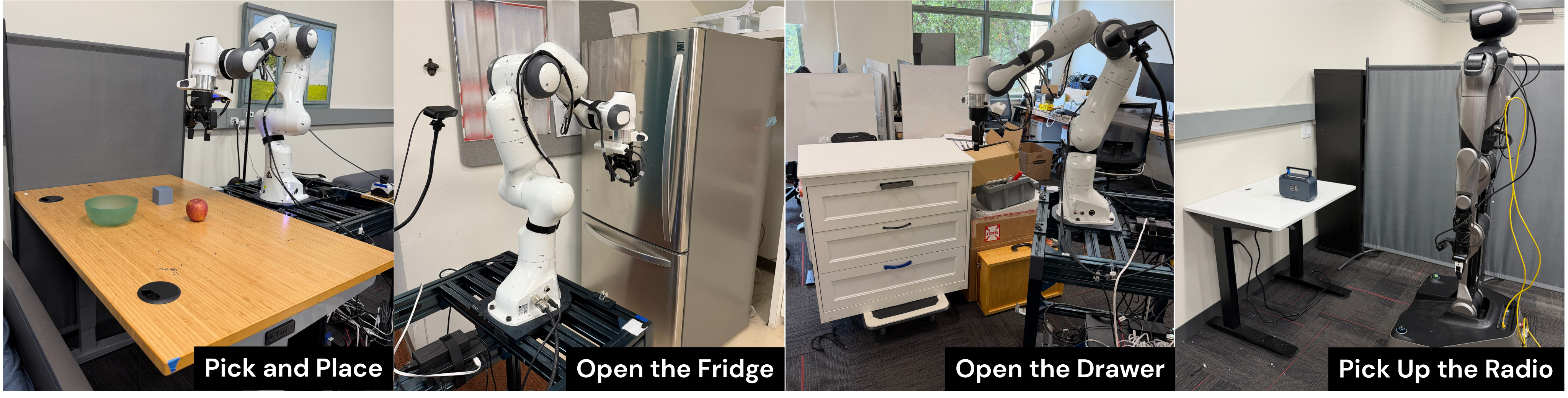
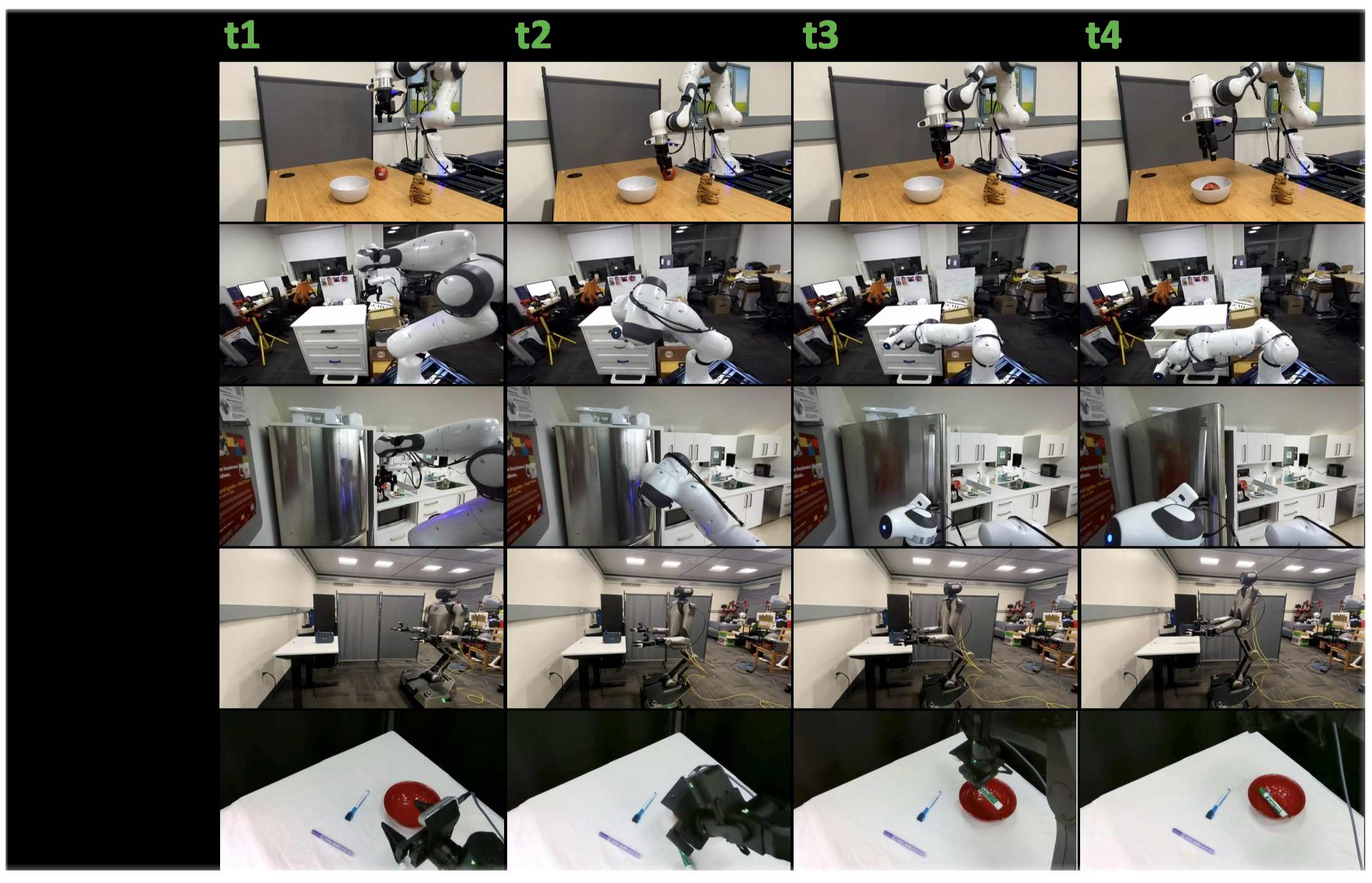
The eight tasks comprise four DROID-style pick-and-place tasks, fridge and drawer opening, R1Pro mobile pickup of a radio, and a YAM arm placing a green marker into a red bowl. Figure 6 preserves physical rollout examples.
The video model’s real training data contains DROID and AgiBot embodiments; R1Pro and YAM are held out from that training. This qualification concerns the renderer’s training set, not a claim that every pretrained component has never encountered related robot data.
A. Policy training
Each comparison begins with the same pretrained π0.5 policy and changes its finetuning observations while retaining simulator-derived states and action targets [44].
Dataset generation
The study generates 1,000 trajectories per pick-and-place task, 2,000 for mobile manipulation, 2,000 for drawer opening, and 1,000 for fridge opening. DROID pick-and-place and mobile tasks use OmniGibson; opening and YAM tasks use MuJoCo.
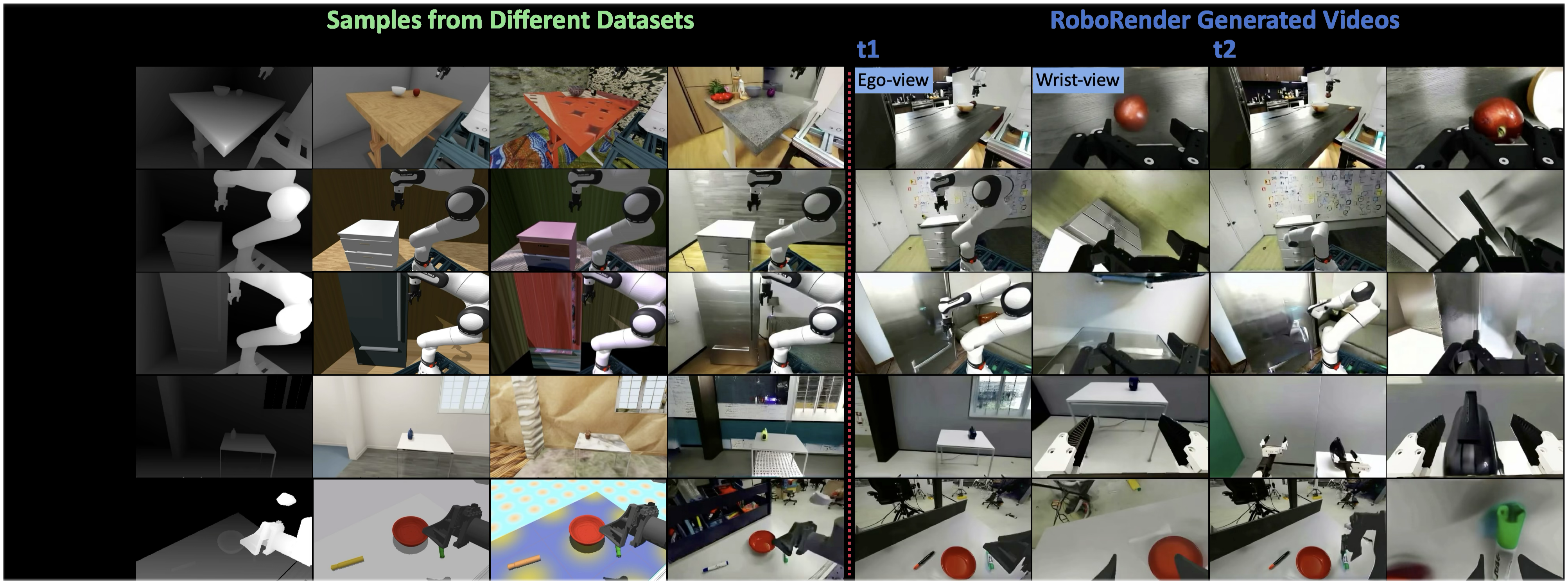
Raw simulation, randomized textures/lighting, and generated videos form the three training datasets. Object size, table height, robot pose, and external camera pose vary in simulation. Figure 5 preserves representative inputs and generated sequences. DROID pick-and-place additionally receives visual distractor augmentation through depth cropping.
Training setup
Policies are finetuned for 40,000 steps at batch size 72, predicting 32-step action chunks and executing the first sixteen. The paper describes a joint pick-and-place policy and separate opening and mobile-manipulation policies. Real-world evaluation uses office scenes with appearance, geometry, and viewpoints differing from simulation.
B. Experiments and analysis
Each task has ten physical rollouts. Pick-and-place object and distractor placements are matched across policies; opening tasks vary robot start pose, and mobile pickup varies the robot and radio positions. With this small per-task sample, observed ten-percentage-point changes correspond to a single additional success.
Visual transfer and clutter robustness
Table III retains all eight tasks. RoboRender scores 80%, 80%, 60%, and 50% on the four DROID pick-and-place tasks; 70% on fridge opening; 90% on drawer opening; and 70% on both unseen-embodiment tasks. Its rounded average is 71%, compared with 10% for raw simulation and 20% for visual randomization.
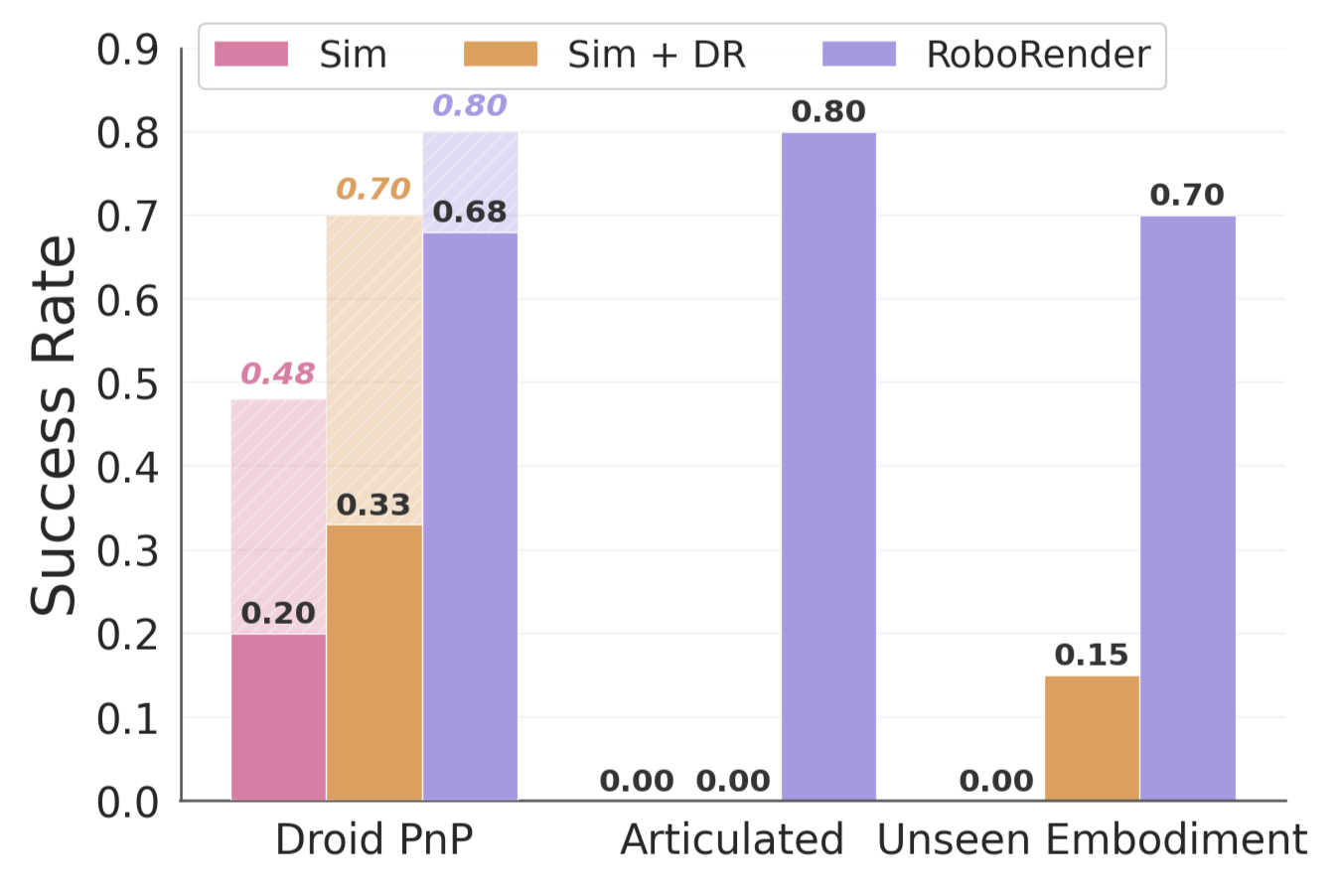
Figure 7 also separates DROID pick-and-place with and without distractors. Without distractors, raw simulation/randomization/RoboRender reaches 48%/70%/80%; with distractors, the corresponding averages are 20%/33%/68% after rounding. RoboRender is more robust here, but photorealism and added clutter vary together, so this comparison does not isolate realism alone.

Unseen robot embodiments
R1Pro mobile pickup improves from 0% with raw simulation and 30% with randomization to 70%; YAM marker placement improves from 0% for both baselines to 70%. Robot-mask conditioning supports useful generation for these two new renderer embodiments. Two tasks do not establish broad morphological or camera-layout generalization.
Depth-conditioned policies
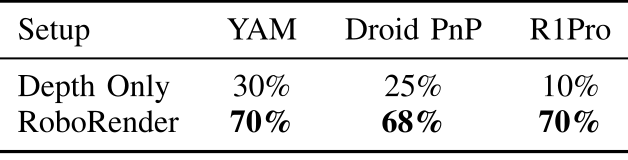
Table IV reports depth-only versus RoboRender success of 30%/70% for YAM, 25%/68% for DROID pick-and-place, and 10%/70% for R1Pro. The depth policies train on simulator depth but receive depth estimated from RGB at deployment.
The comparison supports the usefulness of generated RGB observations under this protocol. It changes available semantics and the deployment perception path, so it does not isolate semantic color information from depth-estimation error.
Video quality and policy success
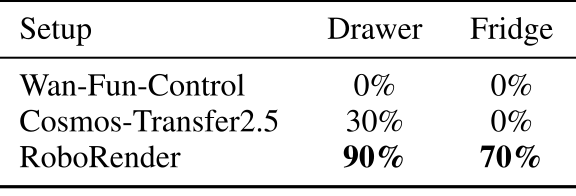
Table V compares training videos generated from the same simulation trajectories. Drawer/fridge success is 0%/0% for Wan, 30%/0% for Cosmos, and 90%/70% for RoboRender. Baselines receive robot appearance in text because they lack robot-mask conditioning.
The alignment between video scores and policy results is encouraging, but generator training, conditioning, and output quality differ together. It is not a controlled causal test of a single image-quality metric.
Multiple videos per trajectory
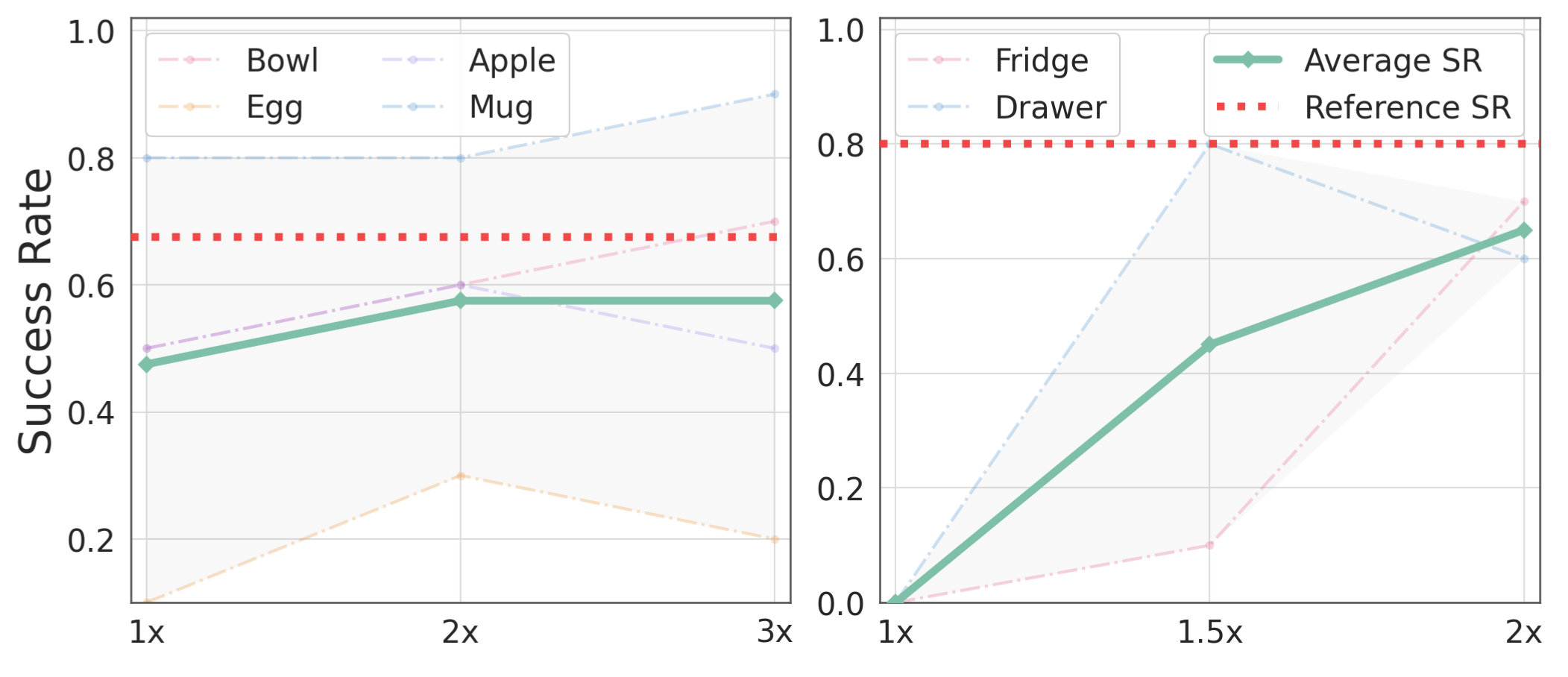
Figure 8 fixes half of the original unique trajectories and varies visual generations per trajectory. DROID pick-and-place average success rises from 48% at one generation to 58% at two, then saturates at three. Opening rises from 0% to 45% at 1.5 generations and 65% at two.
The red references use the full trajectory set with one generation each: approximately 68% for DROID pick-and-place and 80% for opening. Extra visual variation recovers much, but not all, of the gap from reducing physical trajectory diversity. The 65-point opening gain is relative to the half-data one-generation condition, not a gain over the full-data reference.
VI. Conclusion and limitations
The experiments support generative appearance augmentation for the tested sim-to-real tasks. Dynamics and contact fidelity remain simulator limitations, particularly for deformable objects. Broader embodiments, camera configurations, environments, and longer tasks remain open.
The study reports task success from ten trials per setting without uncertainty estimates or repeated-training variability. Its strongest claim is improved transfer under these comparisons, rather than a guarantee of physical validity or general zero-shot deployment.
Appendix
All seven appendices are included, together with their additional figures, tables, sample prompts, and implementation details.
A. Video model training data curation
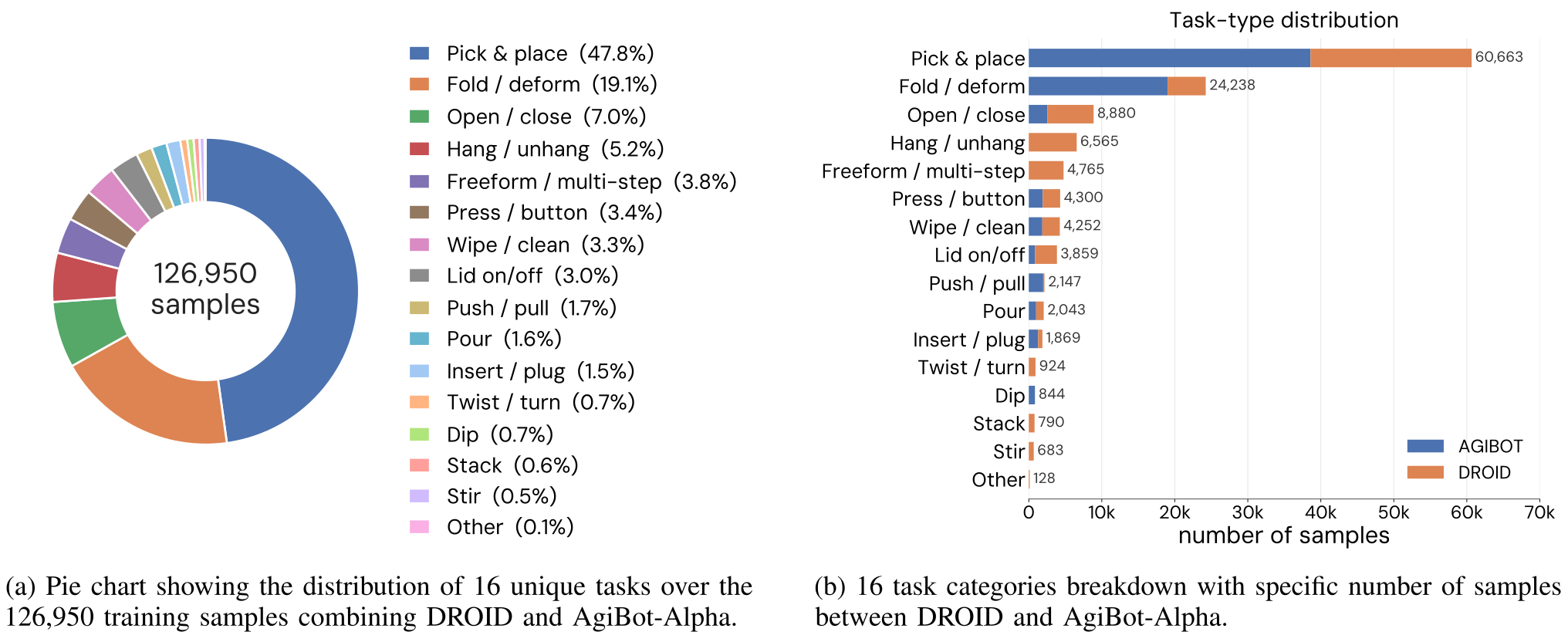
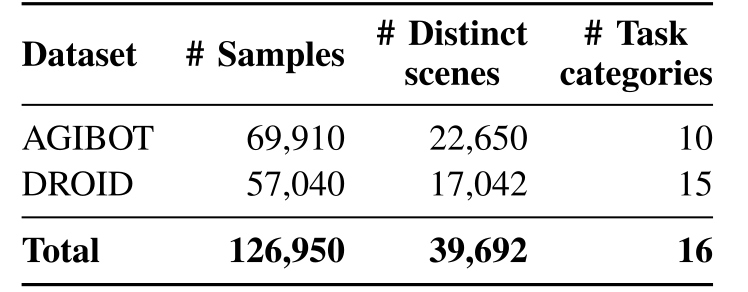
Figure 9 and Table VI retain the full data distribution: 69,910 AgiBot samples and 57,040 DROID samples, totaling 126,950 across sixteen task categories. The paper reports 39,692 distinct scenes. Pick-and-place is 47.8% and fold/deform is 19.1%, showing that the corpus is not balanced across tasks.
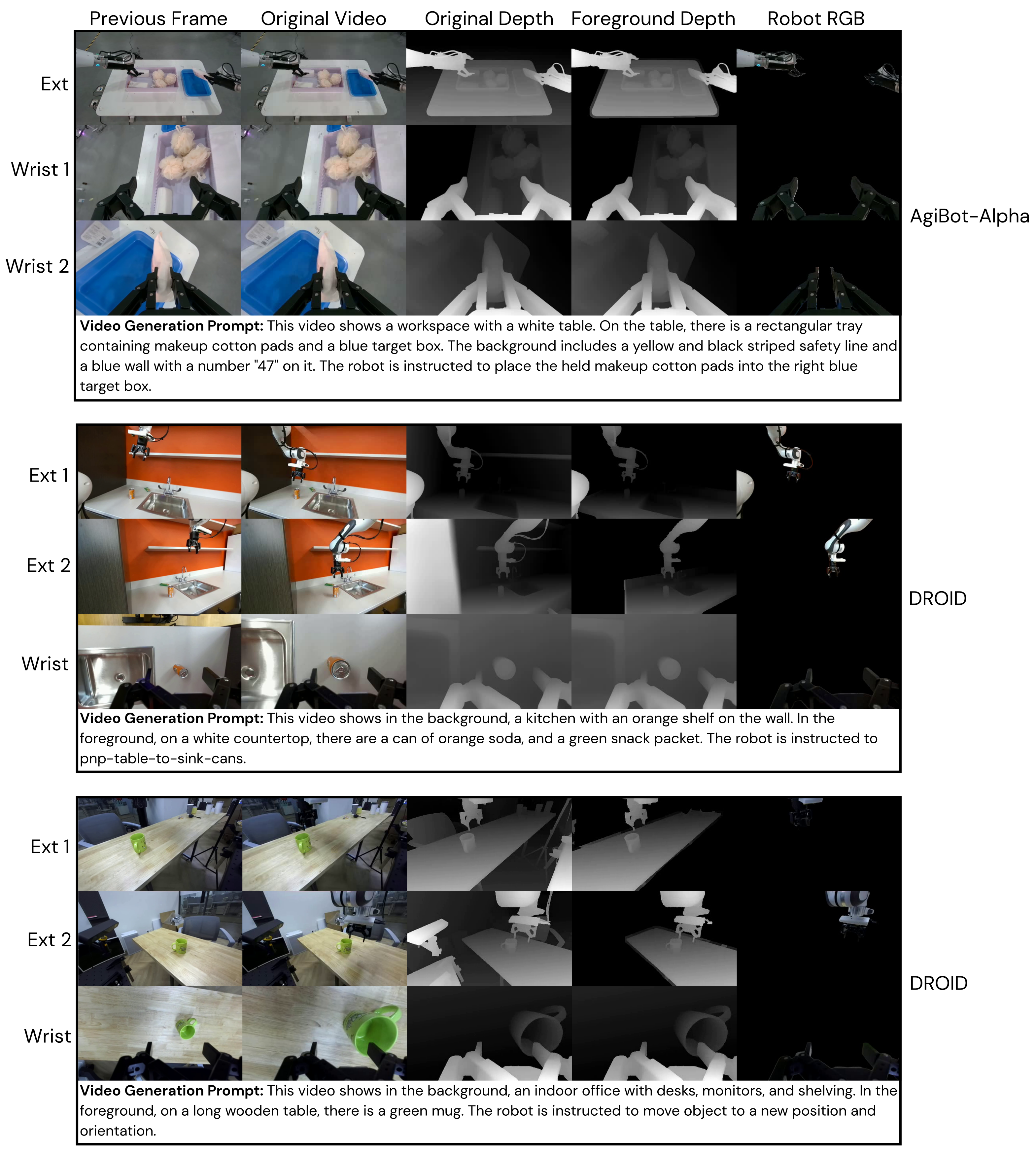
Captioning uses a draft followed by cross-view verification over non-wrist cameras. Depth sources are normalized through inverse depth and mixed during training; segmentation supplies robot appearance and masks. Figure 10 retains all three sample bundles, camera labels, and complete example prompts. The paper states an intention to release the processed paired data.
B. Baseline comparison
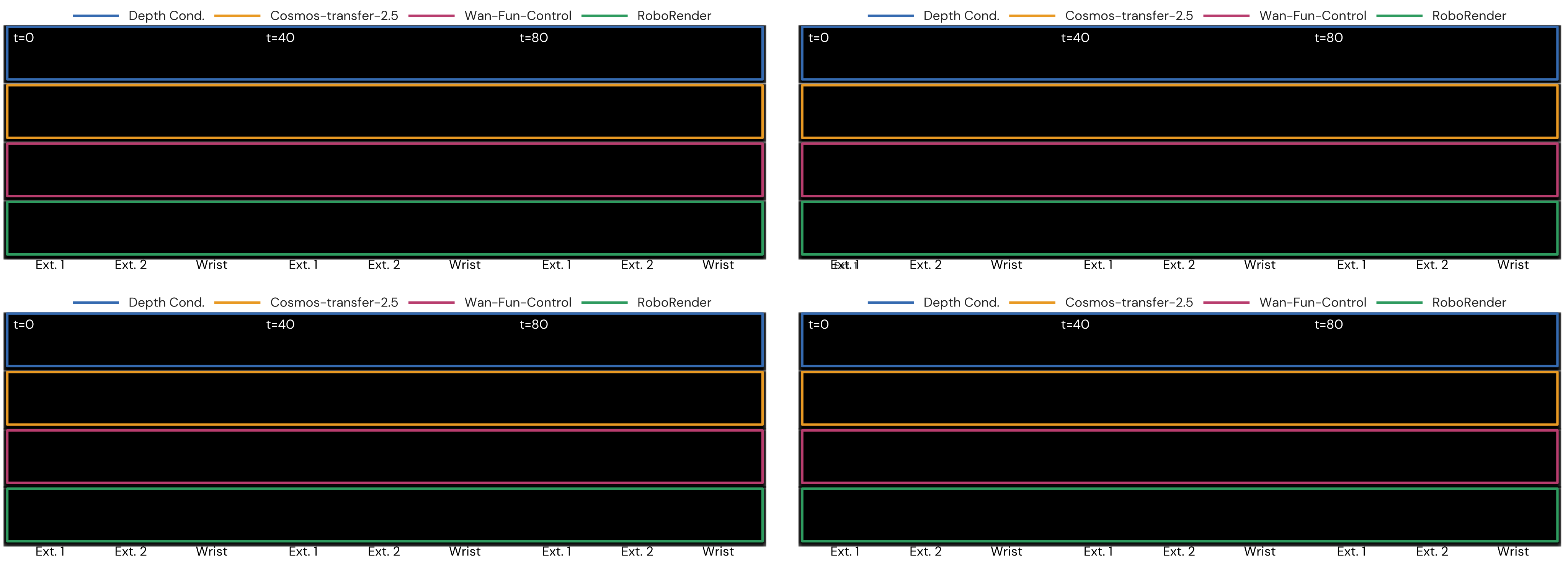
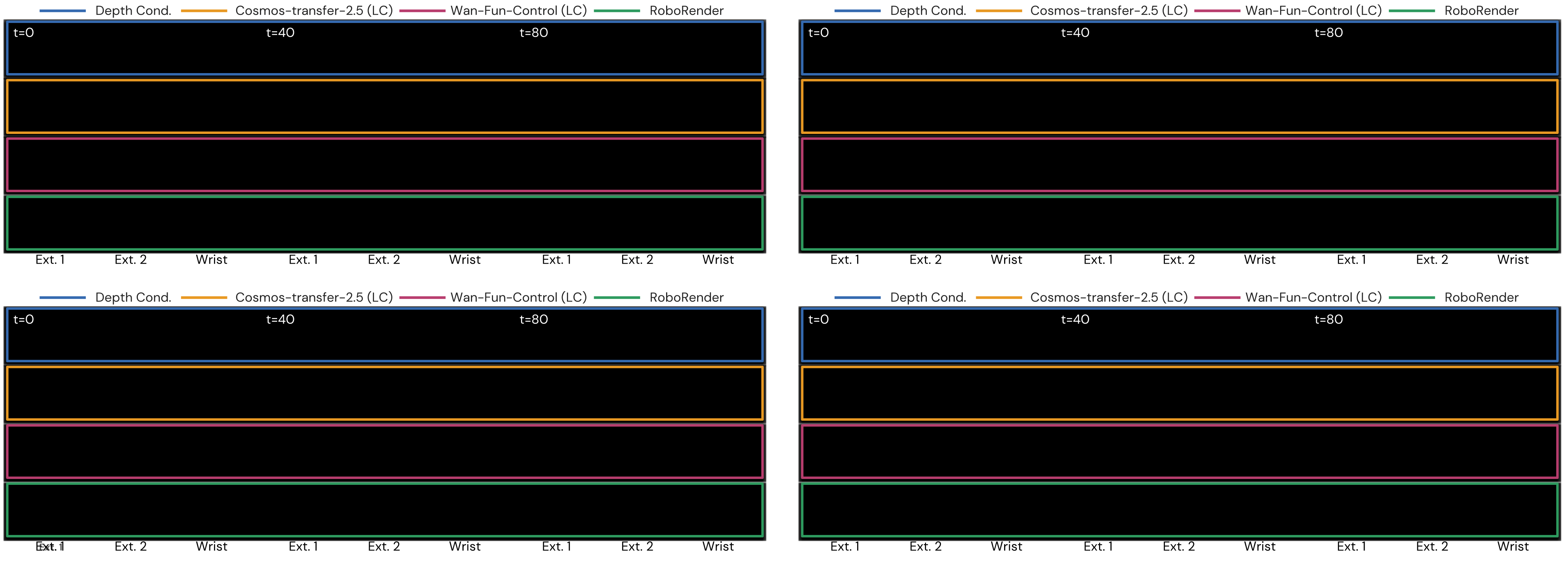
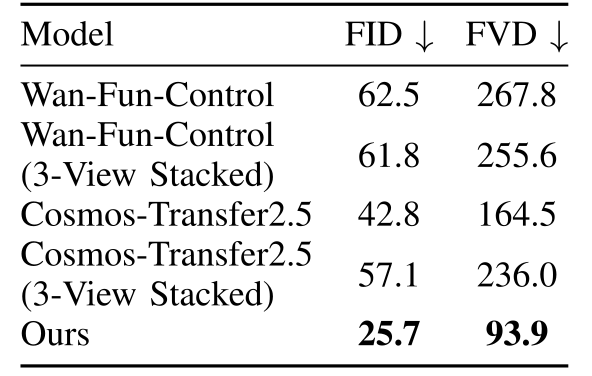
Figures 11–12 preserve every additional baseline comparison. Table VII tests whether merely stacking three views at inference explains the gain: Wan changes from FID/FVD 62.5/267.8 to 61.8/255.6, while Cosmos worsens from 42.8/164.5 to 57.1/236.0. RoboRender remains at 25.7/93.9.
The evidence argues against input stacking alone being sufficient. Dedicated training and other robot-specific adaptations still differ, so the experiment does not isolate multi-view training from every architectural or data choice.
C. Accelerating video generation
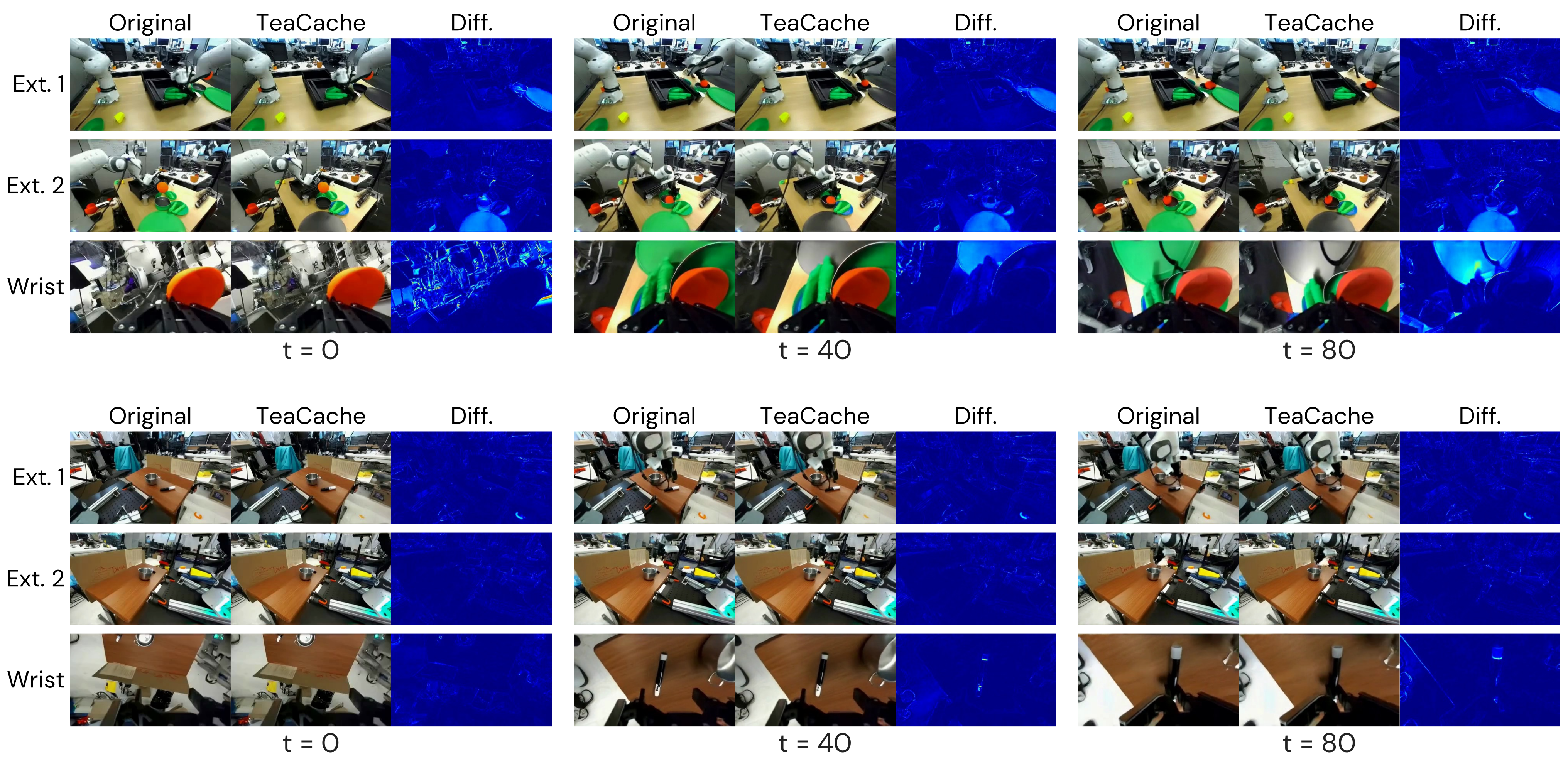
At fifty steps and guidance scale 5.0, a three-view 81-frame clip takes 68.8 seconds on one H200. TeaCache at threshold 0.10 reduces this to 35.3 seconds, about 1.95× faster [45]. Figure 13 preserves original/cached frames and difference maps for every illustrated view and time.
Separately, six-step DMD2 distillation reaches 4.29 seconds per clip after 2,000 distillation iterations. The appendix supplies qualitative similarity examples for TeaCache, but no matching quantitative quality or policy-success table for the distilled model. The two acceleration claims therefore have different accompanying quality evidence.
D. Distractor insertion
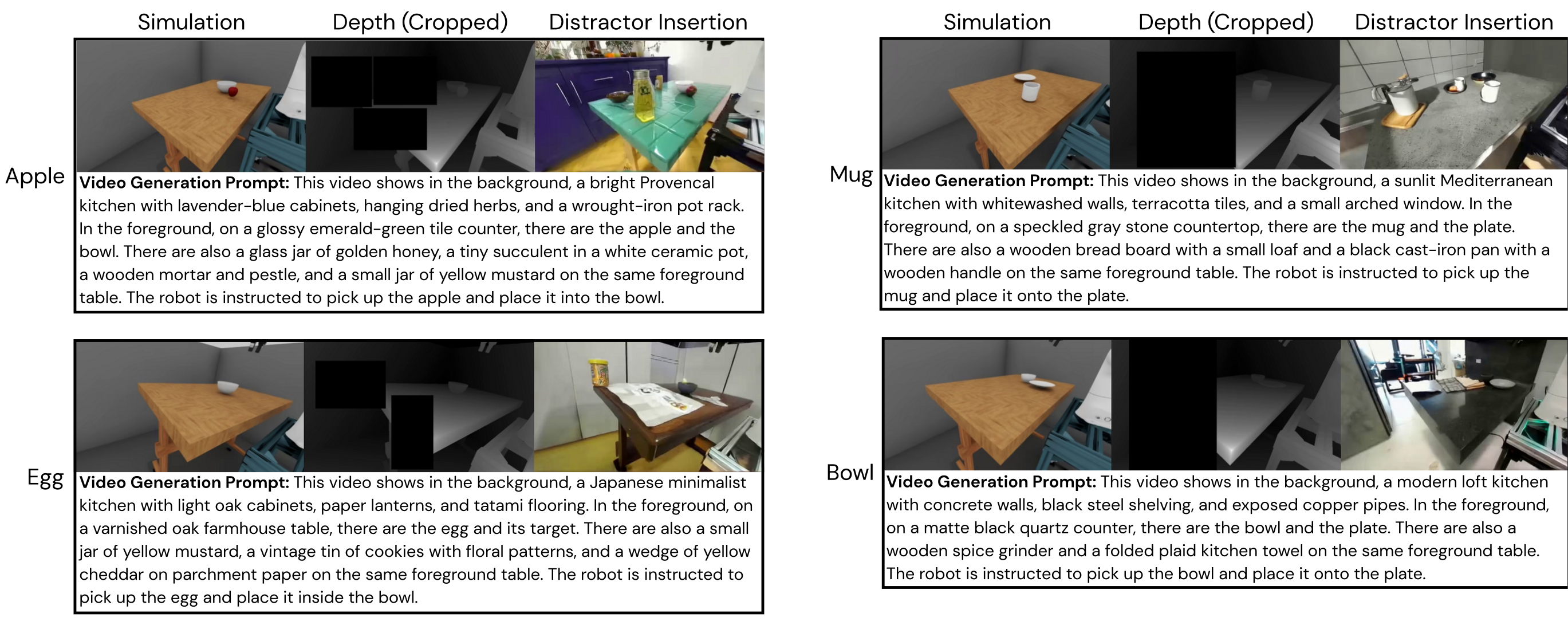
Figure 14 retains four examples with the simulation image, cropped depth, generated distractors, and full prompts. Cropping removes constraints where new objects should appear while aiming to protect the task geometry. The examples support temporally consistent visual clutter; they do not add those objects to physical simulation or update the action trajectories.
E. Robot simulation data generation
The planner augments stored grasps by 180° gripper symmetry, ranks them by geometric criteria, checks collisions, and applies batched inverse kinematics. Opening follows a hinge arc or prismatic line; rigid-object tasks use grasp/lift/place primitives, and mobile tasks prepend navigation.
Replanning handles inverse-kinematics loss, stalling, later infeasibility, or slip. Only successful placement, lifting, or sufficiently displaced joints produce training trajectories. This filtering is part of the data source and limits coverage of recoveries from failure.
F. Policy training data visualization
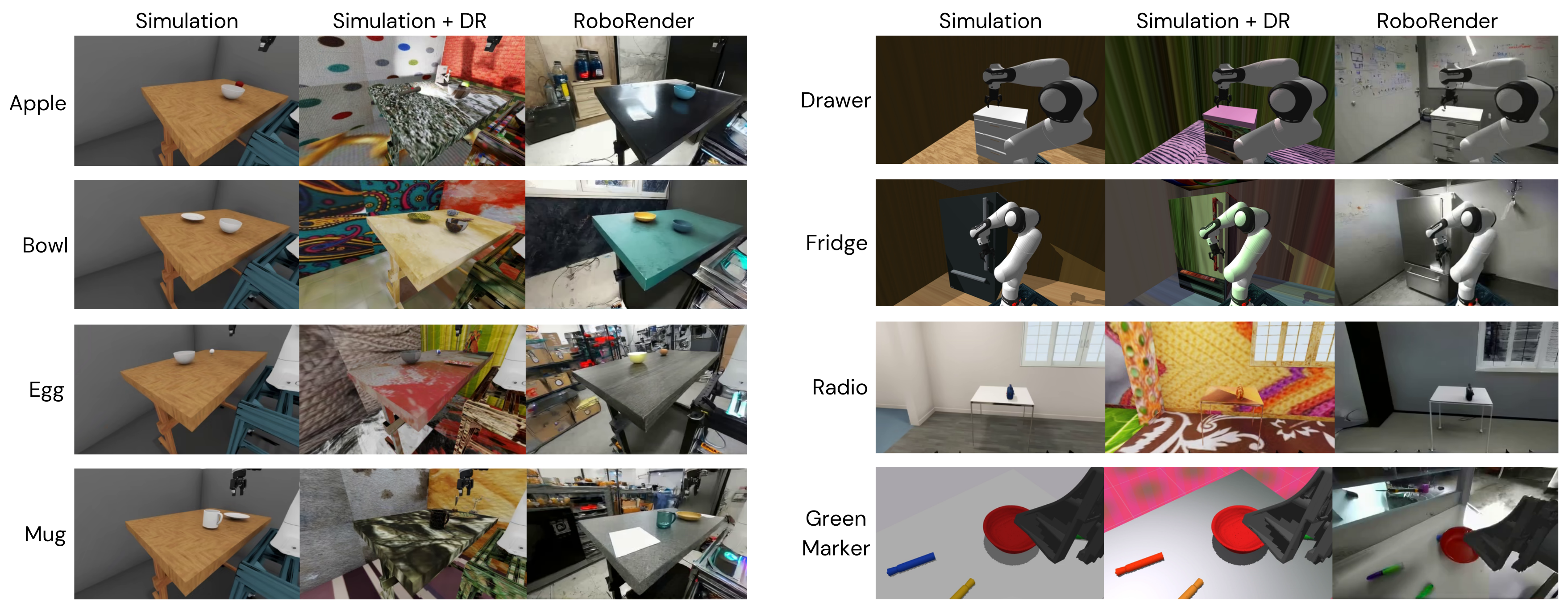
Figure 15 retains raw simulation, randomized rendering, and RoboRender examples for all eight tasks. These illustrate texture and lighting changes; comparative task performance is supplied by Tables III–V rather than appearance examples alone.
G. Physical setup
Figure 16 preserves the physical setups. Object and distractor positions vary for pick-and-place and are shared across compared policies. Opening varies initial robot position and orientation. Mobile pickup varies both robot start and the radio’s table position.