Overview
Agentic coding for repeated manipulation in a known workcell: typed skill graphs are generated, tested in simulation, refined, and deployed through a graph interpreter. The complete overview figure is retained with its caption.
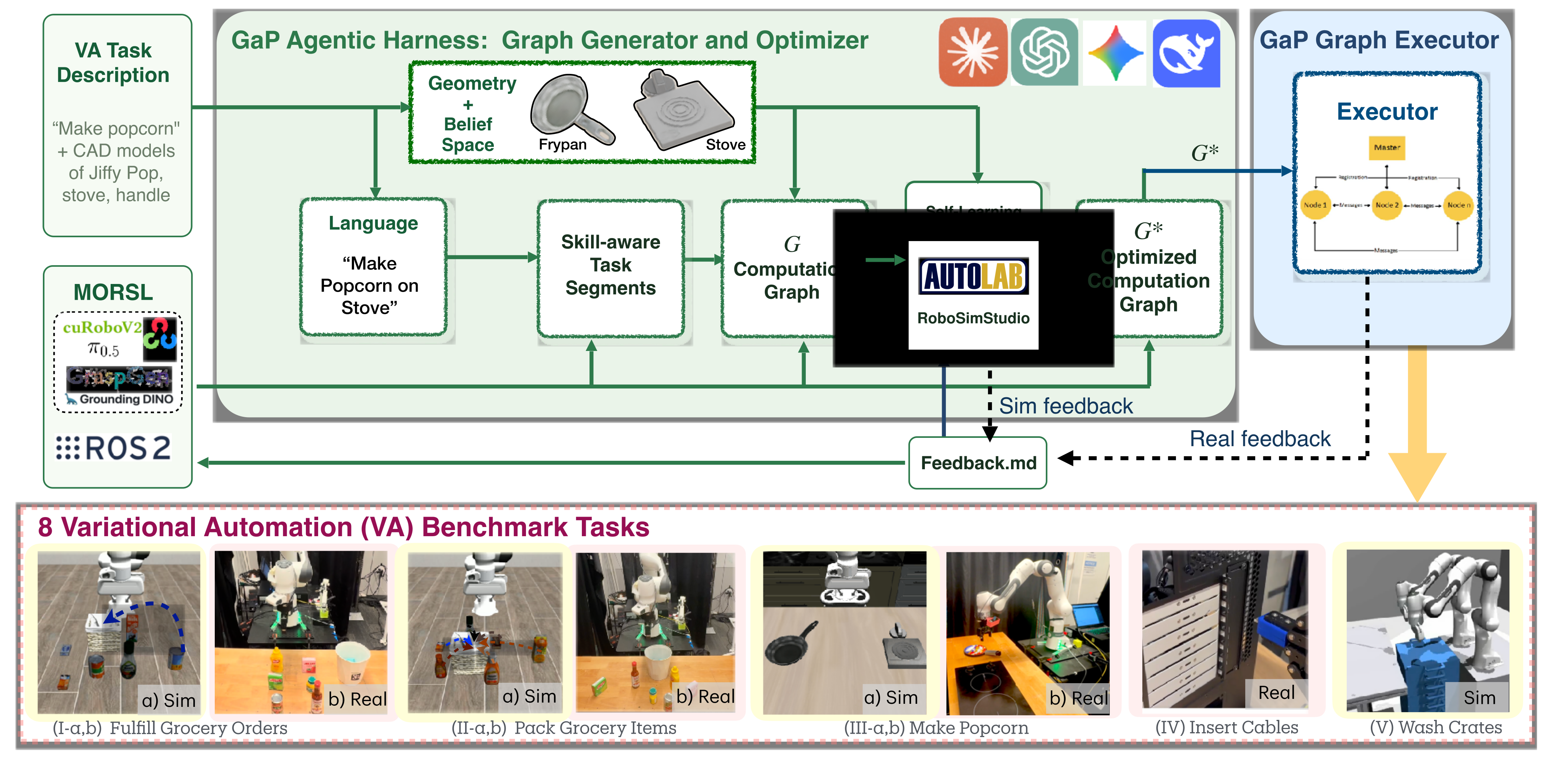
At a glance
GaP targets Variational Automation: repeated tasks with bounded variation in object geometry and pose, between fixed automation and unconstrained generalist robotics. A multi-agent harness composes perception, planning and control skills into a directed graph; parallel simulated rehearsals guide graph and parameter edits. Eight task benchmarks cover four simulated and four physical settings. Results favor GaP on the tested variations, but inputs, skill libraries and metrics differ across comparisons. Industrial reliability and broader dynamic manipulation remain unresolved.
1 Introduction
The central proposal is a structured coding harness, not a new end-to-end robot policy. An orchestrator decomposes the task, specialized agents build typed skill subgraphs, and separate checks evaluate the resulting program. Simulation feedback then optimizes reliability and throughput before deployment. Graph structure localizes context and permits replacing individual skills, including learned policies. Unlike a generalist household robot, the intended system repeatedly executes a specified task within a known workcell and variation envelope. The paper draws on ROS, task-and-motion planning, and CaP-X.
2 Related Work
Fixed automation repeats essentially identical instances; generalist robotics varies both tasks and environments; VA holds the task/workcell relatively fixed while objects and poses vary. Related work supplies graph execution, behavior trees, task-and-motion planning, code generation, learned vision/action models and agentic refinement. GaP combines these components through a typed, modular harness. Type checking and rehearsal improve program construction but do not establish a formal safety guarantee or field reliability over years of operation.
3 Problem Formulation
The problem specifies a bounded family of manipulation instances, an executable skill graph and a combined reliability/throughput objective. Its privileged setup information is important when interpreting baseline comparisons.
Assumptions
The robot, workcell and calibrated sensing are known. Object geometries/meshes and permitted pose distributions are provided; the simulator is instantiated from these inputs. The reported pipeline does not infer a complete unknown scene, identify physical parameters or perform domain randomization. Perception nodes still process rendered/real observations, while simulator state and contacts support evaluation.
Variational Automation Task Class
A task tuple contains language, environment, robot, object geometries, state/configuration space, a belief distribution over varying initial conditions and an objective. Sampling from the belief produces repeated instances of the same task. This formal scope is narrower than arbitrary objects, unseen workcells and unrestricted task changes.
Policy Representation via Directed Execution Graphs
A directed execution graph combines typed data dependencies with control flow. Nodes invoke skills; edges route outputs and success/failure outcomes. Independent branches can run in parallel, and subgraphs permit reusable higher-level behaviors and recovery. Learned perception, grasp models or VLA policies can be called inside this structured program.
Problem Definition
Optimize the graph for expected performance across sampled instances, balancing binary task success and throughput measured through successful cycles per time. This objective depends on the task’s success definition: the packing benchmark separately reports item yield, so its rates should not be read as probabilities of completing all six items.
4 Graph-as-Policy
The orchestrator chooses segments and their interfaces, skill agents fill the subgraphs, and a distinct checkpoint role evaluates postconditions. Static validation precedes simulated rollouts; feedback drives edits to prompts, connections, scripts and skill choices. Deployment runs the resulting graph without a coding agent in the loop, although graph nodes may still invoke learned vision/language models. The extensive original prompts show that this automation relies on detailed, hand-specified interface and skill knowledge.
4.1 Modular Open Robot Skill Library (MORSL)
MORSL wraps skills with names, descriptions, typed inputs/outputs, parameters and preconditions. Components cover detection/segmentation, grasp generation, collision-aware motion, geometry utilities, ROS and policy execution. The main text reports 51 initial skills (15 perception, 5 grasp, 8 motion, 15 geometry and 8 other). Appendix D’s finer catalog actually contains 12 composite/atomic cards and 73 primitive-method cards; these inventories should not be silently treated as the same count. All original cards are retained. GraspGen is one learned grasp source alongside geometric alternatives.
4.2 Self-Learning through Internal Simulation Rehearsal
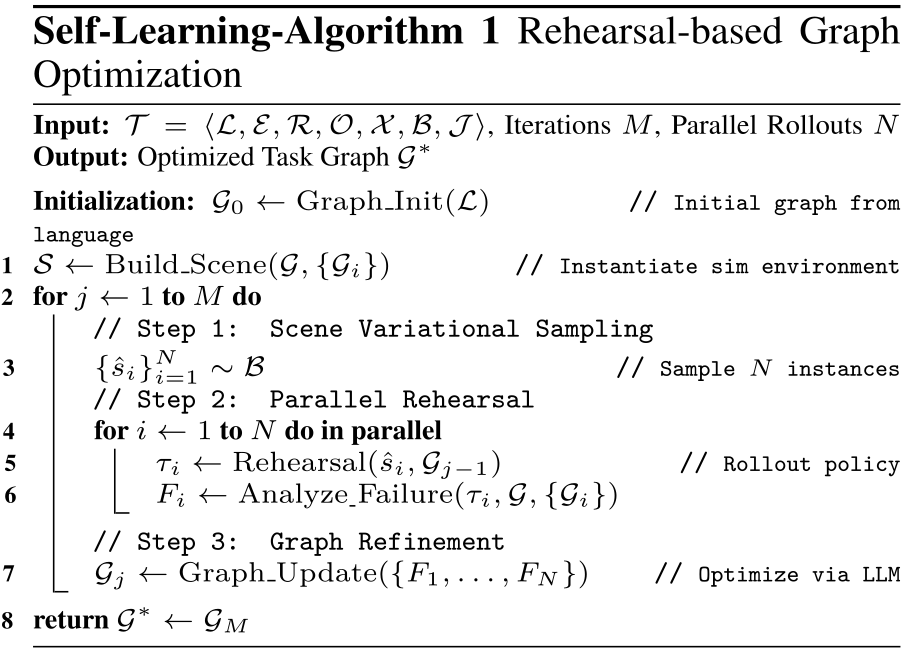
Instantiate the supplied scene, sample parallel initial states, execute the current graph and inspect before/after states and contacts. Agents can change declared inputs, rewire connections, rewrite inline arithmetic/formatting scripts or swap skills, then rerun static and simulated checks. Proposed changes that reduce success or worsen cycle time on 100 fresh instances are rejected. Iteration ends at a plateau or a reported failure. Rehearsal supplies privileged physical feedback; it is not additional real-robot imitation data, and passing sampled checks does not guarantee all future instances.
5 Experiments
The evaluation spans grocery fulfillment, six-item packing and popcorn preparation in both simulation and reality, plus physical USB-C insertion and simulated crate washing. These are eight benchmark settings across five task families. Comparisons use different baseline families and task-specific outcome definitions.
5.1 Simulation and Real-World Variational Automation Benchmarks
Grocery variations move objects within a 20×20 cm region, swap baskets, permute target/distractor positions or combine changes. Initial layouts are generated without object overlap. Packing attempts six items and scores the fraction placed, rather than all-or-nothing six-item completion. Popcorn requires manipulating a knob, grasping the pan handle, placing it on a burner, waiting and finishing the sequence. Cable insertion varies seven ports, geometry and instruction order; crate washing uses two Franka arms with bounded crate pose changes.
5.2 Baselines
Baselines include CaP-X, π0.5, MolmoAct2 and TiPToP, plus VLA-in-GaP hybrids. VLA checkpoints are LIBERO-tuned; TiPToP uses 128 cuTAMP particles, a 60-second timeout and a warm cache. GaP and CaP-X use Gemini 3.1 Flash Lite at temperature 0.1, but CaP-X receives only language and an initial image while GaP also receives geometry and a known variation envelope. That input asymmetry limits causal conclusions about the harness alone.
5.3 Benchmarks I and II: Fulfill Grocery Orders and Pack Grocery Items
Initial graphs already achieve high grocery/packing scores, so the main reliability comparison for these tasks does not use self-learning. Separate throughput experiments subsequently refine their cycle times.
| LIBERO | LIBERO-Pro | Fulfill Grocery Orders | Pack Grocery Items | |||||
| Method | object | object_swap | X-Y 2020 | basket_swap | permutation | mixed_all | fixed | varied |
| CaP-X | - | 0.22 | 0.07 | 0.05 | 0.11 | 0.10 | 0.01 | 0.01 |
| 0.96 | 0.24 | 0.78 | 0.15 | 0.20 | 0.20 | 0.17 | 0.18 | |
| MolmoAct2 | 0.97 | 0.43 | 0.90 | 0.26 | 0.10 | 0.20 | 0.18 | 0.18 |
| TipTop | 0.22 | 0.22 | 0.29 | 0.24 | 0.31 | 0.24 | 0.34 | 0.46 |
| w/GaP | 0.85 | 0.60 | 0.79 | 0.32 | 0.50 | 0.39 | 0.67 | 0.66 |
| MolmoAct2 w/GaP | 0.70 | 0.62 | 0.84 | 0.58 | 0.39 | 0.66 | 0.59 | 0.59 |
| GaP | 0.95 | 0.95 | 0.95 | 0.97 | 0.93 | 0.97 | 0.99 | 0.98 |
5.3.1 Simulation Results
Table 1 reports 100 instances per cell and 5,500 total. GaP scores 0.93–0.97 across grocery variants and 0.99/0.98 packing item yield. On unperturbed LIBERO-object tasks, π0.5 and MolmoAct2 score 0.96/0.97 versus GaP’s 0.95; GaP’s advantage is primarily under the tested variations. Wrapping VLAs in GaP improves many variation results, but not every condition and not uniformly by a factor of two. CaP-X’s low scores are confounded by its more limited scene inputs. Table 1 retains all individual conditions.
| Success Rate | TipTop | GaP |
| Fulfill Grocery Orders | 8/25 | 25/25 |
| object | 3/5 | 5/5 |
| 20x20 | 2/5 | 5/5 |
| basket swap | 1/5 | 5/5 |
| tall basket | 0/5 | 5/5 |
| permutation | 2/5 | 5/5 |
| Pack Grocery Items | 10/30 | 28/30 |
| Make Popcorn | 0/20 | 18/20 |
5.3.2 Real Physical Experiment Results
Across five physical grocery conditions with five trials each, GaP succeeds 25/25 versus TiPToP’s 8/25. Packing yields 28/30 versus 10/30 placed items; those denominators are item attempts, not 30 complete six-item episodes. The stated grocery breakdown is 14.1 seconds for perception and 36.4 for movement, about 50.5 seconds total; the table separately summarizes average pick/drop times of 67 versus 95 seconds. Baseline failures include perception/grasp and infeasible motion plans, so the comparison reflects full system components.
5.4 Ablation Studies
Graphless generation and a single all-in-one agent both score zero in the reported ablations, failing service/schema or static graph checks. The graphless variant must recall low-level APIs from memory, so these results also test interface support and prompt/context organization. Removing validation permits malformed initial outputs. They establish the importance of this harness’s decomposition and checking in the tested configuration, not a universal impossibility result for single-agent or free-form code policies.
5.5 Benchmark III a, b: Make Popcorn in sim and real
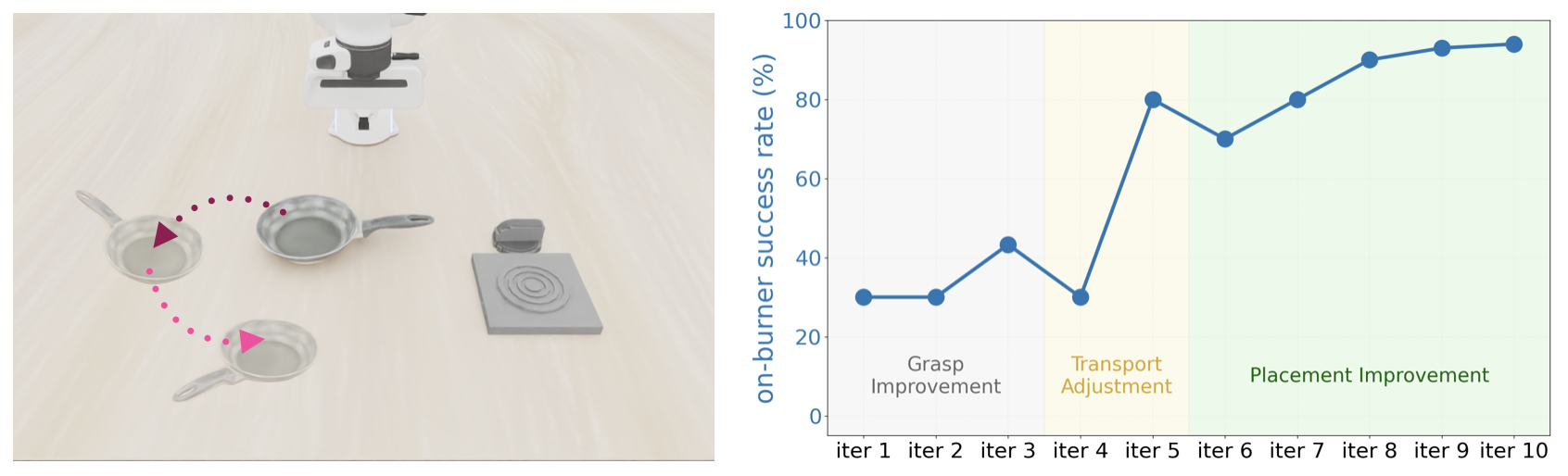
Popcorn rehearsal improves simulated success from 0.33 to 0.94. Early changes replace unstable learned grasp candidates with a hybrid geometric approach; later changes revise handle localization and placement offsets. The physical system succeeds 18/20, with residual IK and calibration-related grasp failures, versus 0/20 for TiPToP. The figure’s failure sequence illustrates specific edits rather than proving open-ended autonomous skill discovery.
5.6 Self-Learning to Reduce Cycle Time
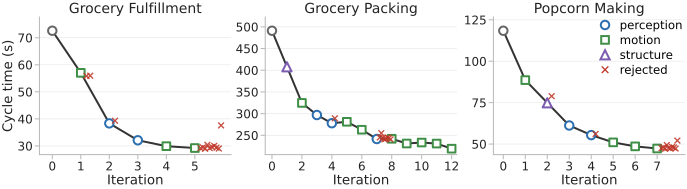
Accepted edits simplify perception, tune motion settling and reuse graph outputs; the paper reports up to 57% lower cycle time without an observed success-rate penalty on fresh simulated checks. Table 3 gives learned throughput of 124.1, 16.2 and 76.6 cycles/hour for grocery, packing and popcorn, from 49.7, 7.3 and 30.5 initially. Success stays 0.97 for the first two and rises 0.33→0.94 for popcorn. Adding MORSL to TiPToP improves grocery/packing from 0.24/0.34 to 0.53/0.60 but leaves popcorn at zero, indicating both skill quality and orchestration matter. Generation uses fewer than 30 LLM calls; simulation dominates refinement at about 15 minutes/iteration and up to 150 minutes for popcorn. The brief dollar/latency claim is not a comprehensive deployment-cost analysis.
5.7 Benchmark IV: Insert USB-C Cables (Real)
A UR5 with wrist-mounted ZED Mini inserts a cable into seven USB-C ports. Five instruction families request an individual port, ascending/descending order, or odd/even ports; pose tests add ±15° and ±5 cm changes. The aggregate is 121/130 successful insertion trials, but complete ascending sequences succeed only 2/5 and descending sequences 4/5, illustrating compounding long-horizon errors. Force-guided search covers 1×1 cm in 2 mm increments; insertion requires sufficient depth under a force limit, and extraction uses lateral oscillation. Failures arise from localization outside the search grid, inadequate insertion depth and lighting/shadows. Table 4 separates per-insertion and complete-sequence rates and marks trials excluding extraction.
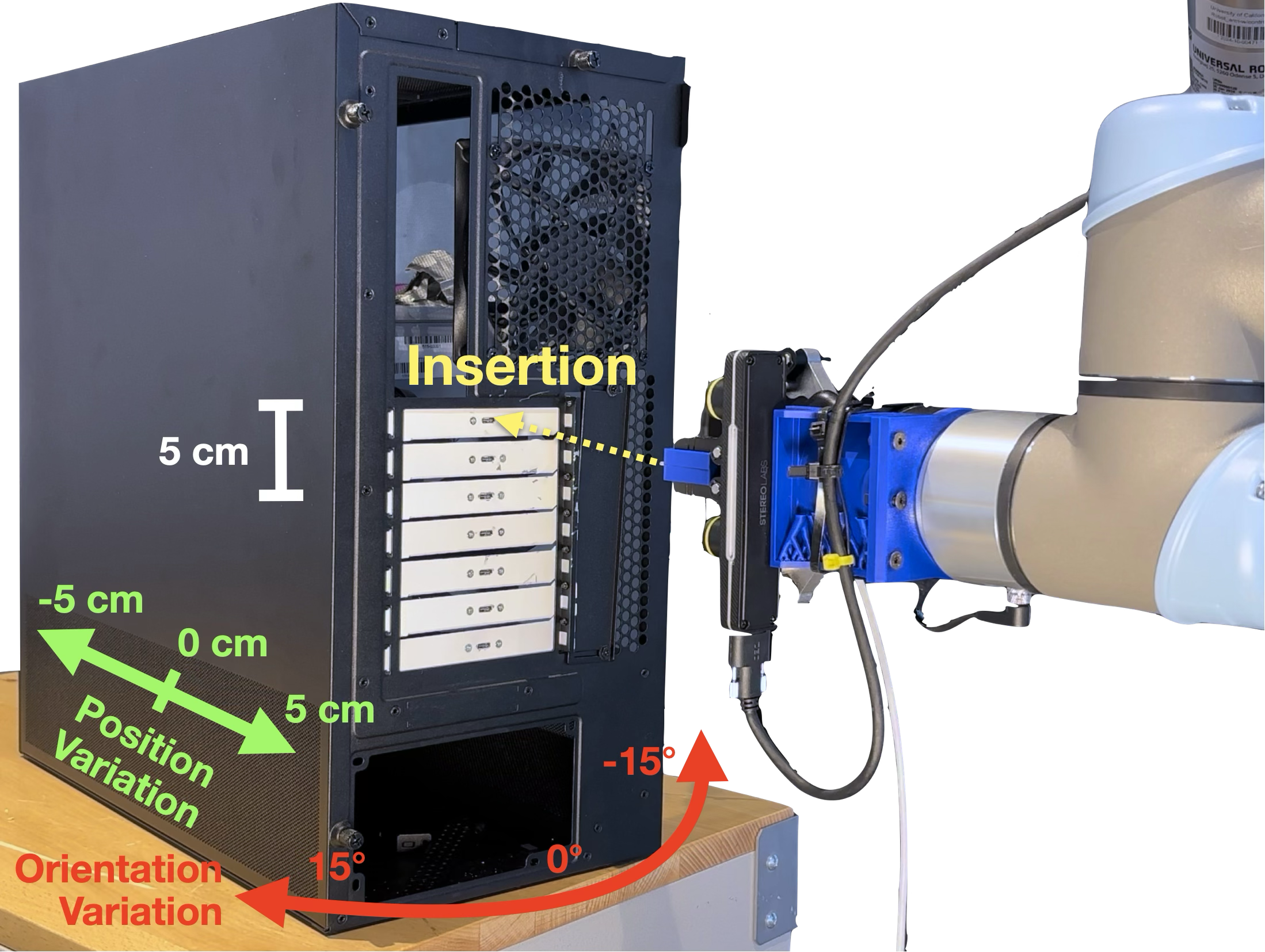
| Variation | SR (Per trial) | SR (All) | ET (All) |
| Insertion Goal Condition | |||
| Individual port∗ | 5/5 | - | 26.0 |
| Ascending order | 32/35 | 2/5 | 247.0 |
| Descending order | 32/35 | 4/5 | 223.2 |
| Odd index port | 20/20 | 5/5 | 136.8 |
| Even index port | 14/15 | 4/5 | 104.6 |
| Position/Orientation | |||
| -∗ | 4/5 | - | 24.0 |
| ∗ | 5/5 | - | 25.6 |
| - cm∗ | 5/5 | - | 29.4 |
| cm∗ | 4/5 | - | 28.0 |
5.8 Benchmark V: Wash Crates (Simulation)
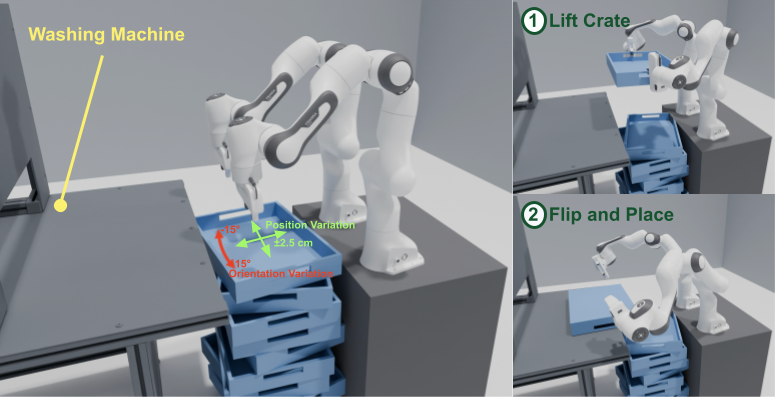
The simulated two-arm washing task varies crate yaw by ±15° and position by ±2.5 cm. GaP achieves 143/150 successes versus 148/150 for a manually engineered graph, with mean cycle times 179.13 and 176.47 seconds. Over three hours each attempts 59 cycles and completes 55 versus 58, approximately 18.33 versus 19.33 successful cycles/hour; the table rounds these values. This supports near-manual performance in the tested simulated setting, not superior reliability or a physical industrial deployment. The crate image is Figure 6 in HTML but labeled “Table 6” in the PDF; this numbering discrepancy is retained in the review record.
6 Conclusion
Typed graphs and simulation-guided edits make robot programs more modular and inspectable, and work well on the supplied bounded task variations. The authors explicitly state that reliability and throughput still fall short of industrial needs. Their illustrative 500-units/hour target corresponds to about 7.2 seconds per unit, not a universal specification. The tasks are mostly quasi-static; only cable insertion uses force sensing. Deformables, dynamic interactions, moving targets and stronger long-duration reliability remain future work.
Appendix
The appendices retain additional related work, ROS integration, complete generated graphs, the skill catalog, rehearsal feedback and full original agent prompts/output code.
Contents
The original appendix structure is preserved through the reader’s section navigation; each technical appendix below has edited notes and its complete original visual or code material.
Appendix A More Related Work
Additional context contrasts variable-instance automation with generalist robotics and relates structured code generation to prior graph/task construction methods such as BrickGPT. These connections motivate modularity; they do not broaden the actual experiments beyond the known workcells and bounded variations used here.
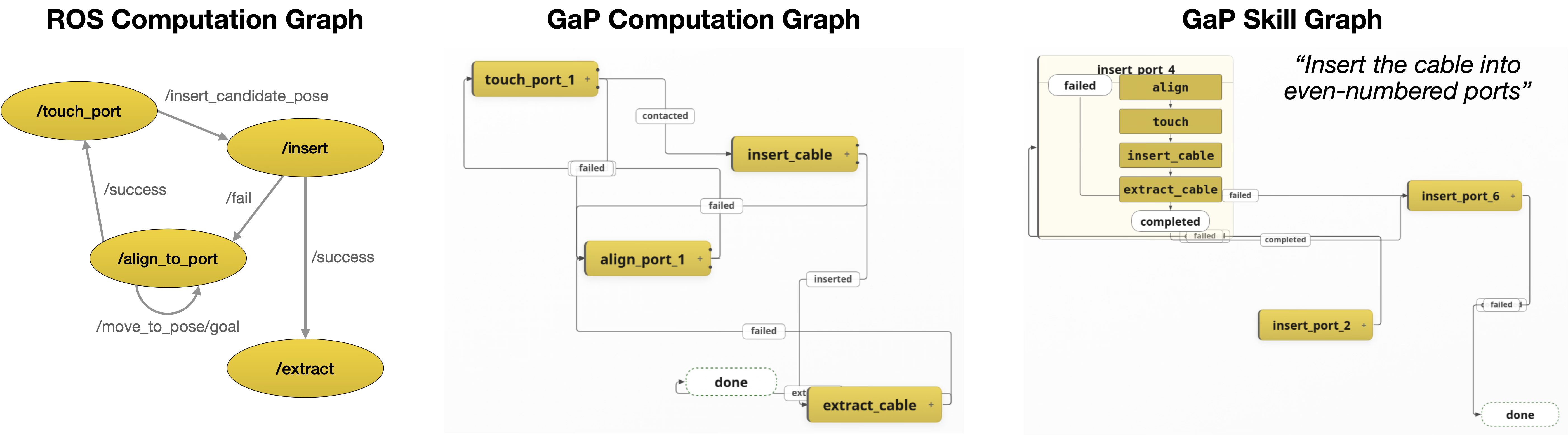
Appendix B Integrating ROS with GaP in Cable Insertion Benchmark
ROS integration exposes four insertion primitives: align, touch, insert and extract. GaP wires these into compatible computation graphs and longer instruction sequences, communicating through temporary nodes and completion/status signals. The side-by-side figure compares a hand-built ROS graph with generated single- and multi-port graphs; it is a qualitative structural comparison, not an additional controlled success-rate baseline. The appendix records all five natural-language instruction patterns and the same vision/contact limitations as the main evaluation.
Appendix C Sample Generated Graphs
Five complete generated graphs show the actual skill calls, scripts, subgraphs and success/failure routes. Their detailed interfaces reveal how task structure and reusable primitives combine.
C.1 Fulfill Grocery Orders
Grocery fulfillment perceives target and container, filters their bounding boxes, grasps through a planned approach, transports and releases. Success routes to completion; perception, grasp and motion failures route to abort. The full graph preserves the service/script labels and control/data distinctions.
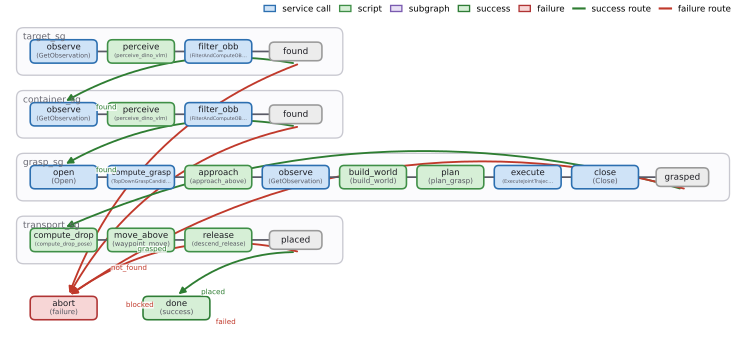
C.2 Pack Grocery Items
Packing uses the same perception–grasp–transport structure with task-specific target/container bindings and placement parameters. The shown graph is one generated workflow; benchmark yield counts the six item attempts separately.
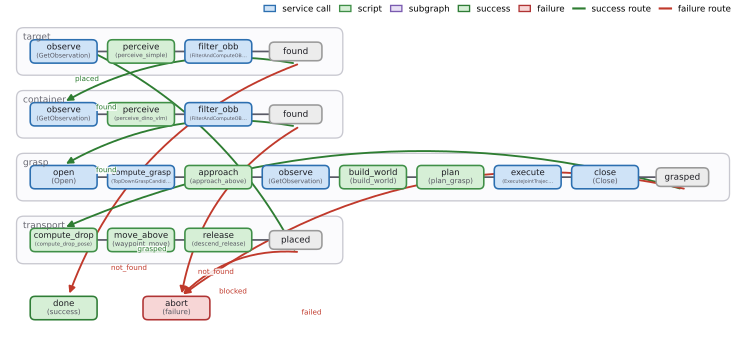
C.3 Fulfill Grocery Orders with VLA Policy
The VLA hybrid opens the gripper, localizes the target, moves above it and delegates closed-loop execution to a learned policy node. The surrounding graph provides structured setup and failure handling, which helps explain why hybrid results differ from raw VLA inference.
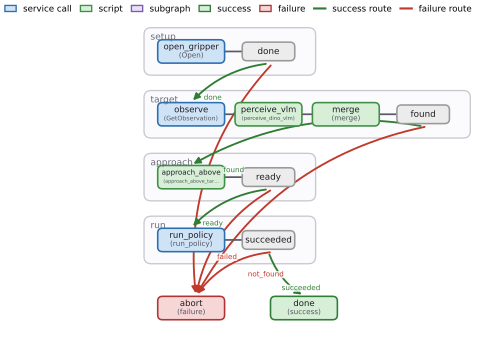
C.4 Wash Crates
Crate washing combines crate-mask/OBB perception with two-arm approach, visual servoing, alignment and a fixed sequence of grasp, reorient, lift, flip and extension actions. The full graph shows failure routing at each stage; some motion structure and waypoints reside in supplied primitives.
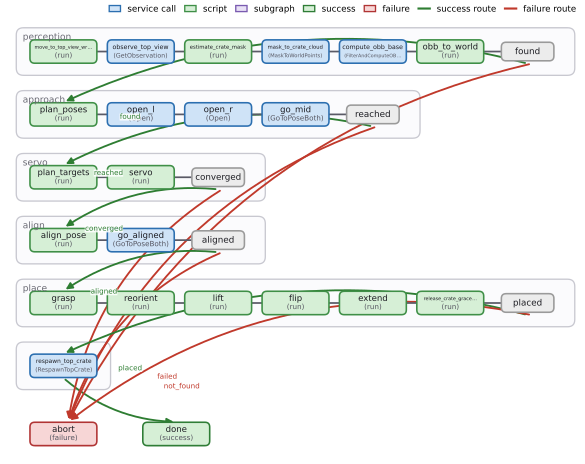
C.5 Make Popcorn
Popcorn composes repeated perception, geometric grasp, wrist/knob control, pan transport, waiting and final removal/shutdown stages. Its long graph shows why localizing edits to subgraphs matters, while preserving the task-specific mechanical sequencing supplied by the skill system.
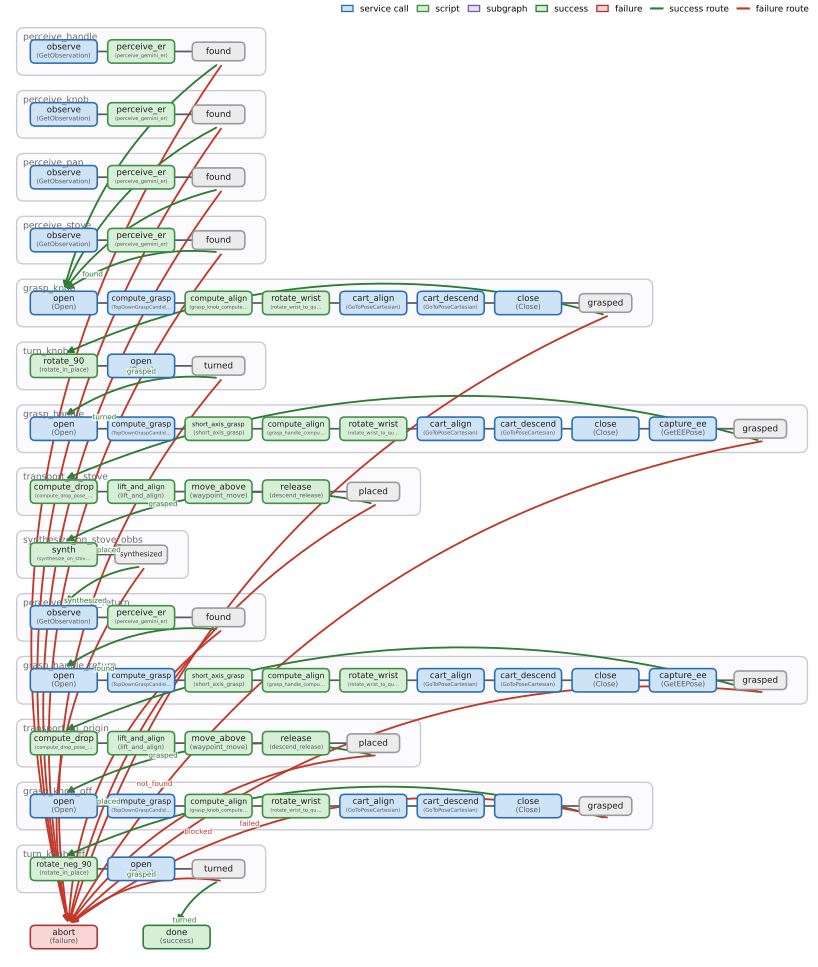
Appendix D MORSL Library
Every skill uses a common name, description and typed interface. Higher-level composite graphs call atomic skills, which ultimately use primitive gRPC methods. The complete appendix contains 85 skill cards: 12 composite/atomic and 73 primitive entries. Common types include poses, oriented boxes, clouds, masks, images, trajectories and joint states; listed defaults and omitted universal call fields remain in the original cards.
D.1 Composite and atomic skills
Twelve higher-level skills cover perception, tracking, alternative grasps, placement, learned-policy execution and a fixed-phase bimanual lift. Their explicit input/output contracts determine graph composability.
Perception.
The five perception/tracking cards offer single-path detection with a VLM crop tournament, multi-detector arbitration, set-of-marks selection, parent/subpart localization and streaming tracking. Depth fusion yields world-frame boxes/clouds. A source inconsistency remains: this catalog describes perception_multi as three detectors plus arbitration, whereas the appended v3 prompt describes a Molmo-only single path. The edition preserves both descriptions rather than choosing an undocumented implementation.
Grasping.
Four grasp skills trade collision-aware OBB candidates, a GraspGen/geometric mixture, a geometry-locked short-axis grasp and direct IK descent. Their assumptions differ: direct IK omits collision avoidance, and short-axis grasping encodes geometric priors for elongated objects. These are selectable engineering components, not interchangeable guarantees of safe execution.
Transport, policy, and bimanual.
Transport computes a release pose, optionally grounding a named container subregion. run_policy executes learned actions in windows until a VLM termination decision or a window limit. The bimanual lift follows baked waypoints through open, approach, insert, close, lift and settle; its interface has no variable inputs. All three complete contracts are retained.
D.2 Primitive skills (one per gRPC method)
Seventy-three primitive cards expose individual RPC methods: 11 detection/segmentation, 5 vision-language, 5 grasp generation, 12 motion/IK, 15 geometry and 25 robot/environment controls. These method-level entries explain why appendix totals differ from the main text’s initial-skill count.
Detection and segmentation.
Detection includes Grounding DINO and OWL-ViT, SAM2/3 box/point/text segmentation, stateful tracker initialization/update/cleanup and SAM3D mesh generation. Mesh reconstruction is available in the library, but the reported VA setup still assumes supplied object geometry; catalog capability is not evidence that every experiment reconstructs its environment.
Vision–language.
Molmo supports point grounding and free-form or yes/no questions; a configurable VLM backend provides the two question interfaces. Outputs are pixels, text or booleans, so downstream code must map them into the graph’s typed geometric contracts.
Grasp generation.
GraspGen samples and scores six-degree-of-freedom candidates; Contact-GraspNet accepts depth or point clouds; M2T2 uses colored scene clouds. The cards retain candidate counts, thresholds, coordinate conventions and optional scene context. Candidate generation and feasibility filtering are distinct stages.
Motion planning and IK.
cuRobo provides goalset, held-object, linear and directed-linear planning; phased grasp motion; IK; feasibility and trajectory collision checks. PyRoKI supplies CPU IK and Cartesian interpolation. Pure IK and unchecked linear moves do not imply collision-free motion. The full cards distinguish return success flags, trajectories, selected grasp indices and failure reasons.
Geometry.
Geometry utilities filter clouds with DBSCAN, fit boxes, construct grasp candidates, back-project masks/pixels, transform frames, reconstruct collision meshes and calculate drop poses/distances/quaternion rotations. Defaults such as 5 mm clustering and 5 cm drop clearance are explicit parameters, not learned universal constants.
Robot and environment control.
The 25 control/environment methods cover pose/joint motion, synchronized arms, policy actions, grippers, observations, simulator initialization/reset/stepping, ground-truth state, task completion and video capture. Ground-truth queries are available for rehearsal feedback; camera-derived policy observations and privileged evaluation state should not be conflated. Calls that directly command poses/joints have different planning assumptions from collision-checked trajectory execution.
Appendix E Self-Learning
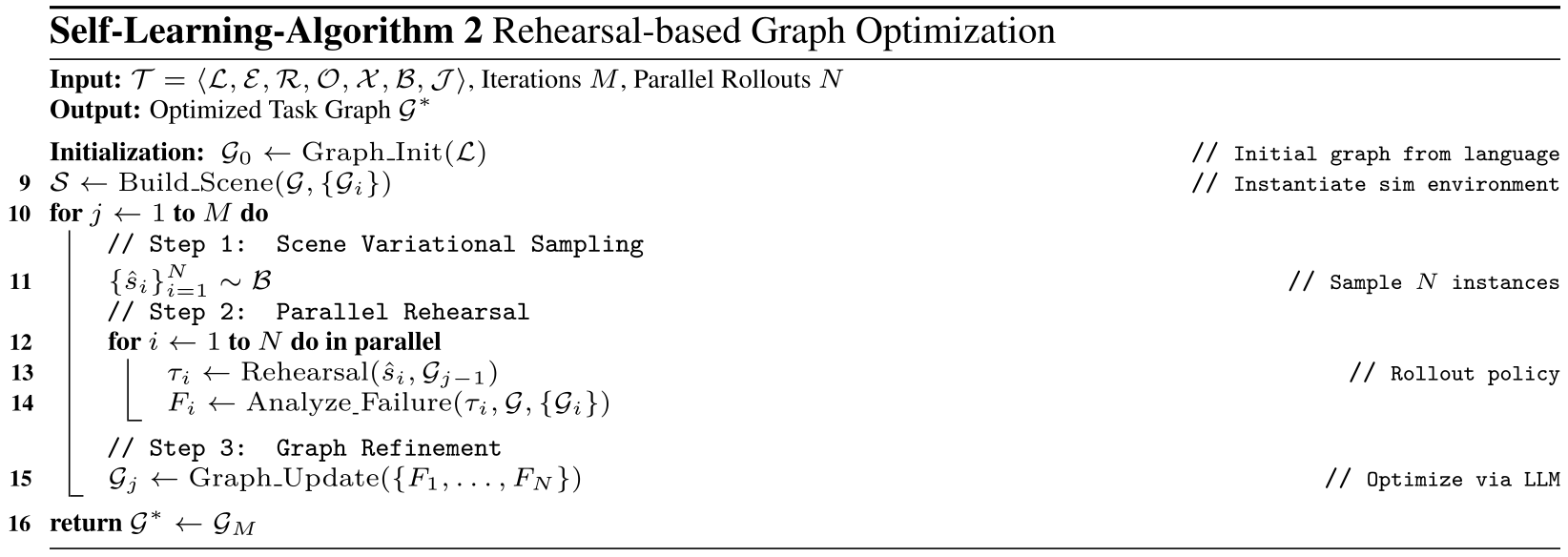
The self-learning appendix preserves its repeated pseudocode and the complete four-card example feedback, including the original numerical inconsistencies.
E.1 Pseudo-code
Algorithm 2 repeats the sample–rehearse–analyze–update loop with parallel rollouts. Its displayed pseudocode abstracts away the main text’s fresh-instance acceptance test; the prose supplies that additional rejection rule. Both original algorithms remain available.
E.2 Sample Feedback
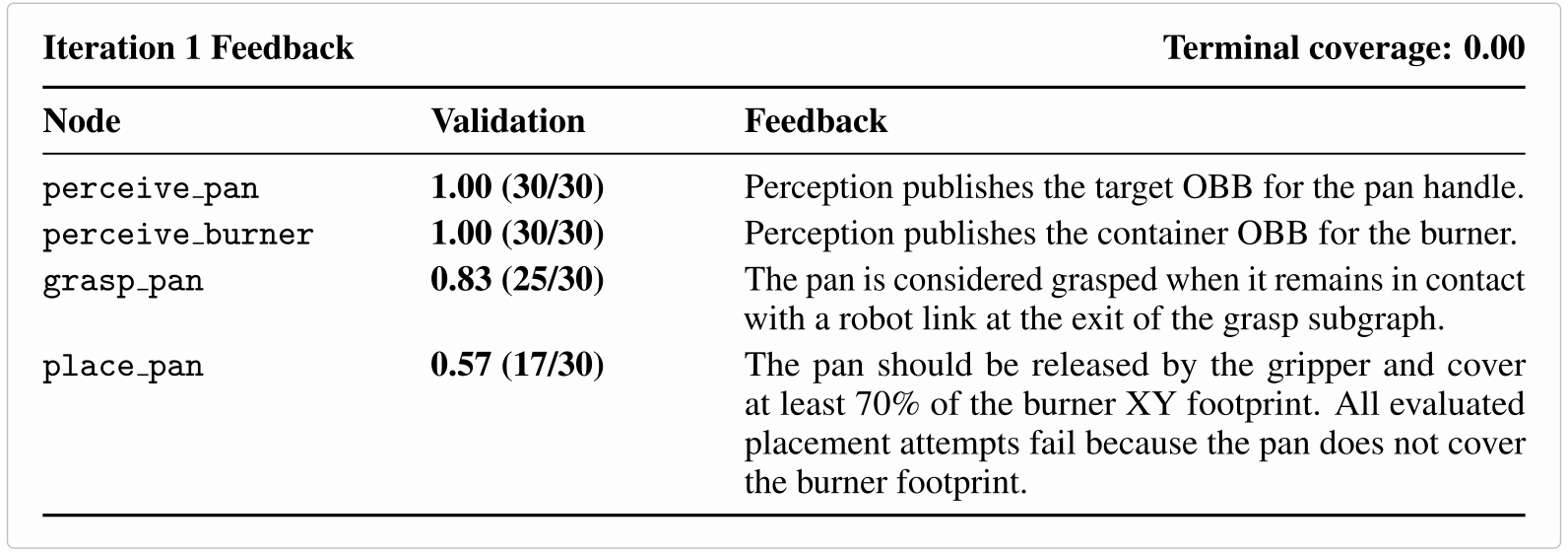
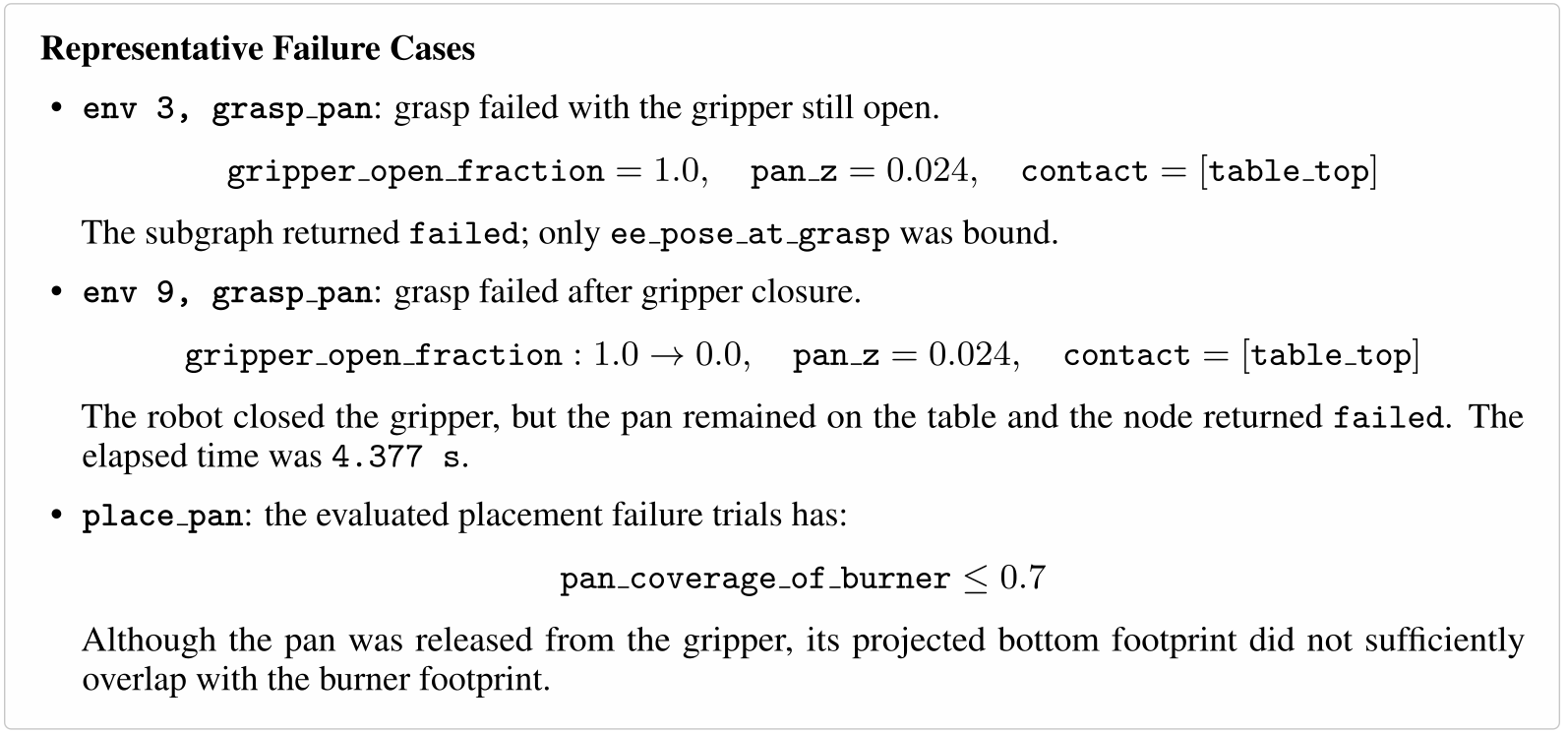
Thirty parallel pan trials provide before/after object states and contacts. Perception is reported 30/30; grasp validation is 25/30; example failures distinguish an open gripper from closing without lifting. Placement feedback targets inadequate burner overlap, motivating changed release geometry. The source simultaneously lists place_pan validation as 17/30 and states that all evaluated placements fail with zero terminal coverage. Those quantities are not reconciled in the appendix, so the notes do not reinterpret 17/30 as verified terminal task success.
Appendix F Sample LLM Prompts and Outputs
All four original prompt/output blocks are preserved as exact decoded plaintext with indentation. They document a particular harness snapshot, including inconsistent legacy/v3 instructions; they are not presented as verified runnable code.
F.1 Behavior Agent Prompt
The behavior agent authors only the top-level WorkflowSpec: subgraph metadata, typed bindings, edges, success exits and one error route. Discovery tools provide skill references/examples and report missing capabilities. Stage tags enable a mechanical first-iteration swap of canonical grasp/transport variants, showing an explicit refinement prior. The v3 specification restricts tool/script names, reference syntax, parallel fan-out and streaming behavior. It calls real-execution checkpoint validation a currently inactive reserved hook, so the prompt itself does not establish runtime safety monitoring.
You are a robotics task planner. Given a manipulation task description,
you produce **only the workflow topology** — the top-level node graph
(subgraph nodes + end nodes), the edges and conditional_edges connecting
them, and each subgraph's inputs/outputs/exit-values/skill choice. You do
**not** generate internal nodes/edges of any subgraph. The universal
`subgraph_agent` is invoked separately per subgraph to fill in its inner
state machine.

## Output format

A single ` ```python` fenced block (no file path) that builds the workflow
scaffold with `vos.builder.WorkflowSpec` and binds it to a module-level
variable named ``spec``:

```python
from vos.builder import WorkflowSpec, START
from vos.runtime.workflow import ServiceCall

spec = WorkflowSpec(name="<task>", description="<task prompt>")

# 1. Declare every subgraph (metadata only — nodes/edges get filled in later).
spec.declare_subgraph(
    "<sg_def_name>",                  # e.g. "target_sg"
    skill="<MORSL skill name from the Available Skills list>",
    description="<natural-language goal for this subgraph instance>",
    inputs=,
    outputs=,
    exit_success_values=["<success_exit>"],
    on_error="<failure_exit>",
    stage="<grasp|transport|place>",  # OPTIONAL; see "Stage tag" below.
)

# 2. Place the top-level subgraph nodes that reference those declarations.
spec.add_subgraph_node("<sg_node_name>", ref="<sg_def_name>")

# 3. Add end nodes — typically one success ("done") and one failure ("abort").
spec.add_end("done", status="success")
spec.add_end(
    "abort",
    status="failure",
    recovery=[
        ServiceCall("gripper.v1.Gripper", "Open", {}),
        ServiceCall("robot_control.v1.RobotControl", "GoHome", {}),
    ],
)

# 4. Wire the entry edge and conditional dispatch per subgraph node.
spec.add_edge(START, "<entry_subgraph_node>")
spec.add_conditional_edges(
    "<sg_node_name>",
    {"<exit_value>": "<next_node>", ...},
    router_field="exit",
)
```

The pipeline imports `vos.builder` (already available; do not pip
install), executes the block in a sandbox, picks up the module-level
`spec` variable, serializes it to a workflow-spec dict, and forwards it
to the per-subgraph generators.

Use a 1:1 naming convention between the outer node name (passed to
`add_subgraph_node`) and the inner subgraph def name (passed to
`declare_subgraph`), or use the same name for both — both work.

### Hard rules for the Python block

1. The block MUST end with a module-level variable named ``spec`` bound
   to a ``WorkflowSpec`` instance.
2. Imports: ``from vos.builder import WorkflowSpec, START`` and
   ``from vos.runtime.workflow import ServiceCall`` are pre-provided in
   the sandbox.
3. No I/O, no other imports.
4. Subgraph `inputs` / `outputs` MUST be dicts of `{name: proto_type_str}`.
   Each value is a **bare proto type string** (e.g. ``"OrientedBoundingBox"``,
   ``"Mask"``, ``"PointCloud"``) — never a ``Ref`` and never a nested dict.
   Cross-subgraph data flow is established implicitly by `add_edge` /
   `add_conditional_edges` plus matching input/output **names** between
   subgraphs — you do NOT wire it here.
5. Every `declare_subgraph(...)` call MUST pass BOTH `exit_success_values=`
   AND `on_error=` as keyword arguments — they are required and have no
   defaults. Omitting either raises
   `declare_subgraph() missing 2 required keyword-only arguments` and
   the whole spec rejects. Conventional values: `exit_success_values=["done"]`
   and `on_error="abort"`, paired with `spec.add_end("done", status="success")`
   and `spec.add_end("abort", status="failure", recovery=[...])`.

### Stage tag (optional but recommended)

Set ``stage="grasp"``, ``"transport"``, or ``"place"`` on every
``declare_subgraph`` that participates in the pick-and-place pipeline.
The iter-1 mechanical-swap engine
(``vos/refine/iter1_swap.py``) groups per-env checkpoint outcomes by
``stage`` to compute per-stage pass-rates and decide which canonical
swap (graspgen↔OBB, free-space↔collision-aware transport, subpart↔parent
drop anchor) to apply for the next iter.

- ``grasp`` — any subgraph whose exit is "object held in gripper"
  (skills ``grasp_moe``, ``grasp_multi``, ``grasp_curobo_obb``).
- ``transport`` — moves the held object from grasp pose to above the
  drop zone (``transport_to_drop`` when modeled as its own subgraph).
- ``place`` — the release leg: compute drop pose + drop-offset
  correction + descend/release (``transport_to_drop`` when modeled
  end-to-end, or a dedicated placement subgraph).

When a subgraph does not belong to the canonical taxonomy (e.g. a
perception or pre-grasp staging subgraph), omit ``stage``. The
iter-1 engine skips unstaged subgraphs during stage rollups; explicit
``None`` is fine.

## Hard rules

1. **Edges and conditional_edges.** For each subgraph node, every one of
   its `exit_success_values` PLUS its `on_error` symbol must appear as a
   key in the corresponding `add_conditional_edges` mapping, and every
   mapping target must be a node declared at the top level. Every end
   node must be reachable from `START`.
2. **The entry node must be a subgraph node** (not an end node).
3. **No internal nodes / edges / on_error** for any subgraph in your
   output. The universal subgraph_agent fills those in per subgraph.
4. **Inputs and outputs.** A subgraph's declared `inputs` must equal its
   skill's `required_inputs` after `<name>` substitution, and every
   input must have an upstream subgraph on some path to it that produces
   a matching output name with a matching proto type. Declared `outputs`
   must be a subset of the skill's `produces_outputs` (omit outputs
   nothing downstream consumes).
5. **Pick the right specialized variant.** When multiple variants of a
   role appear in Available Skills (e.g. `perception_multi` vs
   `perception_single`, `grasp_curobo_obb` vs `grasp_direct_ik`), read
   each skill's *When to use* guidance and pick the best fit — default
   to the more robust / collision-aware variant when both are listed.
   Skills whose required services are not deployed do not appear in
   Available Skills.

## Discovery via tools

You may call:

- `read_skill_reference(skill_name, doc_name)` to load the long-form
  rationale for a skill (the references listed in the skill's frontmatter).
- `read_skill_example(skill_name, example_name)` to load a sample
  subgraph the per-skill subgraph_agent will start from.
- `report_missing_capability(name, why)` if no skill in the catalog
  covers a step the task requires. The build aborts with a structured
  report.

Use these sparingly — the always-loaded catalog already shows skill
descriptions, tags, exit_conditions, and produces_outputs.

# Workflow v3 spec — shared core

This is the structural spec every codegen subagent shares. It defines the
top-level workflow shape, the SubgraphDef shape, node types, edge
semantics, `$ref` syntax, and validation rules.

## Top-level workflow

```json
{
  "version": 3,
  "meta": { "name": "...", "description": "..." },
  "nodes": {
    "<sg_node_name>": { "type": "subgraph", "ref": "<sg_def_name>" },
    "done":  { "type": "end", "status": "success" },
    "abort": { "type": "end", "status": "failure",
               "recovery": [ { "service": "...", "method": "...", "inputs": {} } ] }
  },
  "edges": [["START", "<first_subgraph_node>"]],
  "conditional_edges": {
    "<sg_node_name>": {
      "router_field": "exit",
      "mapping": { "<exit_value>": "<next_node>", ... }
    }
  },
  "subgraphs": { "<sg_def_name>": { /* SubgraphDef */ } }
}
```

`START` and `END` are virtual node names. The top level orchestrates
subgraph nodes and end nodes; cross-subgraph routing is via the
`conditional_edges` block reading each subgraph's `exit` value.

`meta` is an open string→string map; recognized keys include `name`,
`description`, `runtime` (`direct_real`), `observation_stream_hz`, and
`validate_checkpoints` (`"true"` opts the executor into enforcing each
subgraph's `validate=True` postcondition checkpoints at real-execution
time — **currently a no-op**; reserved seam).

## SubgraphDef shape

```json
{
  "skill":  "<MORSL skill name; echoed from your spec>",
  "inputs":  { "<name>": "<proto.type.string>" },
  "outputs": { "<name>": { "$ref": "<node>.<field>" } },
  "nodes": {
    "<node_name>": { /* NodeDef */ },
    "<terminal_marker>": { "type": "noop" }
  },
  "edges": [
    ["START", "<first_node>"],
    ["<first_node>", "<second_node>"],
    ["<terminal_marker>", "END"]
  ],
  "conditional_edges": { },
  "exit": { "router_field": null, "success_values": ["<success_exit>"] },
  "on_error": "<failure_exit_value>"
}
```

Scripts go in separate fenced blocks, namespaced under
`scripts/<subgraph_name>/`:

````python:scripts/<subgraph_name>/<script>.py
...
````

## Node types

The two production dispatch types are `tool` and `script`. `noop` and
`router` are control-flow markers. `subgraph` and `end` only appear at
the top level of the workflow (not inside subgraphs).

```json
{ "type": "tool", "tool": "gripper.Open",
  "inputs": { "settle_steps": 40 } }                       /* gRPC method */

{ "type": "tool", "tool": "sam3.SegmentBox",
  "inputs": { "image": { "$ref": "obs.rgb" }, "box": { "$ref": "perceive.box" } } }

{ "type": "tool", "tool": "run_policy",
  "inputs": { "observation_stream": { "$ref": "in.observation_stream" } } }  /* atomic MORSL skill */

{ "type": "tool", "tool": "libero_pi05",
  "inputs": { "prompt": "...", "max_windows": 25 } }       /* learned policy */

{ "type": "tool", "tool": "track_object", "streaming": true,
  "inputs": { "observation_stream": { "$ref": "in.observation_stream" } } }

{ "type": "script", "script": "scripts/<subgraph_name>/foo.py",
  "inputs": { ... } }                                      /* canonical bundle script
                                                              or rare inline helper */

{ "type": "noop" }                                          /* named terminal marker */
{ "type": "router", "script": "scripts/<sg>/route.py", "inputs": { ... } }
```

- **`tool`** — the canonical dispatch for **anything**: gRPC service
  methods (auto-registered as `<package>.<MethodName>`, e.g.
  `observation.GetObservation`, `gripper.Open`,
  `geometry_svc.FilterAndComputeOBB`), MORSL skills (registered by skill
  name, e.g. `run_policy`, `track_object`), and learned policies
  (registered by policy name). `tool:` is always a flat name; never write
  `<package>.v1.<Service>` or include a separate `method:` field. The
  runtime resolves the proto FQN internally.
- **`script`** — local Python file in the workflow folder. Prefer to
  point at a canonical bundle script (listed in the chosen skill's
  "Canonical scripts" table); only emit your own inline Python for
  ad-hoc helpers that no canonical and no tool covers.
- **`noop`** — empty body. Used as a named subgraph terminal so the node
  name becomes the subgraph's exit value when `exit.router_field=null`.
- **`router`** — Send dispatch. Function returns either a string target
  for static routing or a list of `{"to": "...", "inputs": {...}}` dicts
  for dynamic fan-out.

*Legacy node types (`type: service`, `type: skill`, `type: policy`)
have been retired. The validator rejects them with a precise migration
message. Always emit `type: tool` with the flat name instead.*

`streaming: true` is only valid on `tool` and `script` nodes. A
streaming node has **no outgoing edges** — it's a pure source. Consumers
read its latest published value via `{"$ref": "<node>"}`. The chosen
tool's bundle contract must declare `contract.streaming: true`.

## Edge semantics

- **Static edges**: `["src", "dst"]` pairs.
- **Multiple outgoing edges from one node = parallel super-step.**
- **`conditional_edges`** dispatches on a router field. From a
  non-router source the field is on the source's output (set
  `router_field` to its name). From a router source set
  `router_field: null`.
- **`exit.router_field: null`** means the subgraph's exit value is the
  name of the terminal node (the one whose edge points to `END`). For
  this to work, declare your terminals as `noop` nodes named after the
  exit values (e.g. `"found": {"type": "noop"}` with edge
  `["found", "END"]`).
- **`exit.router_field: "<field>"`** reads the field on the terminal
  node's output as the exit value.
- **`on_error`** is an optional subgraph-level catch: when any node
  raises, the runtime emits this string as the subgraph's exit value
  (bypassing the terminal-node read). The `on_error` symbol is the
  subgraph's single failure exit. It is **never** a declared node and
  **never** a `conditional_edges` mapping target — failures surface
  only by raising.

### `perception_multi`

Molmo point-prompt + SAM3 point/text segmentation + depth-to-3D fusion, ending in a FilterAndComputeOBB to produce a clean OBB and mask. Single path; molmo-only perception (no DINO/VLM).

### `perception_single`

Fast single-path object detection: DINO broad detect + VLM disambiguation + SAM3 segmentation + depth-to-3D fusion, ending in a FilterAndComputeOBB to produce a clean OBB and mask. Best for uncluttered scenes with visually distinct targets, or platforms where only DINO/VLM/SAM are deployed.

...

## Available Tools (flat catalog)

| Tool | Transport | Tags | Summary |
|------|-----------|------|---------|
| `curobo.PlanDirectedLinear` | grpc | curobo | CuRobo.PlanDirectedLinear :: PlanDirectedLinearRequest → PlanDirectedLinearResponse |
| `curobo.PlanGraspMotion` | grpc | curobo | CuRobo.PlanGraspMotion :: PlanGraspMotionRequest → PlanGraspMotionResponse |
| `curobo.PlanLinear` | grpc | curobo | CuRobo.PlanLinear :: CuRoboPlanLinearRequest → CuRoboPlanLinearResponse |
| `curobo.PlanToGraspPoses` | grpc | curobo | CuRobo.PlanToGraspPoses :: CuRoboPlanGraspRequest → CuRoboPlanGraspResponse |
| `curobo.PlanToPose` | grpc | curobo | CuRobo.PlanToPose :: CuRoboPlanToPoseRequest → CuRoboPlanToPoseResponse |
| `curobo.PlanWithGraspedObject` | grpc | curobo | CuRobo.PlanWithGraspedObject :: CuRoboPlanGraspedRequest → CuRoboPlanGraspedResponse |
...

## Task

Pick up the object on the table and place it at the designated target location. Perceive the scene to locate the object, grasp it, transport it above the target, and release it so it rests stably at the target.
F.2 Behavior Agent Output
The sample plan chains target perception, container perception, grasp and transport, then completes or recovers by opening the gripper and homing. It declares on_error="abort" but maps different failure symbols such as not_found, failed and blocked in its conditional routes. This conflicts with the preceding requirement to map the declared error symbol. The exact published example is retained, without silently correcting it or claiming it passes the current validator.
```python
from vos.builder import WorkflowSpec, START
from vos.runtime.workflow import ServiceCall

spec = WorkflowSpec(name="pick_and_place", description="Pick up the object on the table and place it at the designated target location.")

# 1. Declare subgraphs
spec.declare_subgraph(
    "target_sg",
    skill="perception_single",
    description="Locate the object on the table",
    inputs={},
    outputs={
        "target_obb": "OrientedBoundingBox",
        "target_mask": "Mask",
        "target_cloud": "PointCloud",
    },
    exit_success_values=["found"],
    on_error="abort",
)

spec.declare_subgraph(
    "container_sg",
    skill="perception_single",
    description="Locate the target location",
    inputs={},
    outputs={
        "container_obb": "OrientedBoundingBox",
        "container_mask": "Mask",
        "container_cloud": "PointCloud",
    },
    exit_success_values=["found"],
    on_error="abort",
)

spec.declare_subgraph(
    "grasp_sg",
    skill="grasp_multi",
    description="Grasp the object on the table",
    inputs={
        "target_obb": "OrientedBoundingBox",
        "target_mask": "Mask",
        "target_cloud": "PointCloud",
    },
    outputs={"ee_pose_at_grasp": "Se3Pose"},
    exit_success_values=["grasped"],
    on_error="abort",
    stage="grasp",
)

spec.declare_subgraph(
    "transport_sg",
    skill="transport_to_drop",
    description="Transport the object to the target location",
    inputs={
        "target_obb": "OrientedBoundingBox",
        "target_mask": "Mask",
        "container_obb": "OrientedBoundingBox",
        "container_mask": "Mask",
        "ee_pose_at_grasp": "Se3Pose",
    },
    outputs={},
    exit_success_values=["placed"],
    on_error="abort",
    stage="place",
)

# 2. Place subgraph nodes
spec.add_subgraph_node("target_sg", ref="target_sg")
spec.add_subgraph_node("container_sg", ref="container_sg")
spec.add_subgraph_node("grasp_sg", ref="grasp_sg")
spec.add_subgraph_node("transport_sg", ref="transport_sg")

# 3. Add end nodes
spec.add_end("done", status="success")
spec.add_end(
    "abort",
    status="failure",
    recovery=[
        ServiceCall("gripper.v1.Gripper", "Open", {}),
        ServiceCall("robot_control.v1.RobotControl", "GoHome", {}),
    ],
)

# 4. Wire edges
spec.add_edge(START, "target_sg")
spec.add_conditional_edges(
    "target_sg",
    {"found": "container_sg", "not_found": "abort"},
    router_field="exit",
)
spec.add_conditional_edges(
    "container_sg",
    {"found": "grasp_sg", "not_found": "abort"},
    router_field="exit",
)
spec.add_conditional_edges(
    "grasp_sg",
    {"grasped": "transport_sg", "failed": "abort"},
    router_field="exit",
)
spec.add_conditional_edges(
    "transport_sg",
    {"placed": "done", "blocked": "abort"},
    router_field="exit",
)
```
F.3 Skill Agent Prompt
The skill-agent prompt supplies filtered tools, canonical scripts, strict output types, reference conventions and validation rules for a single subgraph. It distinguishes successful noop exits from exception/error routing and requires outputs such as OBB, mask and cloud. Checkpoints use privileged simulator quantities rather than circular visual detections. The text first delegates checkpoint creation to another agent, then requires this builder to emit at least one; it also ends with legacy end-state instructions that conflict with the v3 rules above. Those internal version inconsistencies limit reproducibility from the prompt alone. Exact pose/box field names, WXYZ quaternions, canonical-script preference and all source code remain intact.
# Subgraph agent

You generate **one subgraph** for a v3 robotics workflow. The
coordinator chose your input spec (subgraph name, declared
inputs/outputs/exit-values, and the MORSL skill this subgraph should
use). Your output is a Python script that builds the subgraph with
the `vos.builder` library, plus any inline Python scripts referenced
by `type="script"` nodes.

## Your context window contains

1. The shared workflow spec (top-level shape, node types, edge
   semantics, `$ref` syntax, validation rules) — see
   `_workflow_spec.md`.
2. The chosen skill's SKILL.md body (this is the per-skill guidance —
   recommended node sequence, hard rules, exit-value semantics, and
   contract — including whether the skill is `streaming: true`).
3. The filtered tool catalog: only the tools listed in the skill's
   `allowed-tools` frontmatter, intersected with what is deployed.
4. The chosen skill's `canonical_scripts` list (for composite skills) —
   file references the subgraph may use as `type="script"` nodes.
5. The coordinator-supplied subgraph spec (name, inputs, outputs,
   exit values, context).

## Your job

Compose the minimal sequence of nodes and edges that:

1. Consumes declared inputs (referenced as `Ref(f"in.{name}")`).
2. Produces values bound to the declared outputs via `sg.set_outputs(...)`.
3. Names every success-path exit via `sg.add_exit(name)` (creates the
   terminal `noop` marker), and names the single failure-path exit via
   `sg.set_on_error(value)`.
4. Reaches each success-exit marker on its own path with an explicit
   edge to `END`.
5. Calls only tools in the filtered catalog and scripts in the skill's
   `canonical_scripts` list. If you need a primitive that's missing,
   call `report_missing_capability(name, why)`.

Postcondition checkpoints (`sg.add_checkpoint(...)`) are authored by a
separate `checkpoint_agent` in a follow-on pass. **Do not** declare
any checkpoints yourself — emit structure (nodes, edges,
`set_outputs(...)`, `set_on_error(...)`) only.

### Exit-value rule (HARD, single rule)

There is **one and only one** namespace collision question, and it's
answered by which field the exit value lives in:

| Form | Is it a node? | Where in code |
|---|---|---|
| Success exit (default `set_exit_router` is unset) | **YES** — call `sg.add_exit(name)` (creates a `noop` and edges to `END` are your responsibility) | `sg.add_exit("found")` + `sg.add_edge("found", END)` |
| Success exit when `set_exit_router(router_field=..., success_values=[...])` is used | **NO** — string field-values returned by the terminal node, never node names | `sg.set_exit_router(router_field="exit", success_values=["ok"])` |
| `on_error` | **NO** — single failure symbol; never declare a node with that name | `sg.set_on_error("not_found")` |

Wrong patterns the validator rejects (with rule IDs):

- **S9**: `sg.set_on_error("failed")` plus `sg.add_node("failed", type="noop")` — the `failed` node is forbidden.
- **S10**: routing `"false" -> "failed"` in a `sg.add_conditional_edges(...)` mapping — `failed` cannot be a conditional-edge target. Failure is surfaced by raising, not routing.
- **S11**: `sg.set_exit_router(..., success_values=["grasped"])` then no terminal node returns `grasped` in its `exit` field — every success value must be producible.

### Conditional-edge rules (HARD)

**Source rule:** the first argument to `sg.add_conditional_edges(src, ...)` is the source node — that node must be a real producer of the field named in `router_field`. Terminal `noop` markers (created via `add_exit`) are NOT routers; they have a single outgoing edge to `END` and must NOT be a source.

**Target rule:** every value in a `mapping` must be a **declared node name** (or `START` / `END`) AND must not equal `on_error`. The single failure exit lives only via `set_on_error` and is reached by raising, never by routing.

**How to express "this subgraph's postcondition must hold"** (e.g. "the gripper is actually holding the target after `close`"): do NOT add a node that re-checks the end state and raises, and do NOT route to `on_error`. The follow-on `checkpoint_agent` will declare the postcondition via `sg.add_checkpoint(...)` against privileged state.

**Mid-subgraph preconditions** (a check whose failure means *subsequent nodes in this subgraph cannot run*) are different — for those, insert a `type="script"` guard that raises; the raise propagates to `on_error`:

```python
# scripts/<sg>/require_cloud.py
def run(ctx, found: bool) -> None:
    if not found:
        raise RuntimeError("target not detected; cannot plan a grasp")
    return None
```
```python
sg.add_node("require_cloud", type="script", script="scripts/<sg>/require_cloud.py",
            inputs={"found": Ref("perceive.found")})
sg.add_edge("perceive", "require_cloud")
sg.add_edge("require_cloud", "compute_grasp")
sg.set_on_error("not_found")
```

Use a raising guard only for genuine mid-flow preconditions. For *postconditions* — the end-state promise of the subgraph — leave them to the `checkpoint_agent` follow-on pass; do not declare them here.

If the chosen skill's contract has `streaming: true`, the node invoking it must declare `streaming=True` and have **no outgoing edges** — it's a pure source. Other nodes consume its latest snapshot via `Ref("<this_node_name>")`. A streaming node must still be declared as an edge target from `START` (or another super-step source) so the runtime spawns it.

If an ad-hoc Python step is needed that no canonical script covers, call `request_inline_script(name, signature, purpose, body_hint)` — the coder subagent will emit the script and return its path. Reference the returned path in a `type="script"` node.

## Output format

A single ` ```python` fenced block (no file path) that builds the
subgraph by assigning to a module-level variable named ``sg``:

```python
from vos.builder import Subgraph, Ref, START, END

sg = Subgraph(name="<the subgraph name from your spec>", skill="<the chosen skill name>")

# Declare cross-subgraph inputs (from your spec):
sg.add_input("target_obb", proto_type="OrientedBoundingBox")

# Add the nodes that make up the state machine:
sg.add_node("observe", type="tool", tool="observation.GetObservation")
sg.add_node("perceive", type="script", script="scripts/<sg>/perceive.py",
            inputs={"cameras": Ref("observe.cameras"), "object": "{{target_full}}"})

# Declare success markers — these create `noop` nodes whose names equal
# the exit value. They MUST appear in the edge list with an edge to END.
sg.add_exit("found")

# Wire the edges.
sg.add_edge(START, "observe")
sg.add_edge("observe", "perceive")
sg.add_edge("perceive", "found")
sg.add_edge("found", END)

# Bind subgraph-level outputs declared by your spec, if any.
sg.set_outputs(target_obb=Ref("perceive.obb"), target_mask=Ref("perceive.mask"))

# Declare the failure-path exit symbol.
sg.set_on_error("not_found")

# Do NOT call sg.add_checkpoint(...) — the checkpoint_agent runs after
# you and authors all postconditions for the whole workflow at once.
```

The pipeline imports `vos.builder` (already available; do not pip
install), executes the block in a sandbox, picks up the module-level
`sg` variable, runs the v3 structural validator (S1–S11) against it,
and serializes to JSON.

### Hard rules for the Python block

1. The block MUST end with a module-level variable named ``sg`` bound to
   a ``Subgraph`` instance. Anything else (including stray top-level
   ``print`` calls or ``Workflow`` instances) is rejected.
2. Imports: ``from vos.builder import Subgraph, Ref, START, END`` is
   provided in the sandbox — you may re-import it (idempotent) but no
   other imports are needed.
3. No I/O: do not open files, call ``requests``, spawn threads, or
   import packages beyond ``vos.builder``. Imports outside the allow
   list are rejected.
4. No mutation of nodes/edges after they're added (the builder has no
   `remove`/`rename`/`replace` — re-author from scratch instead).

### Inline-script blocks (unchanged)

Optional ` ```python:scripts/<sg>/<file>.py` blocks for inline scripts —
**only for paths whose stem is NOT in the chosen skill's "Canonical
scripts" table above**. If a `type="script"` node points to
`scripts/<sg>/foo.py` and `foo` is a canonical-script stem, the bundle's
canonical implementation is materialized into the workflow directory
automatically; emitting your own ``` ```python:scripts/<sg>/foo.py``` ```
block **overrides** the canonical with whatever Python you write, which
is the leading cause of correctness regressions in this pipeline
(wrong proto imports, simplified math, dropped parameters).
Re-emit a canonical-stem script only after calling
`request_inline_script` to get explicit approval — and prefer to leave
the canonical alone.

Inline-script blocks are distinguished from the subgraph-builder block
by their fence info: ``` ```python:scripts/... ``` (with a path) is an
inline script, ``` ```python ``` (no path) is the subgraph builder.

## Patterns

**Linear pipeline** (most common): only the success exit is a node;
the failure exit lives in `on_error` and is NOT a node.

```python
sg.add_node("a", type="tool", tool="...")
sg.add_node("b", type="script", script="scripts/<sg>/b.py", inputs={...})
sg.add_node("c", type="tool", tool="...")
sg.add_exit("found")
for u, v in [(START, "a"), ("a", "b"), ("b", "c"), ("c", "found"), ("found", END)]:
    sg.add_edge(u, v)
sg.set_on_error("not_found")
```

**Streaming side-car** (when one of your nodes is a streaming-skill
producer that other nodes need to read continuously):

```python
sg.add_node("tracker", type="tool", tool="track_object", streaming=True,
            inputs={...})
sg.add_node("consumer", type="tool", tool="...",
            inputs={"pose": Ref("tracker")})
sg.add_exit("done")
sg.add_edge(START, "tracker")    # spawned; never blocks downstream
sg.add_edge(START, "consumer")
sg.add_edge("consumer", "done")
sg.add_edge("done", END)
sg.set_on_error("failed")
```

**Conditional branch** (router_field on a non-router source). Both
mapping targets must be **declared nodes** — never `on_error`:

```python
sg.add_node("branch", type="tool", tool="...", inputs={...})   # emits a routing field
sg.add_node("retry_step", type="tool", tool="...", inputs={...})
sg.add_exit("alt_done")
sg.add_exit("done")
sg.add_conditional_edges("branch",
    {"true": "done", "false": "retry_step"}, router_field="ok")
sg.add_edge("retry_step", "alt_done")
sg.add_edge("done", END)
sg.add_edge("alt_done", END)
sg.set_on_error("failed")
```

If the false branch should bail to the failure exit, raise instead
(see the raising-guard pattern above) — do NOT make `on_error` a mapping
target. (Postconditions go in `add_checkpoint`, not in a routing branch
or a node that re-checks-and-raises.)

**Send (dynamic fan-out)**: declare a `type="router"` node whose script
returns `[{"to": "process", "inputs": {"item": x}}, ...]`. Each Send
spawns one copy; outputs collect as a list under the router's name.

## What changes vs. legacy

In the legacy system there was a separate Python class per subagent
(perception_multi, grasp_curobo, motion, …). In MORSL, **you are
universal**: the per-skill node-flow guidance comes from the chosen
skill's SKILL.md, not from a domain-specific subagent class. Read the
SKILL.md body (it's in your context) — that's where the recommended
node flow, hard rules, and exit-value mappings live.

## Discovery tools

- `read_skill_reference(skill_name, doc_name)` — load a long-form
  reference doc bundled with the skill. Use this when the SKILL.md
  body's "See also" links the doc and you want the deeper rationale.
- `read_skill_example(skill_name, example_name)` — load a sample
  subgraph the bundle ships, useful as a starting point. (Examples
  may still be in JSON form; convert them to `vos.builder` calls when
  you reuse them.)
- `report_missing_capability(name, why)` — flag a gap; the build
  surfaces it instead of producing broken output.
- `request_inline_script(name, signature, purpose, body_hint)` —
  delegate ad-hoc Python to the coder subagent.

## Postconditions

Every subgraph MUST declare **≥ 1 `validate=True` checkpoint** (with a
non-empty `rationale`) via
`sg.add_checkpoint(name, predicate, *, diagnostics=None, rationale="",
validate=True, weight=1.0)`. **The parser rejects a subgraph with zero
`validate=True` checkpoints and re-prompts you.** Keep the total ≤ 6.
The rehearsal harness evaluates each predicate against a privileged-state
`World` snapshot at subgraph exit and feeds the results back into the
next iter's prompt — without checkpoints the refine loop has no
localized signal and cannot improve anything beyond the binary terminal
verdict.

Granularity is **subgraph-or-coarser**. A typical subgraph declares
ONE `validate=True` checkpoint (the postcondition the subgraph promised
to satisfy — e.g. `target_held`, `ee_above_target`, `target_in_container`)
plus 0-3 `validate=False` probes (`object_lifted`, `gripper_open_fraction`,
etc.) that add diagnostic richness without blocking downstream evaluation.

A `validate=True` checkpoint is also **where runtime postcondition
verification lives**: never add a node that re-checks the subgraph's end
state and raises — declare the postcondition as a `validate=True`
checkpoint on the subgraph that produced the state.

Anchor predicates to privileged quantities only — positions, contacts,
joint state, AABBs, cavity bounds. NEVER reference camera-derived
features (mask IoU, detection confidence); those are what we're trying
to validate, so using them in the predicate makes the checkpoint
circular. Use **scene-spec object ids** as literal name strings — the
`id` from `scene_spec.json` (e.g. `w.body("alphabet soup")`) is the
canonical name that flows through perception inputs, the rehearsal
`World`, and these checkpoint predicates. Never use the original noun
phrase, a free abbreviation, `{{...}}`, or `Ref(...)`.

**Important**: the `description` field of your subgraph spec may use a
paraphrased name (the coordinator should match scene-spec ids verbatim,
but treat that as best-effort context). The scene-spec ids list in your
context is the ground truth for body names. When you write a
`w.body("...")` literal in a checkpoint predicate, **pick the exact spec
id from the scene-spec context, not the word from the description**.
For example, if the description says *"Place the soup can in the basket"*
but the spec ids are `{"alphabet soup", "basket"}`, the predicate MUST
be `w.body("alphabet soup").is_in(w.body("basket"))` — using `"soup can"`
would raise `BodyNotFoundError` at runtime and the checkpoint would
silently fail.

If the chosen skill's SKILL.md has a `## Checkpoints` section, start
from the canonical checkpoint(s) it lists for that skill kind. For the
full reference — `Checkpoint` semantics, the `World` API surface
(`world.body(...)`, `body.is_grasped()`, `body.is_in(...)`, temporal
helpers, history), `validate`-vs-probe rules, and worked predicate
examples for each subgraph kind — see the loaded `_checkpoints_api.md`
include.

The checkpoints are emitted as part of the same Python builder block
that builds the subgraph; they are NOT serialized into `workflow.json`
and they do NOT change the state machine. The pipeline writes them to a
sidecar `<workflow_dir>/checkpoints/<sg>.py` module that the rehearsal
harness loads at refine time.

# Workflow v3 spec — shared core

This is the structural spec every codegen subagent shares. It defines the
top-level workflow shape, the SubgraphDef shape, node types, edge
semantics, `$ref` syntax, and validation rules.

## Top-level workflow

```json
{
  "version": 3,
  "meta": { "name": "...", "description": "..." },
  "nodes": {
    "<sg_node_name>": { "type": "subgraph", "ref": "<sg_def_name>" },
    "done":  { "type": "end", "status": "success" },
    "abort": { "type": "end", "status": "failure",
               "recovery": [ { "service": "...", "method": "...", "inputs": {} } ] }
  },
  "edges": [["START", "<first_subgraph_node>"]],
  "conditional_edges": {
    "<sg_node_name>": {
      "router_field": "exit",
      "mapping": { "<exit_value>": "<next_node>", ... }
    }
  },
  "subgraphs": { "<sg_def_name>": { /* SubgraphDef */ } }
}
```

`START` and `END` are virtual node names. The top level orchestrates
subgraph nodes and end nodes; cross-subgraph routing is via the
`conditional_edges` block reading each subgraph's `exit` value.

`meta` is an open string→string map; recognized keys include `name`,
`description`, `runtime` (`direct_real`), `observation_stream_hz`, and
`validate_checkpoints` (`"true"` opts the executor into enforcing each
subgraph's `validate=True` postcondition checkpoints at real-execution
time — **currently a no-op**; reserved seam).

## SubgraphDef shape

```json
{
  "skill":  "<MORSL skill name; echoed from your spec>",
  "inputs":  { "<name>": "<proto.type.string>" },
  "outputs": { "<name>": { "$ref": "<node>.<field>" } },
  "nodes": {
    "<node_name>": { /* NodeDef */ },
    "<terminal_marker>": { "type": "noop" }
  },
  "edges": [
    ["START", "<first_node>"],
    ["<first_node>", "<second_node>"],
    ["<terminal_marker>", "END"]
  ],
  "conditional_edges": { },
  "exit": { "router_field": null, "success_values": ["<success_exit>"] },
  "on_error": "<failure_exit_value>"
}
```

Scripts go in separate fenced blocks, namespaced under
`scripts/<subgraph_name>/`:

````python:scripts/<subgraph_name>/<script>.py
...
````

## Node types

The two production dispatch types are `tool` and `script`. `noop` and
`router` are control-flow markers. `subgraph` and `end` only appear at
the top level of the workflow (not inside subgraphs).

```json
{ "type": "tool", "tool": "gripper.Open",
  "inputs": { "settle_steps": 40 } }                       /* gRPC method */

{ "type": "tool", "tool": "sam3.SegmentBox",
  "inputs": { "image": { "$ref": "obs.rgb" }, "box": { "$ref": "perceive.box" } } }

{ "type": "tool", "tool": "run_policy",
  "inputs": { "observation_stream": { "$ref": "in.observation_stream" } } }  /* atomic MORSL skill */

{ "type": "tool", "tool": "libero_pi05",
  "inputs": { "prompt": "...", "max_windows": 25 } }       /* learned policy */

{ "type": "tool", "tool": "track_object", "streaming": true,
  "inputs": { "observation_stream": { "$ref": "in.observation_stream" } } }

{ "type": "script", "script": "scripts/<subgraph_name>/foo.py",
  "inputs": { ... } }                                      /* canonical bundle script
                                                              or rare inline helper */

{ "type": "noop" }                                          /* named terminal marker */
{ "type": "router", "script": "scripts/<sg>/route.py", "inputs": { ... } }
```

- **`tool`** — the canonical dispatch for **anything**: gRPC service
  methods (auto-registered as `<package>.<MethodName>`, e.g.
  `observation.GetObservation`, `gripper.Open`,
  `geometry_svc.FilterAndComputeOBB`), MORSL skills (registered by skill
  name, e.g. `run_policy`, `track_object`), and learned policies
  (registered by policy name). `tool:` is always a flat name; never write
  `<package>.v1.<Service>` or include a separate `method:` field. The
  runtime resolves the proto FQN internally.
- **`script`** — local Python file in the workflow folder. Prefer to
  point at a canonical bundle script (listed in the chosen skill's
  "Canonical scripts" table); only emit your own inline Python for
  ad-hoc helpers that no canonical and no tool covers.
- **`noop`** — empty body. Used as a named subgraph terminal so the node
  name becomes the subgraph's exit value when `exit.router_field=null`.
- **`router`** — Send dispatch. Function returns either a string target
  for static routing or a list of `{"to": "...", "inputs": {...}}` dicts
  for dynamic fan-out.

*Legacy node types (`type: service`, `type: skill`, `type: policy`)
have been retired. The validator rejects them with a precise migration
message. Always emit `type: tool` with the flat name instead.*

`streaming: true` is only valid on `tool` and `script` nodes. A
streaming node has **no outgoing edges** — it's a pure source. Consumers
read its latest published value via `{"$ref": "<node>"}`. The chosen
tool's bundle contract must declare `contract.streaming: true`.

## Edge semantics

- **Static edges**: `["src", "dst"]` pairs.
- **Multiple outgoing edges from one node = parallel super-step.**
- **`conditional_edges`** dispatches on a router field. From a
  non-router source the field is on the source's output (set
  `router_field` to its name). From a router source set
  `router_field: null`.
- **`exit.router_field: null`** means the subgraph's exit value is the
  name of the terminal node (the one whose edge points to `END`). For
  this to work, declare your terminals as `noop` nodes named after the
  exit values (e.g. `"found": {"type": "noop"}` with edge
  `["found", "END"]`).
- **`exit.router_field: "<field>"`** reads the field on the terminal
  node's output as the exit value.
- **`on_error`** is an optional subgraph-level catch: when any node
  raises, the runtime emits this string as the subgraph's exit value
  (bypassing the terminal-node read). The `on_error` symbol is the
  subgraph's single failure exit. It is **never** a declared node and
  **never** a `conditional_edges` mapping target — failures surface
  only by raising.

## Reference syntax

| Form | Meaning |
|---|---|
| `{"$ref": "observe"}` | Full output of the `observe` node. |
| `{"$ref": "observe.cameras"}` | Nested field walk on the output. |
| `{"$ref": "tracker"}` | Snapshot of the latest published value of the streaming `tracker` node. |
| `{"$ref": "in.<name>"}` | Cross-subgraph input from your declared `inputs` schema. |

## Validation rules

Your subgraph fails validation if:

1. Any node referenced by an edge or conditional-edge mapping is not
   declared in `nodes` (and is not `START`/`END`).
2. Any non-`END` node is unreachable from `START`.
3. Any non-streaming, non-end node has no outgoing edge or
   conditional-edges entry.
4. A streaming node has any outgoing edge or conditional-edges entry.
5. A node with `streaming: true` invokes a skill whose contract has
   `streaming: false` (or vice versa) — when the skill registry is
   available.
6. `conditional_edges` from a non-router source omits `router_field`.
7. `conditional_edges` from a router source sets `router_field` to
   non-null (router scripts return the target directly).
8. `outputs` binding references an unknown node or an end node.
9. `exit.success_values` is empty (S7).
10. `on_error` collides with a declared node (S9) or appears as a
    `conditional_edges` mapping target (S10).
11. With `router_field: null`, any name in `exit.success_values` is
    not declared as a `noop` node; OR with `router_field` set, any
    name in `exit.success_values` collides with a node name (S11).
12. Any `{"$ref": "in.<name>"}` references an input name not declared
    in your `inputs` schema (the executor-injected
    `observation_stream` is exempt).
13. `inputs.<name>` declared on a reachable subgraph has no upstream
    producer subgraph that declares an output of the same name.

Errors are fed back; fix every error and re-emit the full subgraph JSON.

## v2 → v3 mapping (for migration)

| v2 concept | v3 replacement |
|---|---|
| `begin: <state_name>` | `["START", node]` edge |
| EndState marker (`{"type": "end"}` inside states) | `noop` node + edge to `END` |
| `on_success` | static edge to next node |
| `on_failure` | subgraph-level `on_error: "<exit>"` catch (or per-node `conditional_edges`) |
| `parallel` state with `branches` | multiple outgoing edges from one node |
| `join_policy: first_success` (race) | NOT in graph — long-running concurrent participants become `streaming: true` skill nodes (consumed via `$ref` snapshots) |
| `transitions: { exit_cond: target_sg }` | top-level `conditional_edges` on the subgraph node, `router_field: "exit"` |
| EndSubgraph | top-level `end`-type node with `status` and `recovery` |

## Type mapping

| Python | Proto |
|---|---|
| `Vec3`, `Se3Pose`, `Quaternion` | `common.Vec3`, etc. |
| `list[Se3Pose]` | `repeated common.Se3Pose` |
| `PointCloud \| None` | optional `common.PointCloud` |
| `float` | `double` |
| `int` | `int64` |

Proto imports — the two `common` modules split as follows.
**`OrientedBoundingBox` lives in `geometry_pb2`, not `sensor_pb2`** —
mis-importing it from `sensor_pb2` is the leading cause of script-load
`ImportError`s in this codebase:

```python
# vos.proto.common.geometry_pb2 — pure geometry types
from vos.proto.common.geometry_pb2 import (
    Vec3, Quaternion, Se3Pose, OrientedBoundingBox,
)

# vos.proto.common.sensor_pb2 — sensor / perception payload types
from vos.proto.common.sensor_pb2 import CameraObservation, Mask, PointCloud

# Per-service request/response messages
from vos.proto.observation.v1 import observation_pb2
from vos.proto.geometry_svc.v1 import geometry_svc_pb2
from vos.proto.curobo.v1 import curobo_pb2
from vos.proto.robot_control.v1 import robot_control_pb2
from vos.proto.gripper.v1 import gripper_pb2
```

## Proto field reference

Exact field names — these trip up LLMs:

| Message | Fields |
|---|---|
| `Vec3` | `x`, `y`, `z` (all `double`) |
| `Quaternion` | `w`, `x`, `y`, `z` (WXYZ convention). Top-down gripper is `Quaternion(w=0, x=1, y=0, z=0)`. |
| `Se3Pose` | `position: Vec3`, **`rotation: Quaternion`** (NOT `orientation`) |
| `OrientedBoundingBox` | `center: Vec3`, `extent: Vec3` (half-extents), **`orientation: Quaternion`** (NOT `rotation`) |

Note the asymmetry: `Se3Pose.rotation` vs `OrientedBoundingBox.orientation`.


## Skill in scope: `perception_single`

# perception_single

Single-path perception: detect → disambiguate → segment → fuse to 3D →
extract OBB. The full pipeline runs once per camera; results across cameras
are merged via KD-tree intersection inside `perceive_dino_vlm.py`.

## When to use

- Uncluttered scenes with visually distinct targets.
- Platforms where only DINO + VLM + SAM3 + Geometry are deployed.
- When `perception_multi` is not in the available skill catalog.

## When NOT to use

- Cluttered scenes with similar nearby distractors. Prefer `perception_multi`.

## Recommended subgraph state flow

3 states:

```text
observe → perceive → filter_obb
```

State details:

> **About `object_name` below:** it is a literal Python string — the natural
> noun phrase for the object you are perceiving, drawn from this subgraph's
> description (e.g. `"alphabet soup can"`, `"basket"`, `"red bowl"`). It is
> a constant per subgraph instance, NOT a binding. **DO NOT** write
> `Ref("in.object_name")` or any other `Ref(...)`; the coordinator does
> not declare `object_name` as a subgraph input. Write the string directly,
> e.g. `"object_name": "basket"`.

1. **`observe`** — `type: tool`, `tool: "observation.GetObservation"`,
   `inputs: {}`. Auto-registered gRPC method; flat name only.
2. **`perceive`** — `type: script`, file `scripts/<sg>/perceive_dino_vlm.py`
   from this bundle. Inputs:
   `cameras=Ref("observe.cameras")`,
   `object_name="basket"` (replace with the actual target noun phrase
   from this subgraph's description),
   plus any optional fields (`object_description`, `dino_prompt`, etc.).
   Returns `{found, cloud, mask, score}`.
3. **`filter_obb`** — `type: tool`,
   `tool: "geometry_svc.FilterAndComputeOBB"`,
   `inputs={"point_cloud": Ref("perceive.cloud")}`. Returns a bare
   `OrientedBoundingBox`.

### Wiring the exit (HARD)

Use the linear edge `filter_obb → found → END`. The `perceive` script
already raises if the target isn't found, so the subgraph's
`on_error: "not_found"` catches that path automatically. Do **NOT**
add any conditional edges on `perceive` — the linear path plus
`set_on_error` is sufficient.

✅ Correct (the literal `vos.builder` calls you should emit):

```python
sg.add_node("filter_obb", type="tool",
            tool="geometry_svc.FilterAndComputeOBB",
            inputs={"point_cloud": Ref("perceive.cloud")})

# add_exit() creates the success-marker noop node AND registers the
# exit value. Do NOT also call sg.add_node("found", type="noop") — that
# would conflict with the node add_exit created.
sg.add_exit("found")

sg.add_edge("perceive", "filter_obb")
sg.add_edge("filter_obb", "found")
sg.add_edge("found", END)

sg.set_on_error("not_found")
```

Bind the subgraph outputs (ALL THREE — required, no exceptions):

```python
sg.set_outputs(
    target_obb=Ref("filter_obb"),
    target_mask=Ref("perceive.mask"),
    target_cloud=Ref("perceive.cloud"),
)
```

(Replace `target_*` with this subgraph's actual name prefix — e.g.
`container_obb`, `container_mask`, `container_cloud` when authoring
the container subgraph.)

Note the asymmetry: `<name>_obb` references `filter_obb` with no
trailing field (FilterAndComputeOBB returns a bare OBB), while
`<name>_mask` and `<name>_cloud` walk into fields of `perceive`'s
output dict. `perceive_dino_vlm.py` already produces all three;
emitting them unconditionally lets downstream subgraphs that need any
of them (e.g. `grasp_moe` requires `<name>_cloud`) wire up without you
having to anticipate which skill they'll use.

## Hard rules

1. Subgraph-level outputs MUST emit ALL THREE: `<name>_obb`,
   `<name>_mask`, AND `<name>_cloud`. The cloud is the fused world-frame
   point cloud needed by learned-grasp skills (e.g. `grasp_moe`); emit
   it unconditionally so the downstream agent can wire it without
   round-tripping. See `references/perception_pipeline_invariants.md`.
2. `geometry_svc.FilterAndComputeOBB` returns a bare `OrientedBoundingBox`;
   bind via `Ref("filter_obb")` (no trailing field).
   See `references/geometry_calling_conventions.md`.

## Required end states

| End state | Meaning |
|---|---|
| `found` | OBB + mask bound; route to next subgraph (typically `grasp_*`). |
| `not_found` | Route to `abort` (or to `done` in clean-all-items loops). |


## See also

- `references/single_vs_multi.md` — the choice between single- and multi-
  method perception.
- `prompts/vlm_select_box.md` — the inline VLM prompt template.
- `scripts/perceive_dino_vlm.py` — the canonical perception script.

### Canonical scripts (you may emit as `type: script` states)

| Logical name | Path | Inputs | Outputs |
|--------------|------|--------|---------|
| `perceive_dino_vlm` | `scripts/perceive_dino_vlm.py` | cameras: list[CameraObservation], object_name: str, text_prompts: list[str] | None, min_points: int, min_score: float, use_multiview: bool, box_threshold: float, text_threshold: float, dino_prompt: str, object_description: str | found: bool, cloud: PointCloud, mask: Mask, score: float |

## Tools available in this subgraph

| Tool | Transport | Summary |
|------|-----------|---------|
| `geometry_svc.FilterAndComputeOBB` | grpc | Geometry.FilterAndComputeOBB :: FilterAndComputeOBBRequest → OrientedBoundingBox |
| `geometry_svc.MaskToWorldPoints` | grpc | Geometry.MaskToWorldPoints :: MaskToWorldRequest → PointCloud |
| `grounding_dino.Detect` | grpc | GroundingDino.Detect :: GroundingDinoDetectRequest → GroundingDinoDetectResponse |
| `observation.GetObservation` | grpc | Observation.GetObservation :: Empty → ObservationResponse |
| `sam3.SegmentBox` | grpc | Sam3.SegmentBox :: Sam3SegmentBoxRequest → SegmentResponse |
| `sam3.SegmentText` | grpc | Sam3.SegmentText :: Sam3SegmentTextRequest → SegmentResponse |
| `vlm.Query` | grpc | Vlm.Query :: VlmQueryRequest → VlmQueryResponse |

## Your subgraph: `container_sg`

Locate the target location

### Required outputs
Bind these from internal state fields via `{"$ref": "<state>.<field>"}` (or `{"$ref": "<state>"}` for bare-message returns):

| Name | Type |
|------|------|
| container_obb | `OrientedBoundingBox` |
| container_mask | `Mask` |
| container_cloud | `PointCloud` |

### Required end states
Your subgraph must contain exactly these end states. Each is a `{"type": "end"}` marker reached via some `on_success`/`on_failure` chain.

| End state | Meaning |
|-----------|---------|
| `found` | Target detected; OBB and mask bound in subgraph outputs. |
| `not_found` | Target not visible in any view. In clean-all-items loops route to done; in normal pick-and-place, route to abort. |

### Upstream outputs (already produced by earlier subgraphs)
| Subgraph | Output | Type |
|----------|--------|------|
| target_sg | target_obb | `OrientedBoundingBox` |
| target_sg | target_mask | `Mask` |
| target_sg | target_cloud | `PointCloud` |
Appendix G Sample Generation Outputs
The final example implements container perception as observe → canonical perception script → cloud filtering/OBB → found, with a not_found error exit and bindings for box, mask and cloud. It uses the literal object name "container" and emits no checkpoint in the shown block. This illustrates the intended typed dataflow but does not resolve the preceding prompt’s contradictory checkpoint requirements.
    ```python
from vos.builder import Subgraph, Ref, START, END

sg = Subgraph(name="container_sg", skill="perception_single")

# Add nodes for the perception pipeline
sg.add_node("observe", type="tool", tool="observation.GetObservation")

sg.add_node("perceive", type="script",
            script="scripts/perceive_dino_vlm.py",
            inputs={
                "cameras": Ref("observe.cameras"),
                "object_name": "container"
            })

sg.add_node("filter_obb", type="tool",
            tool="geometry_svc.FilterAndComputeOBB",
            inputs={"point_cloud": Ref("perceive.cloud")})

# Success marker
sg.add_exit("found")

# Wiring
sg.add_edge(START, "observe")
sg.add_edge("observe", "perceive")
sg.add_edge("perceive", "filter_obb")
sg.add_edge("filter_obb", "found")
sg.add_edge("found", END)

# Bind outputs
sg.set_outputs(
    container_obb=Ref("filter_obb"),
    container_mask=Ref("perceive.mask"),
    container_cloud=Ref("perceive.cloud")
)

# Failure path
sg.set_on_error("not_found")
```