At a glance
CaP-X studies robots controlled by generated Python programs. CaP-Gym exposes perception and motion tools; CaP-Bench varies abstraction, feedback, and visual grounding; CaP-Agent0 adds reusable helpers and multiple candidate programs; CaP-RL post-trains a coding model on simulated rewards. Higher-level tools and iterative feedback improve success, while low-level single-turn coding remains far below extensively developed human scripts. The strongest agent averages about 68% across seven core tasks, with near-human results on four and persistent insertion/bimanual failures. All original figures, tables, and sixteen code/prompt listings are retained.
1 Introduction
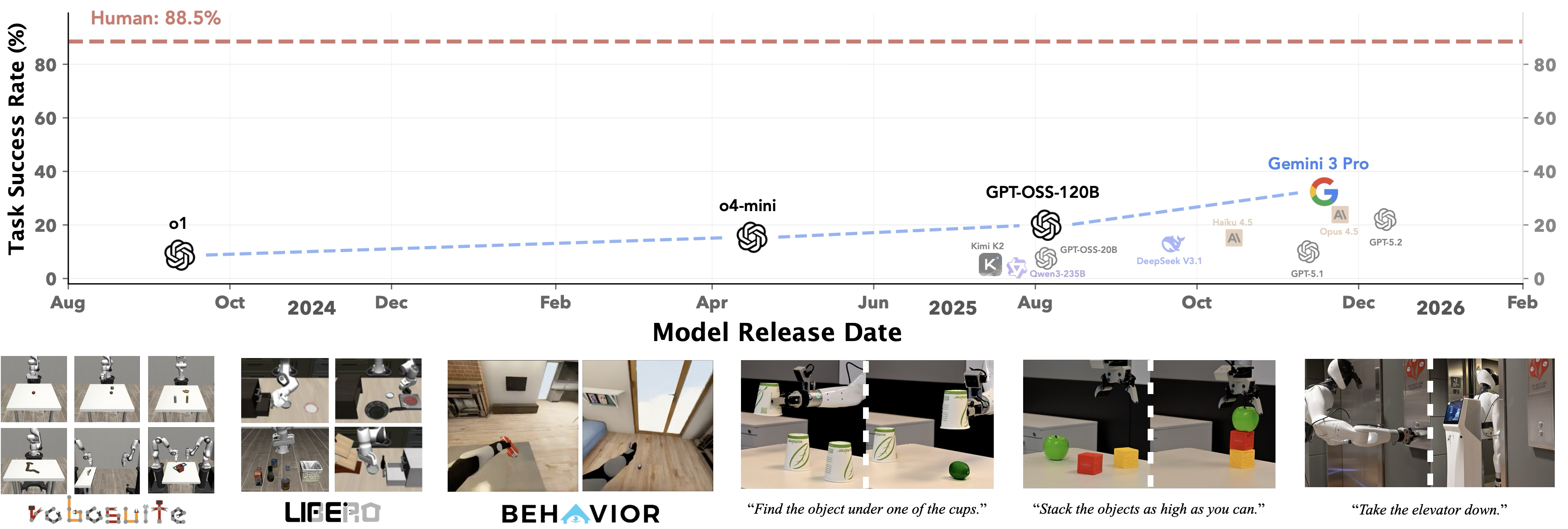
Classical robot programs encode geometry and recovery explicitly, whereas learned visuomotor policies depend on training coverage. Code-as-Policy uses a language model to compose executable control logic, but high-level helper functions can conceal how much competence comes from hand-designed tools. CaP-X exposes that dependence through controlled interfaces. Its released environment collection contains 187 tasks; the main cross-model study uses seven, with additional evaluation on thirty LIBERO-PRO tasks and two BEHAVIOR tasks. The work tests program synthesis over substantial existing perception/control machinery rather than direct generation of low-level motor control from scratch.
| Single-Turn | Multi-Turn | ||||||||
| Category | Characteristic | S1 | S2 | S3 | S4 | M1 | M2 | M3 | M4 |
| Perception | Noiseless (State-Based) | ✓ | |||||||
| Noisy | ✓ | ✓ | ✓ | ✓ | ✓ | ✓ | ✓ | ||
| Primitive Abstraction | High-level | ✓ | ✓ | ✓ | ✓ | ✓ | |||
| Low-level | ✓ | ✓ | ✓ | ||||||
| In-Context Learning | Primitive Usage Examples | ✓ | ✓ | ||||||
| Visual-Grounding Modality | Multimodal Feedback | ✓ | |||||||
| Visual Diff. Module (VDM) | ✓ | ✓ | |||||||
2 CaP-Gym
CaP-Gym combines a physical or simulated low-level environment with a stateful Python executor. One agent turn supplies a program that runs to completion and may invoke many perception calls and robot-control updates. This separation permits ordinary code, loops, reusable functions, and debugging while keeping the underlying simulator dynamics. Multiple turns operate on the same continuing trial; the environment is not reset between attempts.
2.1 Low-Level Perception and Control Primitives
Stateless services provide expensive perception and planning operations for parallel evaluation. SAM3 segments prompted objects, Molmo2 points to visual targets, and standard geometry libraries process observations. Motion uses inverse kinematics or planners such as PyRoki. The agent reasons primarily in Cartesian space and composes these tools. Collision awareness depends on the chosen primitive and implementation; the LIBERO appendix explicitly reports failures from its absence in evaluated motion execution.
3 CaP-Bench: Evaluating Frontier Models
The core benchmark compares twelve frontier coding models on cube lift, stack, wipe, peg insertion, restack, two-arm lift, and handover, with 100 trials per evaluated task/tier. A trial follows Pass@1 but may include online retries in multi-turn tiers. The separate Qwen-2.5-Coder-7B model is used for reinforcement-learning experiments. Human references use the same primitives but were debugged extensively offline. Table 1 makes the eight tier definitions explicit; unsupported visual inputs and untested task/tier cells remain unavailable rather than measured zeros.
3.1 Single-Turn Benchmarks (S1-S4)
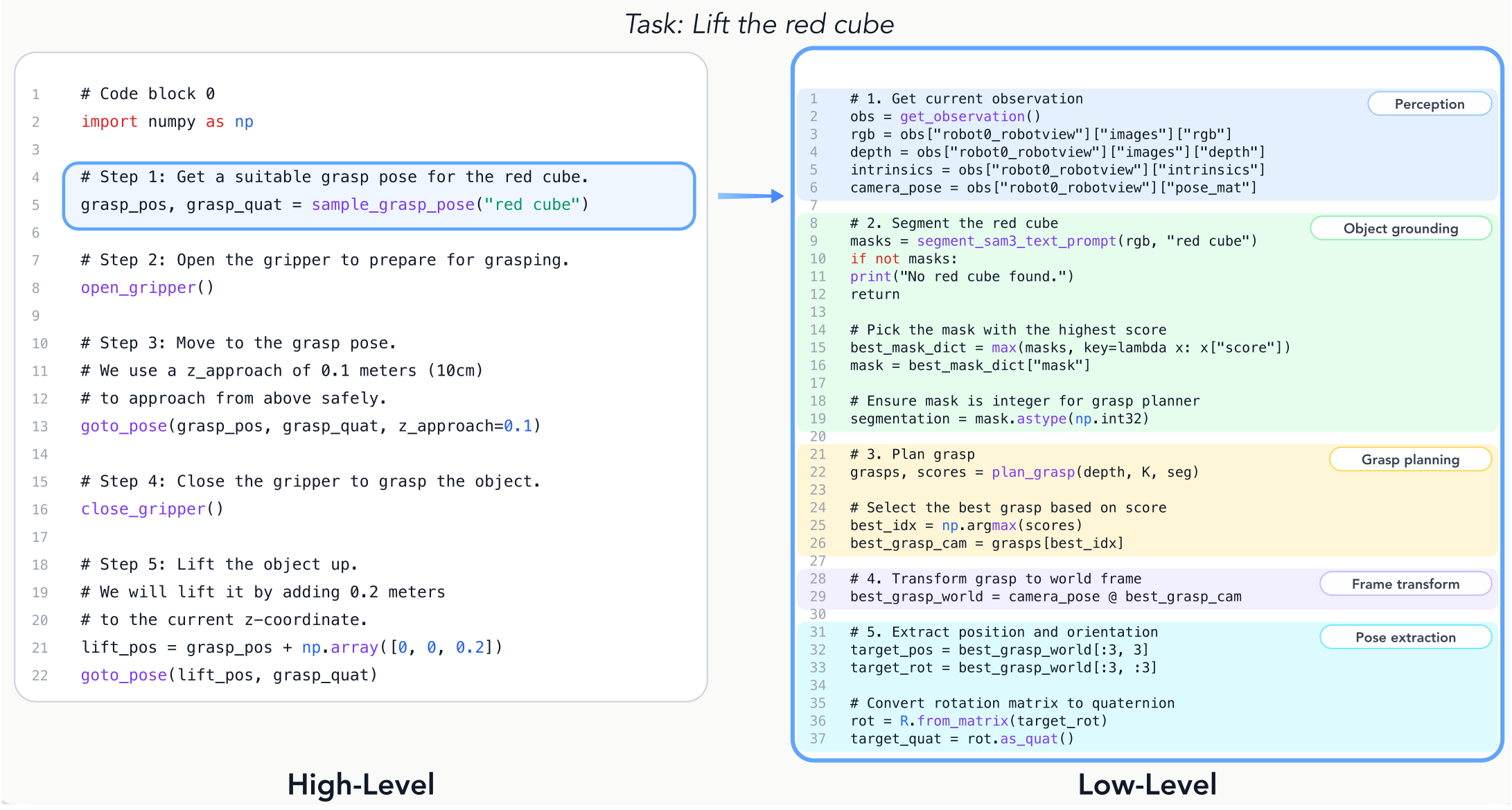
S1 supplies privileged simulation masks/poses and high-level robot macros; S2 keeps macros but replaces privileged state with noisy perception from RGB-D data. S3 exposes constituent low-level tools with examples in their documentation. S4 removes those examples while retaining function signatures and docstrings. Figure 2 shows how one macro expands into segmentation, grasp generation, coordinate conversion, and pose extraction. Comparing S1 with S4 changes both perception and abstraction, while adjacent controlled comparisons isolate particular choices more closely.
3.2 Multi-turn Benchmarks (M1-M4)
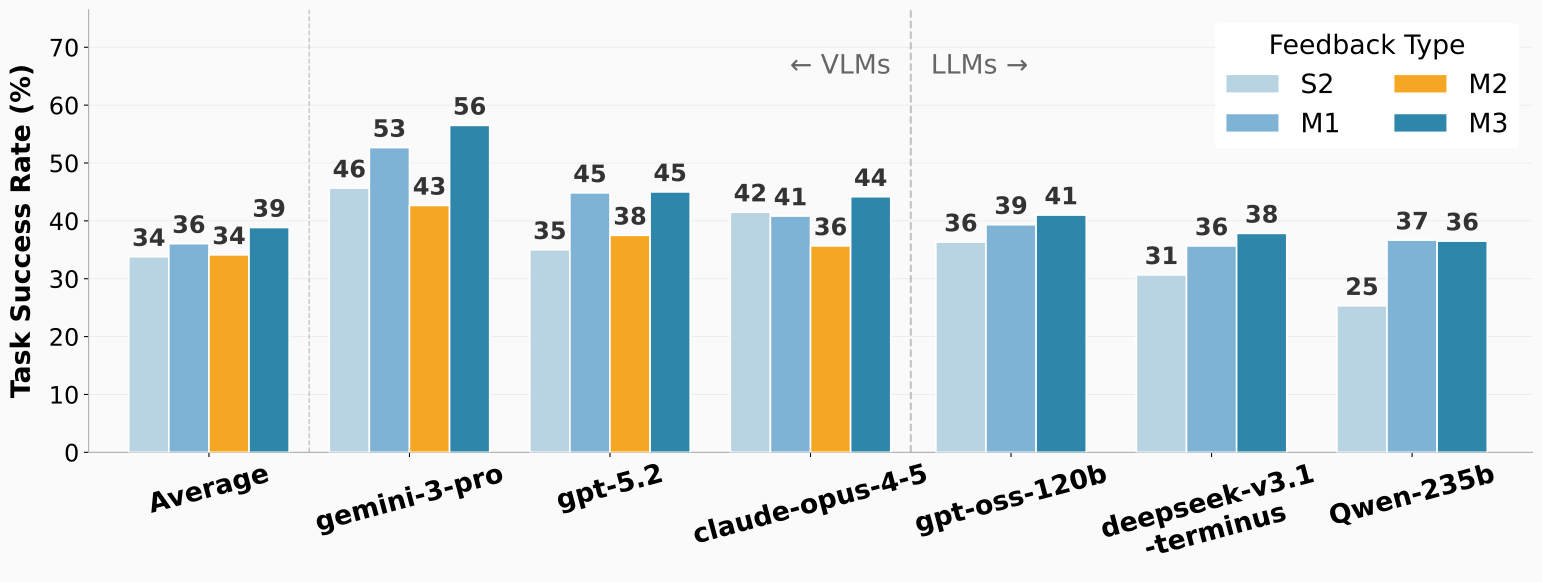
M1 adds execution output and errors to the high-level, non-privileged setup. M2 additionally feeds raw images directly to a multimodal coding model. M3 instead uses a separate visual-differencing model to describe the initial scene and subsequent changes in text, including apparent task completion. M4 combines that feedback with S3’s low-level primitives and examples. All retain execution traces. M2 is unavailable to text-only models, and M3/M4 introduce an additional strong visual model as well as a different representation.
3.3 Discussion
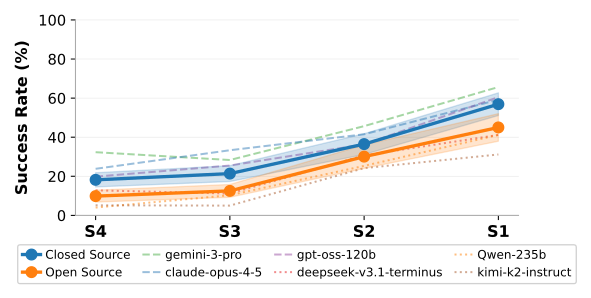
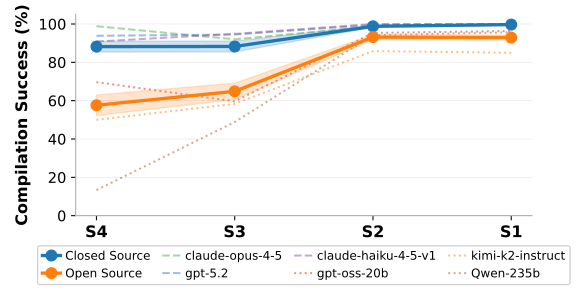
Single-turn model code trails the iterated human reference, which averages 88.5%. Increasing abstraction improves task success and usually code execution, showing how much robust behavior resides in tool design. Execution feedback helps recovery; direct image interleaving often hurts compared with textual traces, while textual visual differencing usually helps. The proposed cross-modal alignment explanation is a hypothesis, not a directly isolated training mechanism.
Low-level multi-turn execution can outperform high-level single-turn code and approach high-level multi-turn performance. This supports allocating computation to verification and recovery, but does not show that unlimited computation removes physical-control limits. Code that runs successfully can still fail the task, and claims of uniform gains should be read alongside the per-model exceptions and task breakdowns.
4 CaP-Agent0: An Agentic Framework for Robot Control
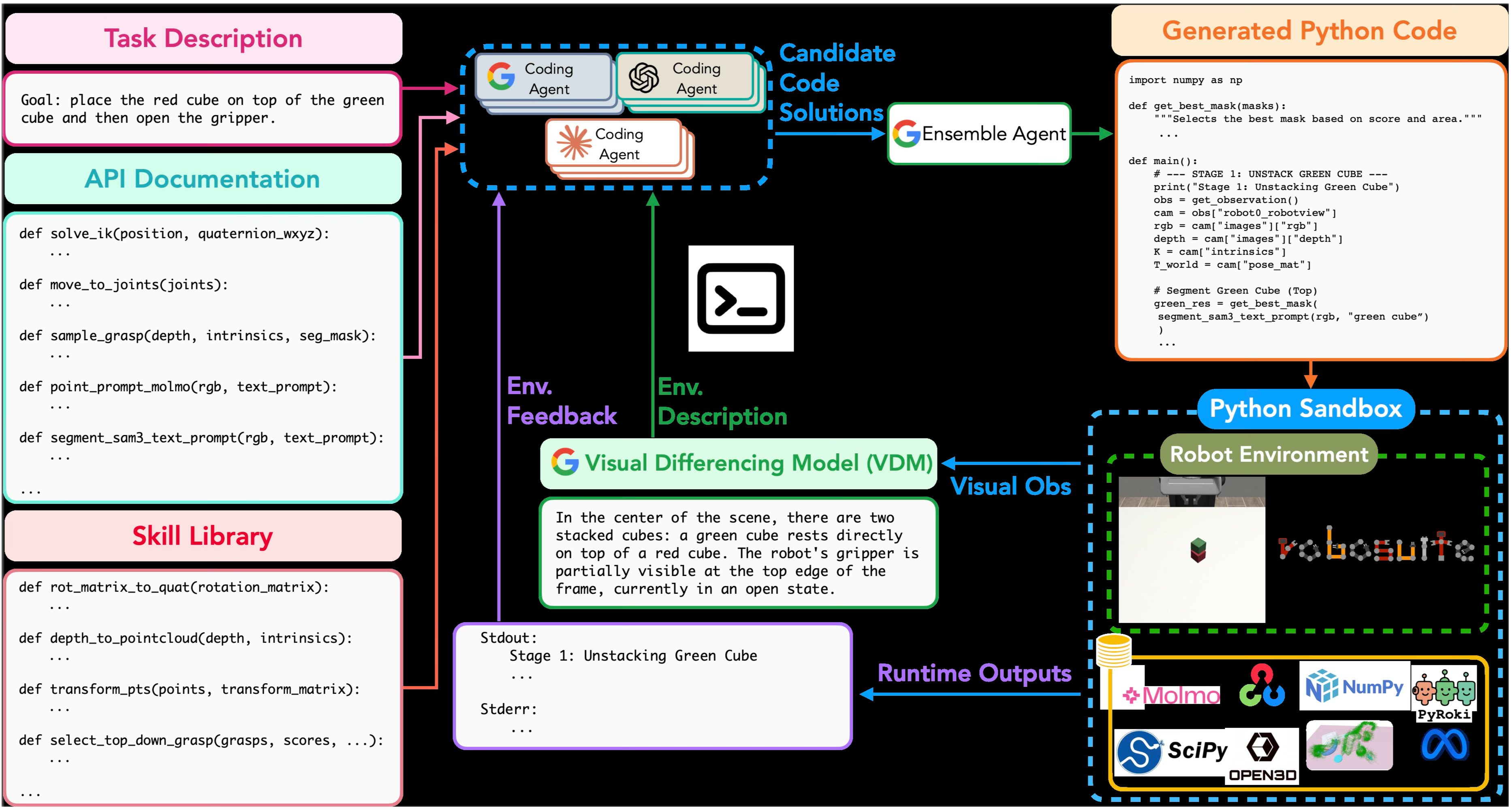
CaP-Agent0 combines visual-differencing feedback, a persistent helper library, and parallel candidate generation. The library is synthesized in one pass from successful S3 rollouts pooled across all evaluated models and all seven core tasks: function definitions are extracted, then Gemini-3-Pro consolidates recurring logic into nine helpers. No model weights are trained, but the system does reuse successful benchmark-task experience. Continual library updates are a proposed extension, not the implementation evaluated here.
At each turn it samples nine candidates, either from one Gemini model or three each from Gemini, GPT-5.2, and Claude Opus. A central agent synthesizes a final program and later aggregates continue/finish decisions. This expands test-time search and can anticipate failure conditions before execution; it also adds model calls beyond the single-agent baselines.
4.1 CaP-Agent0 Performance on CaP-Bench
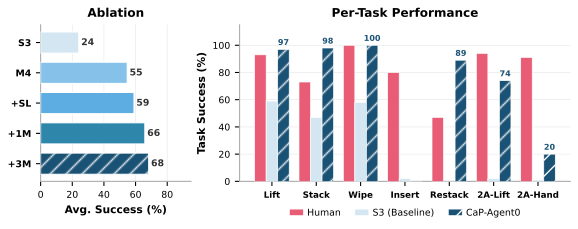
The ablation increases average success from about 24% for low-level single-turn S3 to 55% with M4, 59% with helpers, 66% with single-model parallel candidates, and 68.29% with three-model candidates. The final task scores are 97% lift, 98% stack, 100% wipe, 0% peg insertion, 89% restack, 74% two-arm lift, and 20% handover. Near-human or better performance on four tasks therefore coexists with a substantial overall gap and very poor contact-rich or coordinated cases.
4.2 CaP-Bench++
The extended comparison uses thirty LIBERO-PRO tasks under object-position and instruction changes. CaP-Agent0 averages 21.8%/18.2% on object tasks, 25.6%/16.8% on goal tasks, and 11.8%/14.0% on spatial tasks for position/instruction perturbations respectively. π0.5 reaches 17%/1%, 38%/0%, and 20%/1%; the listed OpenVLA and π0 results are all zero. Coding is more robust to these instruction changes, but it is below π0.5 on two position-perturbed suites and absolute success is low.
Two BEHAVIOR mobile tasks each use twenty-five trials. CaP-Agent0 achieves 80% navigation and 56% full success for radio pickup, versus human 88%/36% and S3 72%/24%. Soda-can pickup reaches 84%/72%, versus human 80%/72% and S3 52%/32%. Search, camera positioning, occlusion, furniture collisions, and grasp recovery dominate. These two tasks do not constitute evaluation of all fifty released BEHAVIOR environments.
| Method | libero-object | libero-goal | libero-spatial | |||
| Pos (Avg.) | Task (Avg.) | Pos (Avg.) | Task (Avg.) | Pos (Avg.) | Task (Avg.) | |
| OpenVLA | 0.00 | 0.00 | 0.00 | 0.00 | 0.00 | 0.00 |
| 0.00 | 0.00 | 0.00 | 0.00 | 0.00 | 0.00 | |
| 0.17 | 0.01 | 0.38 | 0.00 | 0.20 | 0.01 | |
| CaP-Agent0 | 0.22 | 0.18 | 0.26 | 0.17 | 0.12 | 0.14 |
4.3 Let the Agent Experience the Real World
Qualitative Franka Panda and AgiBot G1 demonstrations include searching under cups, arranging number blocks, stacking varied shapes, and responding to user corrections. The interface largely transfers by adapting robot-specific and bimanual primitives. These examples demonstrate expressive use of existing tools without policy post-training; they are selected rollouts rather than a systematic real-world success benchmark for all the shown tasks. Some runs explicitly receive human feedback.
5 CaP-RL
CaP-RL applies group-relative policy optimization to Qwen-2.5-Coder-7B for fifty iterations per task. Training on privileged S1 state reduces ambiguous rewards from noisy perception, then evaluation switches to S2. Over 100 simulated trials, lift/stack/wipe success rises from 25%/4%/30% to 80%/44%/93%; human scripts reach 93%/73%/100%. On twenty-five real trials each, lift improves from 24% to 84% and stack from 12% to 76%, versus human 92% and 84%.
The transferable representation is code that composes shared tools, rather than a learned raw-image motor policy. This is strong evidence on the two real cube tasks and three trained simulated tasks, with limited breadth and no real wiping score. Improved source examples illustrate plausible behavioral changes, but do not by themselves establish broad causal reasoning or out-of-distribution generalization.
6 Related Work
Related work spans executable robot policies, language-based planning, structured intermediate representations, self-refinement, skill synthesis, and reinforcement learning from verifiable outcomes. CaP-X’s distinction is a shared robot-code interface with controlled abstraction and feedback tiers. The skill library resembles reusable-tool approaches such as Voyager; CaP-RL updates the coding model directly, rather than using a frozen model only to generate rewards for a separate motor policy.
7 Conclusion
The four components form a testbed for studying how model reasoning, interface design, perception, and control interact. The results favor structured feedback and reusable program logic, while showing that successful coding, physical execution, and general task competence are distinct measurements.
8 Impact Statements
The authors provide a general statement about advancing machine learning and do not identify a particular societal consequence for separate discussion. The experimental limitations and failure cases are detailed elsewhere in the paper.
Appendix A Future Works
Programmatic control remains brittle when insertion, pouring, or similar contact-rich behavior needs rapid continuous feedback. Proposed directions combine coding agents with visuomotor policies, improve visual grounding and test-time search, and expose constraint-based collision-aware planning. These are future directions; the existing results do not demonstrate a general solution to fine contact control or safe motion through arbitrary clutter.
Appendix B Interactive Real-World Setup
The real-world setup centers on an interactive chat interface for AgiBot G1. Users can propose tasks, inspect generated programs and tool outputs, and correct behavior between turns. This human-assisted workflow should be distinguished from the autonomous benchmark conditions.
B.1 User Interface
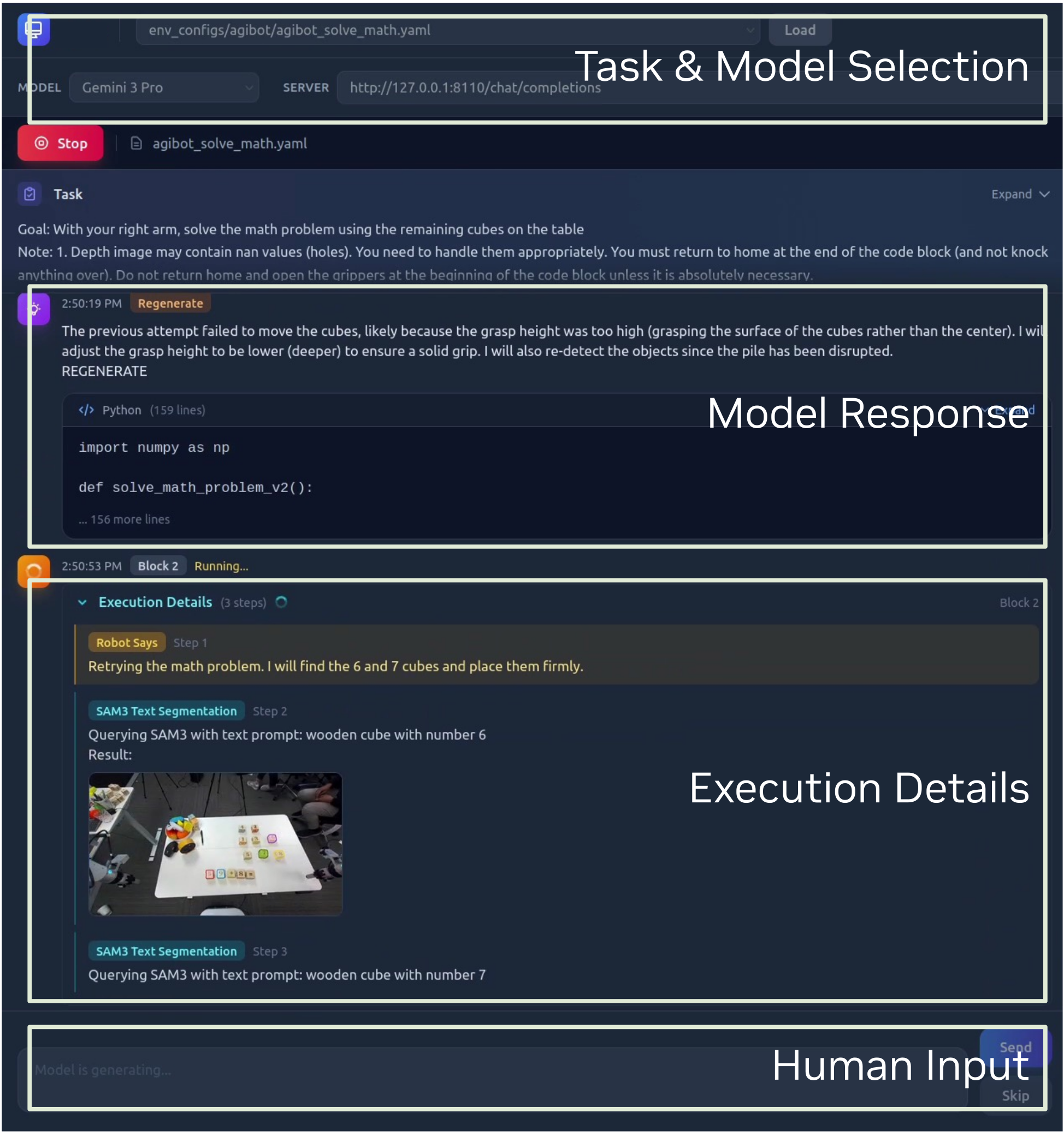
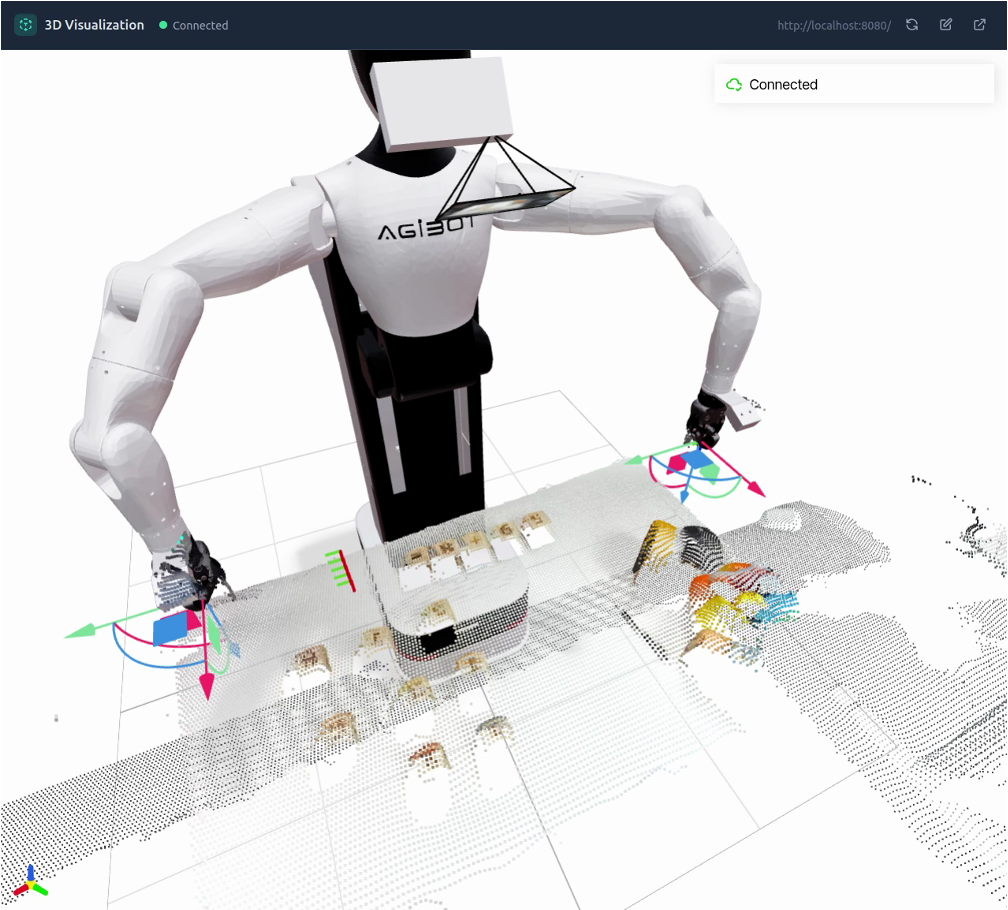
The interface exposes task/model selection, scene descriptions, generated code, segmentation/pointing results, wrist views, and execution progress. A Viser view displays robot geometry, trajectories, and depth points. Figures 9–10 retain the original screenshots. The tool outputs provide observability for the user as well as feedback for the agent.
B.2 Tools
Available tools read head/wrist observations, force-wrenches, and joints; segment or point to objects; move grippers and end effectors; convert poses and point clouds; query an expert visual model; and move the mobile base. Transformation and visualization helpers reduce repeated geometry errors. The real setup therefore includes curated robot interfaces and supporting geometry utilities even when the task program itself is generated without post-training.
B.3 Real World Tasks
The following six examples show successful behaviors and their intermediate reasoning/perception outputs. They are illustrative case studies without per-task trial counts or matched baseline success rates, so they should not be read as a quantitative generalization suite.
B.3.1 Needle in a Haystack
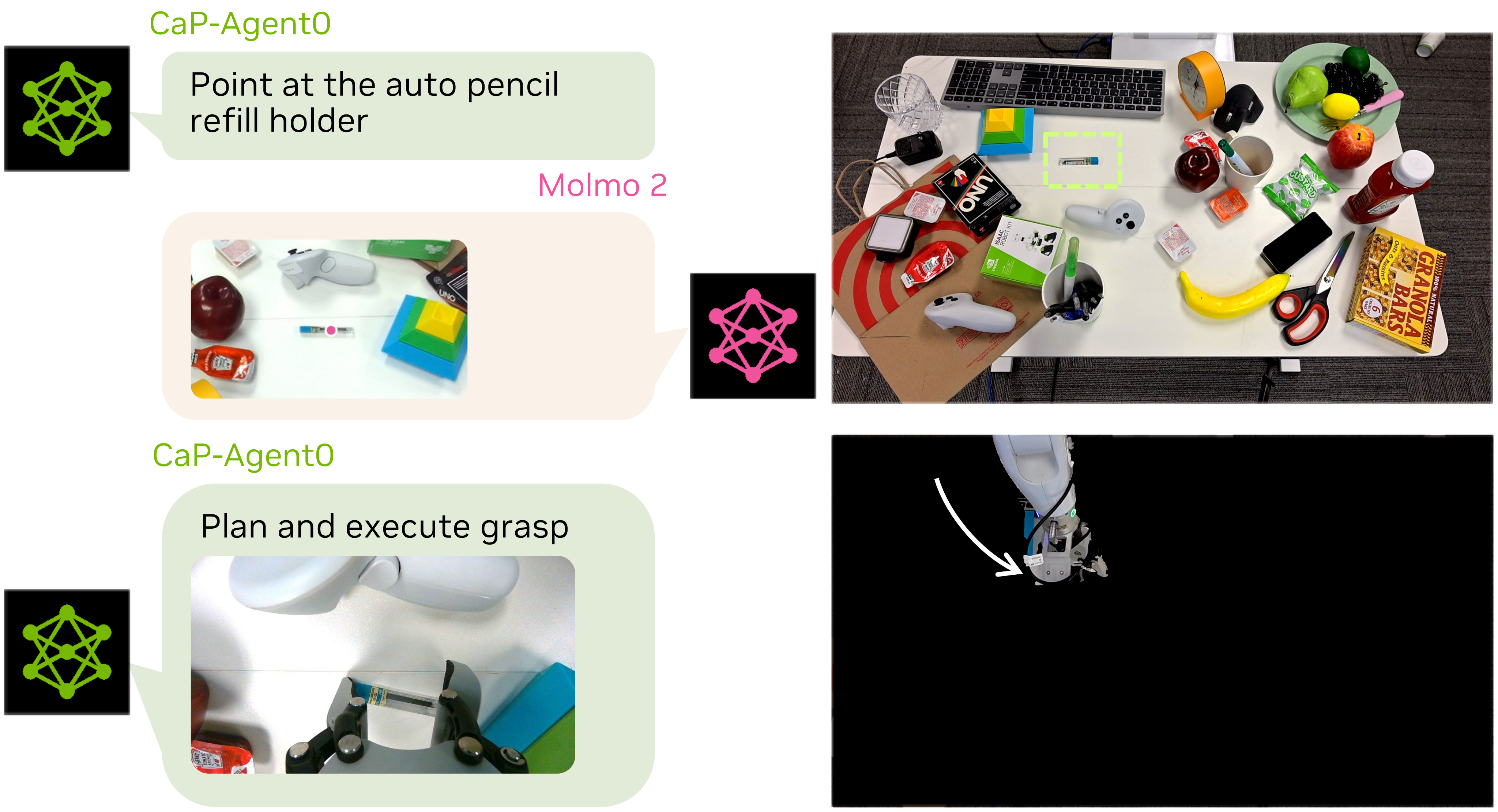
The robot locates an uncommon pencil-refill holder amid clutter using Molmo2 pointing, then plans and executes a grasp. Figure 11 links the semantic localization to the physical retrieval. Claims about difficulty for other policy types are motivation rather than a measured comparison in this example.
B.3.2 Mechanical Search
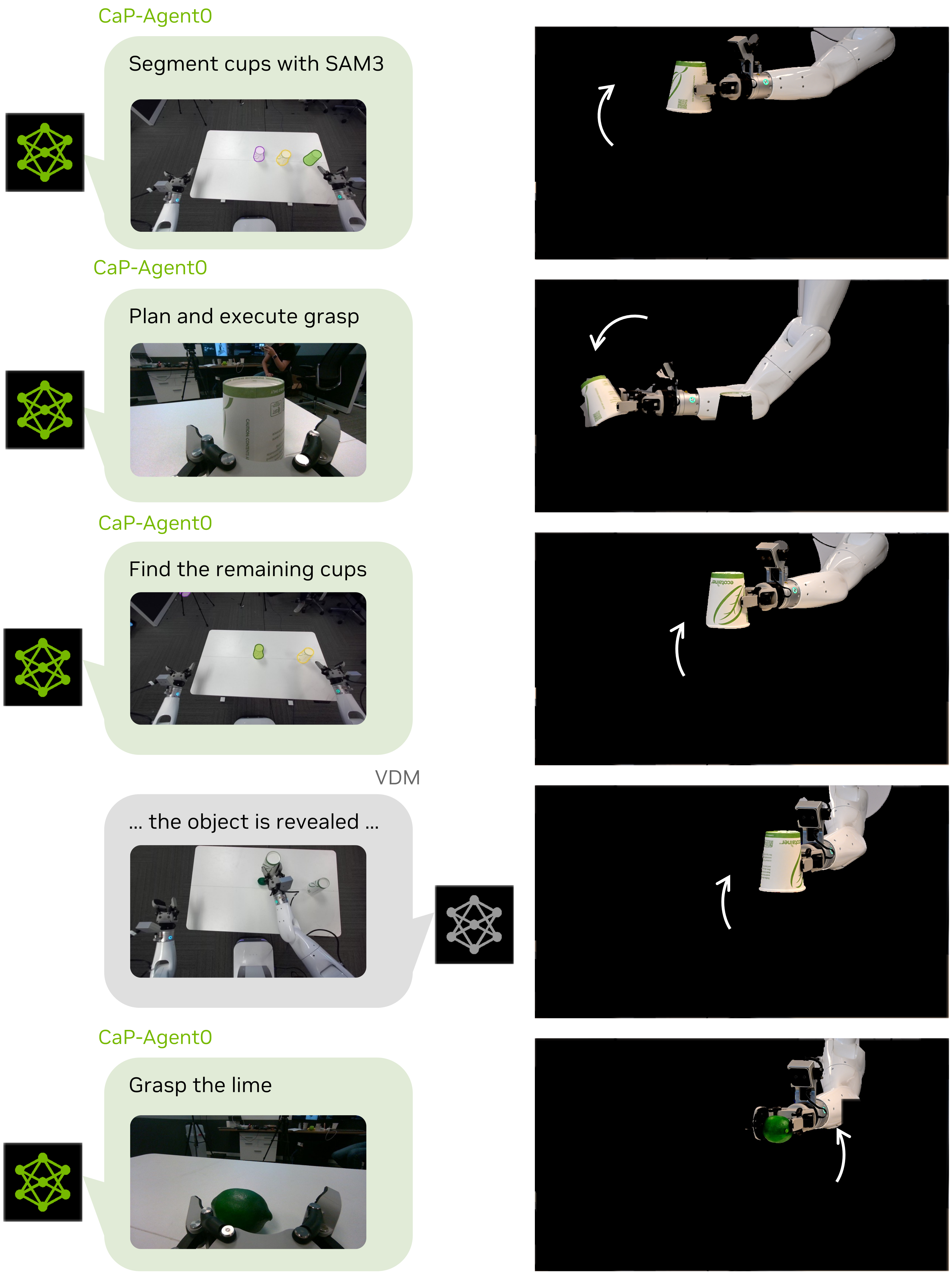
The agent searches beneath three inverted cups for a hidden lime, moving occluders and using new visual feedback to update its plan. Figure 12 preserves the five-stage planning/execution sequence. The example shows why active scene modification can be necessary when the target is initially invisible.
B.3.3 Multimodal Symbolic Reasoning
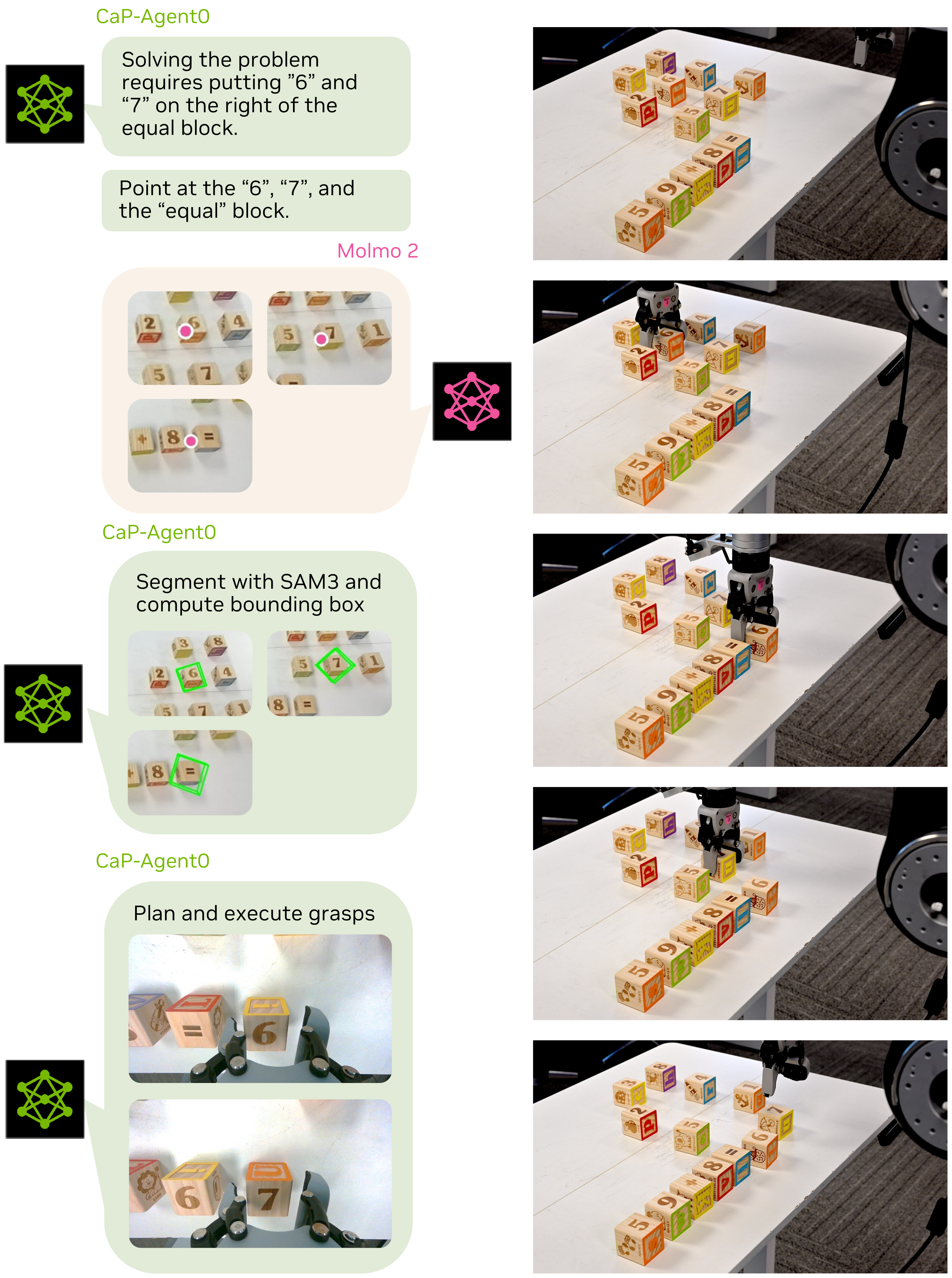
For a physical equation made from number blocks, the agent identifies the arithmetic problem and places blocks representing 67 after the equals sign in the 59+8 example. Figure 13 retains both perception annotations and execution images. This is one successful symbolic-and-physical composition, not a broad arithmetic benchmark.
B.3.4 Learning from Human Feedback
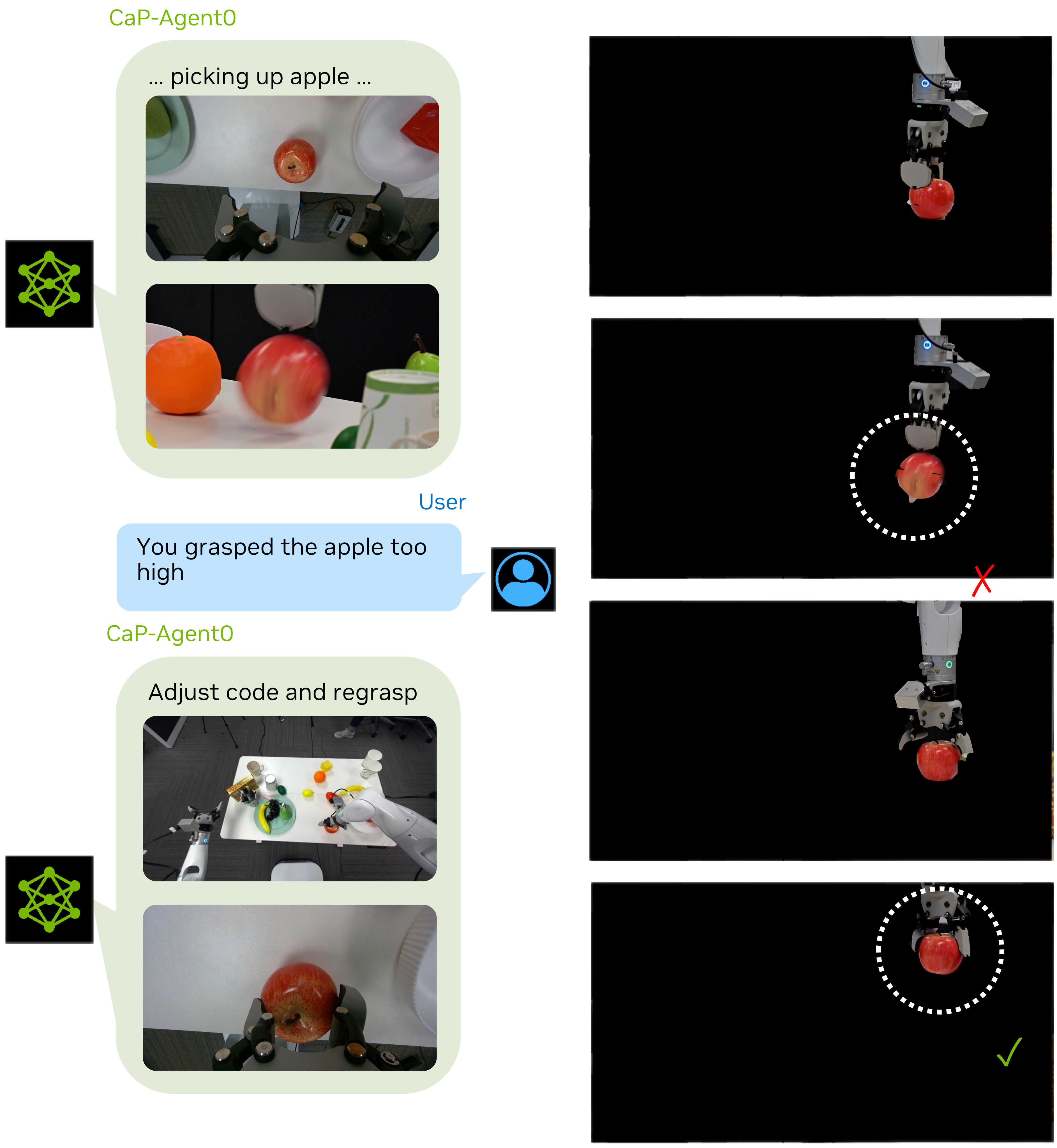
An apple grasp initially misses because its target height is too high. After the user supplies that diagnosis, the agent revises the program and succeeds on the next attempt. The example demonstrates use of explicit human correction; it does not attribute the diagnosis to autonomous visual feedback alone.
B.3.5 Embodied Reasoning
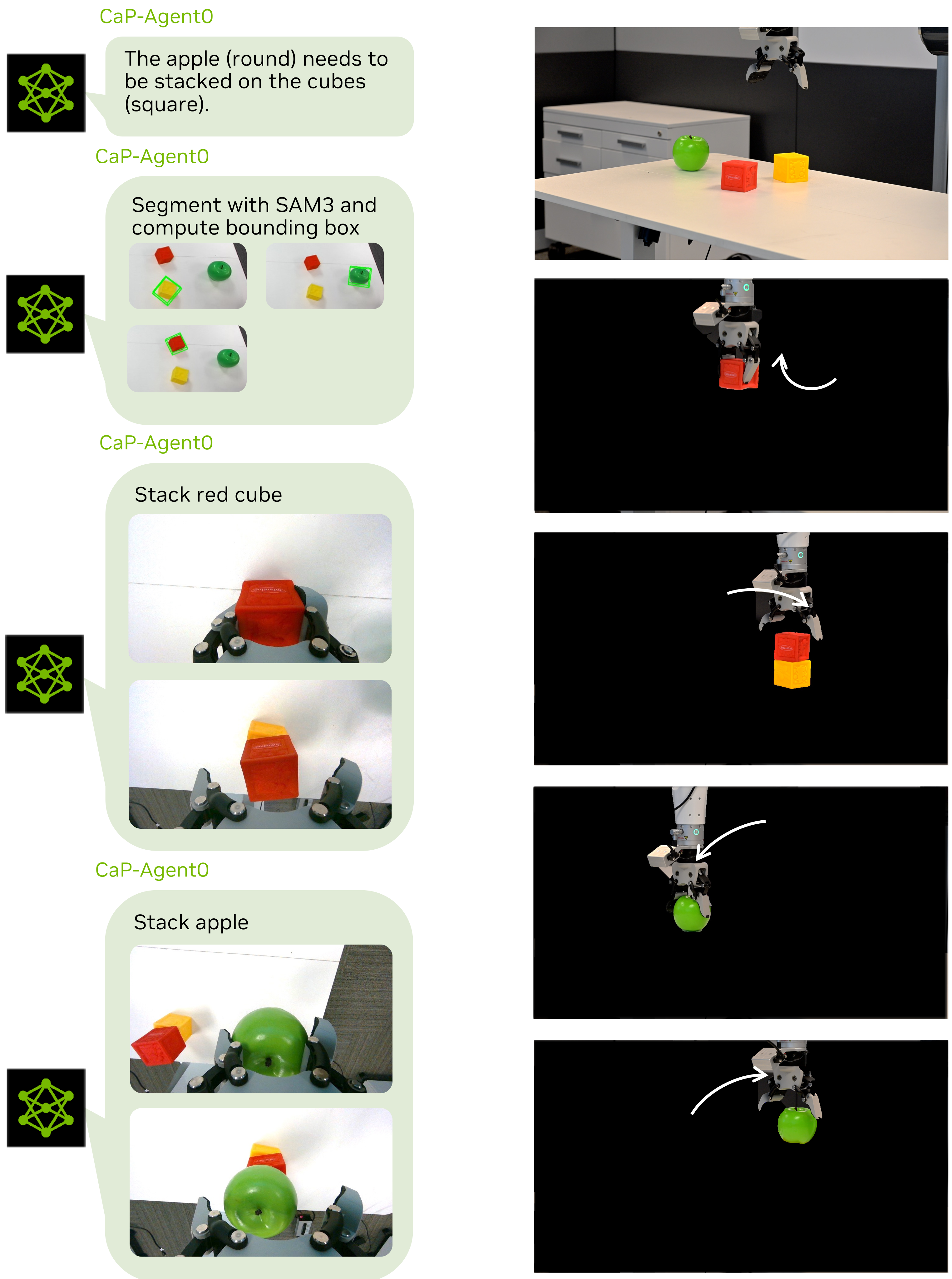
Asked to build a tall stable stack from cubes and a round object, the system places flat objects below the rounded one. Figure 15 shows the selected ordering and execution. This successful arrangement supports task-specific physical reasoning, without verifying global height optimality or all shape combinations.
B.3.6 Tool Generalization with Domain Knowledge
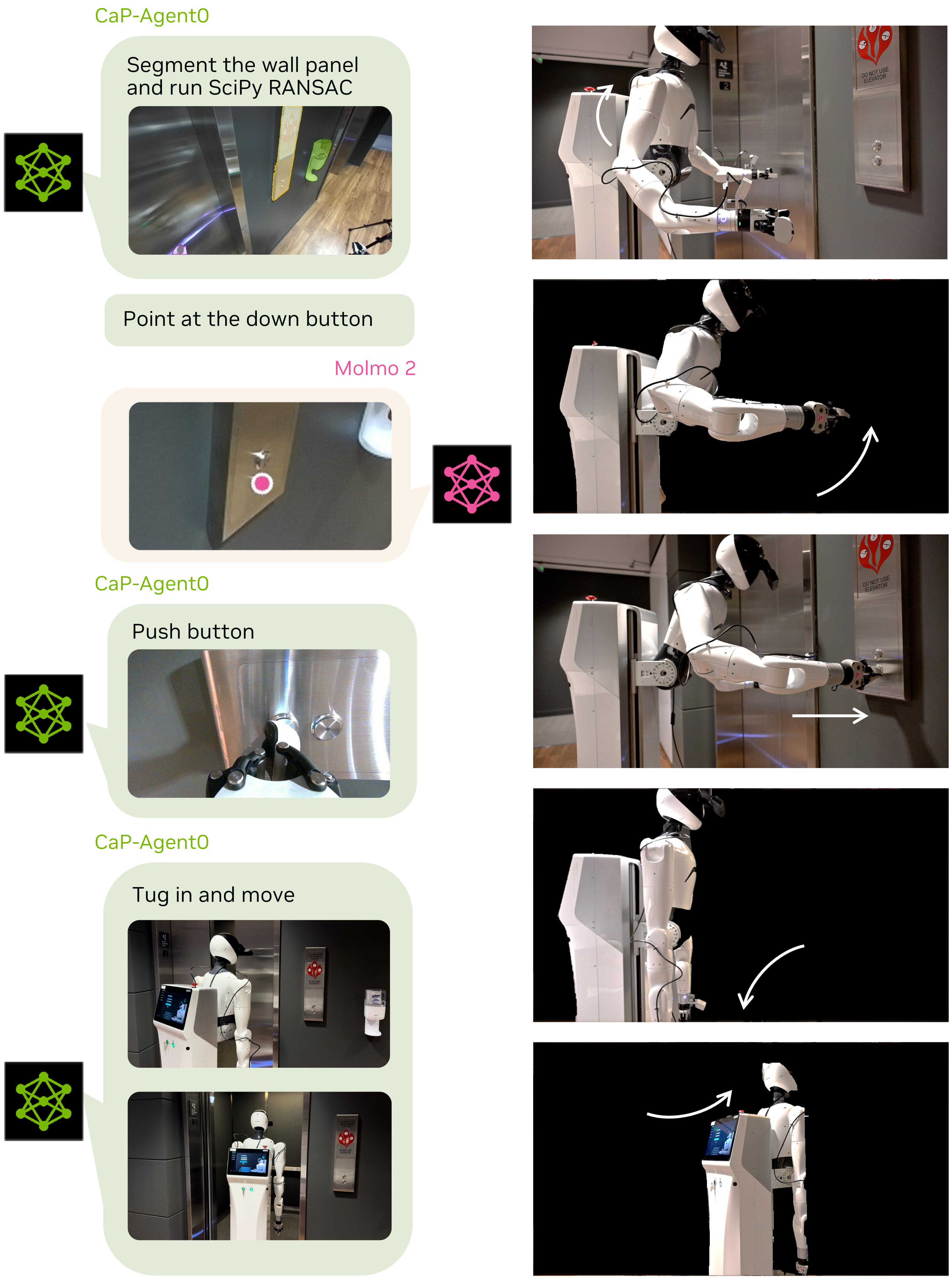
The elevator example combines semantic button localization with geometric estimation of the wall’s surface normal, then presses and moves. The source describes a RANSAC plane-fit procedure through Python tooling. The example illustrates extending an interface with general computation; it provides no repeated-trial reliability estimate for elevator use.
Appendix C Full Benchmark Table
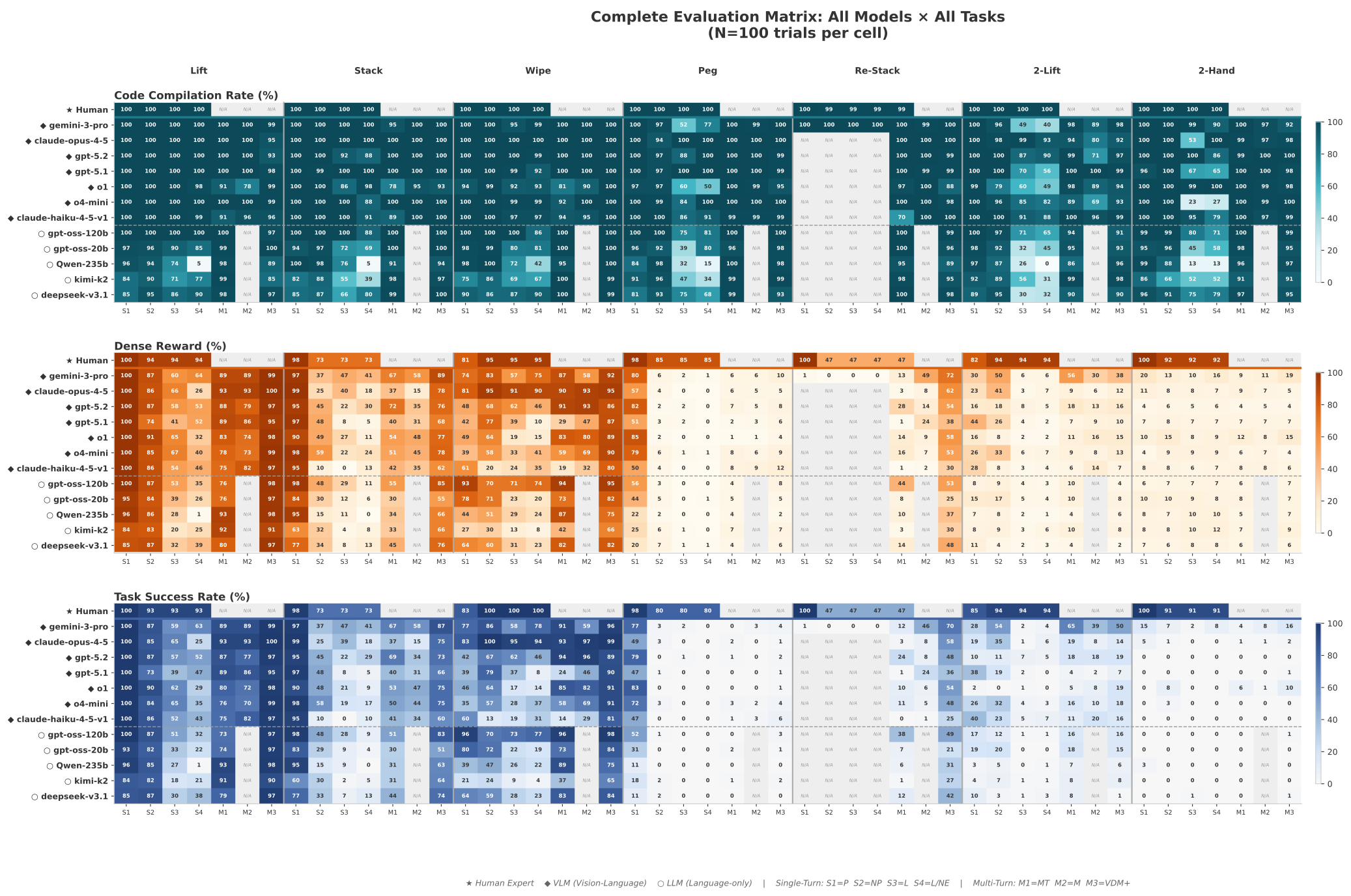
Figure 17 preserves the full matrix of code execution, dense reward, and task success for every reported model/task/tier cell. These metrics should be read separately: compilation or exception-free execution does not imply physical success. Restacking is evaluated primarily in multi-turn conditions because static prompts without visual initialization rarely trigger the required state inspection. Missing cells remain marked unavailable.
Appendix D Additional Takeaways
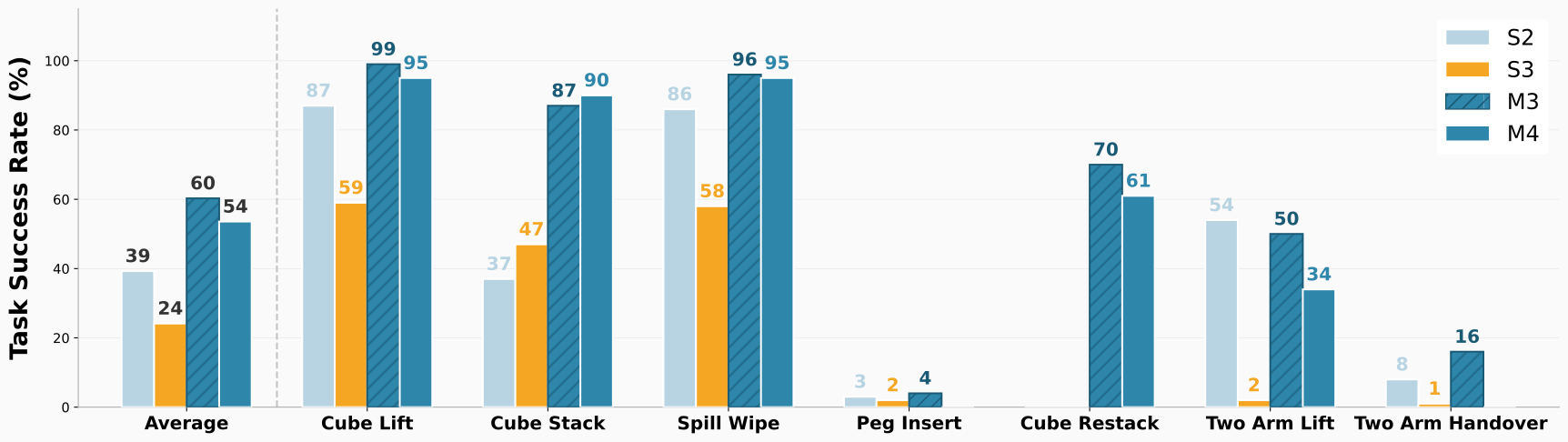
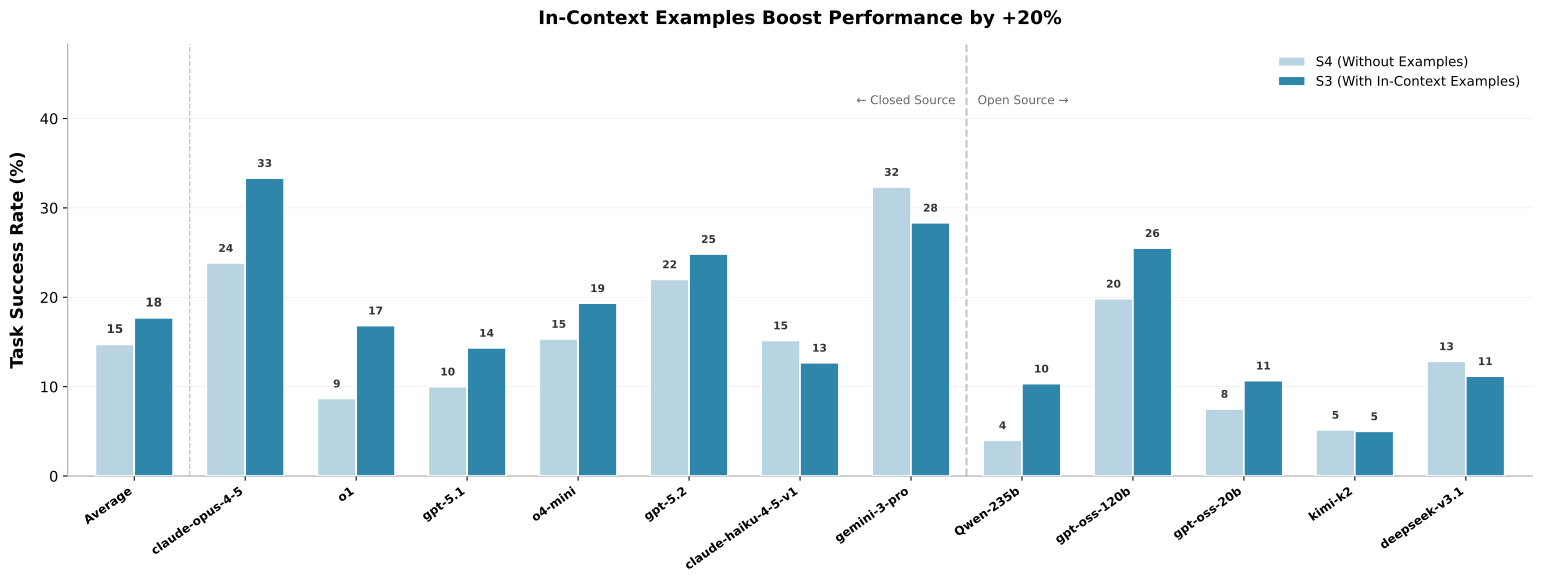
Adding usage examples to low-level API documentation usually improves performance, supporting the value of interface demonstrations as scaffolding. Figure 18 retains exceptions: some models lose success and one is essentially unchanged. The aggregate plot’s claimed improvement is therefore not a uniform benefit for every model or task.
Appendix E Qualitative Analysis of CaP-RL Post-Training Effects
The before/after stacking programs show a concrete change: the base model moves to a placement location without first grasping the object, whereas the post-trained model explicitly grasps, transports, and releases. It also computes stack height from estimated bounding-box extents. Figure 19 records real stacking success changing from 3/25 to 19/25, against human 21/25. Figure 20 shows selected color/object variants.
These examples are consistent with better prerequisite sequencing and geometric use of tool outputs. The broader claims of moving beyond memorization are interpretations of selected programs; generalization across unseen task families is not measured here. Both original code snippets are preserved exactly, including their original comments and assumptions.
import numpy as np

# Get the pose of the green cube
green_cube_position, green_cube_quaternion_wxyz, _ = get_object_pose("green cube")

# Get the pose of the red cube
red_cube_position, red_cube_quaternion_wxyz, _ = get_object_pose("red cube")

# Calculate the placement position for the red cube
placement_position = np.array(green_cube_position) + np.array([0, 0, 0.05])  # 5 cm above the green cube

# Move the robot to the placement position
goto_pose(placement_position, (0, 0, 1, 0), z_approach=0.1)  # Use a slight z_approach for precision

# Open the gripper to release the red cube
open_gripper()
import numpy as np
# Get the positions and extents of the red and green cubes
red_cube_pos, _, red_cube_extent = get_object_pose("red cube", return_bbox_extent=True)
green_cube_pos, _, green_cube_extent = get_object_pose("green cube", return_bbox_extent=True)
# Calculate the placement position on top of the green cube
placement_pos = green_cube_pos + np.array([0, 0, red_cube_extent[2] / 2 + green_cube_extent[2] / 2])
# Sample a grasp pose for the red cube
grasp_pos, grasp_quat = sample_grasp_pose("red cube")
# Move to the grasp pose and approach
goto_pose(grasp_pos, grasp_quat, z_approach=0.1)
# Close the gripper to grasp the red cube
close_gripper()
# Move to the placement position
goto_pose(placement_pos, (0, 0, 1, 0), z_approach=0.1)
# Open the gripper to release the red cube
open_gripper()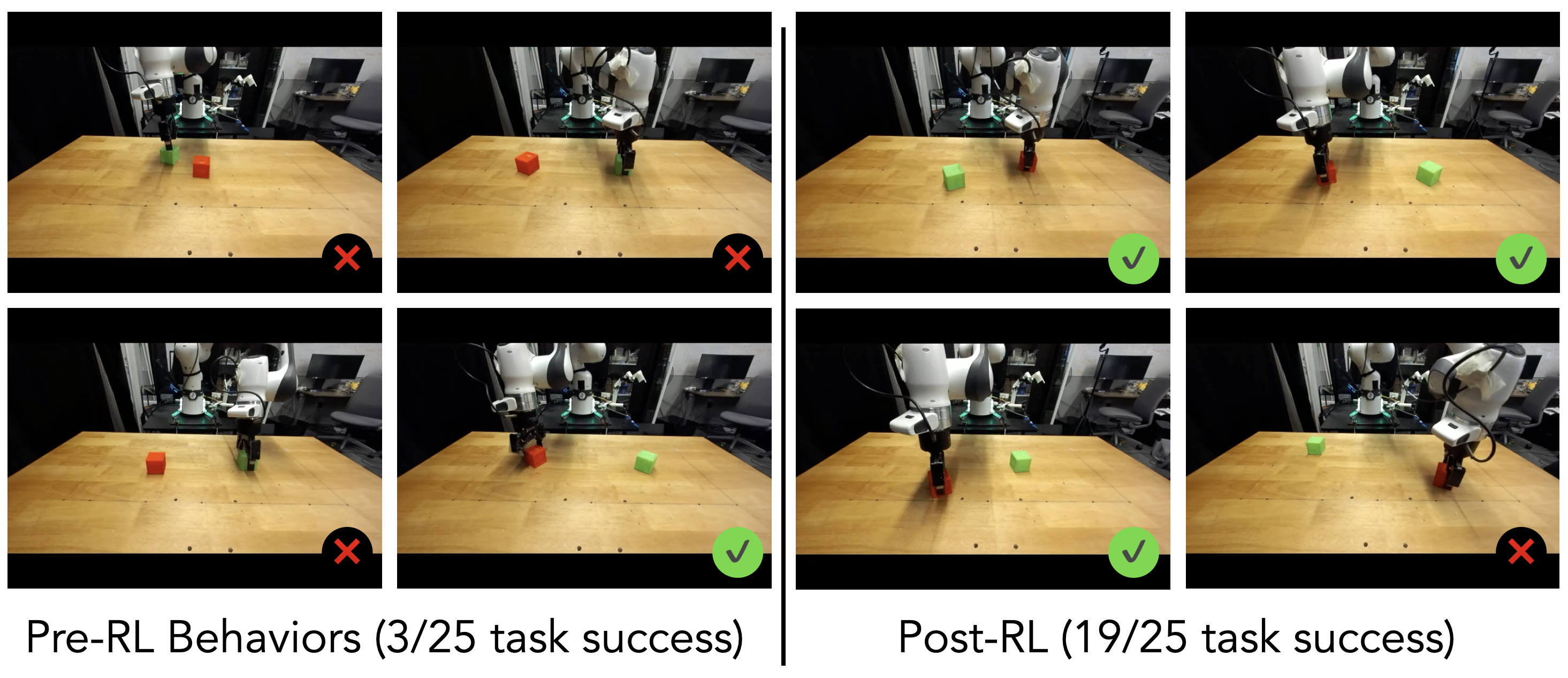
Appendix F CaP-Agent0 Case Studies
The case studies explain mechanisms behind selected successful rollouts and show original generated code, including failure-handling branches. Their role is diagnostic rather than independent statistical proof of the generality of those mechanisms.
F.1 Real-World Case Studies
Two Franka examples pair scene-to-text descriptions with generated manipulation programs. In both, the auxiliary visual model supplies strategic information before the coding model acts, so reasoning is distributed across the system.
F.1.1 Common Sense Physics-Aware Task Decomposition
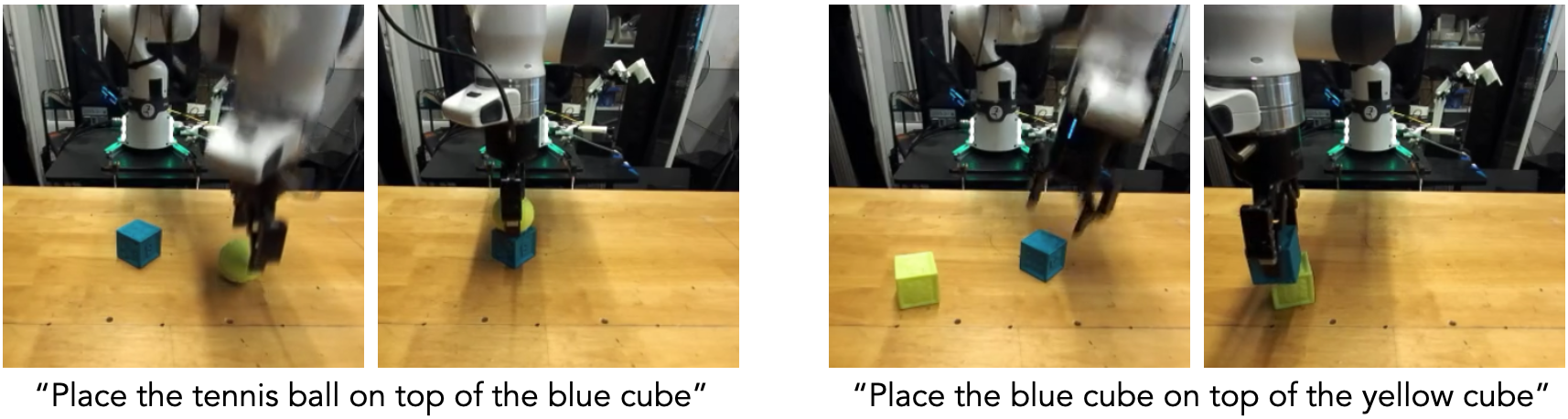
For two cubes and a tennis ball, the visual description explicitly notes flat support surfaces and the need to place the sphere on top. The generated plan stacks a cube and then the ball, recomputing geometry after the scene changes. Figure 21 and Appendix I.1 preserve the execution sequence and complete program. The prior comes partly from the visual-language model, rather than arising from an unconditioned coding model alone.

F.1.2 Implicit Multi-Step Reasoning for Obstructed Goals
A blue cube initially supports yellow and green cubes, but the requested final relation is blue on yellow. The visual model identifies the obstruction and dependency chain. The program removes green, relocates yellow, then lifts blue onto it. Figure 22 preserves this multi-stage rearrangement. The example demonstrates successful dependency handling, without proving that it is the only or optimal possible plan.

F.2 Simulation Case Studies
Simulation examples illustrate verification, cascading perception methods, grasp filtering, and candidate synthesis. The preserved excerpts expose the actual thresholds and fallback logic behind the authors’ explanations.
F.2.1 Verification and Retry Behavior Enabled by Multiturn Design
The lift-recovery excerpt segments the cube, projects valid depth points into world coordinates, and checks mean height against a fixed threshold. If lifting is not confirmed, it opens the gripper, moves home, re-observes, replans a grasp, and lifts again. This is a heuristic state check and retry within the same episode; moving home does not reset the environment to its original state.
    ...

masks = segment_sam3_text_prompt(rgb, "red cube")

is_lifted = False
if not masks:
    print("Could not find red cube to verify state. Assuming failed and moving to home pose.")
    is_lifted = False
else:
    best_mask = max(masks, key=lambda x: x["score"])["mask"]

    y_idxs, x_idxs = np.where(best_mask)
    if len(y_idxs) > 0:
        stride = 10
        y_sample = y_idxs[::stride]
        x_sample = x_idxs[::stride]

        z_sample = depth[y_sample, x_sample]
        if z_sample.ndim > 1: z_sample = z_sample.flatten()

        # Filter invalid depth
        valid = z_sample > 0
        if np.any(valid):
            z_sample = z_sample[valid]
            x_sample = x_sample[valid]
            y_sample = y_sample[valid]

            fx = intrinsics[0, 0]
            fy = intrinsics[1, 1]
            cx = intrinsics[0, 2]
            cy = intrinsics[1, 2]

            x_c = (x_sample - cx) * z_sample / fx
            y_c = (y_sample - cy) * z_sample / fy

            points_c = np.stack([x_c, y_c, z_sample], axis=1)
            points_c_homo = np.hstack([points_c, np.ones((len(points_c), 1))])
            points_w = (cam_pose @ points_c_homo.T).T[:, :3]

            mean_z = np.mean(points_w[:, 2])
            print(f"Estimated mean Z of object: {mean_z:.4f}")

            # If Z > 0.15, we assume it's lifted (table usually ~0, cube size ~0.05)
            if mean_z > 0.15:
                is_lifted = True
                print("Object is confirmed to be lifted.")
            else:
                print("Object appears to be on the table.")

if is_lifted:
    print("Task completed successfully.")
else:
    print("Retrying grasp sequence...")
    open_gripper()

    # Move to home pose to get a better view (avoid occlusion from gripper)
    home_pos = np.array([0.5, 0.0, 0.5])
    home_quat = np.array([0.0, 1.0, 0.0, 0.0]) # w,x,y,z (Approx gripper pointing down)

    move_to_joints(solve_ik(home_pos, home_quat))

    # Re-perceive
    obs = get_observation()
    rgb = obs["robot0_robotview"]["images"]["rgb"]
    depth_im = obs["robot0_robotview"]["images"]["depth"]
    intrinsics = obs["robot0_robotview"]["intrinsics"]
    cam_pose = obs["robot0_robotview"]["pose_mat"]

    masks = segment_sam3_text_prompt(rgb, "red cube")
    if not masks:
        print("No red cube found after reset.")
    else:
        best_mask = max(masks, key=lambda x: x["score"])["mask"]
        if depth_im.ndim == 3: depth_map = depth_im[:, :, 0]
        else: depth_map = depth_im

        grasp_poses, grasp_scores = plan_grasp(depth_map, intrinsics, best_mask.astype(np.int32))

        if len(grasp_poses) == 0:
            print("No grasps found.")
        else:
            best_idx = np.argmax(grasp_scores)
            best_pose_cam = grasp_poses[best_idx]

            pose_world = cam_pose @ best_pose_cam
            target_pos = pose_world[:3, 3]
            target_rot = pose_world[:3, :3]
            target_quat = rot_to_quat(target_rot)

            # Grasp execution
            # 1. Move to Pre-grasp
            pre_pos = target_pos + np.array([0, 0, 0.1])
            move_to_joints(solve_ik(pre_pos, target_quat))

            # 2. Move to Grasp
            move_to_joints(solve_ik(target_pos, target_quat))

            # 3. Close
            close_gripper()

            # 4. Lift
            lift_pos = target_pos + np.array([0, 0, 0.25])
            move_to_joints(solve_ik(lift_pos, target_quat))
            print("Retry finished.")

    ...
F.2.2 Perception Module Cascade Failure Fallbacks
The wipe example first requests a point from Molmo and uses it to prompt SAM3; when no point is available it tries textual segmentation alternatives. The exact excerpt does not retry textual segmentation after every possible point-prompt failure, so the broader prose description should not be read as a complete universally robust cascade. The original code makes that branch structure inspectable.
    ...

    # 2. Try detection using Molmo (VLM) for better semantic understanding
    print("Attempting to detect spill using Molmo...")
    molmo_res = point_prompt_molmo(rgb, "brown spill")
    # Molmo returns dict[str, tuple], getting the first/only value
    spill_pt = None
    if molmo_res:
        # Check if we got a valid coordinate
        for key, pt in molmo_res.items():
            if pt[0] is not None and pt[1] is not None:
                spill_pt = pt
                print(f"Molmo found spill at: {spill_pt}")
                break
    masks = []
    if spill_pt:
        # Use the point to segment with SAM3
        print(f"Segmenting with SAM3 point prompt at {spill_pt}")
        masks = segment_sam3_point_prompt(rgb, spill_pt)
    else:
        # Fallback to text prompt with different wording if Molmo fails
        print("Molmo failed. Trying SAM3 text prompt 'stain'...")
        masks = segment_sam3_text_prompt(rgb, "stain")
        if not masks:
            print("Fallback to 'brown liquid'...")
            masks = segment_sam3_text_prompt(rgb, "brown liquid")
    if not masks:
        print("No masks found after all attempts. Cannot proceed.")
        return
    ...
F.2.3 Geometric Reasoning for Grasp Selection
The agent converts candidate grasps to world coordinates and favors approaches aligned with downward vertical motion. If none passes its orientation threshold, it falls back to the highest-scoring candidate. This adds task-context geometry to a generic grasp predictor. Top-down preference is useful in the illustrated tabletop case, not a universal grasp-quality rule; the retained code preserves its original numerical threshold and comments.
    ...

    # 2. Grasp Planning
    print("Planning grasp...")
    grasp_poses, grasp_scores = plan_grasp(depth, intrinsics, seg_map)
    if len(grasp_poses) == 0:
        print("Error: No grasp poses found.")
        return

    # 3. Filter and Selection
    # Transform all grasps to world frame to check orientation
    best_score = -1.0
    best_grasp_world = None
    # We iterate through high-scoring grasps
    indices = np.argsort(grasp_scores)[::-1] # Descending order
    print(f"Found {len(indices)} candidates. Evaluating top 10...")
    for idx in indices[:20]:
        grasp_camera = grasp_poses[idx]
        grasp_world = transform_camera_to_world(grasp_camera, camera_pose)
        # Check approach vector (Z-axis of rotation matrix)
        # We want the gripper to approach somewhat downwards (negative Z in world)
        rot_mat = grasp_world[:3, :3]
        approach_vec = rot_mat[:, 2] # The Z-axis
        # Dot product with world down vector (0, 0, -1)
        # If dot product is positive (angle < 90), it's pointing somewhat down.
        # Actually, if approach is (0,0,-1), dot with (0,0,-1) is 1.
        # We want approach_z to be negative.
        if approach_vec[2] < -0.5: # At least 60 degrees downward tilt
            print(f"Candidate {idx}: Score {grasp_scores[idx]:.3f}, Approach Z: {approach_vec[2]:.3f} (Good)")
            best_grasp_world = grasp_world
            break
        else:
            # print(f"Candidate {idx}: Score {grasp_scores[idx]:.3f}, Approach Z: {approach_vec[2]:.3f} (Skipping, too horizontal)")
            pass
    if best_grasp_world is None:
        print("Warning: No steep top-down grasp found. Falling back to highest score.")
        best_grasp_world = transform_camera_to_world(grasp_poses[indices[0]], camera_pose)
    target_pos = best_grasp_world[:3, 3]
    target_rot = best_grasp_world[:3, :3]
    target_quat = rotation_matrix_to_quaternion(target_rot)
    ...
F.2.4 Code Generation Ensembling Increases Robustness
A single-query rollout reacts to an implausible grasp only after execution, adding a near-origin sanity check. The ensemble example anticipates absent top-down grasps and falls back to geometry from a masked point cloud. These snippets illustrate proactive versus reactive error handling. They support the interpretation of the aggregate ablation but do not isolate every source of the ensemble’s gain.
    ...
    import numpy as np

    # Step 1: Unstack the green cube from the red cube.
    # Get grasp pose for the green cube (currently on top)
    green_grasp_pos, green_grasp_quat = sample_grasp_pose('green cube')

    # Approach and pick up the green cube
    open_gripper()
    goto_pose(green_grasp_pos, green_grasp_quat, z_approach=0.1)
    close_gripper()
    ...
...
# Based on the logs, the previous execution seems to have proceeded through the logic,
# but looking at the sampled grasp pose for the red cube: [ 0.04235514 0.08625826 -0.04337643]
# compared to the get_object_pose for red cube: [ 0.68666898 0.12055038 -0.09239209]
# The sampled grasp pose for the red cube seems completely wrong (close to robot base origin 0,0,0).
# This likely caused the robot to fail picking up the red cube or crash/move incorrectly in Step 2.
...
# Get poses
red_pos, _, _ = get_object_pose('red cube')
green_pos, _, green_bbox = get_object_pose('green cube', return_bbox_extent=True)
# Sample grasp for red cube
red_grasp_pos, red_grasp_quat = sample_grasp_pose('red cube')
# Sanity check: if grasp pose is near 0,0,0, fall back to object pose + offset
if np.linalg.norm(red_grasp_pos) < 0.2:
# Fallback: use object position directly for grasp center, oriented top-down
print("Warning: Sampled grasp pose seems invalid. Using object position fallback.")
red_grasp_pos = red_pos.copy()
red_grasp_quat = np.array([0, 0, 1, 0]) # Top down for fallback
... ...
def pick_object(mask, depth, intrinsics, extrinsics, z_lift=0.2):
"""Plans and executes a grasp for the object defined by the mask."""
# Plan grasp
grasps, scores = plan_grasp(depth, intrinsics, mask.astype(np.int32))
best_grasp_world, _ = select_top_down_grasp(grasps, scores, extrinsics, vertical_threshold=0.7)
if best_grasp_world is None:
# Fallback to centroid grasp if grasp planner fails
print("Grasp planner failed, falling back to centroid grasp.")
stats = get_object_stats(mask, depth, intrinsics, extrinsics)
if stats is None:
raise RuntimeError("Cannot compute object stats for fallback grasp.")
# Create a default top-down orientation
R_down = np.array([[1.0, 0.0, 0.0], [0.0, -1.0, 0.0], [0.0, 0.0, -1.0]])
quat = rotation_matrix_to_quaternion(R_down)
pos = stats["center"].copy()
pos[2] = stats["max_z"] - 0.02 # Grasp slightly below top
else:
pos, quat = decompose_transform(best_grasp_world)
# Execute sequence
pre_grasp = pos.copy()
pre_grasp[2] += 0.12 # 12cm above
open_gripper()
move_tcp(pre_grasp, quat)
move_tcp(pos, quat)
...Appendix G Low-Level Perception and Control Primitives
The full 492-line primitive implementation is retained with original indentation and docstrings. It defines observations, text/point segmentation, visual pointing, oriented bounding boxes, grasp proposals, inverse kinematics, joint motion, and single/bimanual gripper control. S3 includes examples; S4 removes examples while retaining the interface.
Coordinate conventions are consequential: grasp proposals are in the camera frame, robot pose inputs use world positions and scalar-first quaternions, and bimanual control transforms between base frames. The reproduced code includes implementation offsets and original documentation inconsistencies; it is preserved as the paper’s specification, not silently repaired or certified as a standalone executable package.
from typing import Any
import numpy as np
import open3d as o3d
import viser.transforms as vtf
from PIL import Image
from scipy.spatial.transform import Rotation as SciRotation
from capx.envs.base_env import BaseEnv
from capx.integrations import pyroki_snippets as pks  # type: ignore
from capx.integrations.base_api import ApiBase
from capx.integrations.grasp_graspnet import init_contact_graspnet
from capx.integrations.molmo import init_molmo
from capx.integrations.pyroki import init_pyroki
from capx.integrations.sam3 import init_sam3, init_sam3_point_prompt

class S3(ApiBase):
    """
    Robot perception and control primitives for the S3 CaP-Bench Tier
    """
    def __init__(
        self,
        env: BaseEnv,
        tcp_offset: list[float] | None = [0.0, 0.0, -0.107],
        bimanual: bool = False,
    ) -> None:
        super().__init__(env)
        self._TCP_OFFSET = np.array(tcp_offset, dtype=np.float64)
        self.grasp_net_plan_fn = init_contact_graspnet()
        self.sam3_seg_fn = init_sam3()
        self.sam3_point_prompt_fn = init_sam3_point_prompt()
        self.molmo_point_fn = init_molmo()

        self.ik_solve_fn = init_pyroki()
        self.trajopt_plan_fn = init_pyroki_trajopt()
        self.cfg = None
        self.bimanual = bimanual

    def functions(self) -> dict[str, Any]:
        fns = {
            "get_observation": self.get_observation,
            "segment_sam3_text_prompt": self.segment_sam3_text_prompt,
            "segment_sam3_point_prompt": self.segment_sam3_point_prompt,
            "point_prompt_molmo": self.point_prompt_molmo,
            "plan_grasp": self.plan_grasp,
            "get_oriented_bounding_box_from_3d_points": self.get_oriented_bounding_box_from_3d_points,
        }
        if self.bimanual:
            fns["solve_ik_arm0"] = self.solve_ik_arm0
            fns["solve_ik_arm1"] = self.solve_ik_arm1
            fns["move_to_joints_both"] = self.move_to_joints_both
            fns["move_to_joints_arm0"] = self.move_to_joints_arm0
            fns["move_to_joints_arm1"] = self.move_to_joints_arm1
            fns["open_gripper_arm0"] = self.open_gripper_arm0
            fns["close_gripper_arm0"] = self.close_gripper_arm0
            fns["open_gripper_arm1"] = self.open_gripper_arm1
            fns["close_gripper_arm1"] = self.close_gripper_arm1
        else:
            fns["solve_ik"] = self.solve_ik
            fns["move_to_joints"] = self.move_to_joints
            fns["open_gripper"] = self.open_gripper
            fns["close_gripper"] = self.close_gripper

        return fns

    def get_observation(self) -> dict[str, Any]:
        """Get the observation of the environment.
        Returns:
            observation:
                A dictionary containing the observation of the environment.
                The dictionary contains the following keys:
                - ["robot0_robotview"]["images"]["rgb"]: Current color camera image as a numpy array of shape (H, W, 3), dtype uint8.
                - ["robot0_robotview"]["images"]["depth"]: Current depth camera image as a numpy array of shape (H, W, 1), dtype float32.
                - ["robot0_robotview"]["intrinsics"]: Camera intrinsic matrix as a numpy array of shape (3, 3), dtype float64.
                - ["robot0_robotview"]["pose_mat"]: Camera extrinsic matrix as a numpy array of shape (4, 4), dtype float64.

        """
        return self._env.get_observation()

    # --------------------------------------------------------------------- #
    # Vision models: Sam3 segmentation
    # --------------------------------------------------------------------- #

    def segment_sam3_point_prompt(
        self,
        rgb: np.ndarray,
        point_coords: tuple[float, float],
    ) -> list[dict[str, Any]]:
        """Run SAM3 segmentation on an RGB image, optionally conditioned on an image coordinate point prompt.

        Args:
            rgb:
                RGB image array of shape (H, W, 3), dtype uint8.
            point_coords:
                (x, y) pixel coordinates of the point prompt.

        Returns:
            masks:
                A list of dictionaries. Each dict may contain:

                  - "mask":  np.ndarray of shape (H, W), dtype bool or uint8,
                              where True/1 means the pixel belongs to the instance.
                  - "score": float confidence score.

        Example:
            >>> rgb = obs["robot0_robotview"]["images"]["rgb"]
            >>> masks = segment_sam3_point_prompt(rgb, (100, 100))
        """
        return self.sam3_point_prompt_fn(Image.fromarray(rgb), point_coords)

    def segment_sam3_text_prompt(
        self,
        rgb: np.ndarray,
        text_prompt: str,
    ) -> list[dict[str, Any]]:
        """Run SAM3 segmentation on an RGB image conditioned on a text prompt.

        Args:
            rgb:
                RGB image array of shape (H, W, 3), dtype uint8.
            text_prompt:
                Text prompt for SAM3 segmentation.

        Returns:
            masks:
                A list of dictionaries. Each dict may contain:

                  - "mask":  np.ndarray of shape (H, W), dtype bool or uint8,
                              where True/1 means the pixel belongs to the instance.
                  - "box": list [x1, y1, x2, y2] in pixel coordinates.
                  - "score": float confidence score.

        Example:
            >>> rgb = obs["robot0_robotview"]["images"]["rgb"]
            >>> masks = segment_sam3(rgb, text_prompt="red mug")
        """
        return self.sam3_seg_fn(rgb, text_prompt=text_prompt)

    # --------------------------------------------------------------------- #
    # Molmo point prompt
    # --------------------------------------------------------------------- #
    def point_prompt_molmo(
        self,
        image: np.ndarray,
        text_prompt: str,
    ) -> dict[str, tuple[int | None, int | None]]:
        """Use Molmo to point to a coordinate in the image based on a text prompt.

        Args:
            image: np.ndarray: The RGB image to process. Shape: (H, W, 3), dtype uint8.
            text_prompt: str: The text prompt to point to.

        Returns:
            dict[str, tuple[int | None, int | None]]: Pixel coordinates for each
            object query; (None, None) if parsing failed.
        """
        return self.molmo_point_fn(Image.fromarray(image), objects=[text_prompt])

    def get_oriented_bounding_box_from_3d_points(self, points: np.ndarray) -> dict[str, Any]:
        """Get the oriented bounding box from 3D points.

        Args:
            points: np.ndarray: The 3D points to get the oriented bounding box from.
                Shape: (N, 3), dtype float64.

        Returns:
            dict[str, Any]: The oriented bounding box. The dictionary contains the following keys:
                - "center": np.ndarray: The center of the oriented bounding box in point cloud frame.
                - "extent": np.ndarray: The extent of the oriented bounding box.
                - "R": np.ndarray: The rotation matrix of the oriented bounding box in point cloud frame.
        """
        o3d_points = o3d.geometry.PointCloud()
        o3d_points.points = o3d.utility.Vector3dVector(points)
        o3d_points, ind = o3d_points.remove_statistical_outlier(nb_neighbors=20, std_ratio=2.0)
        obb = o3d_points.get_oriented_bounding_box()
        return {
            "center": obb.center,
            "extent": obb.extent,
            "R": obb.R,
        }

    # --------------------------------------------------------------------- #
    # Grasp planner (Contact-GraspNet)
    # --------------------------------------------------------------------- #
    def plan_grasp(
        self,
        depth: np.ndarray,
        intrinsics: np.ndarray,
        segmentation: np.ndarray,
    ) -> tuple[np.ndarray, np.ndarray]:
        """Plan grasp candidates using Contact-GraspNet for a single instance.

        This is a thin wrapper around the Contact-GraspNet planner. It does not
        apply any camera/world transforms or TCP offsets: the caller is
        responsible for transforming the resulting grasp poses into the desired
        frame and applying TCP offsets if necessary.

        Args:
            depth:
                Depth image in meters.
                Shape: (H, W) or (H, W, 1), dtype float32/float64.
            intrinsics:
                Camera intrinsic matrix.
                Shape: (3, 3), dtype float64.
            segmentation:
                Instance segmentation map where each integer > 0 corresponds to a
                unique object instance ID.
                Shape: (H, W) or (H, W, 1), dtype int32/int64.

        Returns:
            grasp_poses:
                np.ndarray of shape (K, 4, 4), dtype float64.
                Homogeneous transforms for each candidate grasp IN THE CAMERA FRAME.
            grasp_scores:
                np.ndarray of shape (K,), dtype float64.
                Confidence score for each candidate grasp.

        Example:
            >>> cam = obs["robot0_robotview"]
            >>> rgb = cam["images"]["rgb"]
            >>> depth = cam["images"]["depth"][:, :, 0]
            >>> sam3_results = sam3_seg_fn(rgb, text_prompt="red mug")
            >>> best = max(sam3_results, key=lambda d: d["score"])
            >>> mask = best["mask"]
            >>> K = cam["intrinsics"]
            >>> grasp_sample_tf, grasp_scores = plan_grasp(
            ...     depth=depth,
            ...     intrinsics=K,
            ...     segmentation=mask,
            ... )
            >>> best_idx = grasp_scores.argmax()
            >>> best_T = grasp_poses[best_idx]  # (4, 4)
            >>> camera_extrinsics = cam["pose_mat"]
            >>> grasp_sample_world_frame = camera_extrinsics @ best_T
        """
        if depth.ndim == 3 and depth.shape[-1] == 1:
            depth = depth[:, :, 0]
        if segmentation.ndim == 3 and segmentation.shape[-1] == 1:
            segmentation = segmentation[:, :, 0]

        grasp_sample, grasp_scores, _ = self.grasp_net_plan_fn(
            depth,
            intrinsics,
            segmentation,
            1,
            z_range=[0.2, 3.5] if self.is_handover else [0.2, 2.0],
            forward_passes=1 if self.is_handover else 3,
        )

        grasp_sample_tf = (
            vtf.SE3.from_matrix(grasp_sample) @ vtf.SE3.from_translation(np.array([0, 0, 0.12]))
        ).as_matrix()

        return grasp_sample_tf, grasp_scores

    # --------------------------------------------------------------------- #
    # IK / motion primitives
    # --------------------------------------------------------------------- #
    def solve_ik(
        self,
        position: np.ndarray,
        quaternion_wxyz: np.ndarray,
    ) -> np.ndarray:
        """Solve inverse kinematics for the panda_hand link.

        Args:
            position:
                Target position in world frame.
                Shape: (3,), dtype float64.
            quaternion_wxyz:
                Target orientation as a unit quaternion in world frame.
                Shape: (4,), [w, x, y, z], dtype float64.

        Returns:
            joints:
                np.ndarray of shape (7,), dtype float64.
                Joint angles for the 7 DoF Franka arm.

        Example:
            >>> target_pos = np.array([0.5, 0.0, 0.3])
            >>> target_quat = np.array([1.0, 0.0, 0.0, 0.0])  # identity, wxyz
            >>> joints = solve_ik(target_pos, target_quat)
            >>> move_to_joints(joints)
        """
        pos = np.asarray(position, dtype=np.float64).reshape(3)
        quat_wxyz = np.asarray(quaternion_wxyz, dtype=np.float64).reshape(4)
        quat_xyzw = np.array(
            [quat_wxyz[1], quat_wxyz[2], quat_wxyz[3], quat_wxyz[0]], dtype=np.float64
        )
        rot = SciRotation.from_quat(quat_xyzw)
        offset_pos = pos + rot.apply(self._TCP_OFFSET)

        prev_cfg = self.cfg

        for i in range(15):  # run w/ multiple iterations when using vel_cost ik solver
            self.cfg = self.ik_solve_fn(
                target_pose_wxyz_xyz=np.concatenate([quat_wxyz, offset_pos]),
                prev_cfg=prev_cfg,
            )
            if prev_cfg is not None:
                if np.allclose(self.cfg, prev_cfg, atol=1e-3):
                    break
                else:
                    prev_cfg = self.cfg
        joints = np.asarray(self.cfg[:-1], dtype=np.float64).reshape(7)
        return joints

    # Single arm control APIs

    def move_to_joints(self, joints: np.ndarray) -> None:
        """Move the robot to a given joint configuration in a blocking manner.

        Args:
            joints:
                Target joint angles for the 7-DoF Franka arm.
                Shape: (7,), dtype float64.

        Returns:
            None

        Example:
            >>> joints = np.array([0.0, -0.5, 0.0, -2.0, 0.0, 1.5, 0.8])
            >>> move_to_joints(joints)
        """
        joints = np.asarray(joints, dtype=np.float64).reshape(7)
        self._env.move_to_joints_blocking(joints)

    def open_gripper(self) -> None:
        """Open gripper fully.

        Args:
            None
        """
        self._env._set_gripper(1.0)
        for _ in range(30):
            self._env._step_once()

    def close_gripper(self) -> None:
        """Close gripper fully.

        Args:
            None
        """
        self._env._set_gripper(0.0)
        for _ in range(30):
            self._env._step_once()


    # Dual arm control APIs
    def move_to_joints_both(self, joints0: np.ndarray, joints1: np.ndarray) -> None:
        """Move the arms 0 and 1 to a given joint configuration in a blocking manner simultaneously.

        Args:
            joints0:
                Target joint angles for the 7-DoF Franka arm 0.
                Shape: (7,), dtype float64.
            joints1:
                Target joint angles for the 7-DoF Franka arm 1.
                Shape: (7,), dtype float64.
        """
        self._env.move_to_joints_blocking_both(joints0, joints1)

    def move_to_joints_arm0(self, joints: np.ndarray) -> None:
        """Move the robot arm 0 to a given joint configuration in a blocking manner.

        Args:
            joints:
                Target joint angles for the 7-DoF Franka arm 0.
                Shape: (7,), dtype float64.
        """
        joints = np.asarray(joints, dtype=np.float64).reshape(7)
        self._env.move_to_joints_blocking(joints)

    def move_to_joints_arm1(self, joints: np.ndarray) -> None:
        """Move the robot arm 1 to a given joint configuration in a blocking manner.

        Args:
            joints:
                Target joint angles for the 7-DoF Franka arm 1.
                Shape: (7,), dtype float64.
        """
        joints = np.asarray(joints, dtype=np.float64).reshape(7)
        self._env.move_to_joints_blocking_arm1(joints)

    def open_gripper_arm0(self) -> None:
        """Open gripper fully for Arm 0 (robot0).
        Args:
            None
        Returns:
            None
        """
        self._env._set_gripper(1.0)
        for _ in range(30):
            self._env._step_once()

    def close_gripper_arm0(self) -> None:
        """Close gripper fully for Arm 0 (robot0).
        Args:
            None
        Returns:
            None
        """
        self._env._set_gripper(0.0)
        for _ in range(30):
            self._env._step_once()
    def open_gripper_arm1(self) -> None:
        """Open gripper fully for Arm 1 (robot1).
        Args:
            None
        Returns:
            None
        """
        self._env._set_gripper_arm1(1.0)
        for _ in range(30):
            self._env._step_once()

    def close_gripper_arm1(self) -> None:
        """Close gripper fully for Arm 1 (robot1).
        Args:
            None
        Returns:
            None
        """
        self._env._set_gripper_arm1(0.0)
        for _ in range(30):
            self._env._step_once()

    def solve_ik_arm0(self, position: np.ndarray, quaternion_wxyz: np.ndarray) -> np.ndarray:
        """Solve inverse kinematics for the panda_hand link for Arm 0 (robot0)."""
        pos = np.asarray(position, dtype=np.float64).reshape(3)
        quat_wxyz = np.asarray(quaternion_wxyz, dtype=np.float64).reshape(4)
        quat_xyzw = np.array(
            [quat_wxyz[1], quat_wxyz[2], quat_wxyz[3], quat_wxyz[0]], dtype=np.float64
        )
        rot = SciRotation.from_quat(quat_xyzw)
        offset_pos = pos + rot.apply(self._TCP_OFFSET)

        prev_cfg = self.cfg
        for i in range(15):
            self.cfg = self.ik_solve_fn(
                target_pose_wxyz_xyz=np.concatenate([quat_wxyz, offset_pos]),
                prev_cfg=prev_cfg,
            )
            if prev_cfg is not None:
                if np.allclose(self.cfg, prev_cfg, atol=1e-3):
                    break
                else:
                    prev_cfg = self.cfg

        joints = np.asarray(self.cfg[:-1], dtype=np.float64).reshape(7)
        return joints

    def solve_ik_arm1(self, position: np.ndarray, quaternion_wxyz: np.ndarray) -> np.ndarray:
        """Solve inverse kinematics for the panda_hand link for Arm 1 (robot1)."""
        if not hasattr(self._env, "move_to_joints_blocking_arm1"):
            raise RuntimeError("Environment does not support Arm 1 control")

        if not hasattr(self._env, "base_link_wxyz_xyz_0") or not hasattr(
            self._env, "base_link_wxyz_xyz_1"
        ):
            raise RuntimeError("Environment does not provide base transforms.")

        pose_arm0_base = vtf.SE3.from_rotation_and_translation(
            rotation=vtf.SO3(wxyz=quaternion_wxyz),
            translation=position,
        )
        base0_transform = vtf.SE3(wxyz_xyz=self._env.base_link_wxyz_xyz_0)
        pose_world = base0_transform @ pose_arm0_base

        base1_transform = vtf.SE3(wxyz_xyz=self._env.base_link_wxyz_xyz_1)
        base1_transform_inv = base1_transform.inverse()
        pose_arm1_base = base1_transform_inv @ pose_world

        pos = np.asarray(pose_arm1_base.translation(), dtype=np.float64).reshape(3)
        quat_wxyz = np.asarray(pose_arm1_base.rotation().wxyz, dtype=np.float64).reshape(4)
        quat_xyzw = np.array(
            [quat_wxyz[1], quat_wxyz[2], quat_wxyz[3], quat_wxyz[0]], dtype=np.float64
        )
        rot = SciRotation.from_quat(quat_xyzw)
        offset_pos = pos + rot.apply(self._TCP_OFFSET)

        prev_cfg = self.cfg
        for i in range(15):
            self.cfg = self.ik_solve_fn(
                target_pose_wxyz_xyz=np.concatenate([quat_wxyz, offset_pos]),
                prev_cfg=prev_cfg,
            )
            if prev_cfg is not None:
                if np.allclose(self.cfg, prev_cfg, atol=1e-3):
                    break
                else:
                    prev_cfg = self.cfg
        joints = np.asarray(self.cfg[:-1], dtype=np.float64).reshape(7)
        return joints
Appendix H CaP-Agent0 Details
Appendix H specifies the learned-from-rollouts helper library, candidate temperatures, synthesis prompts, a negative debugging-prompt experiment, and turn-count analysis. These details make the evaluation-time scaffold explicit.
H.1 Synthesized Task-Agnostic Skill Library
Nine helper functions convert rotation matrices and transforms, project depth or pixels to world points, transform point sets, interpolate line segments, normalize vectors, and select top-down grasps. The complete 248-line listing is retained. The grasp selector returns no candidate when the threshold is unmet; calling programs decide how to recover. These reusable geometric operations come from successful core-task traces and are distinct from model-weight training.
    def rotation_matrix_to_quaternion(R: np.ndarray) -> np.ndarray:
        """
        Convert a 3x3 rotation matrix to a unit quaternion [w, x, y, z].

        Implements the robust Sheppard's method (checking trace and diagonal elements)
        to avoid numerical instability when the trace is close to zero.
        Args:
            R: (3, 3) rotation matrix.
        Returns:
            np.array: [w, x, y, z] unit quaternion.
        """
        tr = np.trace(R)
        if tr > 0:
            S = np.sqrt(tr + 1.0) * 2
            w = 0.25 * S
            x = (R[2, 1] - R[1, 2]) / S
            y = (R[0, 2] - R[2, 0]) / S
            z = (R[1, 0] - R[0, 1]) / S
        elif (R[0, 0] > R[1, 1]) and (R[0, 0] > R[2, 2]):
            S = np.sqrt(1.0 + R[0, 0] - R[1, 1] - R[2, 2]) * 2
            w = (R[2, 1] - R[1, 2]) / S
            x = 0.25 * S
            y = (R[0, 1] + R[1, 0]) / S
            z = (R[0, 2] + R[2, 0]) / S
        elif R[1, 1] > R[2, 2]:
            S = np.sqrt(1.0 + R[1, 1] - R[0, 0] - R[2, 2]) * 2
            w = (R[0, 2] - R[2, 0]) / S
            x = (R[0, 1] + R[1, 0]) / S
            y = 0.25 * S
            z = (R[1, 2] + R[2, 1]) / S
        else:
            S = np.sqrt(1.0 + R[2, 2] - R[0, 0] - R[1, 1]) * 2
            w = (R[1, 0] - R[0, 1]) / S
            x = (R[0, 2] + R[2, 0]) / S
            y = (R[1, 2] + R[2, 1]) / S
            z = 0.25 * S
        return np.array([w, x, y, z])

    def decompose_transform(T: np.ndarray) -> tuple[np.ndarray, np.ndarray]:
        """
        Decompose a 4x4 homogeneous transformation matrix into position and quaternion.
        Args:
            T: (4, 4) homogeneous transformation matrix.
        Returns:
            tuple:
                - position: (3,) np.array
                - quaternion: (4,) np.array [w, x, y, z]
        """
        position = T[:3, 3]
        R = T[:3, :3]
        quat = rotation_matrix_to_quaternion(R)
        return position, quat

    def depth_to_point_cloud(depth_img: np.ndarray, intrinsics: np.ndarray) -> np.ndarray:
        """
        Convert a depth image to a 3D point cloud in the Camera Frame.
        Args:
            depth_img: (H, W) depth map in meters.
            intrinsics: (3, 3) camera intrinsic matrix.
        Returns:
            np.array: (H, W, 3) image of 3D coordinates.
        """
        if depth_img.ndim == 3:
            depth_img = depth_img[:, :, 0]

        h, w = depth_img.shape
        fx = intrinsics[0, 0]
        fy = intrinsics[1, 1]
        cx = intrinsics[0, 2]
        cy = intrinsics[1, 2]

        # Vectorized grid generation
        y_grid, x_grid = np.mgrid[0:h, 0:w]

        z = depth_img
        x = (x_grid - cx) * z / fx
        y = (y_grid - cy) * z / fy

        return np.dstack((x, y, z))

    def mask_to_world_points(
        mask: np.ndarray, depth: np.ndarray, intrinsics: np.ndarray, extrinsics: np.ndarray
    ) -> np.ndarray:
        """
        Convert specific pixels defined by a binary mask into 3D points in the World Frame.
        Args:
            mask: (H, W) binary mask (0 or 1).
            depth: (H, W) depth map.
            intrinsics: (3, 3) camera intrinsics.
            extrinsics: (4, 4) camera-to-world pose matrix.
        Returns:
            np.array: (N, 3) array of valid 3D points in world coordinates.
        """
        # Get pixel coordinates
        ys, xs = np.where(mask > 0)
        if len(ys) == 0:
            return np.empty((0, 3))

        z_vals = depth[ys, xs]

        # Filter invalid depth
        valid = z_vals > 0
        ys = ys[valid]
        xs = xs[valid]
        z = z_vals[valid]

        fx = intrinsics[0, 0]
        fy = intrinsics[1, 1]
        cx = intrinsics[0, 2]
        cy = intrinsics[1, 2]

        # Deproject to Camera Frame
        x_cam = (xs - cx) * z / fx
        y_cam = (ys - cy) * z / fy

        # Stack to (N, 3)
        points_cam = np.stack([x_cam, y_cam, z], axis=-1)

        # Transform to World Frame
        # Create homogeneous coordinates (N, 4)
        points_cam_hom = np.hstack([points_cam, np.ones((len(points_cam), 1))])
        points_world_hom = (extrinsics @ points_cam_hom.T).T

        return points_world_hom[:, :3]

    def pixel_to_world_point(
        u: int, v: int, z: float, intrinsics: np.ndarray, extrinsics: np.ndarray
    ) -> np.ndarray:
        """
        Deproject a single pixel to a 3D world point.
        Args:
            u, v: Pixel coordinates (col, row).
            z: Depth at that pixel.
            intrinsics: (3, 3) matrix.
            extrinsics: (4, 4) matrix.
        Returns:
            np.array: [x, y, z] in world frame.
        """
        fx = intrinsics[0, 0]
        fy = intrinsics[1, 1]
        cx = intrinsics[0, 2]
        cy = intrinsics[1, 2]

        x_cam = (u - cx) * z / fx
        y_cam = (v - cy) * z / fy

        p_cam = np.array([x_cam, y_cam, z, 1.0])
        p_world = extrinsics @ p_cam
        return p_world[:3]

    def transform_points(points: np.ndarray, transform_matrix: np.ndarray) -> np.ndarray:
        """
        Apply a 4x4 homogeneous transform to a set of 3D points.
        Args:
            points: (N, 3) or (H, W, 3) array of points.
            transform_matrix: (4, 4) homogeneous transformation matrix.
        Returns:
            np.array: Transformed points with same shape as input.
        """
        original_shape = points.shape
        # Flatten to (N, 3)
        points_reshaped = points.reshape(-1, 3)

        # Convert to homogeneous (N, 4)
        ones = np.ones((points_reshaped.shape[0], 1))
        points_hom = np.hstack((points_reshaped, ones))

        # Apply transform: (4,4) @ (4,N) -> (4,N) -> Transpose back to (N,4)
        points_transformed = (transform_matrix @ points_hom.T).T

        # Return to (N, 3) and original shape
        return points_transformed[:, :3].reshape(original_shape)

    def interpolate_segment(
        p1: np.ndarray, p2: np.ndarray, step: float = 0.03
    ) -> list[np.ndarray]:
        """
        Generate waypoints along a line segment between two 3D points.
        Args:
            p1: Start point (3,).
            p2: End point (3,).
            step: Distance between waypoints in meters.
        Returns:
            list[np.ndarray]: List of points including p1 and p2.
        """
        dist = np.linalg.norm(p2 - p1)
        if dist < 1e-6:
            return [p1]
        num_points = int(np.ceil(dist / step))
        # Using linspace to ensure we hit the start and end exactly
        return [p1 + (p2 - p1) * t for t in np.linspace(0, 1, num_points + 1)]

    def normalize_vector(v: np.ndarray) -> np.ndarray:
        """
        Normalize a vector to unit length.
        Args:
            v: (3,) vector.
        Returns:
            np.array: (3,) unit vector.
        """
        norm = np.linalg.norm(v)
        if norm < 1e-6:
            return v
        return v / norm

    def select_top_down_grasp(
        grasps: np.ndarray,
        scores: np.ndarray,
        cam_to_world: np.ndarray,
        vertical_threshold: float = 0.8,
    ) -> tuple:
        """
        Selects the best grasp that aligns the gripper vertically (Top-Down).
        Args:
            grasps: (N, 4, 4) Grasp poses in camera frame.
            scores: (N,) Grasp scores.
            cam_to_world: (4, 4) Extrinsics matrix.
            vertical_threshold: Dot product threshold (1.0 is perfectly vertical).
        Returns:
            tuple: (best_grasp_world_matrix, best_score) or (None, -inf)
        """
        best_grasp = None
        best_score = -np.float64("inf")

        # World Z axis (vertical)
        world_z = np.array([0, 0, 1])

        for i, g_camera in enumerate(grasps):
            # Transform grasp to world frame
            g_world = cam_to_world @ g_camera

            # Extract rotation
            R = g_world[:3, :3]

            # Assuming Gripper Z or Y is the approach vector depending on gripper definition.
            # For Franka/Robotiq, the approach vector is usually the Z-axis of the end effector.
            gripper_approach = R[:, 2]

            # Check alignment with negative World Z (pointing down)
            # Dot product should be close to -1 for top-down
            alignment = -np.dot(gripper_approach, world_z)

            if alignment > vertical_threshold:
                if scores[i] > best_score:
                    best_score = scores[i]
                    best_grasp = g_world

        return best_grasp, best_score
H.2 Model Ensemble Temperature Details
Single-model ensembling samples Gemini nine times at temperatures 0.1 through 0.9. The three-model version queries Gemini, Claude Opus, and GPT-5.2 three times each at 0.1, 0.5, and 0.9. Both therefore compare nine candidates, though provider latency, diversity, and cost can differ.
H.3 Model Ensemble Prompt
The synthesis prompts ask an agent to critique candidate programs, prefer explicit checks, combine useful ideas, and output one final program. Subsequent-turn synthesis also receives candidate continue/finish decisions. All three original prompt blocks are preserved as source material. Candidate agreement is not treated as a formal correctness proof.
    Synthesize the best solution.

    <original_task_description>
    {original prompt for candidates}
    </original_task_description>

    <candidate_solutions>
    {candidate generations}
    </candidate_solutions>
You are synthesizing {# of candidate generations} candidate Python solutions into one optimal program.
SYNTHESIS RULES:
1. Analyze critically and assume no candidate is fully correct
2. Prefer explicit checks over assumptions
3. Combine the best ideas from multiple candidates when appropriate
4. If candidates disagree fundamentally, choose the more robust approach
OUTPUT FORMAT (strict):
You may include reasoning before the fenced code block.
Output ONLY ONE fenced code block (```python...```) containing the complete final solution.
Do NOT include any other code blocks or code snippets outside this single block. You are synthesizing {# of generations} candidate responses for a multi-turn robot control task.
DECISION ANALYSIS:
- {regenerate_count} candidates voted REGENERATE
- {finish_count} candidates voted FINISH
SYNTHESIS RULES:
1. Analyze critically and assume no candidate is fully correct
2. Prefer explicit checks over assumptions
3. Combine the best ideas from multiple candidates when appropriate
4. If candidates disagree fundamentally, choose the more robust approach
5. Combine best code ideas from REGENERATE candidates
OUTPUT FORMAT (strict):
- You may include brief reasoning first
- Then output "REGENERATE" on its own line followed by exactly ONE fenced code block, OR output "FINISH" on its own lineH.4 Multi-turn prompt incentivizing debugging
A stricter verification/debugging prompt fails to improve the seven-task average: the three-model ensemble drops from 68.29% to 65.43%. Stack rises to 100%, while several other tasks worsen and insertion remains zero. The exact prompt and Table 5 are retained. More explicit instructions to verify are therefore insufficient by themselves to improve overall physical success.
| Cube | Cube | Spill | Peg | Cube | Two Arm | Two Arm | Avg. | |
| Lift | Stack | Wipe | Insert | Restack | Lift | Handover | ||
| 3M | 97 | 98 | 100 | 0 | 89 | 74 | 20 | 68.29 |
| 3M + debug | 94 | 100 | 98 | 0 | 88 | 66 | 12 | 65.43 |
    You are acting as experienced debugger and task completion verifier. You will make no assumptions without explicit evidence.
      Your task is to determine whether the program has actually completed the intended task, and to fix all bugs if any exist.
      You can treat the observed differences between the current and previous state of the environment that are provided to you as a source of evidence, but they are not guaranteed to be accurate.

      The following code blocks have been executed so far:
      ```python
      {executed_code}
      ```
      The current console stdout from the most recent code execution is:
      ```
      {console_stdout}
      ```
      The current console stderr from the most recent code execution is:
      ```
      {console_stderr}
      ```

      Do NOT trust printed outputs or logs blindly.

      Proceed as follows to verify task completion:
      1. Line-by-line inspect the executed code
      2. Cross-check the code's behavior against the console stdout and stderr
      3. Identify explicit, concrete evidence that each required step of the task was completed
      4. Treat missing evidence, implicit assumptions, or partial signals as failure

      Decision Rules:
      - If the task is verifiably complete, respond with the single word 'FINISH'.
      - If the task is not verifiably complete:
        1. Identify specific bugs, failures, missing steps, or incorrect assumptions.
        2. Explain why each issue prevents task completion, citing evidence from stdout, stderr, or code behavior.
        3. If the same approach has been attempted multiple times without success, you MUST try a fundamentally different strategy.
        4. Brainstorm multiple strategies to fix or verify these issues in the next code generation.
        5. Synthesize your brainstorming into a single improved Python program that addresses all identified issues and verifiably completes the task.
        6. Respond with the single word 'REGENERATE' followed immediately by new Python code in a fenced code block (```python...```)

      If you choose to regenerate code, you must include your reasoning process only AS COMMENTS at the start of the code explaining:
      - What strategies/APIs have already been tried and why they were insufficient
      - How your solution effectively addresses the identified issues

      To reiterate, you must only respond with EXACTLY ONE of the following:
      - The word 'FINISH' if you decide to stop generating code
      - The word 'REGENERATE' followed immediately by new Python code in a SINGLE fenced code block (```python...```).
H.5 Model Ensemble Decreases Average Turn Count
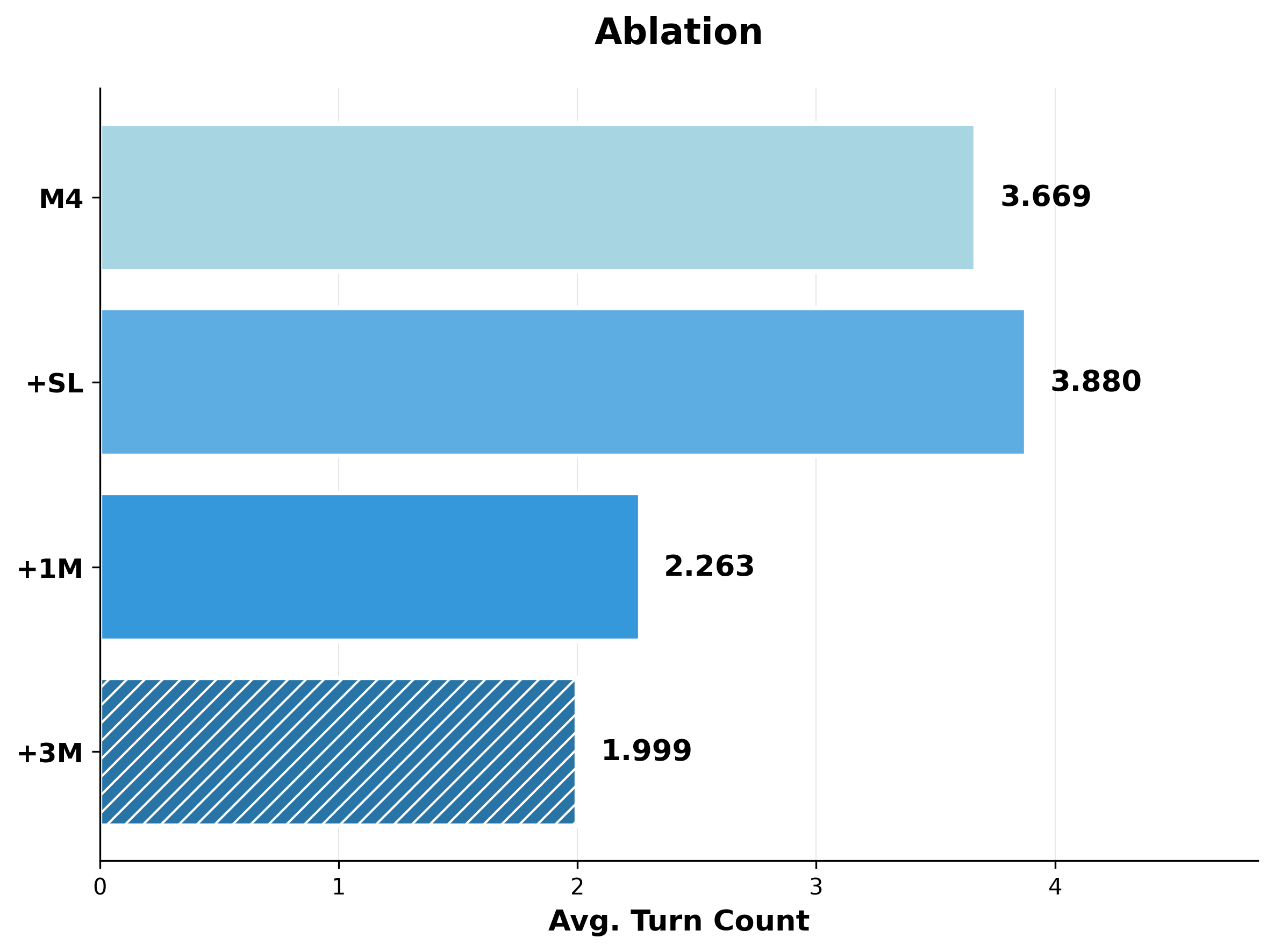
Average turns fall from 3.669 with M4 to 2.263 with single-model candidates and 1.999 with three-model candidates; adding only the helper library slightly increases the average to 3.880. Fewer turns are consistent with better initial fallback logic, but each ensemble turn makes more model calls, so turn count is not equivalent to total computation or latency.
Appendix I Select Case Studies - Full Generated Code
Appendix I provides two complete generated programs plus statistical plots of turn and token usage. The programs retain their original assumptions and are explanatory artifacts rather than new code supplied for deployment.
I.1 Stack These as High as You Can
The full stacking program estimates object centers and robust height percentiles, chooses top-down grasps with a relaxed-threshold fallback, and places objects using the grasp-to-bottom offset. It stacks blue on yellow, observes again, and stacks the tennis ball on the moved blue cube. Re-observation avoids using stale geometry; failed perception or absent grasps can still terminate a stage without a successful task.
import numpy as np

def get_best_mask(masks):
    if not masks:
        return None
    return max(masks, key=lambda x: x["score"])

def get_object_metrics(mask, depth, intrinsics, extrinsics):
    """Returns center (x,y,z), top_z, bottom_z for a given object mask."""
    points = mask_to_world_points(mask, depth, intrinsics, extrinsics)
    if points.shape[0] == 0:
        return None, None, None

    # Get Oriented Bounding Box
    bbox = get_oriented_bounding_box_from_3d_points(points)
    center = bbox["center"]

    # Calculate robust top and bottom Z from points
    zs = points[:, 2]
    if len(zs) == 0:
        return None, None, None

    top_z = np.percentile(zs, 98) # Use 98th percentile to filter outliers
    bottom_z = np.percentile(zs, 2) # Use 2nd percentile

    return center, top_z, bottom_z

def execute_pose_move(pose_matrix):
    """Moves robot to the specified 4x4 pose matrix."""
    pos, quat = decompose_transform(pose_matrix)
    joints = solve_ik(pos, quat)
    move_to_joints(joints)

def pick_and_place(obj_mask, target_center, target_top_z, depth, intrinsics, cam_pose):
    """
    Picks object defined by obj_mask and places it on target defined by target_center and target_top_z.
    """
    # 1. Analyze Object to be picked
    obj_center, obj_top, obj_bottom = get_object_metrics(obj_mask, depth, intrinsics, cam_pose)
    if obj_center is None:
        print("Could not calculate object metrics.")
        return

    # 2. Plan Grasp
    seg_map = obj_mask.astype(np.int32)
    # plan_grasp returns poses in CAMERA FRAME
    grasp_poses_cam, grasp_scores = plan_grasp(depth, intrinsics, seg_map)

    if len(grasp_poses_cam) == 0:
        print("No grasps generated by planner.")
        return

    # Select best top-down grasp.
    # select_top_down_grasp takes grasps in CAMERA FRAME and returns the best in WORLD FRAME.
    best_grasp_world, best_score = select_top_down_grasp(grasp_poses_cam, grasp_scores, cam_pose, vertical_threshold=0.8)

    if best_grasp_world is None:
        print("No strictly vertical grasp found. Trying relaxed threshold.")
        best_grasp_world, best_score = select_top_down_grasp(grasp_poses_cam, grasp_scores, cam_pose, vertical_threshold=0.5)

    if best_grasp_world is None:
        print("No valid grasp found even with relaxed threshold.")
        return

    print(f"Executing grasp with score {best_score}")

    # Calculate offset from TCP to bottom of object
    # TCP Z at grasp - Object Bottom Z
    grasp_z = best_grasp_world[2, 3]
    tcp_to_bottom_offset = grasp_z - obj_bottom

    # 3. Execute Pick
    # Move to Pre-Grasp (Safety Hover)
    pre_grasp = best_grasp_world.copy()
    pre_grasp[2, 3] += 0.10
    execute_pose_move(pre_grasp)

    # Move to Grasp
    execute_pose_move(best_grasp_world)
    close_gripper()

    # Lift Up
    lift_pose = best_grasp_world.copy()
    lift_pose[2, 3] += 0.20
    execute_pose_move(lift_pose)

    # 4. Execute Place
    # Calculate Place Pose
    place_pose = best_grasp_world.copy()
    place_pose[0, 3] = target_center[0]
    place_pose[1, 3] = target_center[1]
    # Target Z for TCP = Target Surface Z + Offset + Padding
    # Adding a small padding (1cm) to ensure we don't collide hard,
    # but close enough to drop safely.
    place_pose[2, 3] = target_top_z + tcp_to_bottom_offset + 0.015

    # Move to Pre-Place (Safety Hover)
    pre_place = place_pose.copy()
    pre_place[2, 3] += 0.15
    execute_pose_move(pre_place)

    # Move to Place
    execute_pose_move(place_pose)
    open_gripper()

    # Move to Post-Place (Lift Up)
    execute_pose_move(pre_place)


# --- Main Execution ---

# 1. Reset
open_gripper()

# 2. Perception & Strategy: Stack Blue Cube on Yellow Cube
obs = get_observation()
rgb = obs["robot0_robotview"]["images"]["rgb"]
depth = obs["robot0_robotview"]["images"]["depth"]
intrinsics = obs["robot0_robotview"]["intrinsics"]
cam_pose = obs["robot0_robotview"]["pose_mat"]

# Find Yellow Cube (Base)
masks_yellow = segment_sam3_text_prompt(rgb, "yellow cube")
yellow_data = get_best_mask(masks_yellow)

# Find Blue Cube (Object 1)
masks_blue = segment_sam3_text_prompt(rgb, "blue cube")
blue_data = get_best_mask(masks_blue)

if yellow_data is not None and blue_data is not None:
    # Get base metrics
    yellow_center, yellow_top, _ = get_object_metrics(yellow_data["mask"], depth, intrinsics, cam_pose)

    if yellow_center is not None:
        print("Stacking Blue Cube on Yellow Cube...")
        pick_and_place(blue_data["mask"], yellow_center, yellow_top, depth, intrinsics, cam_pose)
    else:
        print("Could not compute metrics for Yellow Cube")
else:
    print("Could not find Blue or Yellow cube")


# 3. Perception & Strategy: Stack Ball on Blue Cube
# Re-observe because the blue cube has moved
obs = get_observation()
rgb = obs["robot0_robotview"]["images"]["rgb"]
depth = obs["robot0_robotview"]["images"]["depth"]
intrinsics = obs["robot0_robotview"]["intrinsics"]
cam_pose = obs["robot0_robotview"]["pose_mat"]

# Find Blue Cube again (New Base)
masks_blue_new = segment_sam3_text_prompt(rgb, "blue cube")
blue_data_new = get_best_mask(masks_blue_new)

# Find Tennis Ball (Object 2)
masks_ball = segment_sam3_text_prompt(rgb, "yellow tennis ball")
ball_data = get_best_mask(masks_ball)

if blue_data_new is not None and ball_data is not None:
    # Get base metrics (blue cube is now the base)
    blue_center_new, blue_top_new, _ = get_object_metrics(blue_data_new["mask"], depth, intrinsics, cam_pose)

    if blue_center_new is not None:
        print("Stacking Tennis Ball on Blue Cube...")
        pick_and_place(ball_data["mask"], blue_center_new, blue_top_new, depth, intrinsics, cam_pose)
    else:
        print("Could not compute metrics for Blue Cube (new base)")
else:
    print("Could not find Blue Cube or Tennis Ball for second stack")
I.2 Place the Blue Cube on Top of the Yellow Cube
The rearrangement program segments and lifts objects, creates temporary placement zones, moves green and yellow aside, then places blue on yellow. It refreshes observations between stages and falls back from top-down to highest-score grasps. Fixed drop-zone offsets, a hard-coded placement orientation, and approximate cube height remain in the original code. A printed completion message is therefore not itself an independent success check.
import numpy as np

# --- Helper functions ---

def get_object_centroid(obs, text_prompt):
    """
    Finds the 3D centroid of an object specified by a text prompt.
    Returns the centroid (x, y, z) in world frame and the mask.
    """
    rgb = obs["robot0_robotview"]["images"]["rgb"]
    depth = obs["robot0_robotview"]["images"]["depth"]
    intrinsics = obs["robot0_robotview"]["intrinsics"]
    extrinsics = obs["robot0_robotview"]["pose_mat"]

    # Segment object
    results = segment_sam3_text_prompt(rgb, text_prompt)
    if not results:
        print(f"Object '{text_prompt}' not found.")
        return None, None

    best_result = max(results, key=lambda x: x["score"])
    mask = best_result["mask"]

    # Get 3D points
    points = mask_to_world_points(mask, depth, intrinsics, extrinsics)
    if points.shape[0] == 0:
        print(f"No valid depth points for '{text_prompt}'.")
        return None, None

    centroid = np.mean(points, axis=0)
    return centroid, mask

def pick_object(obs, text_prompt, z_offset=0.0):
    """
    Standard pick routine:
    1. Segment object
    2. Plan grasp
    3. Execute pick trajectory (pre-grasp -> grasp -> close -> lift)
    """
    rgb = obs["robot0_robotview"]["images"]["rgb"]
    depth = obs["robot0_robotview"]["images"]["depth"]
    intrinsics = obs["robot0_robotview"]["intrinsics"]
    extrinsics = obs["robot0_robotview"]["pose_mat"]

    # 1. Segment
    results = segment_sam3_text_prompt(rgb, text_prompt)
    if not results:
        print(f"Could not find {text_prompt} to pick.")
        return False

    # Get mask with highest score
    best_res = max(results, key=lambda x: x["score"])
    mask = best_res["mask"]

    # 2. Plan Grasp
    # Note: depth needs to be (H, W) or (H, W, 1) - API doc says (H, W) usually preferred for planner wrappers,
    # but the function signature accepts (H, W, 1).
    if depth.ndim == 3 and depth.shape[2] == 1:
        depth_map = depth[:, :, 0]
    else:
        depth_map = depth

    grasp_poses, grasp_scores = plan_grasp(depth_map, intrinsics, mask)

    if len(grasp_scores) == 0:
        print(f"No grasps found for {text_prompt}.")
        return False

    # Select best top-down grasp
    best_pose, best_score = select_top_down_grasp(grasp_poses, grasp_scores, extrinsics)

    if best_pose is None:
        print("No valid top-down grasp found, falling back to highest score.")
        best_idx = np.argmax(grasp_scores)
        best_pose_cam = grasp_poses[best_idx]
        best_pose = extrinsics @ best_pose_cam # Convert to world frame

    # Decompose grasp pose
    grasp_pos, grasp_quat = decompose_transform(best_pose)

    # 3. Execute Pick
    # Pre-grasp (hover 10cm above)
    pre_grasp_pos = grasp_pos + np.array([0, 0, 0.1])

    # Move to pre-grasp
    joints = solve_ik(pre_grasp_pos, grasp_quat)
    move_to_joints(joints)

    # Open gripper
    open_gripper()

    # Move to grasp
    joints = solve_ik(grasp_pos, grasp_quat)
    move_to_joints(joints)

    # Close gripper
    close_gripper()

    # Lift up (20cm)
    lift_pos = grasp_pos + np.array([0, 0, 0.2])
    joints = solve_ik(lift_pos, grasp_quat)
    move_to_joints(joints)

    return True

def place_at_position(position, height_offset=0.05):
    """
    Place currently held object at a specific world position.
    Target orientation is usually top-down (gripper pointing down).
    """
    # Standard top-down orientation (gripper pointing -z)
    # A common quaternion for top-down is pointing down z-axis.
    # Let's assume the current grasp orientation is maintained or we define a fixed top-down.
    # For simplicity, we often maintain the orientation we picked with, or reset to a known neutral top-down.
    # Here, we will define a fixed top-down orientation [0, 1, 0, 0] (x-axis rotation 180 deg) or similar.
    # However, to be safe, let's just use the current robot configuration's orientation or a hardcoded one.
    # Often [0, 1, 0, 0] is top down for Panda.
    place_quat = np.array([0.0, 1.0, 0.0, 0.0])

    target_pos = position + np.array([0, 0, height_offset])

    # Move over target (high)
    hover_pos = target_pos + np.array([0, 0, 0.15])
    joints = solve_ik(hover_pos, place_quat)
    move_to_joints(joints)

    # Move down to place
    joints = solve_ik(target_pos, place_quat)
    move_to_joints(joints)

    # Open gripper
    open_gripper()

    # Move back up
    joints = solve_ik(hover_pos, place_quat)
    move_to_joints(joints)

def main():
    obs = get_observation()

    # --- Strategy ---
    # The stack is Green (top) -> Yellow (mid) -> Blue (bottom).
    # Goal: Blue on Yellow.
    # 1. Move Green to the side.
    # 2. Move Yellow to another spot (target base).
    # 3. Pick Blue.
    # 4. Place Blue on top of Yellow.

    # Defined drop zones relative to the table center or just hardcoded offsets based on workspace knowledge.
    # Let's dynamically find a spot by looking at the initial stack position.

    # Find the stack location (using the green cube at the top)
    green_center, _ = get_object_centroid(obs, "green cube")
    if green_center is None: return

    # Define temporary drop zones relative to the stack
    # Drop zone 1 (for green): 20cm to the left
    drop_zone_green = green_center + np.array([-0.2, 0.0, -green_center[2] + 0.02]) # Z is roughly table height
    # Drop zone 2 (for yellow): 20cm to the right (this will be the final destination for yellow)
    drop_zone_yellow = green_center + np.array([0.2, 0.0, -green_center[2] + 0.02])

    # --- Step 1: Remove Green Cube ---
    print("Moving Green Cube...")
    success = pick_object(obs, "green cube")
    if success:
        place_at_position(drop_zone_green, height_offset=0.05) # Place on table
    else:
        print("Failed to move green cube.")
        return

    # Refresh observation
    obs = get_observation()

    # --- Step 2: Move Yellow Cube ---
    # Now Yellow should be exposed.
    print("Moving Yellow Cube...")
    success = pick_object(obs, "yellow cube")
    if success:
        # We place it at drop_zone_yellow. This is where we want to stack the blue one later.
        place_at_position(drop_zone_yellow, height_offset=0.05)
    else:
        print("Failed to move yellow cube.")
        return

    # Refresh observation to find the new position of the yellow cube and the exposed blue cube
    obs = get_observation()

    # Get precise location of yellow cube now that it's moved
    yellow_center, _ = get_object_centroid(obs, "yellow cube")
    if yellow_center is None:
        print("Lost track of yellow cube.")
        return

    # --- Step 3: Pick Blue Cube ---
    print("Picking Blue Cube...")
    success = pick_object(obs, "blue cube")
    if not success:
        print("Failed to pick blue cube.")
        return

    # --- Step 4: Place Blue on Yellow ---
    print("Placing Blue on Yellow...")
    # Target is yellow center, but offset Z by cube height (approx 5cm usually for these cubes)
    # We add a small buffer.
    cube_height_approx = 0.05
    place_at_position(yellow_center, height_offset=cube_height_approx + 0.02)

    # Done, gripper is already opened in place_at_position
    print("Task completed.")

main()
I.3 Additional Analysis Plots
The cube-stack plots separate the distribution of successful multi-turn runs, token counts for privileged single-turn successes, and success rate conditioned on turn count. Most successful runs finish early; later turns often serve recovery, while very long runs have lower success. These are observational associations: difficult trials also require more turns, so the plots do not show that forcing a particular number of turns causes the optimum.
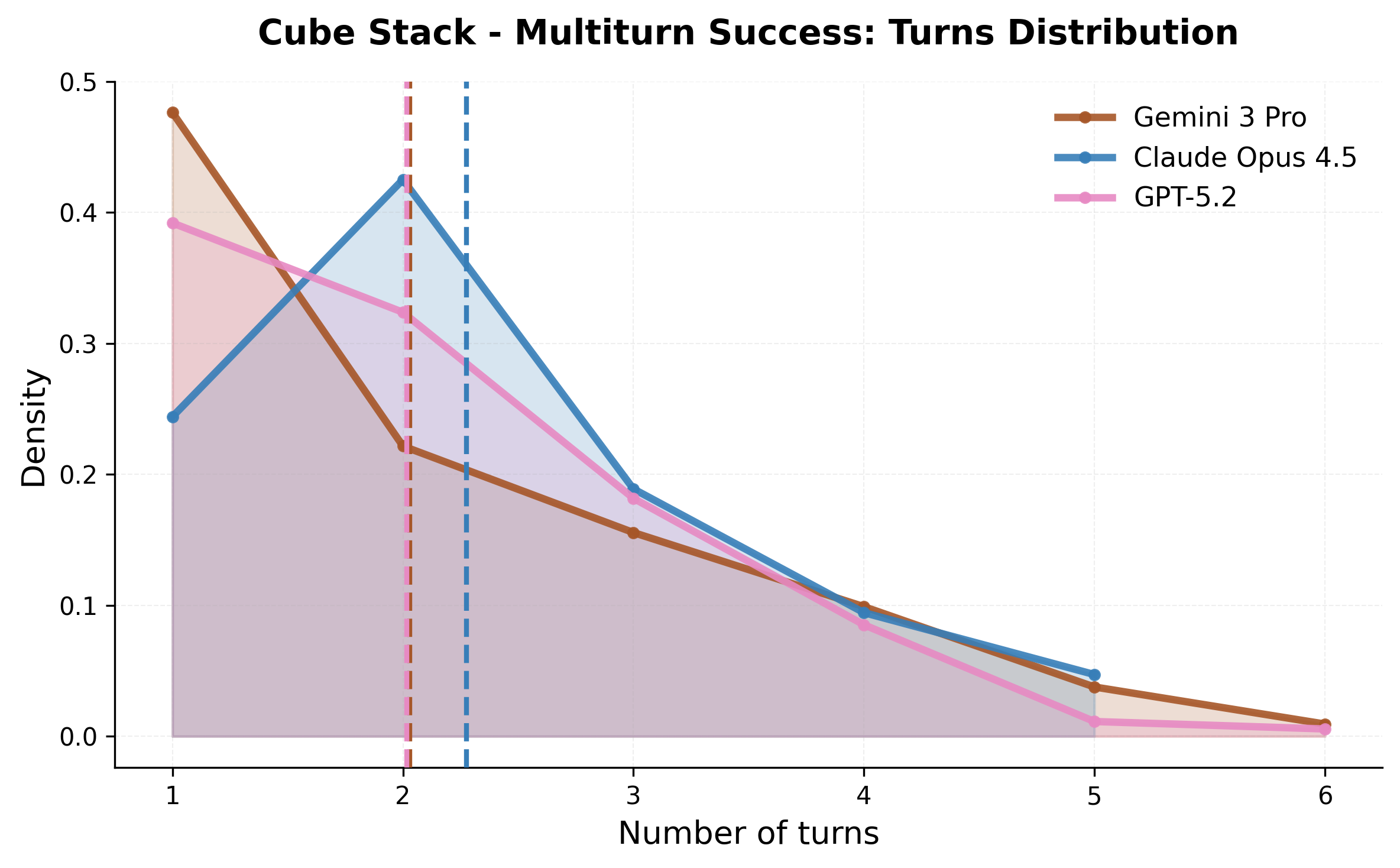
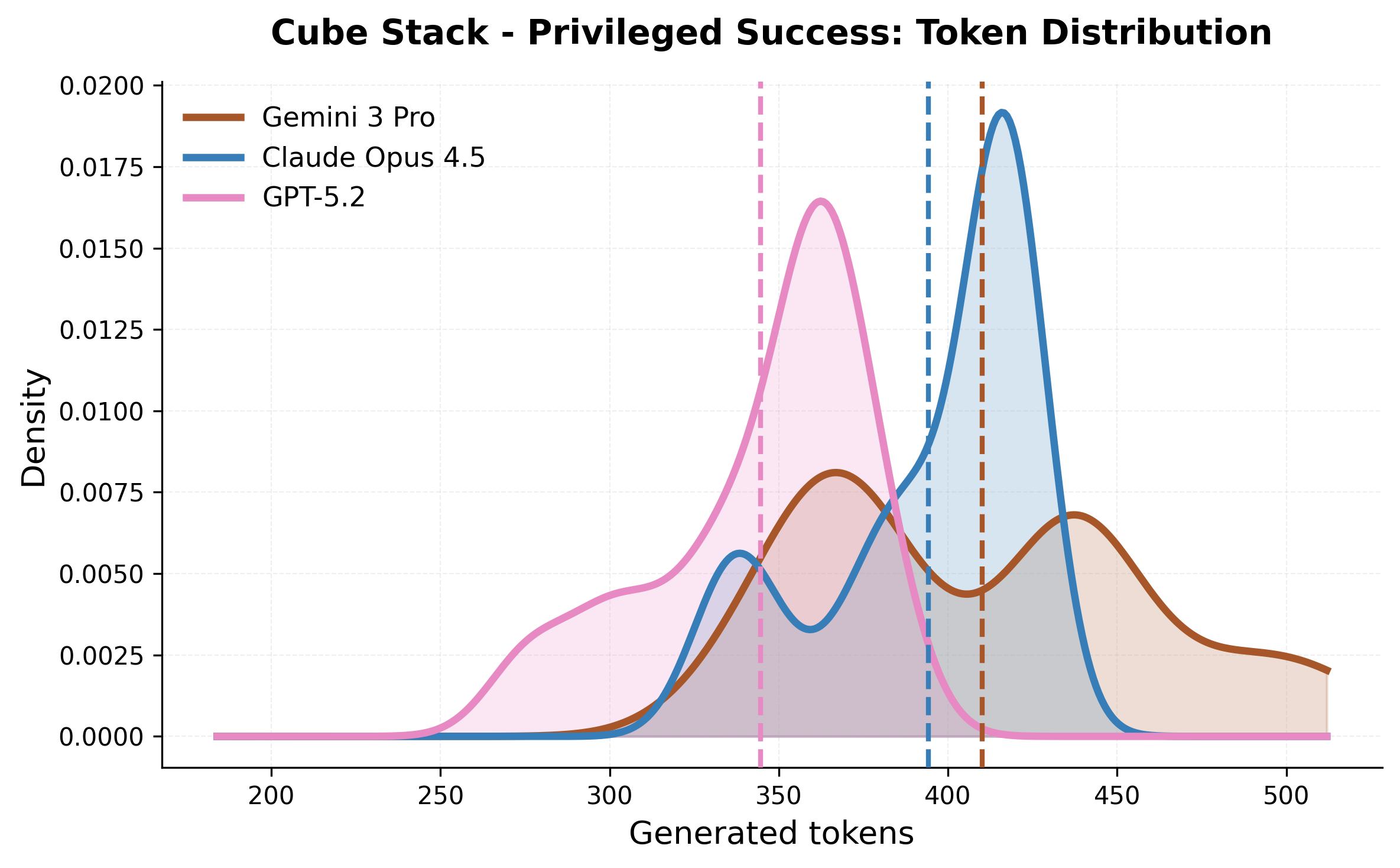
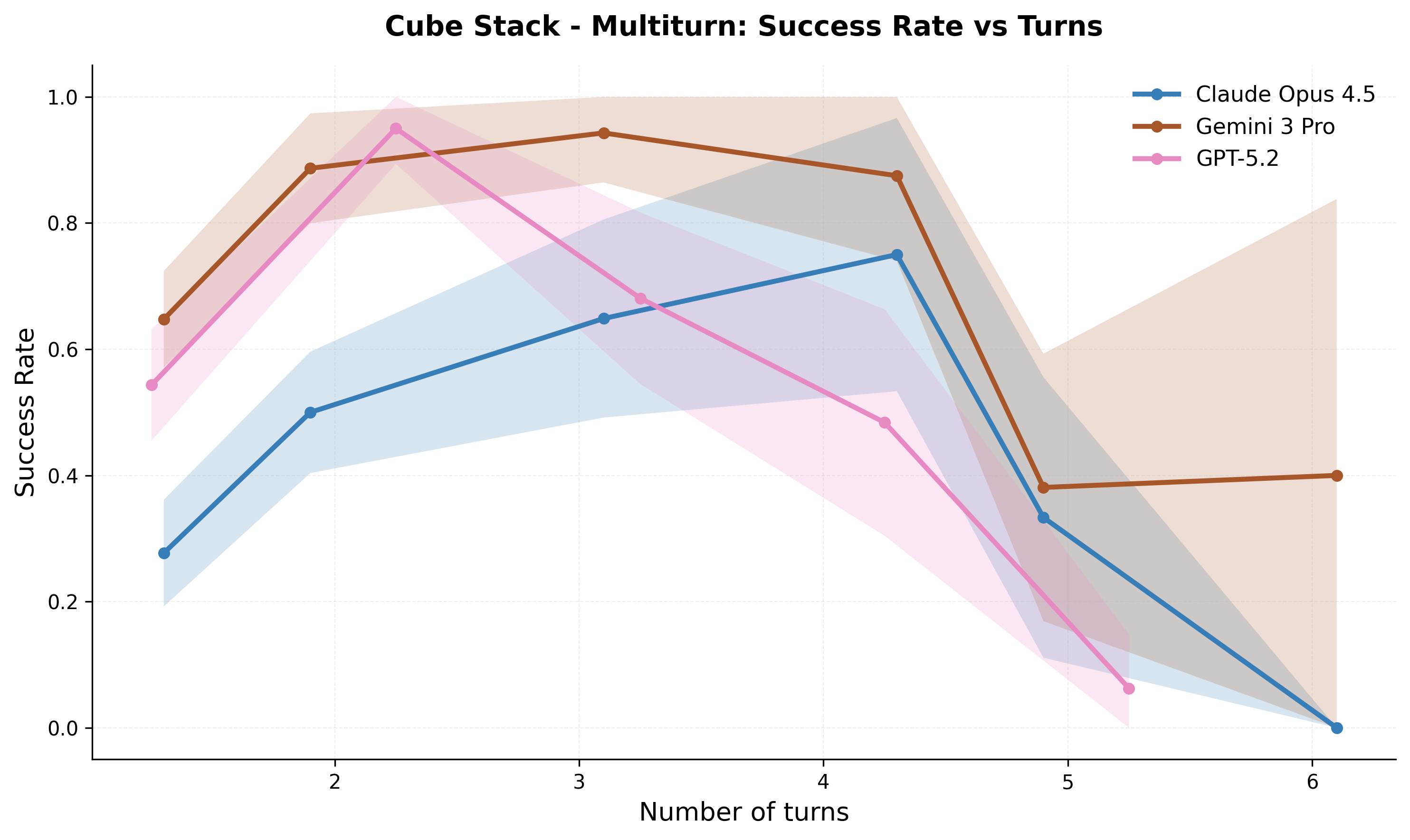
Appendix J LIBERO-PRO Evaluation Results
Tables 6–8 preserve all thirty LIBERO-PRO task results, each based on fifty trials. Failures include semantic confusion between similarly shaped products, occlusion, angled grasps, and collisions that disturb neighboring objects. The paper specifically reports lack of collision-aware motion planning in these evaluations. Instruction flexibility consequently does not remove weaknesses in the underlying perception and execution stack.
| Task (Symbolic Form) | OpenVLA | CaP-Agent0 | ||||||
| Pos | Task | Pos | Task | Pos | Task | Pos | Task | |
| 0.00 | 0.00 | 0.00 | 0.00 | 0.00 | 0.00 | 0.02 | 0.04 | |
| 0.00 | 0.00 | 0.00 | 0.00 | 1.00 | 0.02 | 0.12 | 0.42 | |
| 0.00 | 0.00 | 0.00 | 0.00 | 0.54 | 0.00 | 0.26 | 0.18 | |
| 0.00 | 0.00 | 0.00 | 0.00 | 0.00 | 0.02 | 0.18 | 0.48 | |
| 0.00 | 0.00 | 0.10 | 0.00 | 0.00 | 0.00 | 0.12 | 0.06 | |
| 0.00 | 0.00 | 0.00 | 0.00 | 0.20 | 0.02 | 0.32 | 0.12 | |
| 0.00 | 0.00 | 0.00 | 0.00 | 0.00 | 0.00 | 0.38 | 0.02 | |
| 0.00 | 0.00 | 0.00 | 0.00 | 0.00 | 0.02 | 0.30 | 0.02 | |
| 0.00 | 0.00 | 0.10 | 0.00 | 0.00 | 0.00 | 0.32 | 0.00 | |
| 0.00 | 0.00 | 0.00 | 0.00 | 0.00 | 0.00 | 0.16 | 0.48 | |
| Average | 0.00 | 0.00 | 0.00 | 0.00 | 0.17 | 0.01 | 0.218 | 0.182 |
| Task (Symbolic Form) | OpenVLA | CaP-Agent0 | ||||||
| Pos | Task | Pos | Task | Pos | Task | Pos | Task | |
| 0.00 | 0.00 | 0.00 | 0.00 | 0.00 | 0.04 | 0.00 | 0.00 | |
| 0.00 | 0.00 | 0.00 | 0.00 | 0.94 | 0.02 | 0.04 | 0.00 | |
| 0.00 | 0.00 | 0.00 | 0.00 | 0.00 | 0.00 | 0.00 | 0.10 | |
| 0.00 | 0.00 | 0.00 | 0.00 | 0.00 | 0.02 | 0.36 | 0.38 | |
| 0.00 | 0.00 | 0.00 | 0.00 | 0.00 | 0.04 | 0.22 | 0.12 | |
| 0.00 | 0.00 | 0.00 | 0.00 | 0.00 | 0.02 | 0.60 | 0.04 | |
| 0.00 | 0.00 | 0.00 | 0.00 | 0.98 | 0.02 | 0.04 | 0.34 | |
| 0.00 | 0.00 | 0.00 | 0.00 | 0.88 | 0.02 | 0.02 | 0.12 | |
| 0.00 | 0.00 | 0.00 | 0.00 | 0.98 | 0.02 | 0.62 | 0.40 | |
| 0.00 | 0.00 | 0.00 | 0.00 | 0.00 | 0.00 | 0.66 | 0.18 | |
| Average | 0.00 | 0.00 | 0.00 | 0.00 | 0.38 | 0.00 | 0.256 | 0.168 |
| Task (Symbolic Form) | OpenVLA | CaP-Agent0 | ||||||
| Pos | Task | Pos | Task | Pos | Task | Pos | Task | |
| 0.00 | 0.00 | 0.00 | 0.00 | 0.02 | 0.00 | 0.22 | 0.14 | |
| 0.00 | 0.00 | 0.00 | 0.00 | 0.00 | 0.02 | 0.22 | 0.14 | |
| 0.00 | 0.00 | 0.00 | 0.00 | 0.00 | 0.00 | 0.02 | 0.10 | |
| 0.00 | 0.00 | 0.00 | 0.00 | 0.00 | 0.02 | 0.00 | 0.10 | |
| 0.00 | 0.00 | 0.00 | 0.00 | 0.00 | 0.00 | 0.10 | 0.20 | |
| 0.00 | 0.00 | 0.00 | 0.00 | 0.12 | 0.02 | 0.30 | 0.14 | |
| 0.00 | 0.00 | 0.00 | 0.00 | 0.00 | 0.00 | 0.14 | 0.08 | |
| 0.00 | 0.00 | 0.00 | 0.00 | 0.98 | 0.02 | 0.02 | 0.20 | |
| 0.00 | 0.00 | 0.00 | 0.00 | 0.02 | 0.00 | 0.08 | 0.14 | |
| 0.00 | 0.00 | 0.00 | 0.00 | 0.90 | 0.00 | 0.08 | 0.16 | |
| Average | 0.00 | 0.00 | 0.00 | 0.00 | 0.20 | 0.01 | 0.118 | 0.14 |
Appendix K Additional Clarifications
The final appendix clarifies human development effort, runtime, and visual-model choice. These qualifications are necessary to interpret the headline comparisons and the practical cost of the agent’s feedback loop.
K.1 Human Expert Baseline Protocol
Seven paper authors, each with at least two years of robotics-programming experience, iterated scripts using the same tier-specific primitives. Simple tasks took hours; difficult insertion/handover programs required two to three weeks per task, including toolchain exploration and changes. The resulting 88.5% curve is an extensively developed static-code reference. Comparing it with zero-shot model generation or online multi-turn recovery measures different allocations of development and execution effort, not equal-budget human-versus-model intelligence.
K.2 Computational Cost Analysis
On twenty Gemini cube-stack trials with matched hardware and tool stacks, total trial time rises from 12.9 s for S1 to 20.0 s for S2, 28.4 s for S3, 60.8 s for M1, and 113.6 s for M3. Reported code-generation times are 6.8, 9.6, 23.8, 20.1, and 15.8 s respectively. Table 9 reports those tiers, not a full measured breakdown of the nine-candidate three-model ensemble.
A code turn can execute an entire sequence, whereas a visuomotor-model inference produces an action or short chunk, so per-call latency is not directly comparable. The long feedback delay nevertheless matters for tasks needing continuous correction. The table does not provide monetary cost or broad task-level latency distributions.
K.3 Visual Differencing Module: Model Choice
All main visual-differencing experiments use Gemini-3-Pro, chosen as a strong visual backbone. The interface permits swapping models, but no systematic backbone ablation is reported. Consequently the observed advantage combines a textual feedback mechanism with this particular additional model; it should not be assumed invariant to captioner quality or available compute.