At a glance
This edition follows the complete 46-page v2 journal manuscript dated August 7, 2025, retaining all 18 numbered figures, 11 tables, five numbered listings, the additional function template, complete prompt templates, mathematical displays and 45 references. The three code figures encoded as SVG objects in the HTML are preserved with their full original PDF layouts. The manuscript extends the RSS 2024 conference paper; its journal header and DOI are placeholders, not evidence of a finalized journal publication.
SetItUp converts underspecified arrangement requests into planar object poses. A structured, task-family-specific language specification and five examples guide an LLM that generates, revises and assembles Python functions. Their output is a grounding graph of spatial relations; independently trained diffusion models then jointly ground that graph into geometry. Evaluation covers dining tables, bookshelves and bedrooms, plus selected dual-arm robot demonstrations. The approach improves the reported geometric and functional metrics, but does not guarantee collision-free scenes, complete program correctness or arbitrary 3D manipulation.
1 Introduction
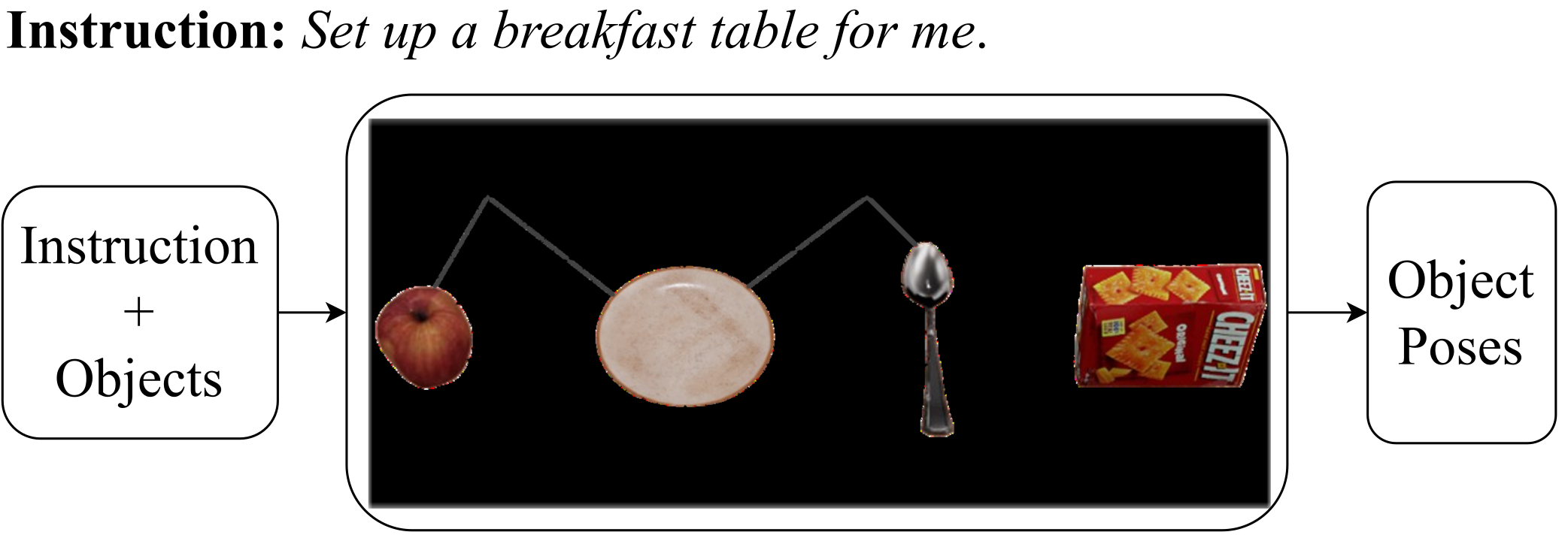
Requests such as setting a dinner table specify a purpose rather than exact coordinates. The challenge is to infer functional conventions, personal preferences and geometric constraints with few fully annotated scenes. SetItUp separates semantic decisions from numerical placement using explicit relation graphs, program induction and compositional diffusion.
Its supervision is more substantial than five demonstrations alone: each task family receives a carefully structured specification, and a predefined geometric relation library supplies synthetic training data. The examples chiefly check and refine the induced functions. New object sets and requests are tested within these specified families; this is not unrestricted task discovery from raw language.
Relative to the earlier conference paper, this version replaces user-written Python skeletons with structured natural language and adds bookshelf and bedroom evaluation [33]. The output is a goal configuration for a separate execution system; trajectory planning and online replanning are outside the main method.

2 Related Work
The comparison distinguishes goal-conditioned rearrangement, functional layout generation and language-based planning. These solve related but different problems, so the experiments use adapted baselines rather than reproducing every original system.
2.1 Object Rearrangement
Many rearrangement methods assume exact goals, goal images or explicit spatial commands, then solve perception and manipulation [2][18][37]. ALFRED studies multistep language instructions and receptacle placement [22]. SetItUp focuses on inferring inter-object layout relations and final poses from a higher-level purpose.
2.2 Functional Object Arrangement
StructFormer and StructDiffusion learn structured layouts, while preference models and DALL-E-Bot use learned visual or commonsense priors [17][16][12][13]. SetItUp exposes geometry through symbolic factors so new combinations can reuse individual relation models. The source’s broad statement about eliminating expert demonstrations should be read alongside its actual requirement for five examples and a domain specification per family.
2.3 Knowledge Extraction from LLM
Language models can suggest actions and semantic groupings, but reliable numeric pose generation is harder. SayCan combines language proposals with affordances, while TidyBot extracts user-specific tidying preferences [10][30]. Here an LLM handles semantic logic and diffusion handles numerical constraints. Learned scores still approximate the intended geometry.
3 Overview
The interface is a family-level specification plus a small example set during induction, followed by a new instruction and known object descriptions at inference. The intermediate graph connects the semantic and geometric stages.
3.1 Problem Formulation
Objects have known categories and shapes represented by 2D bounding boxes. The output is one planar pose (x, y, θ) per object in a canonical frame. Each example supplies an instruction, object set and target arrangement; five examples belong to each task family. A domain specification defines reusable structures and patterns, while a procedural description defines how to interpret and combine them.
Generalization is evaluated on new instructions, shapes and object combinations within the same family. Rendering these planar layouts as 3D scenes does not make the model a full 3D support, stability or collision simulator.
3.2 SetItUp
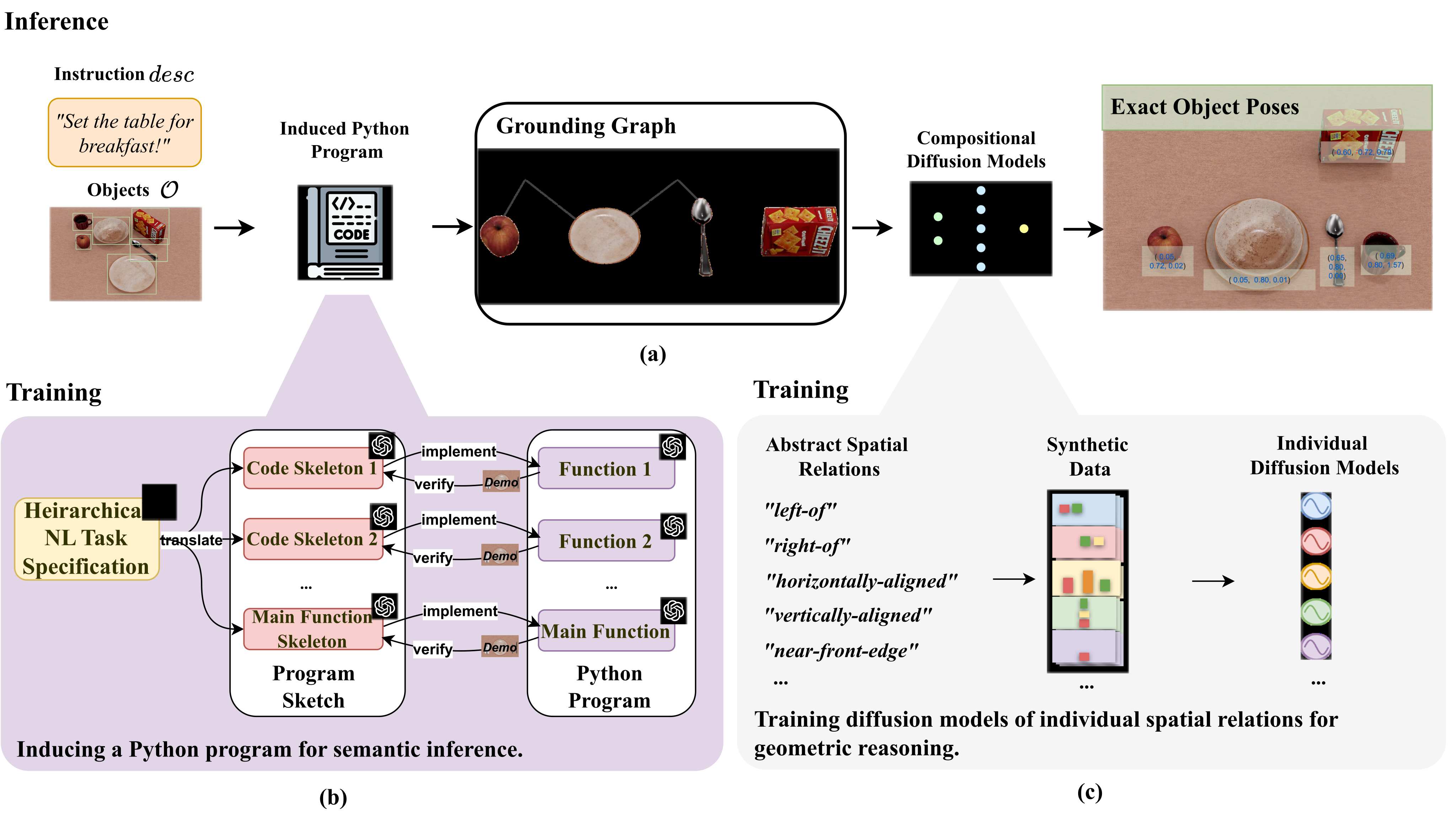
The symbolic stage uses an LLM as sketch translator, coder and verifier. The induced Python program creates a factor-graph-like collection of relation instances. The geometric stage selects independently pretrained relation models and composes their denoising predictions to sample object poses. This decomposition improves reuse, but erroneous or inconsistent graphs can still produce infeasible layouts.
4 Pose Generation via Compositional Diffusion Models
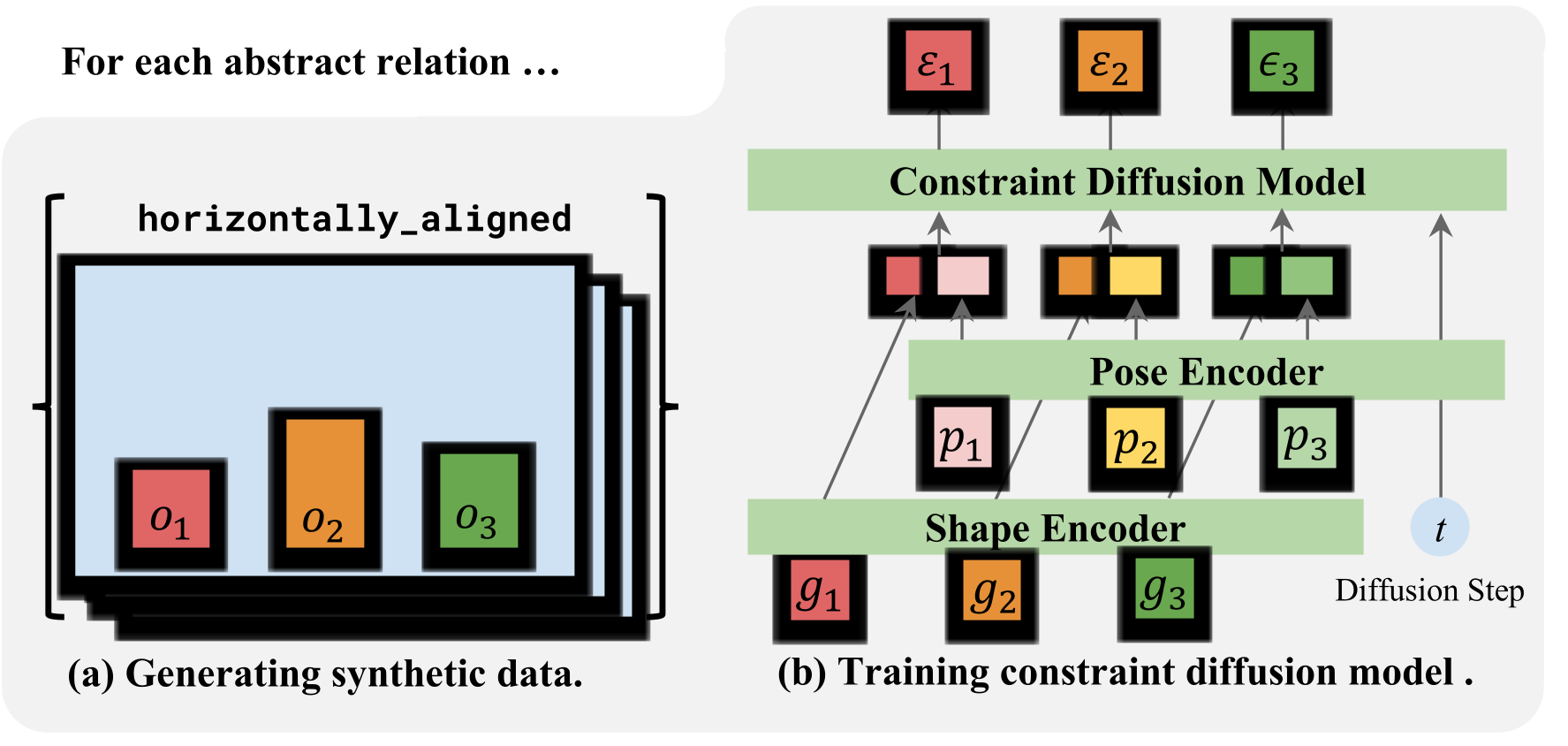
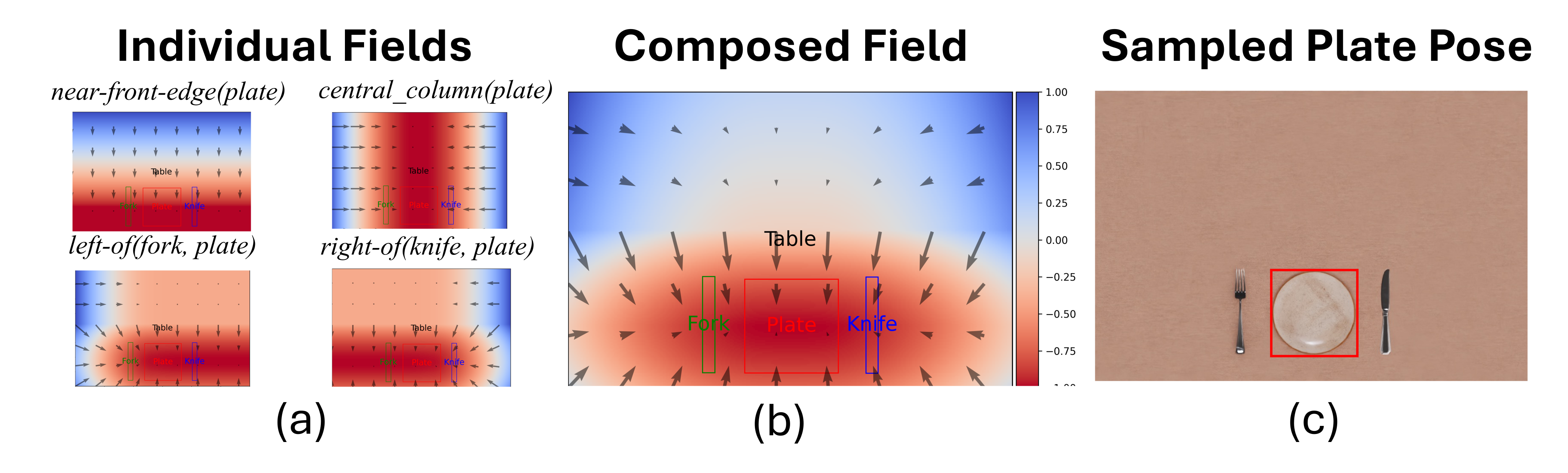
The spatial library defines reusable factors over one, two, three or variable numbers of objects. A graph chooses which factors apply, and sampling jointly adjusts the shared poses. Figures 4–5 retain the training pipeline and the four-factor plate-placement example.
4.1 A Library of Spatial Relations
The paper describes a library of 48 relations, covering position within a container, orientation, pairwise alignment, symmetry and set-level order. Each has a rule-based Boolean classifier and a learned conditional generator. The ideal single-relation distribution is uniform over satisfying poses inside a bounded domain; its original formula is preserved below. A grounding graph multiplies the relevant factors over their associated object subsets.
Positive examples are synthesized from the geometric rules. Each diffusion network learns to predict Gaussian noise added to valid poses [8]. Fixed-arity relations use an MLP; variable-arity relations use a transformer. The loss and reverse-kernel formulas are retained. Unlike prior compositional constraint work, these relation models are trained independently and combined only during inference [34]. The experiment reports 30,000 synthetic single-relation arrangements in addition to the 15 family examples, not 30,000 demonstrated complete functional scenes.
| Unary Relations | |
| central-column | central-row |
| at-center | left-half |
| right-half | front-half |
| back-half | near-left-edge |
| near-right-edge | near-front-edge |
| near-back-edge | facing-front |
| facing-back | against-right-wall |
| against-left-wall | against-front-wall |
| against-back-wall | right-of-wall |
| left-of-wall | center-of-wall |
| at-front-left-corner | at-front-right-corner |
| at-back-left-corner | at-back-right-corner |
| Binary Relations | |
| horizontally-aligned-bottom | horizontally-aligned-centroid |
| vertically-aligned-centroid | horizontal-symmetry-on-table |
| vertical-symmetry-on-table | left-of |
| right-of | on-top-of |
| centered | left-touching |
| right-touching | in-front-of |
| under-window | |
| Ternary Relations | |
| horizontal-symmetry-about-axis-obj | vertical-symmetry-about-axis-obj |
| Variable-Arity Relations | |
| aligned-in-horizontal-line-bottom | aligned-in-horizontal-line-centroid |
| aligned-in-vertical-line-centroid | regular-grid |
| contiguously-aligned | height-sorted-ascending |
| height-sorted-descending | width-sorted-ascending |
| width-sorted-descending | |
Equation
Equation
Equation 1
| (1) |
4.2 Composing Diffusion Models for Pose Generation
The target is a product of relation distributions, which cannot simply inherit an individual diffusion model’s exact reverse process. Following energy-based composition, SetItUp sums relation denoising scores, normalizes their magnitudes, and applies annealed Langevin updates [5]. It uses 20 MCMC updates at each diffusion noise level. Normalization balances competing factors; different arities may require further weighting.
This is approximate sampling with learned scores and finite updates. The main text claims unbiased convergence, but Appendix C only compares update/noise expressions and does not provide a finite-step error bound or a proof that the normalized practical sampler exactly satisfies every constraint. Its own failure analysis reports collisions and boundary violations. Read the method as a useful compositional optimizer, not a feasibility certificate.
Equation
5 Grounding Graph Generation via Program Induction
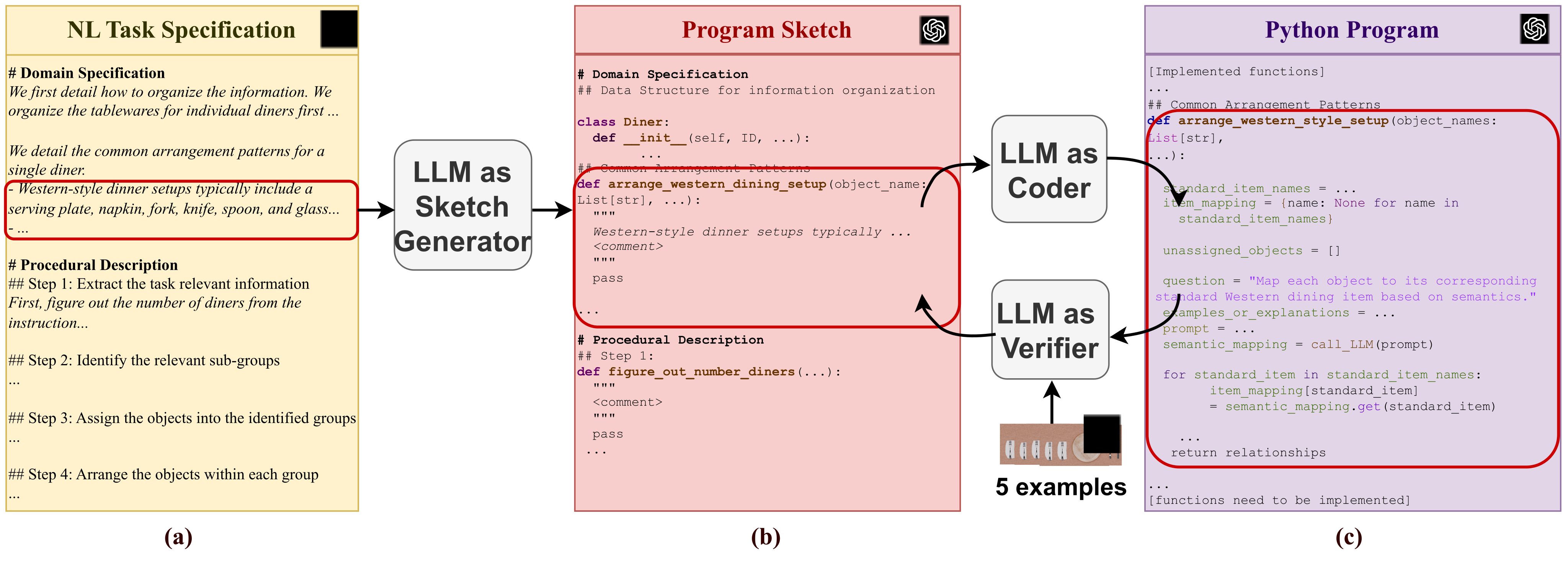
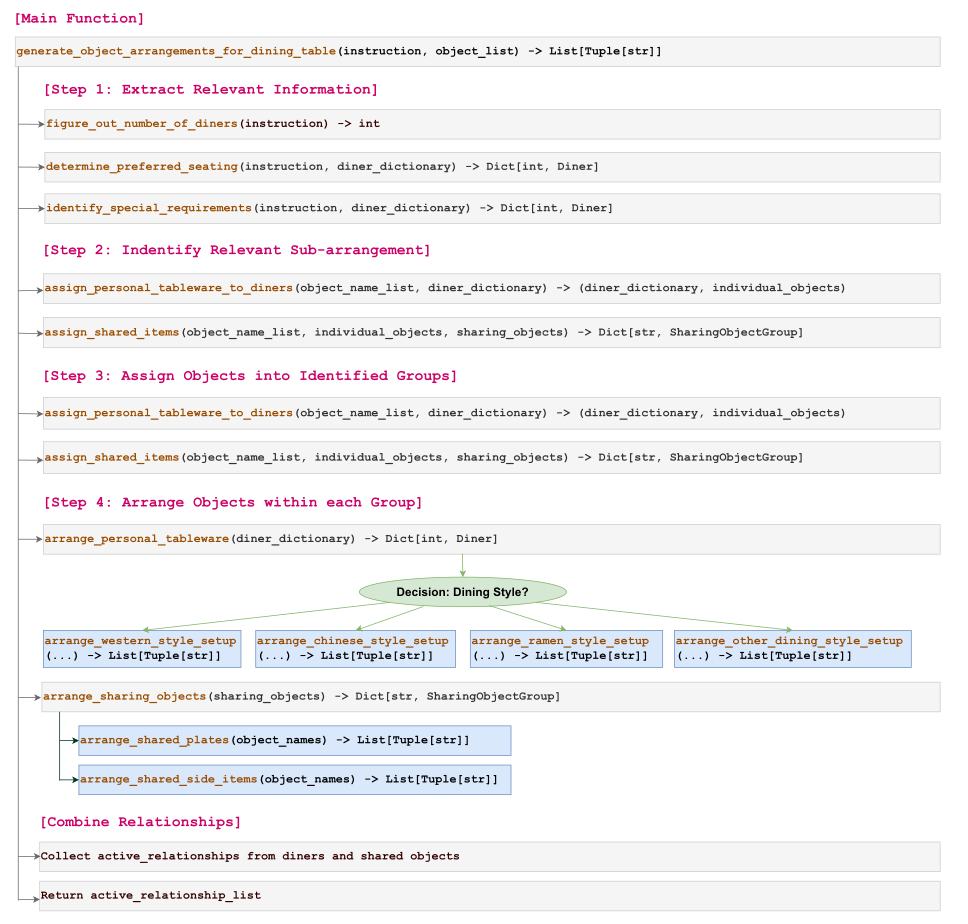
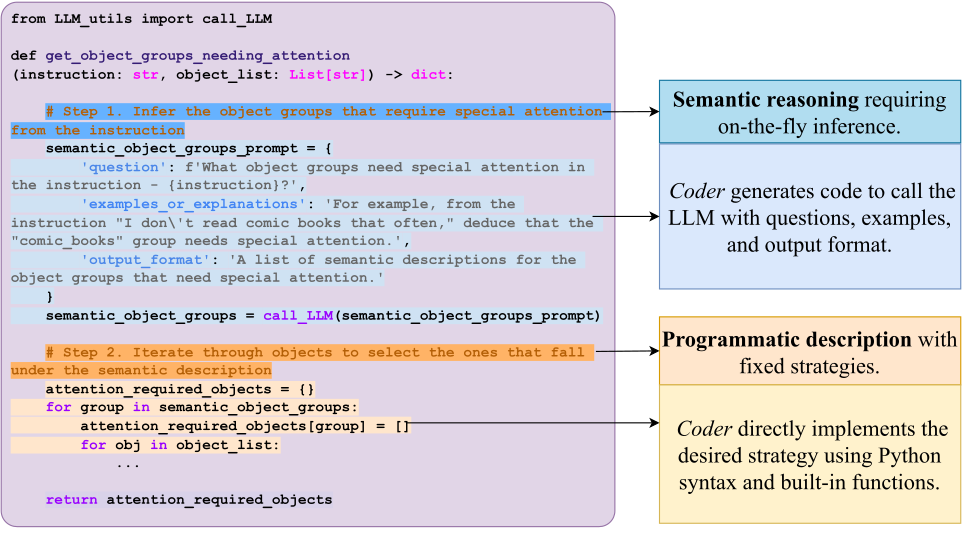
The program supplies semantic structure that few examples alone may not specify. A family-level strategy is translated into function signatures and comments, then implemented and checked module by module. The examples refine omitted preferences rather than serving as the coder’s sole source of domain knowledge [36]. Figures 6–10 retain the complete sketch, prompt, control-flow and code diagrams.
5.1 Hierarchical Natural Language Task Specification
A domain specification explains what intermediate information to store and recurring patterns such as a single diner’s tableware. A procedural description extracts requirements, groups objects, assigns within-group relations and combines groups. Decomposition continues until a subproblem is either a fixed algorithm or an explicit query to an LLM.
Structured language removes the need to write Python, but still requires users or experts to articulate an effective algorithm and resolve domain conventions. The paper does not report a user study measuring specification effort or non-programmer authoring success.
5.2 Compositional Program Induction
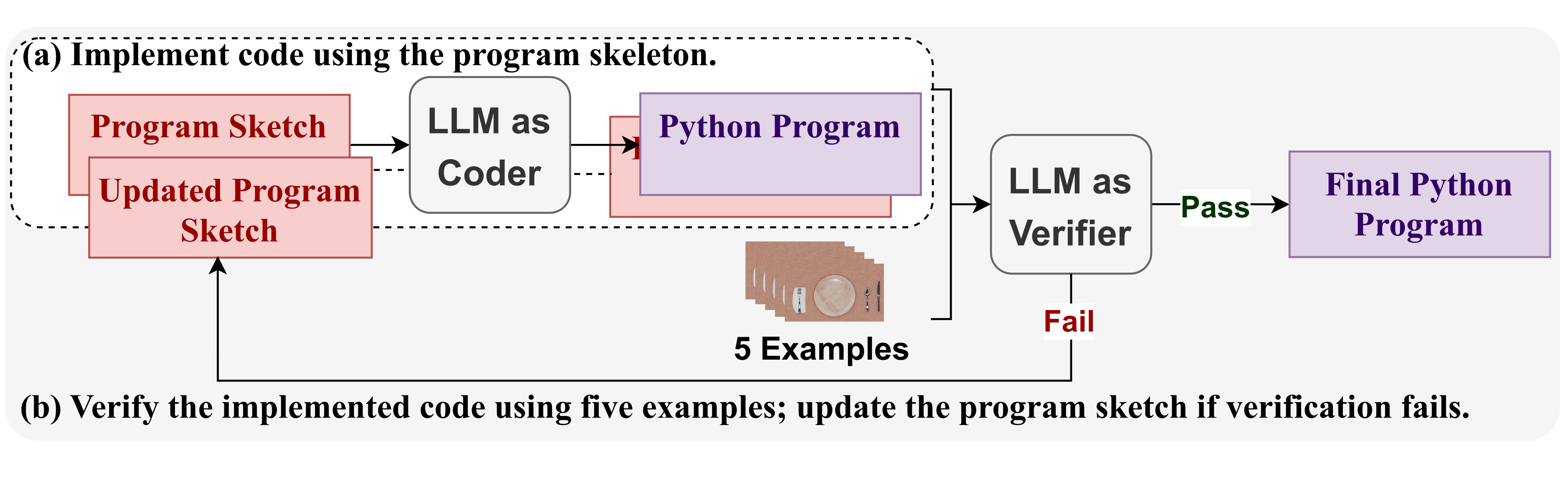
The three modules are a sketch generator, a coder and a verifier. Functions have meaningful names, input/output types and descriptions. The main function follows the hierarchy of the specification. This modular design makes local revision possible, although checking local examples does not establish correctness for every complete graph.
Sketch generator.
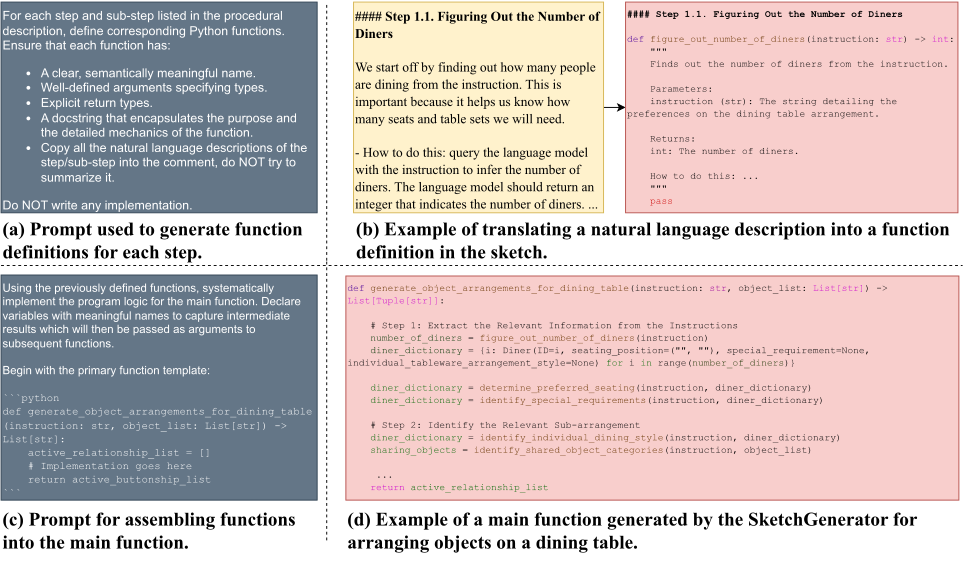
The sketch generator translates data structures, recurring patterns and procedural steps with separate templates, preserving the original descriptions in comments. It generates function skeletons and a main routine that composes them, without filling every body at once. All original symbolic definitions and the two prompt/output panels remain.
Equation
Equation
Coder.
GPT-4 implements fixed strategies with Python/NumPy control flow and invokes a provided LLM utility for semantic inference. Thus the resulting program is not wholly deterministic or independent of an LLM at test time: it may query for diner counts, categories or special requirements. Figure 10 distinguishes these two execution modes.
Equation
Verifier.
The verifier compares each function with five example input/output pairs. On failure it revises the sketch’s comments or logic, and the coder regenerates the implementation. The paper reports 1.2 iterations per function on average, with at most three. Fewer examples may leave preferences ambiguous; a consistently right-side seasoning placement is its illustrative case.
The supplied verifier prompt asks an LLM to emulate the output of embedded LLM calls. This is example-based, model-mediated checking, not formal verification or exhaustive execution coverage. At inference, variable binding and semantic calls still depend on the LLM. Contradictory specifications are not resolved by the present method.
Equation
6 Experiments
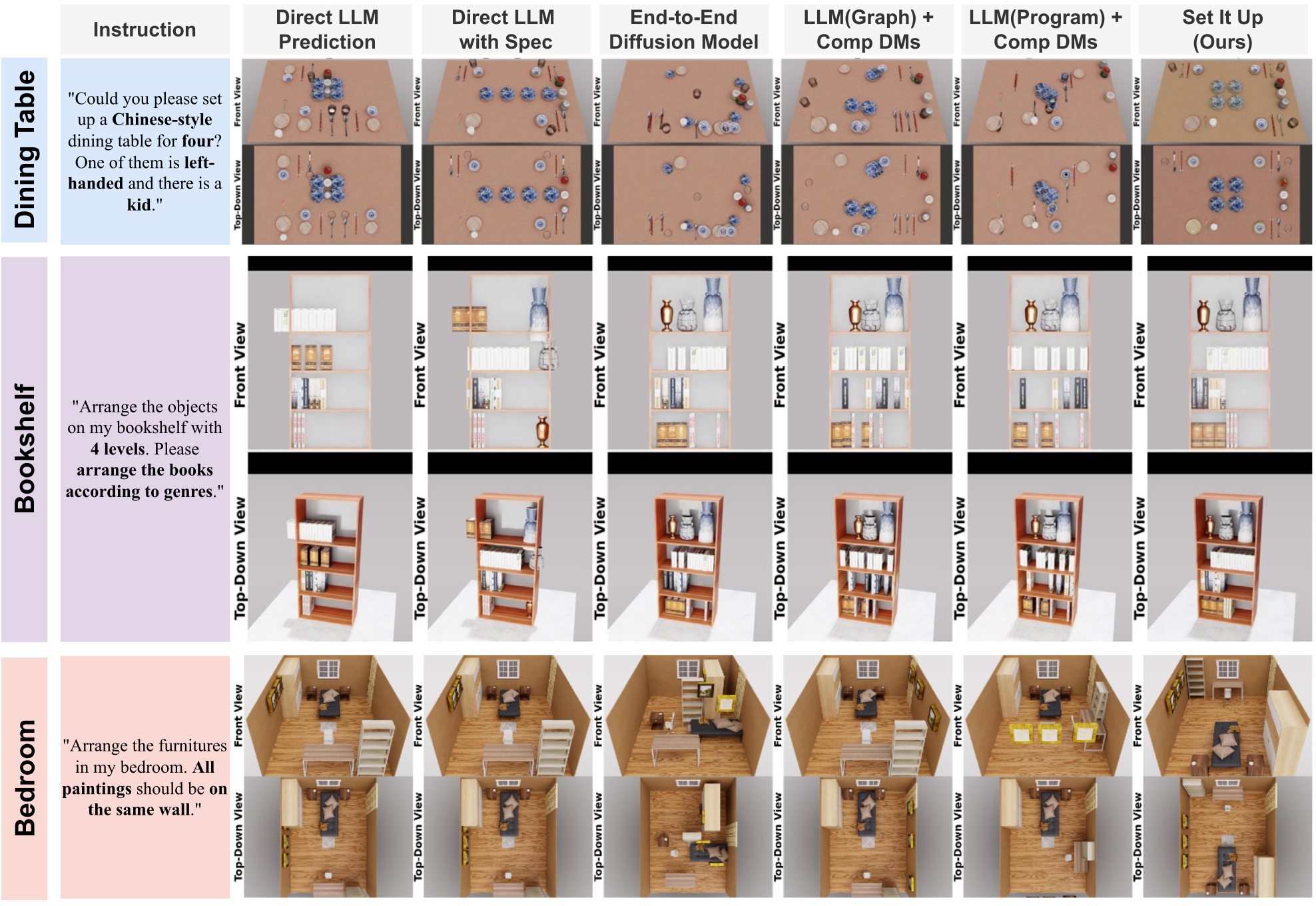
Each of three task families contains 20 scenes: five induction/training examples and 15 test scenes, for 15 training and 45 test scenes overall. The benchmark varies instructions and object combinations. Figures 11–15 retain qualitative comparisons and robot demonstrations; all numerical results remain in Table 4.
| Method | Intermediate Graph | Semantic Inference | Geometric Reasoning |
| Direct LLM Prediction (w/o task spec) | No | LLM, as commonsense knowledge repository | |
| Direct LLM Prediction (with task spec) | No | LLM, guided by task spec | |
| End-to-end Diffusion Model | No | CLIP embedding + Single diffusion model | |
| LLM (graph) + Comp DMs | Yes | LLM predicts the graph directly | Compositional DMs |
| LLM (program) + Comp DMs | Yes | LLM predicts the program directly | Compositional DMs |
| Set It Up (Ours) | Yes | Compositional program induction | Compositional DMs |
6.1 Baselines
The baselines are a language-conditioned end-to-end diffusion model and direct LLM pose prediction with or without the structured specification. Two ablations directly predict a grounding graph or a Python program, then use the same compositional diffusion models. The adapted neural baseline receives synthetic relation data and 15 functional scenes; this comparison deliberately tests sparse complete-scene supervision.
These are adaptations of StructDiffusion and TidyBot, including different geometry interfaces and training inputs [16][30]. Appendix G describes a 16-object transformer capacity for the end-to-end baseline, while several test cases contain more objects; how those cases are handled is not explained. That unresolved implementation detail limits a clean capacity-matched interpretation.
6.2 Evaluation Metrics
Physical feasibility is the fraction of objects that avoid 2D collisions and stay inside their designated container, averaged across scenes. It is not the percentage of entirely successful, collision-free scenes. Functionality is the fraction of manually specified functional relations satisfied, such as accessibility, unobstructed doors or requested grouping.
Fifteen graduate students score functionality from 1–3 and aesthetics from 1–2. The text says each participant evaluates 45 scenes generated by the method or baselines; Table 4 describes the same 15 test scenes per family. Assignment, randomization and the precise statistical test are not detailed. Bold human scores are labeled significant at p<0.05, but the table alone does not establish the full comparison protocol. Omniverse renders the 2D poses for judging; its 3D models are not inputs to layout generation [19].
| Functionality (1-3) | |
| Points | Description |
| 1 | Non-functional. The arrangement fails to serve the functional purpose of the task (e.g., dining) and does not meet the preferences or requirements specified in the instructions (e.g., seating preferences). |
| 2 | Partially functional. The arrangement fulfills either the functional purpose of the task or the specified preferences, but not both. Alternatively, it inadequately satisfies both due to improper placement or lack of accessibility, failing to conform to user habits or social norms (e.g., a study desk is placed against the bed as requested but blocks the door). |
| 3 | Fully functional. The arrangement properly serves both the functional purpose of the task and the preferences or requirements indicated in the instructions. |
| Aesthetic Appeal (1-2) | |
| Points | Description |
| 1 | Visually unappealing. The arrangement lacks visual harmony, alignment, or symmetry. |
| 2 | Visually appealing. The arrangement is aesthetically pleasing, exhibiting proper alignment, symmetry, and overall visual harmony. |
6.3 Dining Table Arrangement
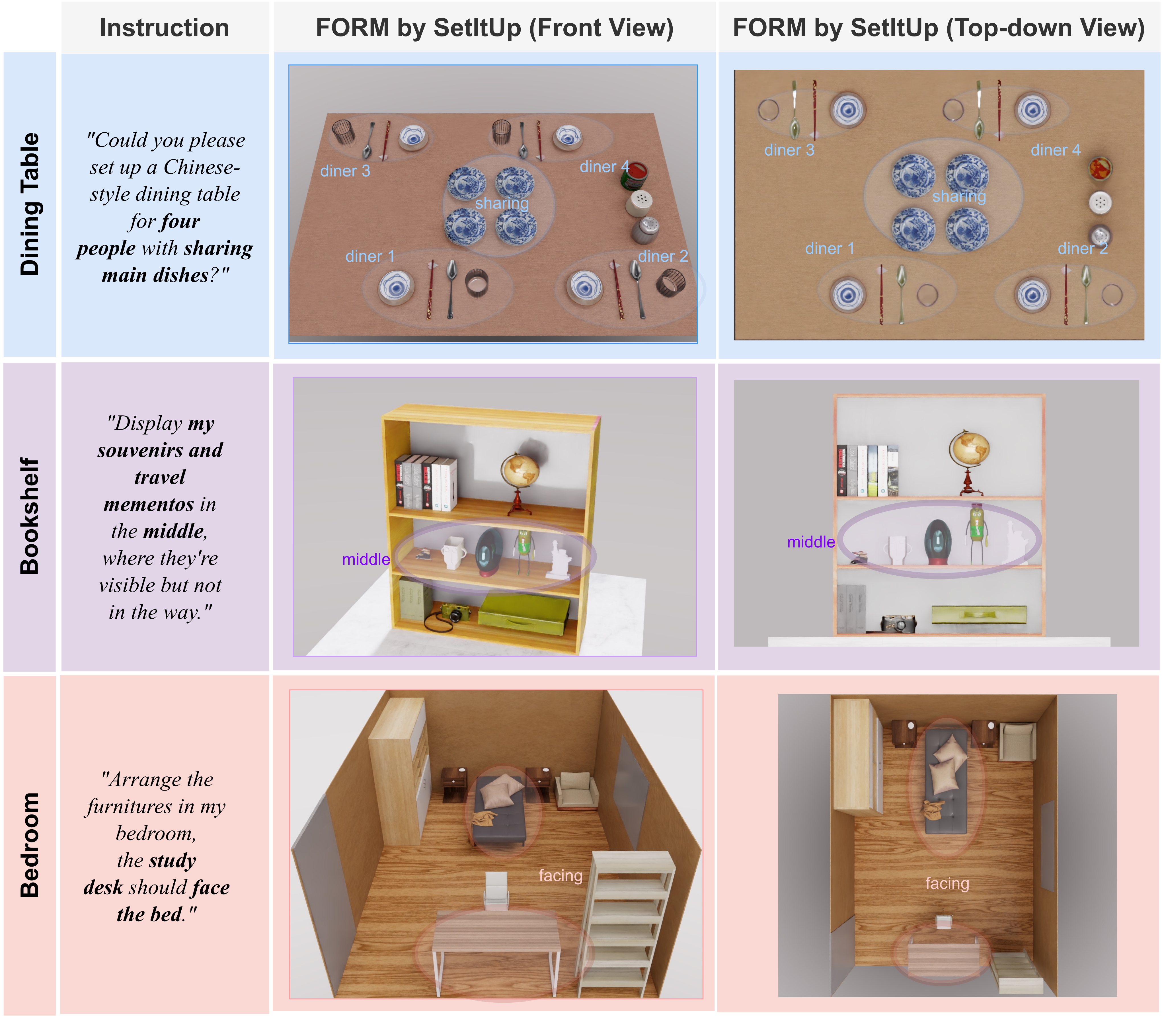
Dining arrangements test nested diner-specific layouts and shared dishes under seating, handedness and family requirements. This is the family where explicit procedural conventions are especially useful.
6.3.1 Challenges.
Local tableware placement must remain correct when diners face opposite directions, sit together, use different dining styles or need child-specific objects. Shared items introduce relations across the local groups.
6.3.2 SetItUp on Multi-level Hierarchical Arrangement Tasks.
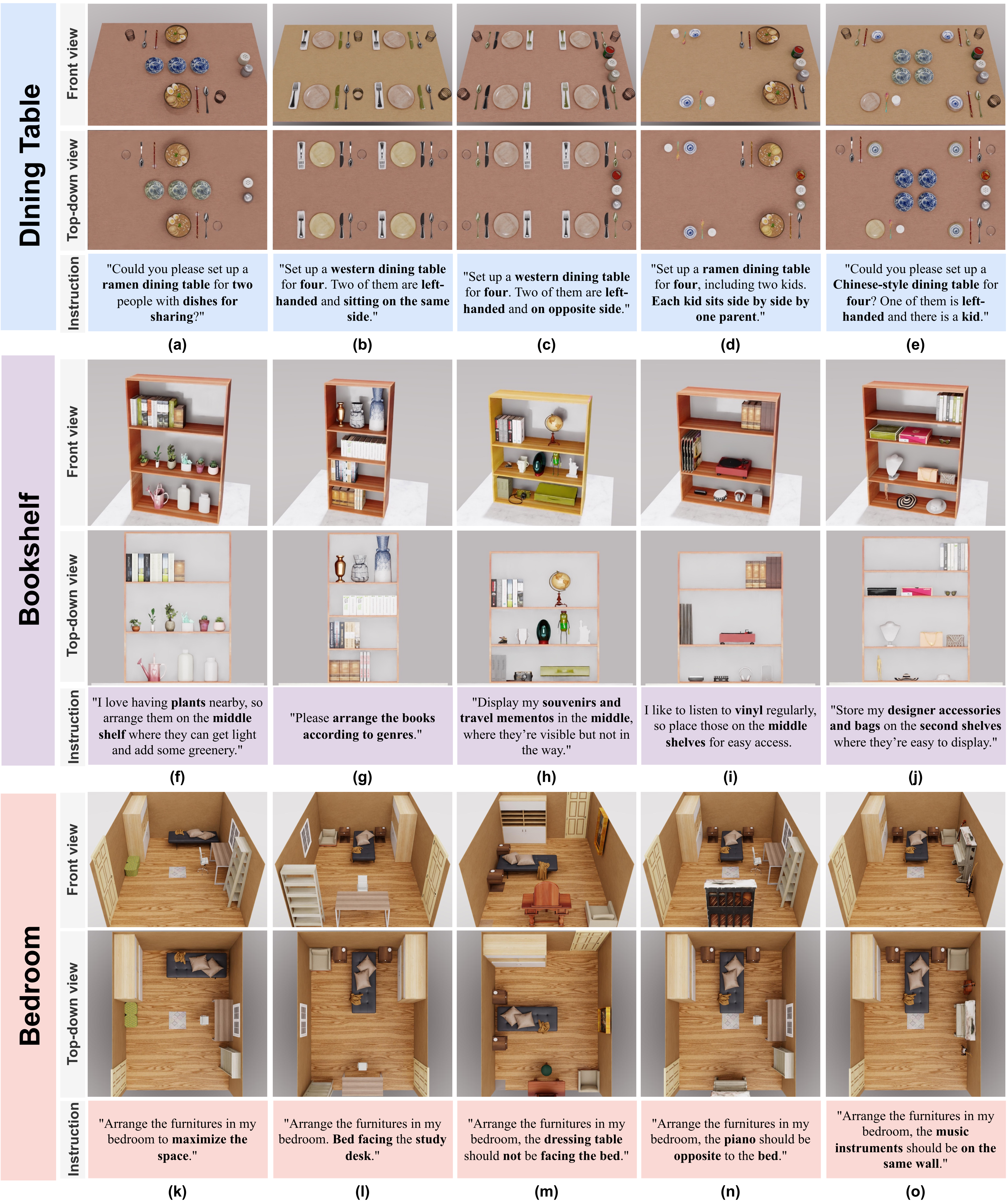
The program combines reusable single-diner patterns with seating and shared-object logic. Figure 12a–e shows two- to four-person arrangements with selected combinations of children, left-handedness and seating preferences. These examples demonstrate the specified cases, not all culturally valid dining conventions.
6.3.3 Baseline Comparison.
SetItUp achieves 94.0% object-level physical feasibility and 89.1% rule functionality. The best corresponding baseline values are 82.1% and 70.8%; end-to-end diffusion obtains 22.7/21.8%. Human functionality is 2.86/3. Human aesthetics is 1.87/2, slightly below direct LLM prediction without the specification at 1.89, so superiority is not uniform across every metric.
The graph/program ablations have only 45.2/53.3% physical feasibility despite sharing the geometric solver. Incorrect or conflicting symbolic constraints can therefore negate the benefits of composition. The source attributes these failures to weaker semantic inference; it does not separately isolate every contribution of hierarchy, verification and prompting.
| Model | Dining Table | Bookshelf | Bedroom | |||||||||
| Physical | Functionality | Human Judgment | Physical | Functionality | Human Judgment | Physical | Functionality | Human Judgment | ||||
| Feasibility (%) | (%) | Functionality (1-3) | Aesthetics (1-2) | Feasibility (%) | (%) | Functionality (1-3) | Aesthetics (1-2) | Feasibility (%) | (%) | Functionality (1-3) | Aesthetics (1-2) | |
| Direct LLM (w/o spec) | 63.1 | 40.7 | 1.83±0.76 | 1.89±0.26 | 50.3 | 90.7 | 2.24±0.45 | 1.34±0.32 | 67.6 | 34.4 | 1.53±0.64 | 1.73±0.46 |
| Direct LLM (with spec) | 82.1 | 67.7 | 2.12±0.70 | 1.75±0.25 | 53.5 | 90.2 | 2.23±0.56 | 1.43±0.32 | 68.3 | 37.4 | 1.60±0.64 | 1.83±0.47 |
| End-to-End Diffusion | 22.7 | 21.8 | 1.13±0.35 | 1.20±0.41 | 86.8 | 31.2 | 1.32±0.54 | 1.43±0.32 | 17.0 | 25.5 | 1.27±0.43 | 1.26±0.45 |
| LLM(Graph)-Comp DMs | 45.2 | 67.3 | 2.43±0.52 | 1.23±0.49 | 87.0 | 93.2 | 2.87±0.34 | 1.63±0.43 | 57.7 | 60.3 | 2.07±0.35 | 1.53±0.52 |
| LLM(Program)-Comp DMs | 53.3 | 70.8 | 2.62±0.46 | 1.30±0.50 | 90.0 | 93.5 | 2.92±0.25 | 1.65±0.65 | 45.6 | 78.2 | 2.27±0.59 | 1.40±0.51 |
| SetItUp (Ours) | 94.0 | 89.1 | 2.86±0.35 | 1.87±0.34 | 98.1 | 94.4 | 2.92±0.23 | 1.95±0.21 | 93.8 | 91.5 | 2.87±0.35 | 1.87±0.34 |
6.4 Bookshelf Arrangement
Bookshelf tasks emphasize semantic grouping of varied object types and placement within compartments of different shapes and sizes.
6.4.1 Challenges.
Personalized collections include plants, music objects, souvenirs, tools and books. The limited demonstrations cannot enumerate all categories, so LLM commonsense supplies context-dependent groupings.
6.4.2 SetItUp on Tasks That Require On-The-Fly Semantic Inference.
Figure 12f–j preserves examples for nature, reading, travel, music and fashion interests. Similar objects can be grouped differently according to the instruction. The benchmark tests selected unseen combinations within a specified bookshelf task, not open-ended physical recognition or discovery of object affordances.
6.4.3 Baseline Comparison.
Physical feasibility is 98.1% and rule functionality 94.4%; human functionality/aesthetics are 2.92/3 and 1.95/2. The program ablation ties human functionality at 2.92, and other LLM variants already reach about 90–94% rule functionality. Geometric diffusion mainly improves containment and visual organization over direct numeric LLM predictions.
End-to-end diffusion has 86.8% physical feasibility but only 31.2% functionality. Thus semantic grouping and geometric packing are distinct capabilities. This family provides weaker evidence for a large semantic benefit from hierarchical induction than the dining experiments do.
6.5 Bedroom Layout
Bedroom tasks combine furniture relations, room boundaries, doors, windows and preferences in a constrained space. These conditions are mutually dependent rather than independent diner-like groups.
6.5.1 Challenges.
A valid arrangement must leave entrances usable, respect requested facing/avoidance relations and fit furniture in the room. Earlier placements constrain later choices, requiring a graph that represents competing spatial requirements.
6.5.2 SetItUp on Tasks with Intricately Entangled Constraints.
Figure 12k–o shows requested open space, facing relations, avoidance relations and same-wall groupings. Symbolic graphs provide an editable representation of these constraints. The examples do not demonstrate an exhaustive search for all feasible layouts or formal optimality for “maximize open space.”
6.5.3 Baseline Comparison.
SetItUp obtains 93.8% physical feasibility, 91.5% rule functionality, 2.87/3 human functionality and 1.87/2 aesthetics. The best competing rule functionality is 78.2% from direct program induction. Direct LLM methods reach about 68% physical feasibility while scoring only 34–37% on rule functionality.
The authors interpret similar direct-LLM layouts as copying training configurations. The displayed examples support that interpretation, but the paper does not independently quantify memorization or disentangle every baseline failure. Small changes in a graph can still drive different geometric solutions without training a new whole-scene model.
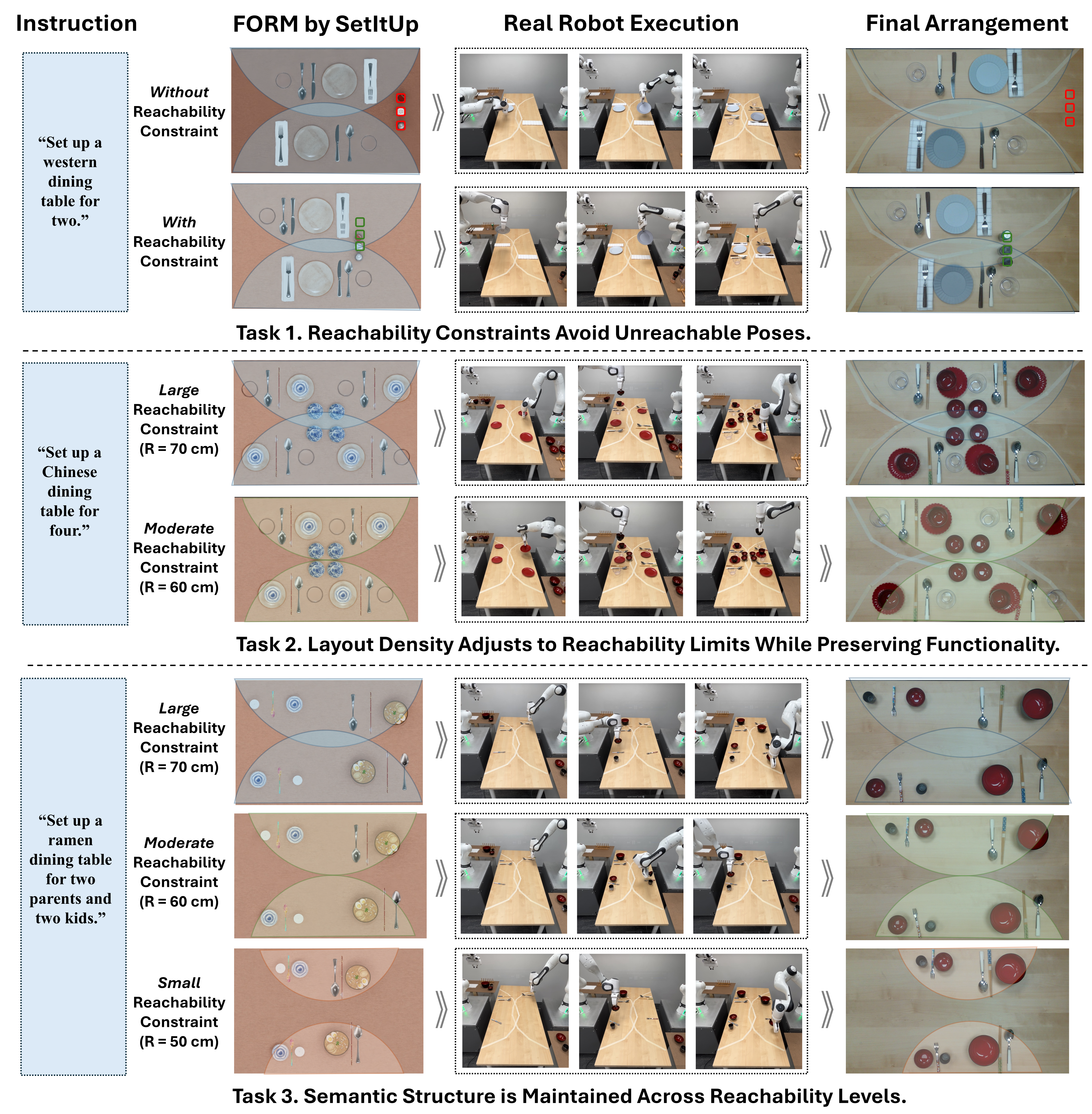
6.6 Real-Robot Experiment: Incorporating Reachability Constraints
A new reachable relation constrains an object to a radius of 70, 60 or 50cm around an assigned robot base. Additional diffusion models are trained by relabeling synthetic data. Objects are associated with the nearest arm, with central objects distributed between arms. This is a geometric reachability approximation, not a complete kinematic or collision-free trajectory guarantee.
Figure 14 preserves three dining scenarios, their predicted layouts, robot execution frames and final arrangements. Smaller radii produce denser layouts while retaining selected grouping constraints. The caption says the constraint tightens “from 50cm to 70cm,” but the labeled panels and main text show tightening from 70 to 50cm. Original caption wording is retained; the physical direction is clarified here. No repeated-trial execution success rate is reported.
6.7 Real-Robot Experiment: Generalization to Complex Scene
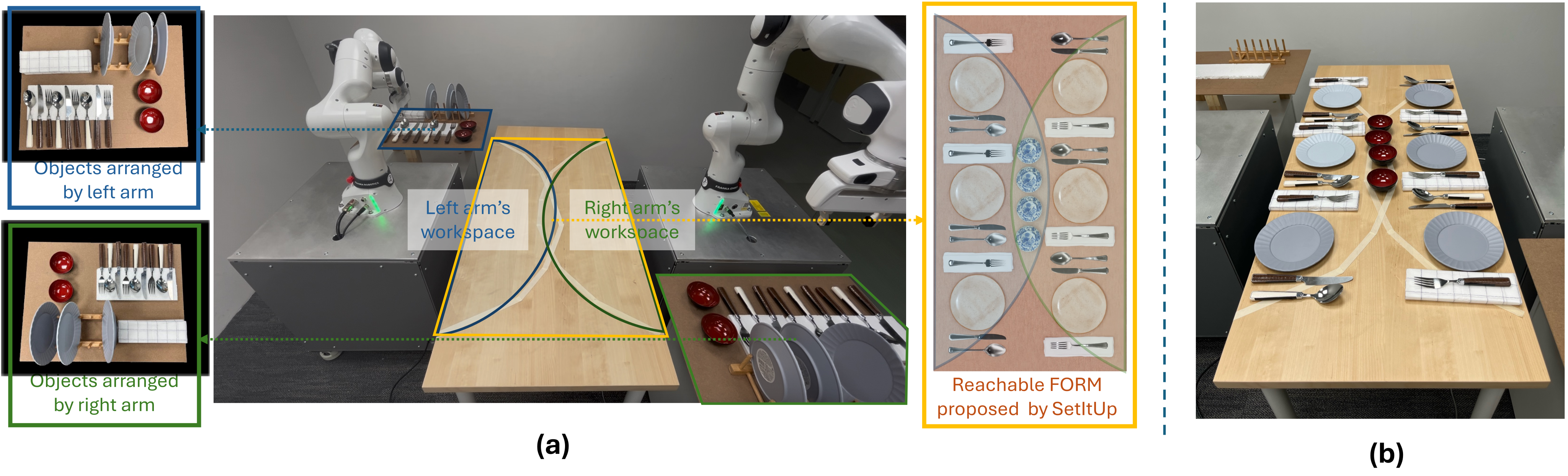
Two Franka Research 3 arms execute a six-diner buffet with more than 30 objects using the same dining program and prompt templates. The extension adds reachability factors and corresponding trained models, so “no prompt tuning” does not mean no robot-specific setup. Initial object poses/types, table-to-base calibration, object-type grasps and execution order are supplied.
SetItUp produces goal poses; a separate motion planner and predefined pick/place routines execute them. The selected successful demonstration establishes integration feasibility, not robust autonomous perception, arbitrary clutter handling or an end-to-end reliability benchmark.
6.8 Failure Case Analysis
Failures include small collisions and objects partly outside containers, especially in tightly packed dining and bedroom scenes. Independently learned factors can impose competing or narrowly overlapping constraints, and finite sampling may only approximately satisfy them. Better joint training or constrained sampling are proposed, not evaluated. The high per-object scores can therefore coexist with fully unsuccessful scenes.
7 Conclusion
The contribution is a reusable link from structured semantic strategies to geometric sampling. Its strongest evidence concerns the specified planar benchmark families under sparse complete-scene supervision. Specification writing still needs domain expertise, verification assumes consistent instructions, and test-time LLM calls remain a dependency. Full 3D support/stability, richer data, contradictory specifications and interactive authoring are future work.
Appendix A Discussion of Differences with the Conference Version
This appendix distinguishes the journal manuscript from the RSS 2024 version [33]. It adds a natural-language-to-program induction pipeline and broadens the task families, rather than treating the two versions as separate unrelated methods.
1. Introduction of a New Program Induction Pipeline with Structured Natural Language Input
The earlier interface required a Python skeleton. The new pipeline generates that skeleton from a structured specification, then implements and revises modules with examples. This reduces required programming syntax while retaining the need for an explicit strategy. The source contains an unresolved section cross-reference in this discussion.
2. Expanded Experimental Evaluation across Diverse Task Families
Bookshelves test personalized grouping of diverse objects; bedrooms test intertwined spatial constraints. These augment the earlier dining setting and exercise different components of the same decomposition.
Appendix B Spatial Relation Library
The complete relation-definition table is retained, including arities, descriptions and classifier rules. Table 1 lists 48 relations, while the detailed table contains 46 named rows and omits the two binary table-axis symmetry definitions. Names also vary between the overview, detailed table and prompt library.
These are descriptive rules rather than a complete tested implementation. Threshold values are generally unspecified, and there are wording inconsistencies: for example, right-half’s description says “left half” despite its right-side test, and horizontal-centroid alignment has potentially confusing coordinate/spacing descriptions. The original entries remain unchanged so these details can be checked against source code before reuse. The planar on-top-of relation tests footprint overlap; it does not establish 3D support or stability.
| Relation | Arity | Description | Implementation of |
| central-column(Obj_A) | Unary | The centroid of obj_A is positioned within the central column of the container, which runs vertically through the container’s midpoint, spanning half the container’s width. | Check if centroid_A is within the central column bounds. |
| central-row(Obj_A) | Unary | The centroid of obj_A is positioned within the central row of the container, which runs horizontally through the container’s midpoint, spanning half the container’s length. | Check if centroid_A is within the central row bounds. |
| at-centered(Obj_A) | Unary | The centroid of Obj_A coincides with center of the container. | Check if the distance between the centroid_A and the container’s center is below a threshold. |
| left-half(Obj_A) | Unary | Obj_A entirely resides within the left half of the container, occupying the left portion as divided vertically along the container’s center axis. | Check if the rightmost point of the bounding box is on the left of the container’s vertical centerline. |
| right-half(Obj_A) | Unary | Obj_A entirely resides within the left half of the container, occupying the right portion as divided vertically along the container’s center axis. | Check if the leftmost point of the bounding box is on the right of the container’s vertical centerline. |
| front-half(Obj_A) | Unary | Obj_A entirely resides within the front half of the container, occupying the front portion as divided horizontally along the container’s center axis. | Check if the highest point of the bounding box is below the container’s horizontal centerline. |
| back-half(Obj_A) | Unary | Obj_A entirely resides within the back half of the container, occupying the back portion as divided horizontally along the container’s center axis. | Check if the lowest point of the bounding box is above the container’s horizontal centerline. |
| near-front-edge(Obj_A) | Unary | Obj_A is positioned near the container’s front edge, which appears at the bottom in the top-down camera view and closest to the camera in the front view. | The shortest distance from any point on the bounding box to the front edge falls below a specified threshold. |
| near-back-edge(Obj_A) | Unary | Obj_A is near the back edge of the container (i.e. the edge opposite the front edge). | The shortest distance from any point on the bounding box to the back edge falls below a specified threshold. |
| near-left-edge(Obj_A) | Unary | Obj_A is near the left edge of the container, which is on the left in both top-down and front views. | The shortest distance from any point on the bounding box to the left edge falls below a specified threshold. |
| near-right-edge(Obj_A) | Unary | Obj_A is near the right edge of the container, which is on the right in both top-down and front views. | The shortest distance from any point on the bounding box to the right edge falls below a specified threshold. |
| facing-front(Obj_A) | Unary | Obj_A is oriented to face the front of the container, aligned with the container’s front edge. | Check if the orientation of Obj_A’s bounding box is 0 radians (facing forward). |
| facing-back(Obj_A) | Unary | Obj_A is oriented to face the back of the container, opposite to the container’s front edge. | Check if the orientation of Obj_A’s bounding box is radians (facing backward). |
| against-right-wall(Obj_A) | Unary | Obj_A is positioned against the right wall of the container, facing left toward the center from the right wall. | Verify that the rightmost point of Obj_A’s bounding box touches the container’s right boundary, and the orientation is radians (facing left). |
| against-left-wall(Obj_A) | Unary | Obj_A is positioned against the left wall of the container, facing right toward the center from the left wall. | Verify that the leftmost point of Obj_A’s bounding box touches the container’s left boundary, and the orientation is radians (facing right). |
| against-front-wall(Obj_A) | Unary | Obj_A is positioned against the front wall of the container, facing back toward the center from the front wall. | Verify that the frontmost point of Obj_A’s bounding box touches the container’s front boundary, and the orientation is radians (facing back). |
| against-back-wall(Obj_A) | Unary | Obj_A is positioned against the back wall of the container, facing front toward the center from the back wall. | Verify that the backmost point of Obj_A’s bounding box touches the container’s back boundary, and the orientation is radians (facing front). |
| right-of-wall(Obj_A) | Unary | Obj_A is on the right side of the wall it is placed against, viewed from the room’s center facing that wall. | Determine the wall against which Obj_A is placed, then verify that Obj_A’s position along that wall is within the right half when facing the wall from the room’s center. |
| left-of-wall(Obj_A) | Unary | Obj_A is on the left side of the wall it is placed against, viewed from the room’s center facing that wall. | Determine the wall against which Obj_A is placed, then verify that Obj_A’s position along that wall is within the left half when facing the wall from the room’s center. |
| center-of-wall(Obj_A) | Unary | Obj_A is at the center of the wall it is placed against, viewed from the room’s center facing that wall. | Determine the wall against which Obj_A is placed, then verify that Obj_A’s position along that wall falls within the central third when facing the wall from the room’s center. |
| at-front-left-corner(Obj_A) | Unary | Obj_A is placed at the front-left corner of the container, facing the back wall. | Verify that Obj_A’s position is within a defined threshold of the front-left corner of the container, and the orientation is radians (facing the back wall). |
| at-front-right-corner(Obj_A) | Unary | Obj_A is placed at the front-right corner of the container, facing the back wall. | Verify that Obj_A’s position is within a defined threshold of the front-right corner of the container, and the orientation is radians (facing the back wall). |
| at-back-left-corner(Obj_A) | Unary | Obj_A is placed at the back-left corner of the container, facing the front wall. | Verify that Obj_A’s position is within a defined threshold of the back-left corner of the container, and the orientation is radians (facing the front wall). |
| at-back-right-corner(Obj_A) | Unary | Obj_A is placed at the back-right corner of the container, facing the front wall. | Verify that Obj_A’s position is within a defined threshold of the back-right corner of the container, and the orientation is radians (facing the front wall). |
| horizontally-aligned-bottom(Obj_A, Obj_B) | Binary | Obj_A and Obj_B are aligned horizontally at their bases. | Check if and |
| horizontally-aligned-centroid(Obj_A, Obj_B) | Binary | Obj_A and Obj_B are aligned horizontally at their centroids. | Check if and |
| vertically-aligned-centroid(Obj_A, Obj_B) | Binary | Obj_A and Obj_B are aligned vertically at their centroids. | Check if and |
| left-of(Obj_A, Obj_B) | Binary | Obj_A is immediately to the left side of Obj_B viewed from the canonical camera frame. | Check if 1) , and 2) and overlap substantially. |
| right-of(Obj_A, Obj_B) | Binary | Obj_A is immediately to the right side of Obj_B viewed from the canonical camera frame. | Check if 1) , and 2) and overlap substantially. |
| in-front-of(Obj_A, Obj_B) | Binary | Obj_A is immediately in front of Obj_B, both facing the same wall. Obj_A’s orientation aligns with Obj_B’s. | Check if: 1) ; 2) and overlap substantially; and 3) (orientations are aligned). |
| on-top-of(Obj_A, Obj_B) | Binary | Obj_A is placed on top of Obj_B. | Check if 1) completely overlaps with , and 2) the area of is equal or larger than . |
| centered(Obj_A, Obj_B) | Binary | Center of Obj_A coincides with center of Obj_B. | Check if . |
| left-touching(Obj_A, Obj_B) | Binary | Obj_A is directly to the left of Obj_B, touching it, both facing the same wall from the room’s center. | Confirm orientations are aligned within ; determine axis based on facing wall; check Obj_A is left of Obj_B along that axis; verify adjacent sides are within touching threshold. |
| right-touching(Obj_A, Obj_B) | Binary | Obj_A is directly to the right of Obj_B, touching it, both facing the same wall from the room’s center. | Confirm orientations are aligned within ; determine axis based on facing wall; check Obj_A is right of Obj_B along that axis; verify adjacent sides are within touching threshold. |
| under-window(Obj_A, Obj_B) | Binary | Obj_A is placed directly under the window (Obj_B), facing the window. | Confirm Obj_A is horizontally aligned with Obj_B within a threshold; positioned directly below Obj_B; orientation matches window’s wall (facing the window). |
| horizontal-symmetry-about-axis-obj (Axis_obj, Obj_A, Obj_B) | Ternary | Obj_A and Obj_B are symmetrical to each other with respect to the horizontal axis of the Axis_obj, meaning they are mirror images along that axis. | Check mirrored centroids along Axis_obj’s horizontal line |
| vertical-symmetry-about-axis-obj (Axis_obj, Obj_A, Obj_B) | Ternary | Obj_A and Obj_B are symmetrical to each other with respect to a vertical axis of the Axis_obj, meaning they are mirror images along that axis. | Check mirrored centroids along Axis_obj’s vertical line |
| aligned-in-horizontal-line-bottom(Obj_1, …, Obj_N) | Variable (N) | Objects aligned horizontally with equal spacing at their bases. | Check for pairwise and , and equal spacing horizontally between the adjacent objects. |
| aligned-in-horizontal-line-centroid(Obj_1, …, Obj_N) | Variable (N) | Objects aligned horizontally with equal spacing at their centroids. | Check for pairwise and , and equal spacing vertically between the adjacent objects. |
| aligned-in-vertical-line-centroid(Obj_1, …, Obj_N) | Variable (N) | Objects aligned vertically with equal spacing at their centroids. | Check for pairwise and , and equal spacing vertically between the adjacent objects. |
| regular-grid(Obj_1, …, Obj_N) | Variable (N) | Arranged in a grid or matrix pattern. | Verify if the centroids of objects in the same row or column are aligned and ensure the distances between rows and columns are constant. |
| contiguously-aligned(Obj_1, …, Obj_N) | Variable (N) | Obj_1 through Obj_N are aligned horizontally in a straight line at their bases, each directly contacting its neighbors. | - Confirm orientations are similar: For all , . - Check bases are aligned: For all , . - Verify objects are ordered along the horizontal axis: - For to , confirm within a touching threshold. |
| height-sorted-ascending(Obj_1, …, Obj_N) | Variable (N) | Objects are aligned from left to right at their bases, sorted in ascending order of height. | - Confirm bases are aligned: For all , . - Verify left-to-right order: For to , ensure . - Check heights are ascending: For to , confirm . |
| height-sorted-descending(Obj_1, …, Obj_N) | Variable (N) | Objects are aligned from left to right at their bases, sorted in descending order of height. | - Confirm bases are aligned: for all . - Verify left-to-right order: For to , ensure . - Check heights are descending: For to , confirm . |
| width-sorted-ascending(Obj_1, …, Obj_N) | Variable (N) | Objects are aligned from left to right at their bases, sorted in ascending order of width. | - Confirm bases are aligned: for all . - Verify left-to-right order: For to , ensure . - Check widths are ascending: For to , confirm . |
| width-sorted-descending(Obj_1, …, Obj_N) | Variable (N) | Objects are aligned from left to right at their bases, sorted in descending order of width. | - Confirm bases are aligned: for all . - Verify left-to-right order: For to , ensure . - Check widths are descending: For to , confirm . |
Appendix C Reverse Sampling and ULA Sampling
The appendix compares fixed-noise reverse diffusion and unadjusted Langevin updates [8][27]. It motivates doubling the noise variance, or interpreting the original schedule as a lower-temperature sampler. All five displayed formulas are preserved, including the three numbered equations.
The printed notation is internally difficult to reconcile: the text names β as a variance while some updates multiply the noise by β rather than its square root, and the displayed score is written as a gradient of p rather than log p. This derivation does not separately establish the main text’s convergence claim for finite, normalized, composed learned scores. The edition preserves those expressions rather than silently repairing them.
Equations 2–4
| (2) |
| (3) |
| (4) |
Appendix D Diffusion Model Implementation Details
Shapes and planar poses are normalized by reference-container dimensions. Two-layer shape/pose encoders use hidden width 256 and SiLU; the time encoder uses sinusoidal features, a fourfold expansion and Mish. Fixed-arity factors use an MLP, while variable-arity factors use a transformer with positional encoding, masks and padding.
The stated transformer capacity is 16 objects per relation. Composition can connect many local factors into a larger scene, but the paper does not specify how an individual relation exceeding that arity is handled. Training uses squared noise-prediction error; inference uses a cosine schedule with 1,500 diffusion steps and, in the main text, 20 MCMC updates per level. Full optimizer, training-duration and runtime/token-cost details are not reported.
Appendix E Prompts
The complete source prompts and listings are retained as selectable text, including the long dining specification. They expose the substantial domain knowledge and structured interfaces behind the small demonstration count.
E.1 Natural Language Task Specification
Listing 1 gives the full dining strategy: diner/shared-object records, Western/Chinese/ramen/custom patterns, shared dishes and side items, requirement extraction, seating, category assignment and relation aggregation. It includes explicit handedness and orientation adjustments. This reusable specification is part of the supervision, not a behavior inferred solely from five arrangements.
# Program Synthesis for Dining Table

## Description

This guide details how to arrange tableware and cutlery on a dining table according to specified instructions and preferences. It consists of two main components:

1) **Domain Specification**: Defines the customized storage structure for organizing information and describes common arrangement rules and patterns for recurring sub-structures.
2) **Procedural Description**: Provides a step-by-step process to propose the object arrangement layout.

## Domain Specification

### Step 1: **Create Data Structure for Information Handling**

To ensure consistency in our arrangement, we create data structures to help organize information as we procedurally generate abstract object relations. The object arrangement layout involves two main components:
1. Tableware arrangement for individual diners.
2. Shared tableware arrangement.

Based on this structure, we develop two data structures to handle relevant information and abstract relations for each component.

**Component 1: Individual Diner Tableware Arrangement**

We create a Python dictionary named `diner_dictionary`, indexed by diner ID. Each entry stores the details of an individual diner's tableware arrangement using a `Diner` class. The `Diner` class includes the following attributes:
- `ID`: A unique identification number.
- `special_requirement`: Specific needs or preferences (default is none).
- `individual_tableware_arrangement_style`: A semantic name indicating the dining style, e.g., "Chinese dining setup" or "Western dining setup".
- `seating_position`: A tuple describing the diner's seating position at the table. The first element indicates the table side ("near_front_edge" or "near_back_edge"), and the second element specifies the relative location on that side ("left_half," "central_column," or "right_half").
- `object_list`: A list of object names assigned to the diner.
- `active_relations`: A list of abstract object relations describing the layout for the diner.

**Component 2: Shared Tableware Arrangement**

We create a Python dictionary named `sharing_objects`, indexed by the semantic names of sharing object groups (e.g., "sharing dishes" or "sharing seasonings"). Each entry uses a `SharingObjectGroup` class to organize the information, which includes the following attributes:
- `object_list`: A list of object names belonging to the sharing object group.
- `abstract_relations`: A list of proposed active abstract relations for the shared objects.

By organizing our data structures in this way, we can efficiently manage both individual and shared tableware arrangements, ensuring a consistent and coherent layout.


### Step 2: **Establish General Setup Guidelines**

Different dining styles (e.g., Western vs. Chinese) and occasions (e.g., setups for kids or left-handed diners) require specific tableware arrangements. We follow common guidelines to arrange these setups based on available tableware and provided instructions.

There are recurring basic arrangement units for specific setups, including individual dining-style arrangements, sharing dishes, and sharing utensils. We describe the common rules for these arrangements below, allowing us to select, combine, and adapt them as needed.

#### Step 2.1. **Arranging Western-style Tableware for an individual Diner**

Western-style dinner setups typically include a serving plate, napkin, fork, knife, spoon, and glass. Let's discuss a standard setup for a right-handed diner, whose `seating_position` is at the "central column" "near the front edge" of the table.

- **Serving Plate**: Positioned according to the diner's `seating position`: ("central_column", "serving_plate") and ("near_front_edge", "serving_plate").
- **Napkin**: Placed to the left of the serving plate ("left_of", "napkin", "serving_plate").
- **Fork**: Placed on top of the napkin ("on_top_of", "fork", "napkin").
- **Knife and Spoon**: Positioned to the right of the serving plate, with the knife first and then the spoon ("right_of", "knife", "serving_plate") and ("right_of", "spoon", "knife").
- **Glass**: Positioned to the right of the spoon ("right_of", "glass", "spoon").

Adjustments may be needed based on:
1. Available tableware.
2. Diner's seating position.
3. Diner's personal preferences.

Given a list of object names, the diner's `seating_position` as a tuple, and a string indicating their `personal_preference`, here is the adjustment process:

1. Query the language model to associate the object names with standard setup items.
2. Collect unassigned object names in a separate list.
3. Propose the placement for the object designated as the "serving_plate" based on the `seating_position`.
4. For matched objects, follow the standard arrangement rules.
5. For unassigned objects, query the language model with:
   - Dining style.
   - Current object list.
   - Current arrangement.
   This will help determine their abstract relations with the rest of the setup.
6. Adjust the arrangement based on `personal preference` and the table edge in the `seating_position`. If the diner is left-handed xor facing the back edge, reverse the "left_of" and "right_of" relations.


#### Step 2.2. **Arranging Chinese-style Tablewares for an individual diner.**

Typical items used in Chinese-style table setups include a small plate, rice bowl, chopsticks, spoon, and a glass. Let's discuss a common setup for a right-handed diner whose `seating_position` is at the "central column" "near the front edge" of the table.

- **Small Plate**: Positioned according to the diner's `seating_position`: such as "central_column" and "near_front_edge".
- **Rice Bowl**: Placed on top of the small plate.
- **Chopsticks, Spoon, and Glass**: Positioned sequentially from left to right on the right-hand side of the small plate.

Adjustments may be needed based on:
1. Available tableware.
2. Diner's seating position.
3. Diner's personal preferences.

Given a list of object names, the diner's `seating_position` as a tuple, and a string indicating their `personal_preference`, here is the adjustment process:

1. Query the language model to associate the object names with standard setup items.
2. Collect unassigned object names in a separate list.
3. Propose the placement for the object designated as the "small_plate" based on the `seating_position`.
4. For matched objects, follow the standard arrangement rules.
5. For unassigned objects, query the language model with:
   - Dining style.
   - Current object list.
   - Current arrangement.
   This will help determine their abstract relations with the rest of the setup.
6. Adjust the arrangement based on `personal preference` and the table edge in the `seating_position`. If the diner is left-handed xor facing the back edge, reverse the "left_of" and "right_of" relations.


#### Step 2.3. **Arranging Ramen-style Tablewares for an individual diner.**

A standard Japanese Ramen table setup commonly includes a ramen bowl, chopsticks, spoon, and glass. Let's discuss a basic arrangement for a right-handed diner, whose `seating_position` is at the "central column" "near the front edge" of the table.

- **Ramen Bowl**: Positioned according to the diner's `seating_position`, such as "central_column" and "near_front_edge".
- **Chopsticks**: Placed to the right of the ramen bowl.
- **Spoon**: Positioned to the right of the chopsticks.
- **Glass**: Positioned to the right of the spoon.

Adjustments may be needed based on:
1. Available tableware.
2. Diner's seating position.
3. Diner's personal preferences.

Given a list of object names, the diner's `seating_position` as a tuple, and a string indicating their `personal_preference`, here is the adjustment process:
1. Query the language model to associate the object names with standard setup items.
2. Collect unassigned object names in a separate list.
3. Propose the placement for the object designated as the "ramen_bowl" based on the `seating_position`.
4. For matched objects, follow the standard arrangement rules.
5. For unassigned objects, query the language model with:
   - Dining style.
   - Current object list.
   - Current arrangement.
   This will help determine their abstract relations with the rest of the setup.
6. Adjust the arrangement based on `personal preference` and the table edge in the `seating_position`. If the diner is left-handed xor facing the back edge, reverse the "left_of" and "right_of" relations.


#### Step 2.4. **Arranging other-dining style for an individual diner.**

Given a list of object names, a tuple indicating the diner's `seating_position`, a string indicating the diner's `personal_preference`, and a string specifying the `individual_tableware_arrangement_style`, we will propose a tableware arrangement for a single diner by following these steps:

1. **Identify the Main Dish Container**: Determine the "main_dish_container" essential for the dining style. For example, the "main_serving_plate" is the "main_dish_container" for a western dining setup. Query the language model using the `individual_tableware_arrangement_style` and the object name list to identify the relevant object name.
2. **Determine Placement for the Main Dish**: Position the "main_dish_container" based on the diner's `seating_position`. For example, if the `seating_position` is ("central_column", "near_front_edge"), the proposed placements are ("central_column", "main_dish_container") and ("near_front_edge", "main_dish_container").
3. **Arrange Related Objects**: Query the language model to propose the abstract object relations for other objects relative to the "main_dish_container" and among themselves, according to the `individual_tableware_arrangement_style` and the object name list. The language model should consider the dining conventions for a right-handed diner.
4. **Adjust for Preferences**: Modify the arrangement based on the diner's `personal_preference` and exact `seating_position`. For a left-handed diner or one facing the back edge, reverse the "left_of" and "right_of" relations.

#### Step 2.5. **Arranging Shared Plates.**

Given a list of object names for shared dishes at a meal, the arrangement should be neat and centrally located for easy access by all diners. The arrangement varies based on the number of objects:

1. **Neat Arrangement**:
   - **One Object**: Simply center the object.
   - **Two Objects**: Arrange them symmetrically along the table's vertical axis.
   - **Three or Four Objects**: Arrange them in a single horizontal line.
   - **More Than Four Objects**: Arrange them in a regular grid.

2. **Central Arrangement**:
   - **One Object**: Place it at the exact center of the table.
   - **Multiple Objects**: Place each of them on central row of the table.


#### Step 2.6. **Arranging Shared Side Items**

Given a list of object names for shared side items, such as seasonings or bottles of water, follow these steps to ensure easy access and a neat arrangement:

1. **Vertical Alignment**: Align the side items vertically.
2. **Central Row Placement**: Place each item along the central row of the table.
3. **Edge Positioning**: Decide on either the left or right edge of the table, then place each item near that edge.


## Procedural Description

### Step 1: **Extract the Relevant Information from the Instructions**

#### Step 1.1. **Figuring Out the Number of Diners**
We start off by finding out how many people are dining from the instruction. This is important because it helps us know how many seats and table sets we will need.
- How to do this: query the language model with the instruction to infer the number of diners. The language model should return an integer that indicates the number of diners. Based on the number of diners, create a diners dictionary to store the information for all the diners.


#### Step 1.2. **Determining Where Everyone Wants to Sit**
To determine where everyone wants to sit at the table, follow these steps. Our table has two main sides (front and back edge) and three seating positions on each side (left, center, and right). We will update the `seating_position` for each diner. The `seating_position` is a tuple where the first element indicates either "near_front_edge" or "near_back_edge" of the table, and the second element indicates whether the seat is on the "left_half", "central_column", or "right_half" of the assigned table edge.

Given `instruction`, `diner_dictionary`, you need to make sure that each diner in the dictionary has their `seating_position` assigned as a tuple.
How to do this:
1. **Determine Table Side**:
    - Query the language model to infer from the instruction if diners want to sit on the same side or opposite sides of the table (default is opposite sides).
      - If opposite sides: Evenly distribute diners between the front_edge and back_edge.
      - If same side: Allocate all diners to the front_edge.

2. **Determine Preferred Side**:
    - Query the language model to infer if each diner has a preferred seating area.
      - If preferences are indicated: Assign seats according to each diner's preference.
      - If no preferences: Evenly distribute the diners on each edge by assigning left_half, central_column, or right_half positions.


#### Step 1.3. **Identifying the Diners with Special Requirements**
Lastly, we need to check if any diner has special requirements, such as "needing a baby seat" or being "left-handed". We will update the `personal_preference` field for each diner.

Given `instruction`, `diner_dictionary`, make sure that each diner in the dictionary has their `personal_preference` field updated with the inferred special requirements.


How to do this:

1. **Query Special Requirements**:
    - Query the language model using the instruction and the number_of_diners to infer a list of strings indicating special requirements for each diner. The default is `None`.

2. **Assign Requirements**:
    - Assign each element of the inferred list to the `personal_preference` field for each diner.


### Step 2: Identify the Relevant Sub-arrangement

#### Step 2.1 **Identify the individual Dining Style**
Next we need to identify the relevant dining style for arranging the tablewares for each diner from the instruction, such as "western dining style" or "Chinese dining style". We update the `individual_tableware_arrangement_style` field for each diner.

How to do this:
- we query the language model to infer the style of dining based on the instruction as a single string,
- iterate through the diners, assign the inferred dining_style to the `individual_tableware_arrangement_style` for each diner.

Given instruction, diner_dictionary, assign the `individual_tableware_arrangement_style` for each diner in the diner_dictionary.

#### Step 2.2. **Identify the categories for Shared Objects**

Next, we will identify the categories for the shared objects among the diners. There are two possible categories: "shared_dishes" for the main dishes and "shared_side_objects" for items like condiments or drinks.

How to do this:

1. **Query the Categories**:
    - Using the instruction and the object name list, query the language model to determine the categories of the shared objects. There are two possible categories: "shared_dishes" for the main dishes and "shared_side_objects" for items like condiments or drinks.
    - Return a list of the identified category names.

2. **Initialize the `sharing_objects` Dictionary**:
    - Create a dictionary with the identified category names as keys.
    - Assign `SharingObjectGroup` as the placeholder value for each category.

Given instruction, object_name_list, output the `sharing_objects` dictionary. The keys of the dictionary are the identified category names, while the values are `SharingObjectGroup` for now.


### Step 3: Assigning the Objects Into the Identified Groups

#### Step 3.1. **Assigning Personal Tableware to Diners**

Given the full `object_name_list` and the `diners` dictionary, we will assign a list of personal tableware items to the `object_list` for each diner.


How to do this:

1. **Identify Individual Usage Objects**:
    - Query the language model with the `object_name_list`, number of diners, and `individual_tableware_arrangement_style` to select a list of object names intended for individual use.
    - Ensure the selected list includes main serving tableware and the required utensils for each diner.
    - Save these object names in a list called `individual_objects`.

2. **Assign Objects to Diners**:
    - Iterate through each diner in the `diners` dictionary.
    - For each diner, query the language model to select a subset of object names based on the diner's `personal_preference` and `individual_tableware_arrangement_style` from the `individual_objects` list.
    - Assign this subset list to the `object_list` for each diner.

#### Step 3.2. **Assigning the Shared Items**

Given the full `object_name_list`, the previously identified `individual_objects`, and the `sharing_objects` dictionary, we will assign a list of shared object names to each shared object category.

How to do this:
1. **Identify Shared Objects**:
    - Create a list called `shared_objects_list` by selecting all objects in `object_name_list` that are not in the `individual_objects` list.

2. **Assign Objects to Categories**:
    - Iterate through the keys of the `sharing_objects` dictionary (each key representing a category).
    - For each category, query the language model to select a subset of object names based on the `category_name` (the key) and the `shared_objects_list`.
    - Assign this subset of object names to the `object_list` of `ShareObjectGroup` of the corresponding category name.


### Step 4: **Arranging the Objects within Each Group**

#### Step 4.1 **Arranging the Personal Tableware For Each Diner**

We propose the object arrangement for each diner based on their `individual_tableware_arrangement_style`, `personal_preference`, `seating_position`, and `object_list`.

Given `diners` dictionary, we update it with the `active_relations` for each diner assigned a list of abstract relations.

How to do this:

1. **Iterate Through Diners**:
    - For each diner in the `diners` dictionary, based on its `individual_tableware_arrangement_style`, call the relevant arrangement function with the necessary arguments. We have the following arrangement functions for individual diner:
        - `western_dining_arrangement(object_list, seating_position, personal_preference)`
        - `chinese_dining_arrangement(object_list, seating_position, personal_preference)`
        - `ramen_dining_arrangement(object_list, seating_position, personal_preference)`
        - `other_dining_arrangement(individual_tableware_arrangement_style, object_list, seating_position, personal_preference)`

2. **Assign Abstract relations**:
    - Each arrangement function returns a list of abstract object relations.
    - Assign this list to the `active_relations` for each diner.


#### Step 4.2 **Arranging the Sharing Objects**

We propose the arrangements for groups of shared objects based on their categories.

Given `sharing_objects` dictionary, we update it with the `active_relations` for each `SharedObjectGroup` assigned a list of abstract relations.

How to do this:
1. we iterate through the `sharing_objects` dictionary, and call the relevant function for arranging the objects based on the `category_name` (the key of the dictionary) and the associated `object_list`. We have the following arrangement functions for the shared objects:
    - `shared_dished_arrangement(object_list)`
    - `shared_side_objects_arrangement(object_list)`
2. each arrangement function returns a list of abstract object relations. Assign this this to the `active_relation` to each `SharedObjectGroup` indexed by the category name.
E.2 Prompts for SketchGenerator
Separate sketch prompts translate reusable structures/patterns and hierarchical procedures. The four full source prompt blocks below are preserved in addition to their edited explanations.
E.2.1 Prompt for Domain Specification
The domain prompt requests suitable data structures and typed, documented function signatures. It explicitly asks for the original descriptions to be copied into comments without implementation.
We first translate the domain specification from the natural language description to a Python code skeleton. This translation involves two components: 1) creating data structure, and 2) specifying the function definition for each common patterns.
Creating Data Structure
Design and implement an appropriate data structure in Python based on the provided natural language description for organizing the information.
Specifying the Function Definition for each Common Patterns
-
A clear, semantically meaningful name.
-
Well-defined arguments specifying types.
-
Explicit return types.
-
A docstring that encapsulates the purpose and the detailed mechanics of the function.
-
Copy all the natural language descriptions of the step/sub-step into the comment, do NOT try to summarize it.
Do NOT write any implementation.
E.2.2 Prompt for Procedural Description
The procedural prompt creates functions for every step/substep and assembles a main function, with named intermediate results. The original eleven-line function template and all instructions are retained. Function bodies are deferred to the coder.
Next, translate the detailed procedural description for proposing tableware arrangements on a dining table into a Python code skeleton. You do NOT need to implement the functions; your role is to organize the information by translating the natural language description for each step and sub-step into Python function skeletons. You have the following two tasks: 1) specifying the function definition for each step and integrating the functions for the main function.
Specify the Function Definition for each Step
For each step and **sub-step** listed in the natural language instructions, define corresponding Python functions. Ensure that each function has:
-
A clear, semantically meaningful name.
-
Well-defined arguments specifying types.
-
Explicit return types.
-
A docstring that encapsulates the purpose and the detailed mechanics of the function.
-
Copy all the natural language descriptions of the step/sub-step into the comment, do NOT try to summarize it.
Do NOT write any implementation.
Integrating the Functions for the Main Function
Using the previously defined functions, systematically implement the program logic for the main function. Declare variables with meaningful names to capture intermediate results which will then be passed as arguments to subsequent functions.
Please design the functions such that they can be chained together to process the input and produce the desired output based on the stepwise procedure explained in the instructions. Begin with the primary function template:
def generate_object_arrangements_for_dining_table(instruction: str, object_list: List[str]) -> List[str]:
    """
    Generate a list of abstract relations among objects on a dining table based on given instructions.

    :param instruction: A string detailing the preference on the dining table arrangement.
    :param object_list: A list of strings, each a name of an object to be arranged.
    :return: A list of tuples of strings describing the relation among the arranged objects.
    """
    active_relation_list = []
    # Implementation goes here
    return active_relation_list
Ensure all function signatures within the main function are properly defined and that their integration adheres to the logical steps provided in the instructions.
E.3 Prompts for Coder
The coder prompt distinguishes direct implementation of a fixed strategy from semantic questions handled through call_LLM and parse_LLM. Each semantic prompt specifies its question, contextual examples/explanations and output format. These are source prompt instructions shown for inspection, not commands executed by this reading edition.
You are tasked with synthesizing Python code based on a fully-documented function signature and an accompanying docstring.
Below are the function signature and docstring:
Program sketch goes to here.
Your task is to carefully interpret the provided function signature and docstring, then implement the function in Python by following the natural language description step-by-step. If the description specifies a fixed strategy, implement it directly using Python code. If the description requires on-the-fly inference or adaptation, use the call_LLM() function to query GPT-4 and parse_LLM() during your coding process. We have already imported call_LLM() and parse_LLM() for you.
When using call_LLM(), structure your prompt in three parts:
-
Question: Clearly state the query related to your implementation.
-
Examples or explanations: Provide examples or further explanation to clarify the query. You can extract this information from the natural language description.
-
Output Format: Describe the format in which you want the response.
E.4 Prompt for Verifier
The verifier receives the signature/docstring, implementation and five examples. It predicts behavior, uses commonsense to emulate LLM calls, then returns pass/fail and revises the documentation on failure. It is an LLM-based consistency check over examples, not a proof of program behavior.
You are a verifier tasked with ensuring that a function’s implementation matches specified input-output examples.
For this task, you are provided with:
-
Function signature and the docstring: the input to the synthesizer.
-
Function Implementation: The actual code of the function implemented by the Coder LLM.
-
5 demonstrations: each demonstration is an input-output pair:
-
Input: The data that will be fed into the function.
-
Expected Output: The anticipated result based on the input.
-
Your role is to determine if the function’s implementation correctly produces the expected output for the given input. When using call_LLM(), use your commonsense reasoning to emulate the function’s output. If the function passes the test, return ”Pass”. If it fails, return ”Fail”, and revise the function signature and docstring to inform the synthesizer about the specific code issues and how to correct them.
Appendix F Task Family Overview
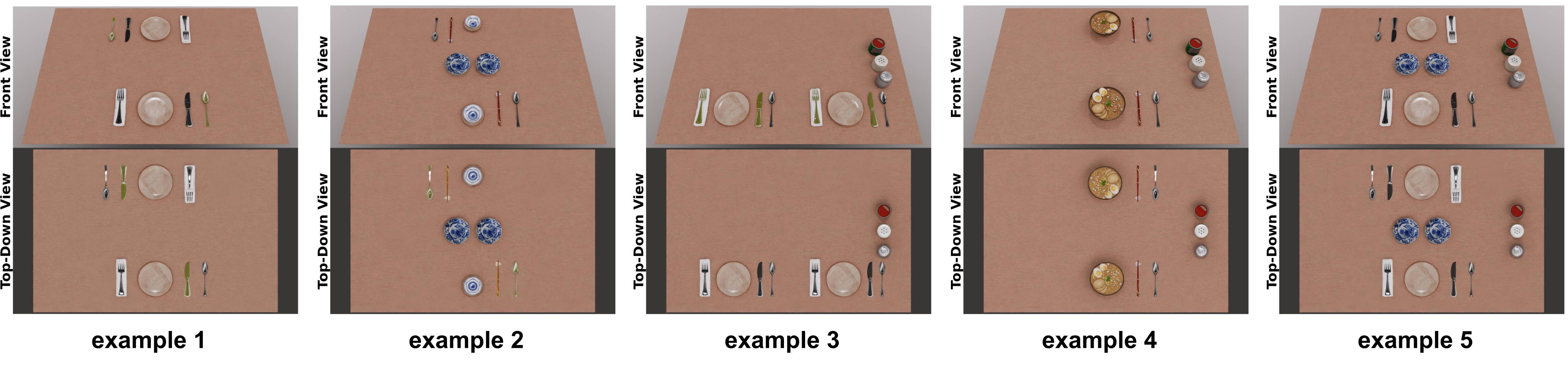
The dataset appendix retains every training/test instruction, object list, room/compartment condition and all 15 illustrated training layouts. Each family has five training and 15 test cases.
F.1 Dining Table
Dining includes serving dishes, standard utensils, bowls, chopsticks, child-specific tableware and seasonings. The test table ranges from seven to 27 objects and varies handedness, seating, shared dishes and adults/children. These exact cases and the five training examples remain in Tables 6–7 and Figure 16.
| Index | User Instruction | Object List |
| 1 | Could you please arrange a dining table for two people? | serving_plate_1, napkin_1, fork_1, knife_1, spoon_1, serving_plate_2, napkin_2, fork_2, knife_2, spoon_2 |
| 2 | Please prepare a Chinese-style dining table for two guests. | medium_plate_1, medium_plate_2, small_plate_1, small_plate_2, rice_bowl_1, rice_bowl_2, chopsticks_1, chopsticks_2, spoon_1, spoon_2 |
| 3 | Could you please arrange a dining table for two? We would like to sit side by side? | serving_plate_1, napkin_1, fork_1, knife_1, spoon_1, serving_plate_2, napkin_2, fork_2, knife_2, spoon_2, seasoning_1, seasoning_2, seasoning_3 |
| 4 | Could you please set up the ramen dining table for two, ensuring that the seating accommodates one left-handed diner? | ramen_bowl_1, chopsticks_1, spoon_1, ramen_bowl_2, chopsticks_2, spoon_2, seasoning_1, seasoning_2, seasoning_3 |
| 5 | Instruction: Could you please set up a dining table for two, with the setup for sharing the main dishes? | medium_plate_1, medium_plate_2, serving_plate_1, napkin_1, fork_1, knife_1, spoon_1, serving_plate_2, napkin_2, fork_2, knife_2, spoon_2, seasoning_1, seasoning_2, seasoning_3 |
| Index | User Instruction | Object List | # Objects |
| 1 | Could you please set up a western dining table for me with the seasoning on the side? | serving_plate, napkin, fork, knife, spoon, glass, seasoning_1, seasoning_2, seasoning_3 | 9 |
| 2 | Could you please set up a Chinese-style dining table for me with the seasoning on the side? | medium_plate_1, medium_plate_2, medium_plate_3, small_plate, rice_bowl, chopsticks, spoon, glass, seasoning_1, seasoning_2, seasoning_3 | 11 |
| 3 | Could you please set up a ramen dining table for me with the seasoning on the side? | ramen_bowl, chopsticks, spoon, glass, seasoning_1, seasoning_2, seasoning_3 | 7 |
| 4 | Could you please set up a dining table for two people with drinks on the side? | serving_plate_1, napkin_1, fork_1, knife_1, glass_1, spoon_1, serving_plate_2, napkin_2, fork_2, knife_2, spoon_2, glass_2, seasoning_1, seasoning_2, seasoning_3 | 15 |
| 5 | Could you please set up a western dining table for two people sitting side by side with drinks on the side? | serving_plate_1, napkin_1, fork_1, knife_1, glass_1, spoon_1, serving_plate_2, napkin_2, fork_2, knife_2, spoon_2, glass_2, seasoning_1, seasoning_2, seasoning_3 | 15 |
| 6 | Could you please set up a western dining table for a parent and a kid? They should sit side by side so the parent can help the kid. | serving_plate_1, napkin_1, fork_1, knife_1, glass_1, spoon_1, baby_plate, baby_spoon, baby_cup, seasoning_1, seasoning_2, seasoning_3 | 12 |
| 7 | Could you please set up a western dining table for two people with drinks on the side? Both of them are left-handed. | serving_plate_1, napkin_1, fork_1, knife_1, spoon_1, glass_1, serving_plate_2, napkin_2, fork_2, knife_2, spoon_2, glass_2, seasoning_1, seasoning_2, seasoning_3 | 15 |
| 8 | Could you please set up a ramen dining table for a parent and a kid? They should sit side by side so the parent can help the kid. | ramen_bowl, chopsticks, spoon, baby_bowl, baby_spoon, baby_cup, seasoning_1, seasoning_2, seasoning_3 | 9 |
| 9 | Could you please set up a Chinese-style dining table for two people with dishes for sharing? | medium_plate_1, medium_plate_2, medium_plate_3, medium_plate_4, small_plate_1, rice_bowl_1, chopsticks_1, spoon_1, glass_1, small_plate_2, rice_bowl_2, chopsticks_2, spoon_2, glass_2, seasoning_1, seasoning_2, seasoning_3 | 17 |
| 10 | Could you please set up a ramen dining table for two people with dishes for sharing? | medium_plate_1, medium_plate_2, medium_plate_3, ramen_bowl_1, chopsticks_1, spoon_1, glass_1, ramen_bowl_2, chopsticks_2, spoon_2, glass_2, seasoning_1, seasoning_2 | 13 |
| 11 | Could you please set up a western dining table for four people? | serving_plate_1, napkin_1, fork_1, knife_1, glass_1, spoon_1, serving_plate_2, napkin_2, fork_2, knife_2, glass_2, spoon_2, serving_plate_3, napkin_3, fork_3, knife_3, glass_3, spoon_3, serving_plate_4, napkin_4, fork_4, knife_4, glass_4, spoon_4 | 24 |
| 12 | Could you please set up a western dining table for four people? Two of them are left-handed and they should sit facing each other. | serving_plate_1, napkin_1, fork_1, knife_1, glass_1, spoon_1, serving_plate_2, napkin_2, fork_2, knife_2, glass_2, spoon_2, serving_plate_3, napkin_3, fork_3, knife_3, glass_3, spoon_3, serving_plate_4, napkin_4, fork_4, knife_4, glass_4, spoon_4, seasoning_1, seasoning_2, seasoning_3 | 27 |
| 13 | Could you please set up a Chinese-style dining table for four people with sharing main dishes? | medium_plate_1, medium_plate_2, medium_plate_3, medium_plate_4, small_plate_1, rice_bowl_1, chopsticks_1, spoon_1, glass_1, small_plate_2, rice_bowl_2, chopsticks_2, spoon_2, glass_2, small_plate_3, rice_bowl_3, chopsticks_3, spoon_3, glass_3, small_plate_4, rice_bowl_4, chopsticks_4, spoon_4, glass_4, seasoning_1, seasoning_2, seasoning_3 | 27 |
| 14 | Could you please set up a ramen dining table for four people with two kids? Each kid should sit side by side by one parent so the parent can help them. | ramen_bowl_1, chopsticks_1, spoon_1, ramen_bowl_2, chopsticks_2, spoon_2, baby_bowl_1, baby_spoon_1, baby_cup_1, baby_bowl_2, baby_spoon_2, baby_cup_2, seasoning_1, seasoning_2, seasoning_3 | 15 |
| 15 | Could you please set up a Chinese-style dining table for four? One of them is left-handed and there is a kid. | medium_plate_1, medium_plate_2, medium_plate_3, medium_plate_4, small_plate_1, rice_bowl_1, chopsticks_1, spoon_1, glass_1, small_plate_2, rice_bowl_2, chopsticks_2, spoon_2, glass_2, small_plate_3, rice_bowl_3, chopsticks_3, spoon_3, glass_3, baby_plate, baby_spoon, baby_cup, seasoning_1, seasoning_2, seasoning_3 | 25 |
F.2 Bookshelf
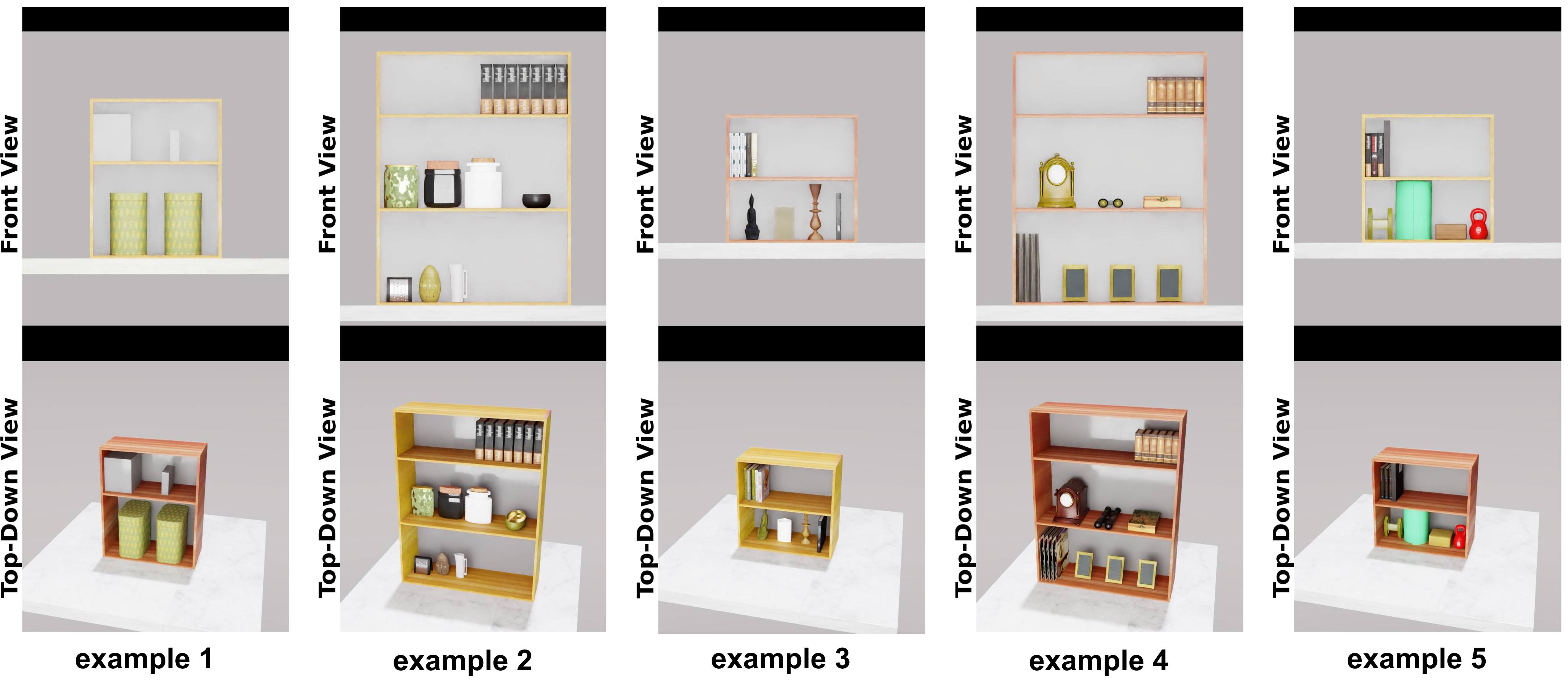
The bookshelf family spans a reported 140 object types across 20 scenarios, with two to four compartments in the listed examples. Test cases contain 11–23 objects and personalized grouping or accessibility requests. Tables 8–9 retain the full inventories, and Figure 17 shows all five training layouts. These finite cases are the measured scope of the open-set claim.
| Index | User Instruction | # Compartments | Object List |
| 1 | Children’s books need to be easily accessible, so put them on the top shelf. | 2 | basket_of_toys_1, basket_of_toys_2, children_book_1, children_book_2, children_book_3, children_book_4, children_book_5, children_book_6, puzzles |
| 2 | I reference my cookbooks regularly, so put them on the top shelf. | 3 | kitchen_gadget_grater, kitchen_gadget_timer, kitchen_gadget_measuring_cup, jar_with_dried_herbs_and_spices_1, jar_with_dried_herbs_and_spices_2, jar_with_dried_herbs_and_spices_3, decorative_bowl, cookbook_1, cookbook_2, cookbook_3, cookbook_4, cookbook_5, cookbook_6, cookbook_7 |
| 3 | Keep my meditation items like candles and incense on the bottom shelf where I can easily access them during my sessions. | 2 | small_buddha_statue, candle, incense_holder, journal, self_help_book_1, self_help_book_2, self_help_book_3, self_help_book_4, self_help_book_5 |
| 4 | Arrange antique items like clocks or keepsakes on the middle shelf. | 3 | vinyl_record_1, vinyl_record_2, vinyl_record_3, vinyl_record_4, photograph_frame_1, photograph_frame_2, photograph_frame_3, antique_old_clock, antique_binoculars, antique_ornate_box, old_leather_bound_book_1, old_leather_bound_book_2, old_leather_bound_book_3, old_leather_bound_book_4, old_leather_bound_book_5, old_leather_bound_book_6 |
| 5 | Keep my workout equipment on the bottom shelf where I can grab it easily when I’m ready to exercise. | 2 | dumbbell, yoga_mat, yoga_block, kettle_bell, fitness_book_1, fitness_book_2, fitness_book_3, workout_log_1, workout_log_2 |
| Index | User Instruction | # Compartments | Object List | # Objects |
| 1 | Keep my laptop and a few office supplies in the middle for quick access. | 3 | binder_1, binder_2, binder_3, folder_1, folder_2, folder_3, laptop_close, pen_holder, succulent_1, hardcover_book_1, hardcover_book_2, hardcover_book_3, hardcover_book_4, hardcover_book_5, hardcover_book_6, hardcover_book_7, hardcover_book_8 | 17 |
| 2 | I love having plants nearby, so arrange them on the middle shelf where they can get light and add some greenery. | 3 | small_watering_can, nutrition_bottle, pesticide_bottle, potted_plant_1, potted_plant_2, potted_plant_3, succulent_1, succulent_2, succulent_3, environmental_book_1, environmental_book_2, environmental_book_3, environmental_book_4, environmental_book_5, environmental_book_6, environmental_book_7, environmental_book_8, dictionary | 18 |
| 3 | Please arrange the books according to genres. | 4 | dictionary_1, dictionary_2, dictionary_3, comic_book_1, comic_book_2, comic_book_3, novel_1, novel_2, novel_3, novel_4, novel_5, novel_6, textbook_1, textbook_2, textbook_3, textbook_4, textbook_5, textbook_6, textbook_7, textbook_8, small_vase, medium_vase, large_vase | 23 |
| 4 | Display my souvenirs and travel mementos in the middle, where they’re visible but not in the way. | 3 | photo_album_1, photo_album_2, photo_album_3, camera, vintage_suitcase, souvenir_1, souvenir_2, souvenir_3, souvenir_4, souvenir_5, travel_guide_1, travel_guide_2, travel_guide_3, travel_guide_4, travel_guide_5, travel_guide_6, small_globe | 17 |
| 5 | Keep my gadgets and equipment on the bottom shelf where I can reach them easily. | 2 | smart_speaker, old_computer_component, vr_headset, tech_magazine_1, tech_magazine_2, tech_magazine_3, instruction_manual_1, instruction_manual_2, instruction_manual_3, coding_book_1, coding_book_2, coding_book_3 | 12 |
| 6 | Keep my art supplies within reach on the second shelf so I can grab them while working. | 4 | canvas_1, canvas_2, canvas_3, canvas_4, jar_with_paintbrushes, sketchbook_1, sketchbook_2, sketchbook_3, brush, pencils, paint_tubes, framed_painting_1, framed_painting_2, framed_painting_3, framed_painting_4, art_book_1, art_book_2, art_book_3, art_book_4, art_book_5, art_book_6, art_book_7, art_book_8 | 23 |
| 7 | I like to listen to vinyl regularly, so place those on the middle shelves for easy access. | 3 | harmonica, tambourine, headphones, smart_speaker, vinyl_record_1, vinyl_record_2, vinyl_record_3, vinyl_record_4, small_turntable, music_history_book_1, music_history_book_2, music_history_book_3, biography_of_musician_1, biography_of_musician_2, biography_of_musician_3 | 15 |
| 8 | My rare books should be on display, so place them on the top shelf. | 4 | collector_catalogue_1, collector_catalogue_2, collector_catalogue_3, collector_catalogue_4, miniature_car_1, miniature_airplane_1, jar_of_collectible_coin, decoration_jar, stamp, old_leather_bound_book_1, old_leather_bound_book_2, old_leather_bound_book_3, old_leather_bound_book_4 | 13 |
| 9 | Keep my camera gear and lenses on the middle shelf where they’re easy to grab. | 3 | tripod, light_meter, lighting_setup, camera_lens_1, camera_lens_2, camera_1, camera_2, roll_of_film_1, roll_of_film_2, photography_book_1, photography_book_2, photography_book_3, photograph_frame_1, photograph_frame_2 | 14 |
| 10 | Arrange my potted plants on the middle shelf where they get good light. | 3 | gardening_tool, repotting_pot_1, repotting_pot_2, bag_of_soil_1, potted_plant_1, potted_plant_2, potted_plant_3, plant_spray_bottle, botany_book_1, botany_book_2, botany_book_3, botany_book_4, botany_book_5, botany_book_6 | 14 |
| 11 | Store my designer accessories and bags on the second shelf where they’re easy to display. | 4 | mannequin_torso, hat_1, hat_2, jewellery_display_stand, handbag_1, handbag_2, designer_shoe_box_1, designer_shoe_box_2, sunglasses, fashion_book_1, fashion_book_2, fashion_book_3, fashion_book_4, fashion_book_5, fashion_book_6, fashion_book_7, fashion_book_8 | 17 |
| 12 | I need my craft books on hand while working, so they should go on the top shelf. | 3 | craft_project_1, craft_project_2, extra_materials_bin, basket_yarn, basket_thread, basket_fabric, scissors, sewing_kit, craft_book_1, craft_book_2, craft_book_3, craft_book_4 | 12 |
| 13 | Journals and reference materials can go on the second shelf for easy access. | 4 | folder_1, folder_2, small_globe, old_college_textbook_1, old_college_textbook_2, notebook_1, notebook_2, pen_holder, reference_book_dictionary, reference_book_thesaurus, reference_book_encyclopedia, academic_book_1, academic_book_2, academic_book_3, academic_book_4 | 15 |
| 14 | Display my memorabilia on the middle shelf where it’s visible. | 3 | dvd_1, dvd_2, dvd_3, dvd_4, blu_ray_1, blu_ray_2, movie_memorabilia_1, movie_memorabilia_2, action_figure_1, action_figure_2, funko_pop_toy_1, funko_pop_toy_2, comic_book_1, comic_book_2, comic_book_3, book_about_films_1, book_about_tv_shows_1 | 17 |
| 15 | Keep my meditation tools on the bottom shelf where they’re easily accessible during my wellness routines. | 2 | aromatherapy_kit, essential_oils, meditation_cushion, yoga_block, self_care_book_1, self_care_book_2, self_care_book_3, self_care_book_4, self_care_book_5, self_care_book_6, self_care_book_7 | 11 |
F.3 Bedroom
Bedroom examples specify room layout, fixed door/window positions and furniture inventories. The test cases contain six to twelve furniture items and vary requested facing, proximity and same-wall relations. Tables 10–11 and Figure 18 preserve all cases. Geometry remains planar despite the rendered room views.
| Index | User Instruction | Room Layout | Object List |
| 1 | Arrange the furnitures in my bedroom. | The window is on the center of the left wall. The door is on the left of the left wall. | bed, bedside_table_1, bedside_table_2, wardrobe, study_desk, study_chair, bookshelf, couch |
| 2 | Arrange the furnitures in my bedroom, the study desk should be facing the window. | The window is on the center of the front wall. The door is on the right of the right wall. | bed, bedside_table_1, bedside_table_2, wardrobe, study_desk, study_chair, painting_s_1, painting_s_2 |
| 3 | Arrange the furnitures in my bedroom, the study desk should not be facing the bed. | The window is on the center of the back wall. The door is on the left of the front wall. | bed, bedside_table_1, bedside_table_2, wardrobe, dressing_table, dressing_chair, couch, mirror |
| 4 | Arrange the furnitures in my bedroom to maximize the space. | The window is on the center of the left wall. The door is on the right of the right wall. | bed, wardrobe, study_desk, study_chair, bookshelf, storage_1, storage_2, carpet, painting_s_1, painting_s_2, mirror |
| 5 | Arrange the furnitures in my bedroom, the bookshelf should be on the left side of the study desk. | The window is on the center of the right wall. The door is on the left of the left wall. | bed, wardrobe, study_desk, study_chair, bookshelf, storage_unit_1, storage_unit_2, carpet |
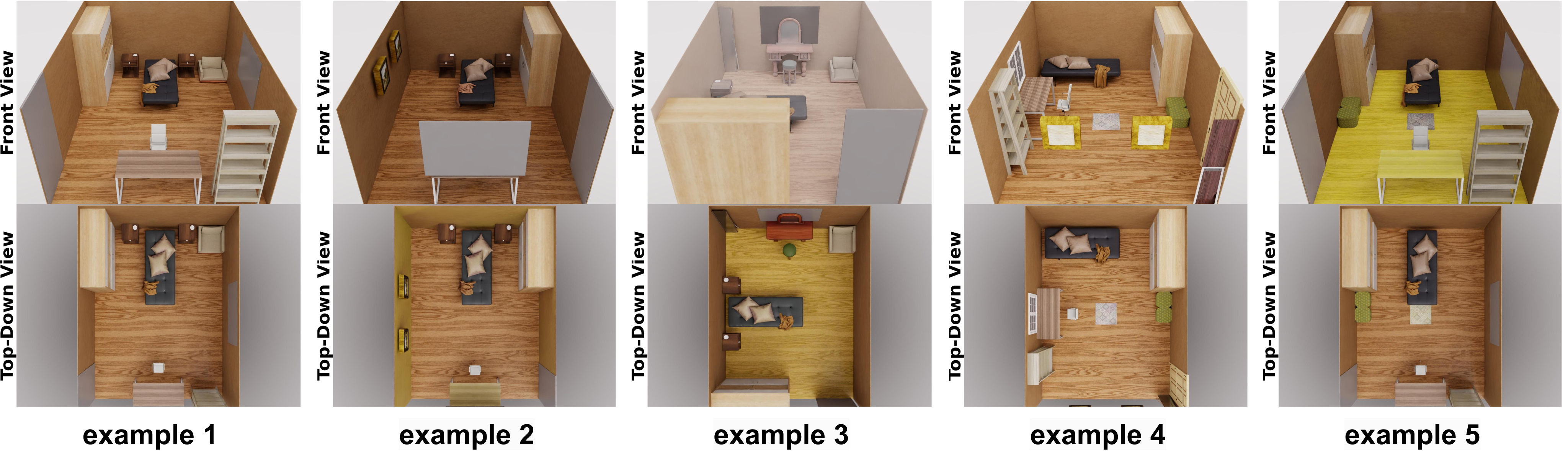
| Index | User Instruction | Room Layout | Object List | # Furniture |
| 1 | Arrange the furnitures in my bedroom. | The window is on the center of the left wall. The door is on the right of the right wall. | bed, bedside_table_1, bedside_table_2, wardrobe, study_desk, study_chair, bookshelf, couch | 8 |
| 2 | Arrange the furnitures in my bedroom, the bed should be facing the TV. | The window is on the center of the right wall. The door is on the left of the left wall. | bed, wardrobe, dressing_table, dressing_chair, television, carpet | 6 |
| 3 | Arrange the furnitures in my bedroom, the dressing table should not be facing the bed. | The window is on the center of the front wall. The door is on the right of the back wall. | bed, bedside_table_1, bedside_table_2, wardrobe, dressing_table, dressing_chair, couch, painting_xl, Christmas_tree | 9 |
| 4 | Arrange the furnitures in my bedroom to maximize the space. | The window is on the center of the right wall. The door is on the left of the left wall. | bed, wardrobe, study_desk, study_chair, bookshelf, storage_unit_1, storage_unit_2, carpet | 8 |
| 5 | Arrange the furnitures in my bedroom, the study desk should be facing the window. | The window is on the center of the back wall. The door is on the left of the right wall. | bed, bedside_table_1, bedside_table_2, wardrobe, study_desk, study_chair, bookshelf, carpet, painting_s_1, painting_s_2, painting_s_3 | 11 |
| 6 | Arrange the furnitures in my bedroom, the bedside table should be on the right side of the bed. | The window is on the center of the left wall. The door is on the left of the right wall. | bed, bedside_table, wardrobe, dressing_table, dressing_chair, carpet, painting_s_1, painting_s_2 | 8 |
| 7 | Arrange the furnitures in my bedroom, the study desk should be on the right side of the bookshelf. | The window is on the center of the left wall. The door is on the left of the right wall. | bed, bedside_table_1, bedside_table_2, wardrobe, study_desk, study_chair, bookshelf, storage_unit_1, storage_unit_2, carpet, guitar | 11 |
| 8 | Arrange the furnitures in my bedroom, the bookshelf should not be close to the bed. | The window is on the center of the front wall. The door is on the left of the left wall. | bed, wardrobe, bedside_table_1, bedside_table_2, study_desk, study_chair, bookshelf, carpet | 8 |
| 9 | Arrange the furnitures in my bedroom, the bookshelf should be close to the bed. | The window is on the center of the front wall. The door is on the left of the left wall. | bed, wardrobe, bedside_table_1, bedside_table_2, study_desk, study_chair, bookshelf, carpet | 8 |
| 10 | Arrange the furnitures in my bedroom, the piano should be opposite to the bed. | The window is on the center of the right wall. The door is on the left of the left wall. | bed, wardrobe, bedside_table_1, bedside_table_2, study_desk, study_chair, bookshelf, carpet, piano | 9 |
| 11 | Arrange the furnitures in my bedroom, the painting should be facing the bed. | The window is on the center of the back wall. The door is on the left of the front wall. | bed, wardrobe, bedside_table_1, bedside_table_2, study_desk, study_chair, bookshelf, carpet, couch | 9 |
| 12 | Arrange the furnitures in my bedroom, the painting should not be facing the bed. | The window is on the center of the back wall. The door is on the left of the front wall. | bed, wardrobe, bedside_table_1, bedside_table_2, study_desk, study_chair, bookshelf, carpet, couch | 9 |
| 13 | Arrange the furnitures in my bedroom, the piano should not be facing the bed. | The window is on the center of the back wall. The door is on the left of the right wall. | bed, wardrobe, bedside_table_1, bedside_table_2, study_desk, study_chair, carpet, piano, Christmas_tree | 9 |
| 14 | Arrange the furnitures in my bedroom, the paintings should be on the same wall. | The window is on the center of the back wall. The door is on the left of the left wall. | bed, wardrobe, bedside_table_1, bedside_table_2, study_desk, study_chair, bookshelf, carpet, painting_s_1, painting_s_2, painting_s_1, painting_s_2 | 12 |
| 15 | Arrange the furnitures in my bedroom, the music instruments should be on the same wall. | The window is on the center of the front wall. The door is on the left of the left wall. | bed, wardrobe, bedside_table_1, bedside_table_2, couch, carpet, guitar, piano, cello | 9 |
Appendix G Baselines
This appendix specifies three baseline systems and two semantic ablations, including their full dining prompt templates. The adaptations change the original methods’ inputs and outputs to match planar pose generation.
G.1 End-to-end Diffusion Model:
The end-to-end model encodes language with CLIP and combines shape, pose and time embeddings in a four-layer, two-head transformer, with normalization and 1,500 diffusion steps. It replaces StructDiffusion’s point-cloud/6-DOF interface with 2D geometry and sparse family examples [16]. Its stated 16-object sequence limit is below several listed test-scene sizes; padding, truncation or decomposition for these cases is not documented. It therefore cannot be assumed that only compositionality differs between systems.
G.2 Direct LLM Prediction
The direct-LLM alternatives adapt TidyBot’s example-summarization idea to numerical pose prediction [30]. Both receive dimensions and examples; one additionally receives the structured family specification. This tests a stronger geometric output requirement than original receptacle-level tidying.
Prompts for Direct LLM Prediction without Task Specification
Listing 2 preserves the no-specification prompt, its coordinate/orientation convention, JSON output format and five-example placeholder. The coordinate description itself mentions both a front-left origin and a centered origin; the explicit bounds use centered coordinates. That source ambiguity is retained rather than silently reconciled.
Your task is to generate precise object poses to arrange tableware objects on a dining table, ensuring the arrangement satisfies a given instruction.

The dining table is a rectangle measuring 3 units in length and 2 units in width. The coordinate system is centered at the front-left corner, with the origin (0, 0) at the center of the tabletop. Object positions, specified by coordinates (x, y, \theta), must fall within:
- Length (x-axis): -1.5 < x < 1.5
- Width (y-axis): -1 < y < 1
- Rotation angle \theta in radians

Here, x and y represent the centroid coordinates of an object, and \theta is the 2D rotation angle. The angle \theta corresponds to:
- \theta = 0: Object faces the front
- \theta = np.pi: Faces the back
- \theta = np.pi/2: Faces right
- \theta = -np.pi/2: Faces left
(All orientations are viewed from the front.) Each object's dimensions are given as a 2D bounding box (w, l).

For each task, you'll receive:
1. A natural language instruction indicating the desired functional arrangement of the objects.
2. A list of objects, including their names and 2D bounding boxes.

You need to predict the object poses that satisfy the instruction, formatted as:

```json
{
  "serving_plate": {
    "dimension": [0.48, 0.48],
    "pose": [0.0, -0.66, 0],
    "name": "serving_plate"
  },
  "napkin": {
    "dimension": [0.15, 0.52],
    "pose": [-0.465, -0.64, 0],
    "name": "napkin"
  },
  ...
}
```

To assist you, you'll be provided with five example arrangements, each consisting of an instruction and the corresponding functional arrangement in JSON format. These examples will be given one by one. Please begin the arrangement task only after you have received all five examples and the test instruction with the input object list.

<5 instruction-example pairs>
Prompts for Direct LLM Prediction with Task Specification
Listing 3 adds the hierarchical specification to the same pose-prediction interface. Its source caption incorrectly repeats “without task specification,” although the heading and prompt content identify the with-specification variant. Both full prompts remain available to compare the actual inputs.
Your task is to generate precise object poses to arrange tableware objects on a dining table, ensuring the arrangement satisfies a given instruction.

The dining table is a rectangle measuring 3 units in length and 2 units in width. The coordinate system is centered at the front-left corner, with the origin (0, 0) at the center of the tabletop. Object positions, specified by coordinates (x, y, \theta), must fall within:
- Length (x-axis): -1.5 < x < 1.5
- Width (y-axis): -1 < y < 1
- Rotation angle \theta in radians

Here, x and y represent the centroid coordinates of an object, and \theta is the 2D rotation angle. The angle \theta corresponds to:
- \theta = 0: Object faces the front
- \theta = np.pi: Faces the back
- \theta = np.pi/2: Faces right
- \theta = -np.pi/2: Faces left
(All orientations are viewed from the front.) Each object's dimensions are given as a 2D bounding box (w, l).

For each task, you'll receive:
1. A natural language instruction indicating the desired functional arrangement of the objects.
2. A list of objects, including their names and 2D bounding boxes.

You need to predict the object poses that satisfy the instruction, formatted as:

```json
{
  "serving_plate": {
    "dimension": [0.48, 0.48],
    "pose": [0.0, -0.66, 0],
    "name": "serving_plate"
  },
  "napkin": {
    "dimension": [0.15, 0.52],
    "pose": [-0.465, -0.64, 0],
    "name": "napkin"
  },
  ...
}
```

To assist you, you will be provided with a heirarchical task description and five examples.

Here's the natural language description on how to arrangement the objects for a dining table setup:

<Hierarchical Natural Language Task Specification>

You are also provided with five example arrangements, each consisting of an instruction and the corresponding functional arrangement in JSON format. These examples will be given one by one. Please begin the arrangement task only after you have received all five examples and the test instruction with the input object list.

<5 instruction-example pairs>
G.3 LLM + Diffusion Variants
Both ablations use the same compositional geometric stage and family specification/examples. They change the generation of symbolic constraints, making graph quality a central variable in the comparison.
LLM(Graph) + DMs
The graph variant directly predicts relation tuples from the specification, examples and new object list. Listing 4 preserves the relation library, output schema and example placeholders. Its relation names are not entirely identical to Table 1, a detail to resolve when implementing the interface.
Your task is to create a set of abstract relations for arranging tableware on a dining table, ensuring the arrangement complies with given instructions. The objects are represented as 2D bounding boxes viewed from above, with all orientations considered from the front.

**Use only the relations defined in the following library.** Each abstract relation is a tuple of strings: the first element is the relation's name, followed by the associated object names.

**relation Library:**

- **("near-front-edge", obj_A):** obj_A is near the table's front edge (bottom in the top-down view).
- **("near-back-edge", obj_A):** obj_A is near the table's back edge (top in the top-down view).
- **("near-left-edge", obj_A):** obj_A is near the table's left edge.
- **("near-right-edge", obj_A):** obj_A is near the table's right edge.
- **("facing-front", obj_A):** obj_A is facing the front (from the table's front edge).
- **("facing-back", obj_A):** obj_A is facing the back (from the table's front edge).
- **("front-half", obj_A):** obj_A is entirely within the front half of the table (horizontally divided along the center).
- **("back-half", obj_A):** obj_A is entirely within the back half of the table.
- **("left-half", obj_A):** obj_A is entirely within the left half of the table (vertically divided along the center).
- **("right-half", obj_A):** obj_A is entirely within the right half of the table.
- **("central-column", obj_A):** The centroid of obj_A is within the central vertical column of the table (middle half of the table's width).
- **("central-row", obj_A):** The centroid of obj_A is within the central horizontal row of the table (middle half of the table's length).
- **("centered-table", obj_A):** The centroid of obj_A coincides with the table's center.
- **("horizontally-aligned-bottom", obj_A, obj_B):** obj_A and obj_B are horizontally aligned at their bases.
- **("horizontally-aligned-centroid", obj_A, obj_B):** obj_A and obj_B are horizontally aligned at their centroids.
- **("vertically-aligned-centroid", obj_A, obj_B):** obj_A and obj_B are vertically aligned at their centroids.
- **("left-of", obj_A, obj_B):** obj_A is immediately to the left of obj_B (from the canonical camera frame).
- **("right-of", obj_A, obj_B):** obj_A is immediately to the right of obj_B.
- **("front-of", obj_A, obj_B):** obj_A is immediately in front of obj_B.
- **("back-of", obj_A, obj_B):** obj_A is immediately behind obj_B.
- **("on-top-of", obj_A, obj_B):** obj_A is placed on top of obj_B.
- **("centered", obj_A, obj_B):** The center of obj_A coincides with the center of obj_B.
- **("vertical-symmetry-on-table", obj_A, obj_B):** obj_A and obj_B are symmetrically placed across the table's vertical axis.
- **("horizontal-symmetry-on-table", obj_A, obj_B):** obj_A and obj_B are symmetrically placed across the table's horizontal axis.
- **("vertical-line-symmetry", axis_obj, obj_A, obj_B):** obj_A and obj_B are symmetrical about the vertical axis of axis_obj.
- **("horizontal-line-symmetry", axis_obj, obj_A, obj_B):** obj_A and obj_B are symmetrical about the horizontal axis of axis_obj.
- **("aligned-in-horizontal-line-bottom", obj_1, ..., obj_N):** Objects are horizontally aligned at their bases with equal spacing.
- **("aligned-in-horizontal-line-centroid", obj_1, ..., obj_N):** Objects are horizontally aligned at their centroids with equal spacing.
- **("aligned-in-vertical-line-centroid", obj_1, ..., obj_N):** Objects are vertically aligned at their centroids with equal spacing.
- **("regular-grid", obj_1, ..., obj_N):** Objects are arranged in a grid or matrix pattern.

For each task, you will receive:
1. A natural language instruction indicating the desired arrangement of the objects.
2. A list of objects, each with a unique name.

You need to predict the set of abstract relations (constraints) that satisfy the instruction, formatted as:

```json
{
  "constraints":
    [
        ["facing-front", "serving_plate"],
        ["near-front-edge", "serving_plate"],
        ...
    ]
}
```

Each abstract relation is written as a constraint: the first element is the relation name, followed by the object names bound to it. Ensure all relations are from the library, all object names are provided in the input, and the number of arguments matches the specification.

To assist you to generate the abstract relations, you will be provided with a heirarchical task description and five examples.

Here's the natural language description on how to arrangement the objects for a dining table setup:

<hierarchical natural language task specification>

You are also provided with five example arrangements, each consisting of an instruction and the corresponding functional arrangement in JSON format. These examples will be given one by one. Please begin the arrangement task only after you have received all five examples and the test instruction with the input object list.

<5 instruction-example pairs>
LLM(Program) + DMs
The program variant generates a whole Python program without modular decomposition or verification. Appendix G says another LLM interprets that program at inference, whereas the main description says it is executed. The exact execution difference is unresolved, so this is not clearly a pure ablation of hierarchy alone. Listing 5 preserves the complete prompt.
Your task is to generate a Python program that proposes a functional arrangement of tableware objects on a dining table. The program accepts:

1. **A natural language instruction** specifying the desired table arrangement.
2. **A list of available tableware objects**, each represented by a unique name.

The output is a **list of abstract relations** among the objects that represent the desired dining table arrangement according to the given instruction.

- Each abstract relation is a tuple of strings:
  - The **first element** is the semantic name of the relation.
  - The **subsequent elements** are the object names associated with it.

The objects are represented as **2D bounding boxes viewed from above**, with all orientations considered from the front.

**Use only the abstract relations from the following library:**

- **("near-front-edge", obj_A):** obj_A is near the table's front edge (bottom in the top-down view).
- **("near-back-edge", obj_A):** obj_A is near the table's back edge (top in the top-down view).
- **("near-left-edge", obj_A):** obj_A is near the table's left edge.
- **("near-right-edge", obj_A):** obj_A is near the table's right edge.
- **("facing-front", obj_A):** obj_A is facing the front (from the table's front edge).
- **("facing-back", obj_A):** obj_A is facing the back (from the table's front edge).
- **("front-half", obj_A):** obj_A is entirely within the front half of the table (horizontally divided along the center).
- **("back-half", obj_A):** obj_A is entirely within the back half of the table.
- **("left-half", obj_A):** obj_A is entirely within the left half of the table (vertically divided along the center).
- **("right-half", obj_A):** obj_A is entirely within the right half of the table.
- **("central-column", obj_A):** The centroid of obj_A is within the central vertical column of the table (middle half of the table's width).
- **("central-row", obj_A):** The centroid of obj_A is within the central horizontal row of the table (middle half of the table's length).
- **("centered-table", obj_A):** The centroid of obj_A coincides with the table's center.
- **("horizontally-aligned-bottom", obj_A, obj_B):** obj_A and obj_B are horizontally aligned at their bases.
- **("horizontally-aligned-centroid", obj_A, obj_B):** obj_A and obj_B are horizontally aligned at their centroids.
- **("vertically-aligned-centroid", obj_A, obj_B):** obj_A and obj_B are vertically aligned at their centroids.
- **("left-of", obj_A, obj_B):** obj_A is immediately to the left of obj_B (from the canonical camera frame).
- **("right-of", obj_A, obj_B):** obj_A is immediately to the right of obj_B.
- **("front-of", obj_A, obj_B):** obj_A is immediately in front of obj_B.
- **("back-of", obj_A, obj_B):** obj_A is immediately behind obj_B.
- **("on-top-of", obj_A, obj_B):** obj_A is placed on top of obj_B.
- **("centered", obj_A, obj_B):** The center of obj_A coincides with the center of obj_B.
- **("vertical-symmetry-on-table", obj_A, obj_B):** obj_A and obj_B are symmetrically placed across the table's vertical axis.
- **("horizontal-symmetry-on-table", obj_A, obj_B):** obj_A and obj_B are symmetrically placed across the table's horizontal axis.
- **("vertical-line-symmetry", axis_obj, obj_A, obj_B):** obj_A and obj_B are symmetrical about the vertical axis of axis_obj.
- **("horizontal-line-symmetry", axis_obj, obj_A, obj_B):** obj_A and obj_B are symmetrical about the horizontal axis of axis_obj.
- **("aligned-in-horizontal-line-bottom", obj_1, ..., obj_N):** Objects are horizontally aligned at their bases with equal spacing.
- **("aligned-in-horizontal-line-centroid", obj_1, ..., obj_N):** Objects are horizontally aligned at their centroids with equal spacing.
- **("aligned-in-vertical-line-centroid", obj_1, ..., obj_N):** Objects are vertically aligned at their centroids with equal spacing.
- **("regular-grid", obj_1, ..., obj_N):** Objects are arranged in a grid or matrix pattern.

The Python program takes in the following input:
1. A natural language instruction indicating the desired arrangement of the objects.
2. A list of objects, each with a unique name.

The program should then output the set of abstract relations (constraints) that satisfy the instruction, formatted as:

```json
{
  "constraints":
    [
        ["facing-front", "serving_plate"],
        ["near-front-edge", "serving_plate"],
        ...
    ]
}
```

Each abstract relation is written as a constraint: the first element is the relation name, followed by the object names bound to it. Ensure all relations are from the library, all object names are provided in the input, and the number of arguments matches the specification.

To assist you to generate the python program, you will be provided with a heirarchical task description and five examples.

Here's the natural language description on how to arrangement the objects for a dining table setup:

<hierarchical natural language task specification>

You are also provided with five example arrangements, each consisting of an instruction and the corresponding functional arrangement in JSON format. These examples will be given one by one. Please only generate the python program for arrangement after you have received all five examples and the test instruction with the input object list.

<5 instruct-example pairs>
Appendix H Robot Setup
Two calibrated Franka Research 3 arms with parallel grippers begin with known object poses on side tables. Planar goals are lifted into rigid 3D transforms. Each object type has a prescribed grasp and approach sequence; pick/place routines compose the object transform with these offsets, as retained in the original transform expression.
A separate planner avoids collisions while reaching target gripper poses. Object types determine the execution order, and routines run sequentially. The experiment assumes calibration, initial poses and grasp strategies rather than learning them. It provides a concrete demonstration of executing generated goals without evaluating online replanning or perception uncertainty.