At a glance
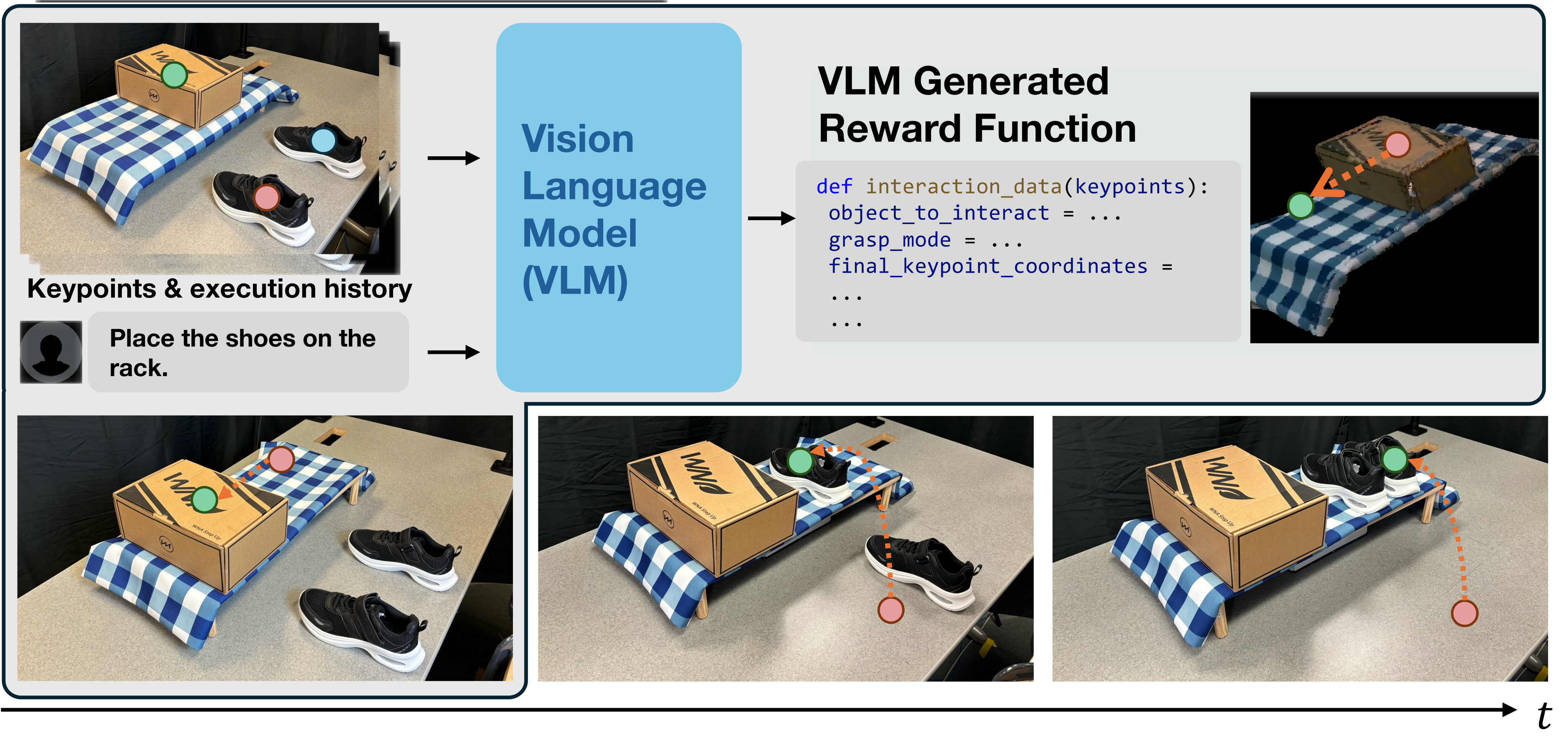
IKER uses a vision-language model to turn instructions and numbered scene keypoints into Python code specifying object interactions and target keypoint locations. A reconstructed simulation trains a policy for the resulting reward, and the robot executes that policy before obtaining a revised specification. This combines spatial task grounding, simulation-trained control, and stage-level feedback. Tests on shoes and books favor keypoint targets over pose targets when the VLM supplies them, but complete three-stage success is four of ten trials and new policy training takes about five minutes per task.
I Introduction
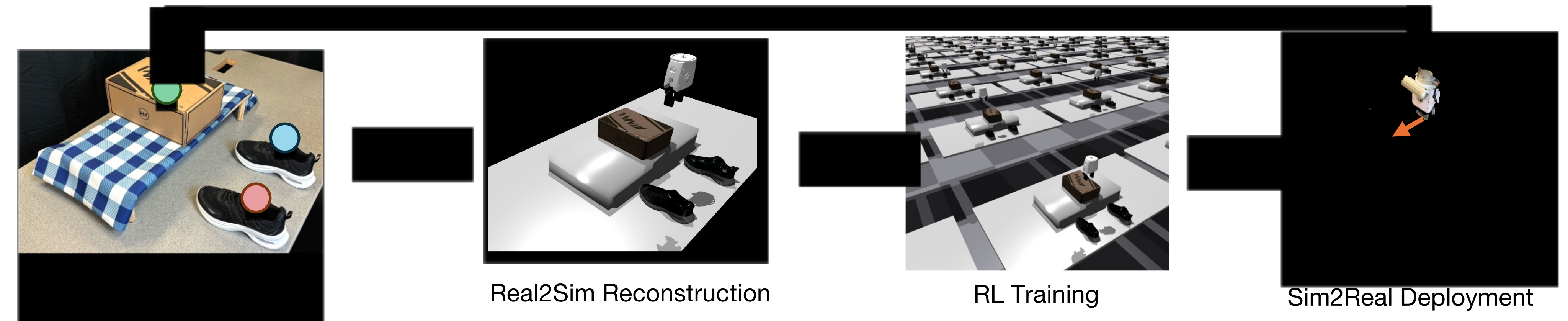
A request such as placing shoes on a rack can require an unspoken prerequisite: moving a box to make room. IKER represents both position and orientation through several points attached to each object, then revises the plan after observing execution. Its real-to-sim-to-real loop avoids robot demonstrations for policy learning, but still requires object scanning, pose estimation, simulation construction, grasp detection, and task-specific training. The reported open-vocabulary interface should be distinguished from unrestricted operation with unseen objects or arbitrary interactions.
II Related Work
Earlier VLM systems produce task sequences, affordances, value maps, or robot code; ReKep [9] motivates relational keypoints, and VoxPoser [12] is the multi-stage comparison. IKER adds iterative target updates and reinforcement-learning control for both grasping and pushing. Related reward-generation work motivates coding objectives, while reconstruction and domain-randomization work motivate simulation transfer. BundleSDF [63] and FoundationPose [90] supply object geometry and pose. Compared with demonstration-based RialTo [89], these policies train in simulation without imitation demonstrations. The experiments compare particular implementations, not every capability of the cited methods.
III Method
Algorithm 1 retains the complete loop: reconstruct objects, obtain current marked keypoints and an image, ask the VLM for the next interaction, stop if it declares completion, otherwise create the simulated task, train a policy, execute it physically, and append the observation/code to history. Replanning occurs between interaction stages, while each learned policy supplies continuous low-level feedback.
III-A Iterative Keypoint Reward (IKER)
GPT-4o receives the instruction, current RGB image with numbered 3D keypoints projected onto it, and previous observations/code. It selects an object, chooses grasping or pushing, and computes target keypoint coordinates relative to visible references. The model is not explicitly given the point-to-object grouping, though labels are grouped by object during construction. Multiple points convey orientation without requiring direct rotation-angle prediction. The generated targets feed a weighted reward combining gripper–object distance, motion direction, target alignment, a sustained-success bonus, and penalties for excessive motion, dropping, or force.
Thus the VLM primarily specifies interaction mode and geometric targets within an existing reward structure; it does not learn all reward terms or their weights from scratch. Exact weights and detailed term formulas are not provided here. A done flag ends the high-level loop. Incorrect point associations or using too few points can give poor alignment despite syntactically valid code.
Equation
|
|
III-B Transferring real-world scene to simulation
Manipulable objects are moved while filmed from all sides, and BundleSDF reconstructs reusable meshes. FoundationPose places those meshes in the simulated scene; point clouds reconstruct static tables and racks. Object keypoints lie at axis extremities relative to the object center, while static surfaces receive uniformly distributed points. Projected points that overlap are removed, prioritizing object points over background points and lower-numbered object points over higher-numbered ones. The pipeline therefore depends on prior geometric reconstruction and pose quality, even though the VLM reasons from a marked image.
III-C Policy Training in Simulation
The policy observes end-effector pose, current object pose, current object keypoints, and their targets. Poses include quaternions; actions are relative three-dimensional translations and rotations. It consumes these estimated geometric states rather than raw images. Isaac Gym trains PPO [92] with a shared actor–critic MLP of widths 256, 128, and 64 and ELU activations. Training takes about five minutes per task in the reported configuration, so rapid stage-level replanning includes a substantial policy-learning cost.
Domain randomization changes object geometry, mass, friction, restitution, compliance, initial poses, and grasp poses. These variations address simulation mismatch, especially during pushing. They do not constitute identified real-world dynamics or a formal transfer guarantee. Grasping is a separate subroutine; the policy is not trained to discover arbitrary grasp mechanics from images.
| Task | Annotated (Human labeled reward) | Automatic (VLM-generated reward) | ||||||
|---|---|---|---|---|---|---|---|---|
| Simulation | Real-World | Simulation | Real-World | |||||
| IKER (Ours) | Pose | IKER (Ours) | Pose | IKER (Ours) | Pose | IKER (Ours) | Pose | |
| Shoe Place | 0.945 | 0.938 | 0.8 | 0.9 | 0.778 | 0.353 | 0.7 | 0.3 |
| Shoe Push | 0.871 | 0.850 | 0.7 | 0.7 | 0.716 | 0.289 | 0.6 | 0.2 |
| Stowing Push | 0.901 | 0.914 | 0.8 | 0.7 | 0.679 | 0.374 | 0.6 | 0.3 |
| Stowing Reorient | 0.848 | 0.859 | 0.8 | 0.7 | 0.858 | 0.265 | 0.7 | 0.2 |
III-D Deployment of Trained Policy
Physical execution runs at 10 Hz. Inverse kinematics converts end-effector commands to joint targets, and commands are clipped to workspace limits. FoundationPose tracks object poses and thereby rigidly attached keypoints. AnyGrasp [95] provides real-world grasp poses when requested. Workspace clipping limits commanded position but is not a collision-avoidance or force-safety guarantee.
IV Experiments and Analysis
Evaluation asks whether keypoint rewards train useful single-stage manipulation policies, whether VLM-generated targets compare favorably with pose targets, and whether updated observations enable multi-stage execution and recovery.
IV-A Experimental Setup, Metrics and Baselines
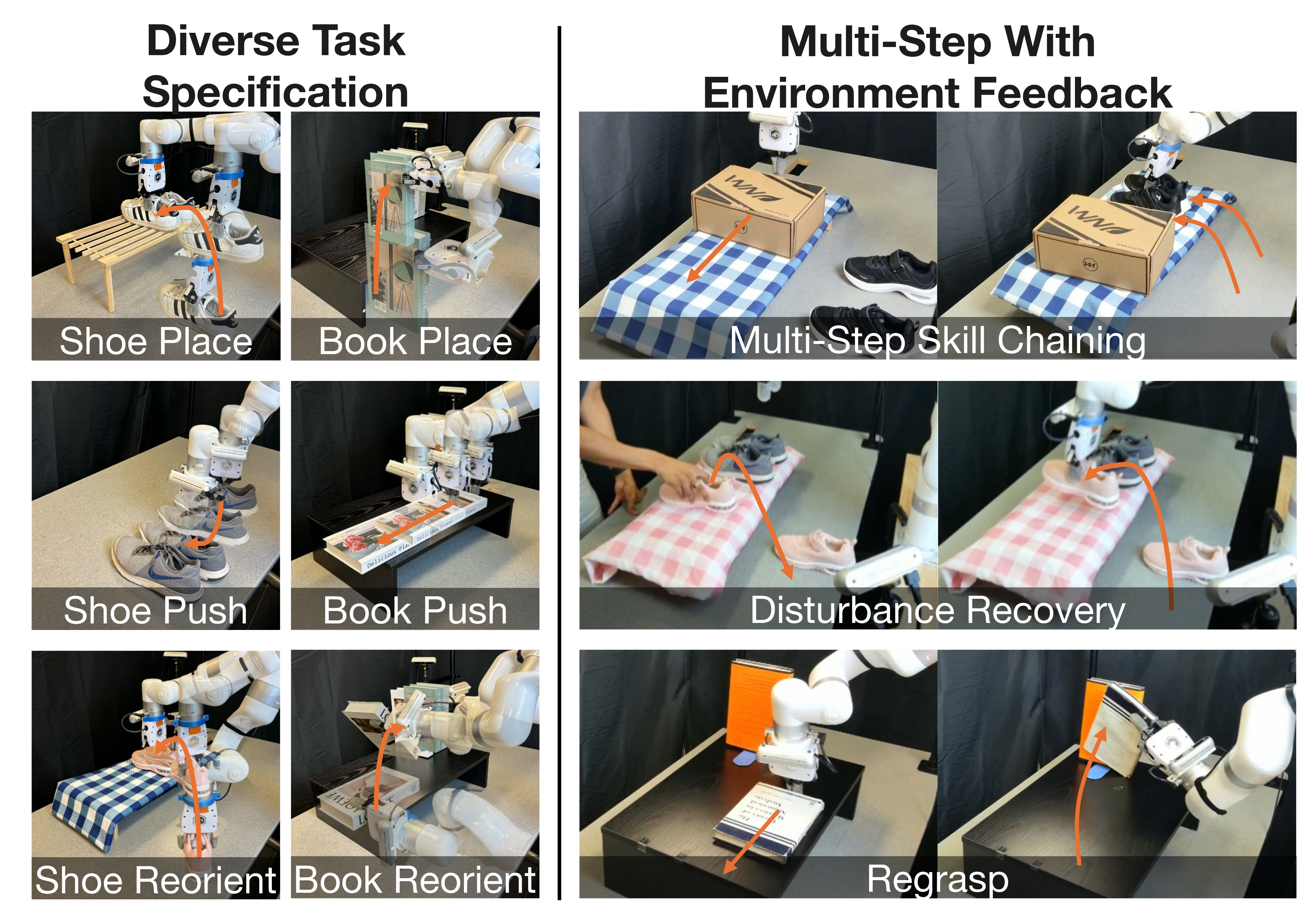
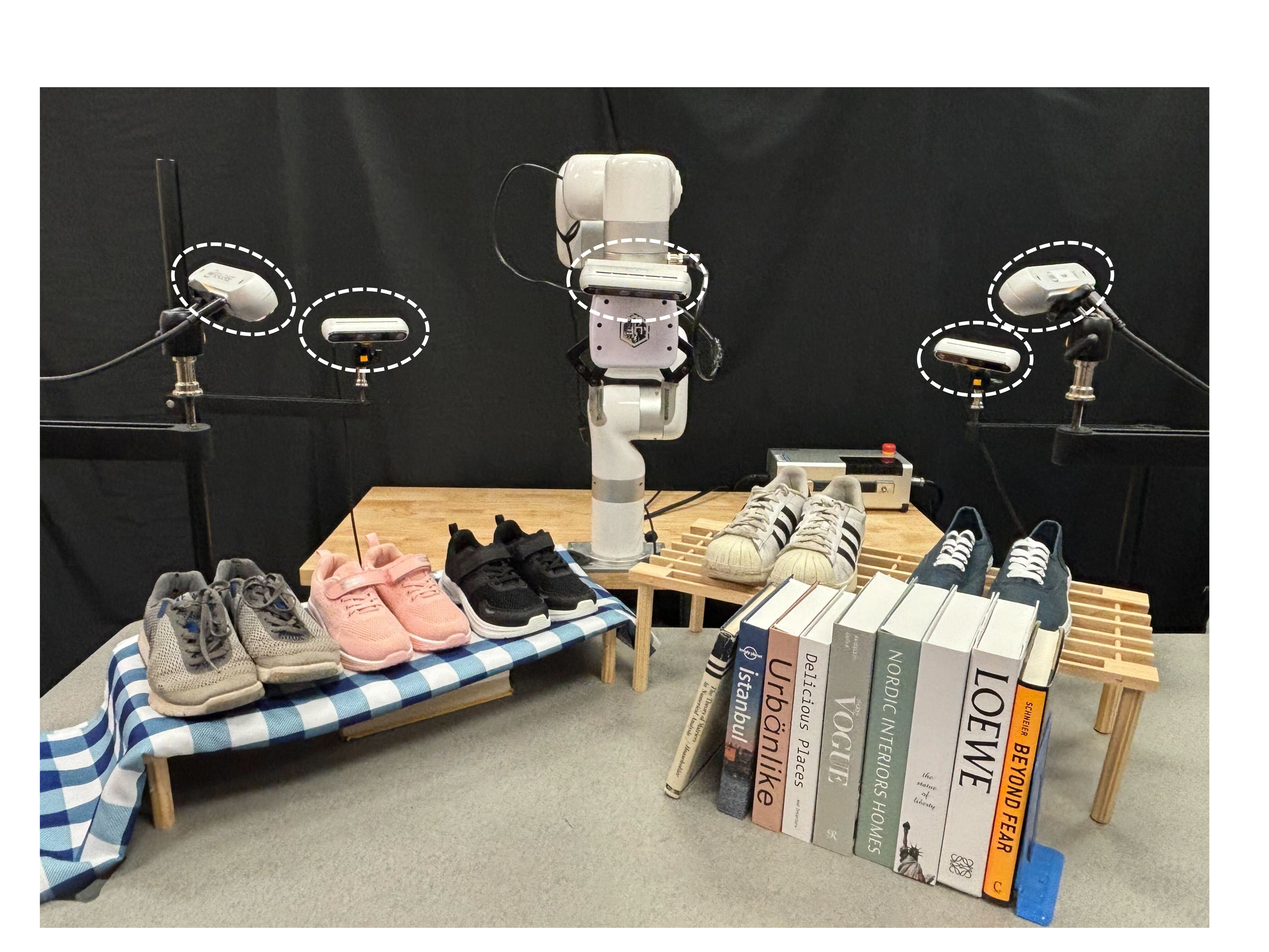
All tests use an XArm7, four stationary RealSense cameras, and a wrist camera for VLM images. Objects include five shoe pairs, two racks, and nine books. Four evaluated scenarios are shoe placement, shoe pushing, book pushing, and book reorientation. Each has ten start/target configurations. Simulation averages 128 randomized environments per configuration, or 1,280 trials per scenario; physical evaluation uses ten configurations. Success means average object-keypoint distance to target below 5 cm, which measures the defined geometric objective rather than arbitrary semantic correctness.
Baselines use either human-annotated or VLM-generated targets, represented as keypoints or object position plus roll/pitch/yaw. This separates the representation’s suitability for policy training from the VLM’s ability to generate that representation. Physical sample counts are small, and the paper does not provide uncertainty intervals.
IV-B Policy Training with IKER for Single-Step Tasks
With human targets, both representations work similarly in simulation: shoe placement is 0.945 for IKER and 0.938 for poses; physical rates are 0.8 and 0.9. With VLM targets, IKER is substantially better: physical success across shoe place, shoe push, book push, and book reorient is 0.7/0.6/0.6/0.7 versus 0.3/0.2/0.3/0.2 for poses. The corresponding IKER simulation rates are 0.778/0.716/0.679/0.858. These results primarily support keypoints as a more effective target interface for the tested VLM, not inherent superiority over well-specified poses.
Failures include incorrect keypoint selection, incomplete orientation constraints, mismatched simulated and physical grasps, pose/reconstruction errors, and pushing dynamics. Table I is authoritative for the reported combinations: the prose’s shoe-push 0.850 figure belongs to the annotated pose simulation column, whereas annotated IKER physical shoe pushing is 0.7. Additional examples and better spatial reasoning are suggested remedies, not separately quantified improvements in this experiment.
IV-C Iterative Replanning for Multi-Step Tasks
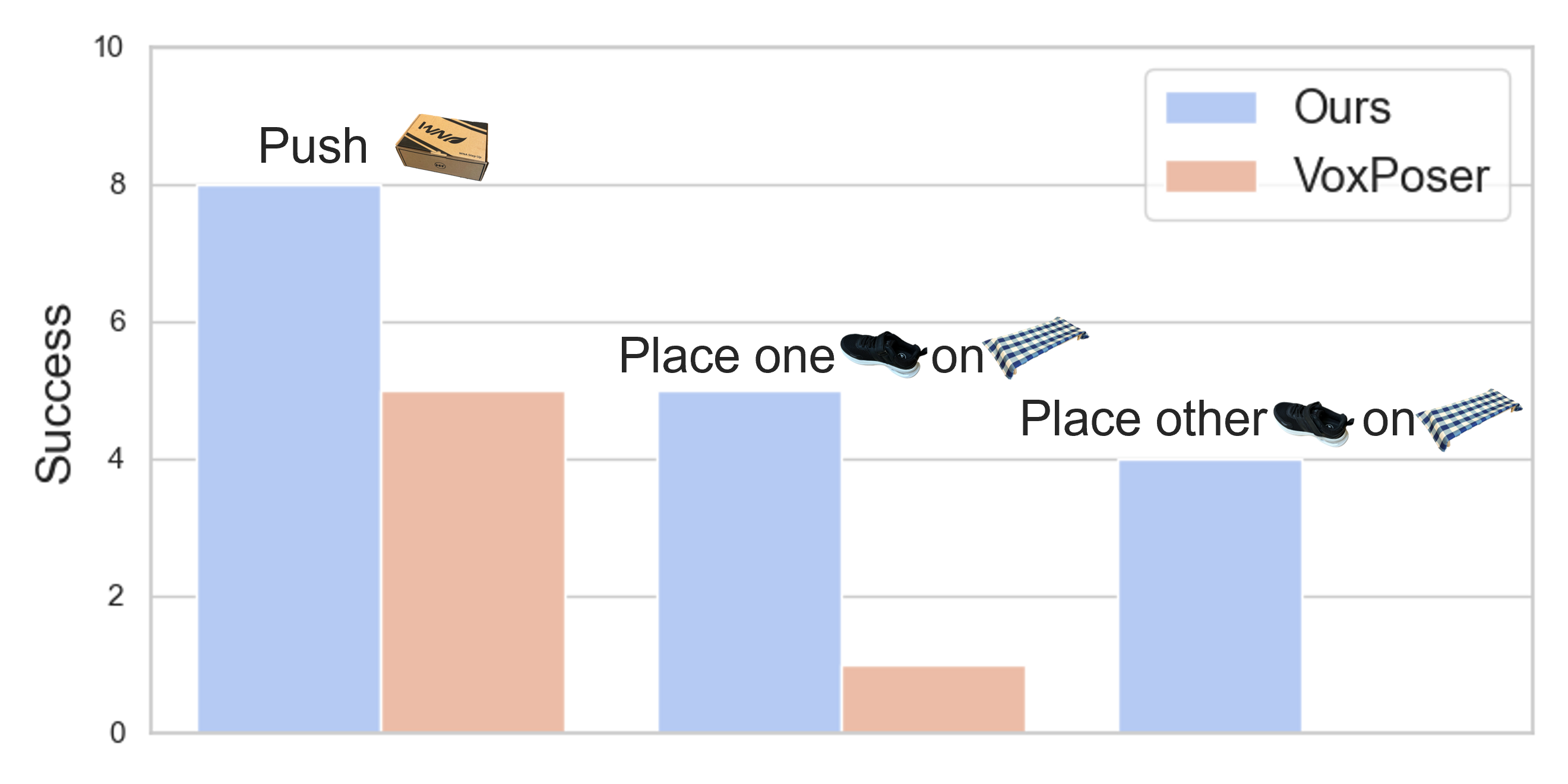
The three-stage sequence pushes a box aside, places one shoe, then places the other. Across ten configurations, IKER has 8, 5, and 4 cumulative successes after the respective stages; adapted VoxPoser has 5, 1, and 0. These are surviving sequences out of ten, not independent per-stage success probabilities. The baseline receives ground-truth object locations and a full plan because its perception/planner struggled with this setup. Differences also include grasping and motion-control mechanisms, so the result does not isolate feedback alone as the source of improvement.
IV-D Robustness, Adjusting Plans, and Re-Planning
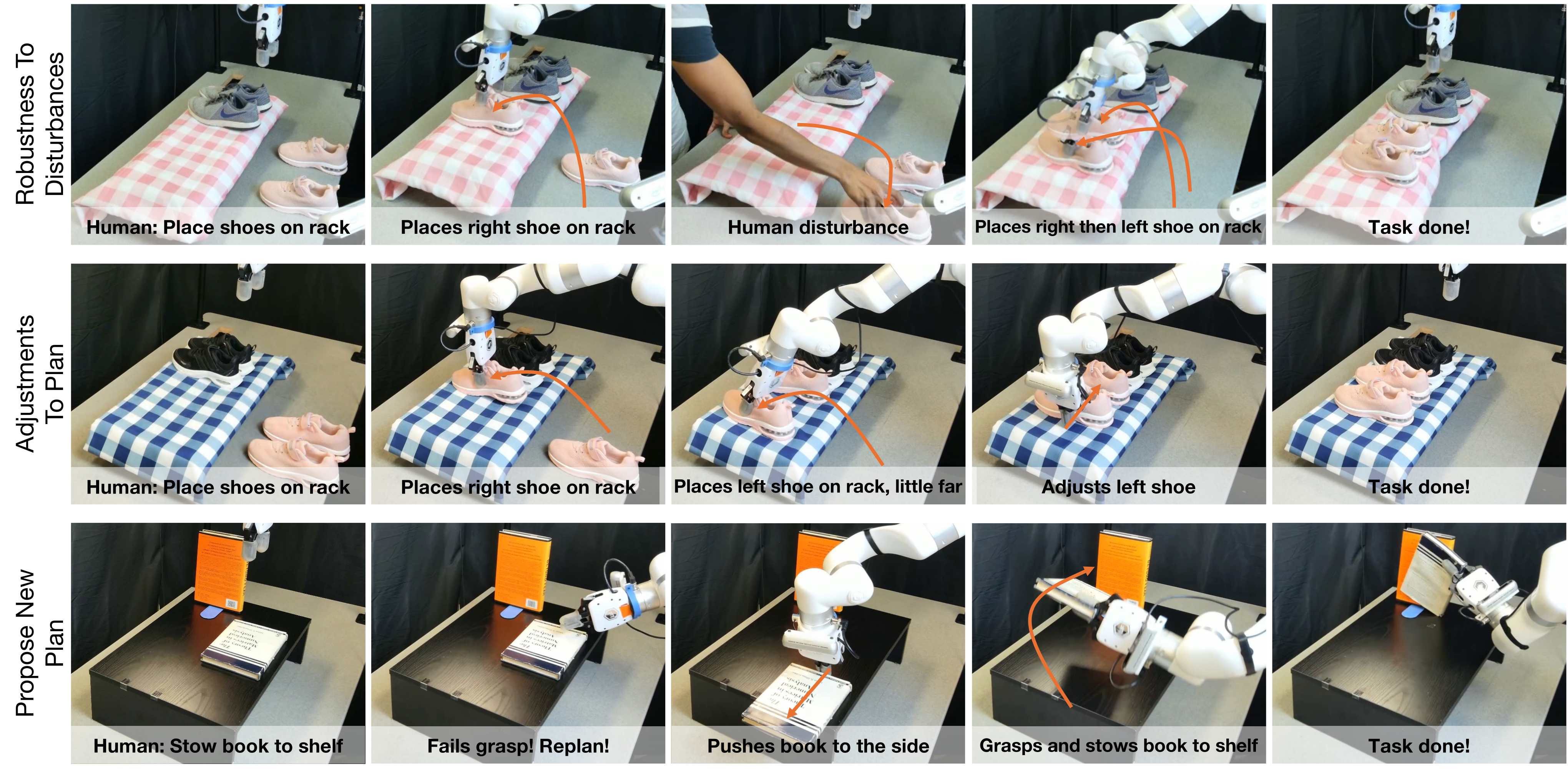
Qualitative examples show recovery after a human disturbs a shoe, a corrective push to align a pair, and a revised plan when a book is too large for the attempted grasp. They demonstrate possible behaviors, while no repeated-trial recovery rate or disturbance distribution is reported. In the book case, the system pushes the object into a position permitting a different grasp rather than directly succeeding with the original plan.
IV-E Effect of Domain Randomization
Table II shows that domain randomization reduces nominal simulation success slightly but improves physical success: shoe placement changes from 0.964 simulation/0.5 real without randomization to 0.945/0.8 with it; pushing changes from 0.923/0.2 to 0.871/0.7. The placement prose instead says 0.6 without randomization; that disagreement is preserved explicitly rather than silently choosing the larger number. Ten-run physical results support a transfer benefit in these setups, with observed failures including rack collisions, pose errors, crushing, and slipping.
| Task | Without DR | With DR | ||
|---|---|---|---|---|
| Simulation | Real-World | Simulation | Real-World | |
| Place | 0.964 | 0.5 | 0.945 | 0.8 |
| Push | 0.923 | 0.2 | 0.871 | 0.7 |
V Conclusion and Limitations
IKER connects language-grounded geometric targets with simulation-trained feedback policies and iterative stage selection. Its limits include all-view object scanning, inaccurate physical parameters, grasp mismatch, fallible VLM target generation, several minutes of policy training, and manipulation of one main object per stage. Complex coupled multi-object interactions are outside the evaluation. The result is a promising task-specification pipeline with partial multi-stage reliability, not a demonstration of general autonomous manipulation.
VI Acknowledgements
The authors acknowledge collaborators and support from Amazon AICE, Sony Group, and DARPA TIAMAT, and state that the article reflects the authors’ views rather than sponsor policies.
-A Grasping Subroutine
Simulation uses a fast heuristic grasp: approach with open fingers, then close. Physical execution instead obtains the pose from AnyGrasp. Grasp-pose randomization partially addresses that mismatch. Fingers otherwise remain closed, including pushing, and grasping is integrated into an interaction stage rather than treated as a separate planned stage.
-B Domain Randomization Parameters
Table III retains every randomization interval: object scale 0.8–1.2, mass 0.3–2.0, friction 0.3–1.8, restitution/compliance 0–1, and perturbations for center of mass, initial object position/orientation, and grasp position/orientation. The table does not fully specify units or whether every object-property range is an absolute value or multiplier; reproduction should resolve those conventions rather than infer them from the numerical intervals alone.
| Parameter | Range |
|---|---|
| Object Scale | [0.8, 1.2] |
| Mass | [0.3, 2.0] |
| Friction | [0.3, 1.8] |
| Restitution | [0.0, 1.0] |
| Compliance | [0.0, 1.0] |
| Center of Mass Perturbation | [-0.05, 0.05] |
| Initial Position Perturbation | [-0.02, 0.02] |
| Initial Orientation Perturbation | [-0.05, 0.05] |
| Grasp Position Noise | [-0.01, 0.01] |
| Grasp Orientation Noise | [-0.2, 0.2] |
-C VLM Prompts
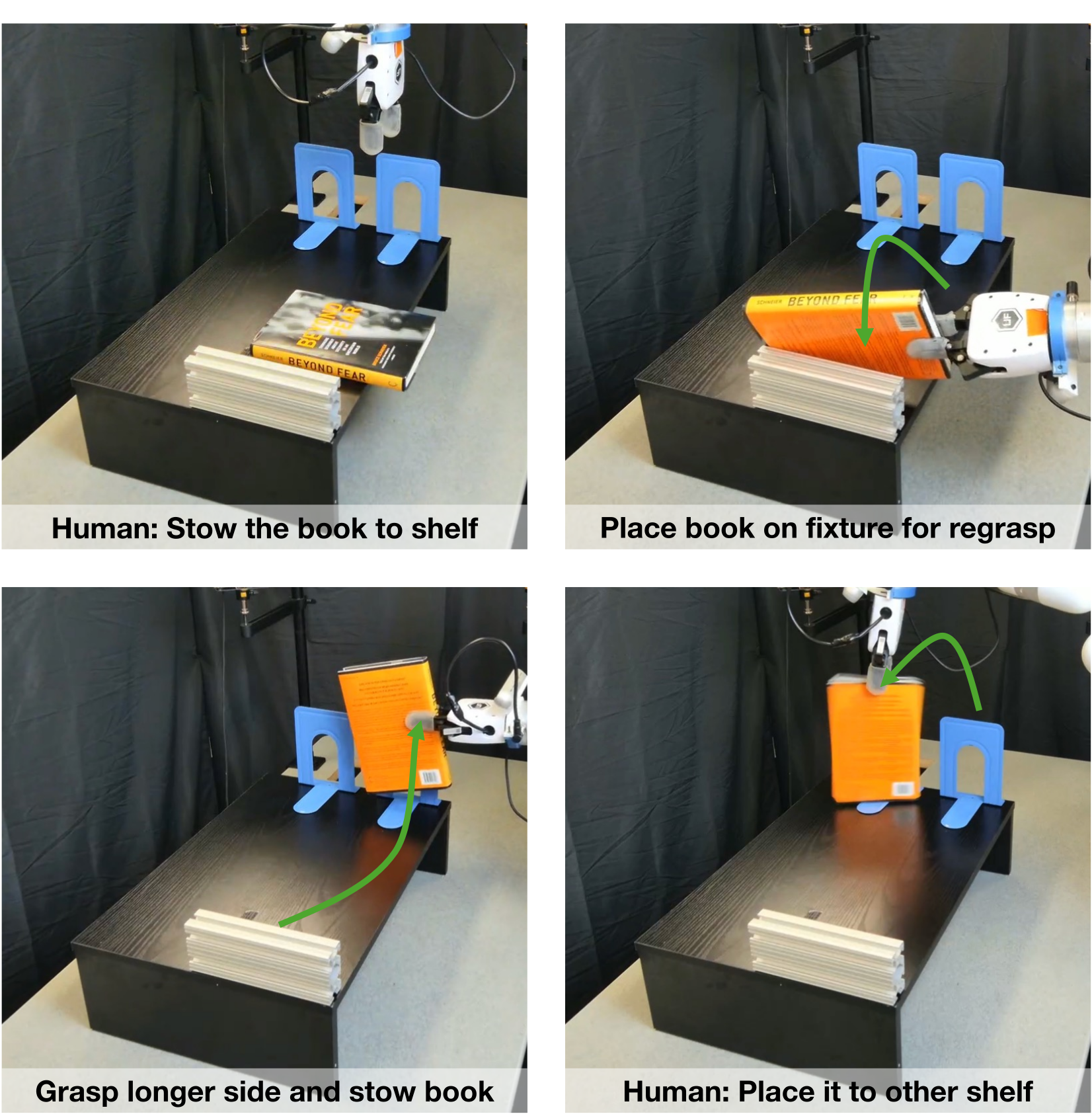
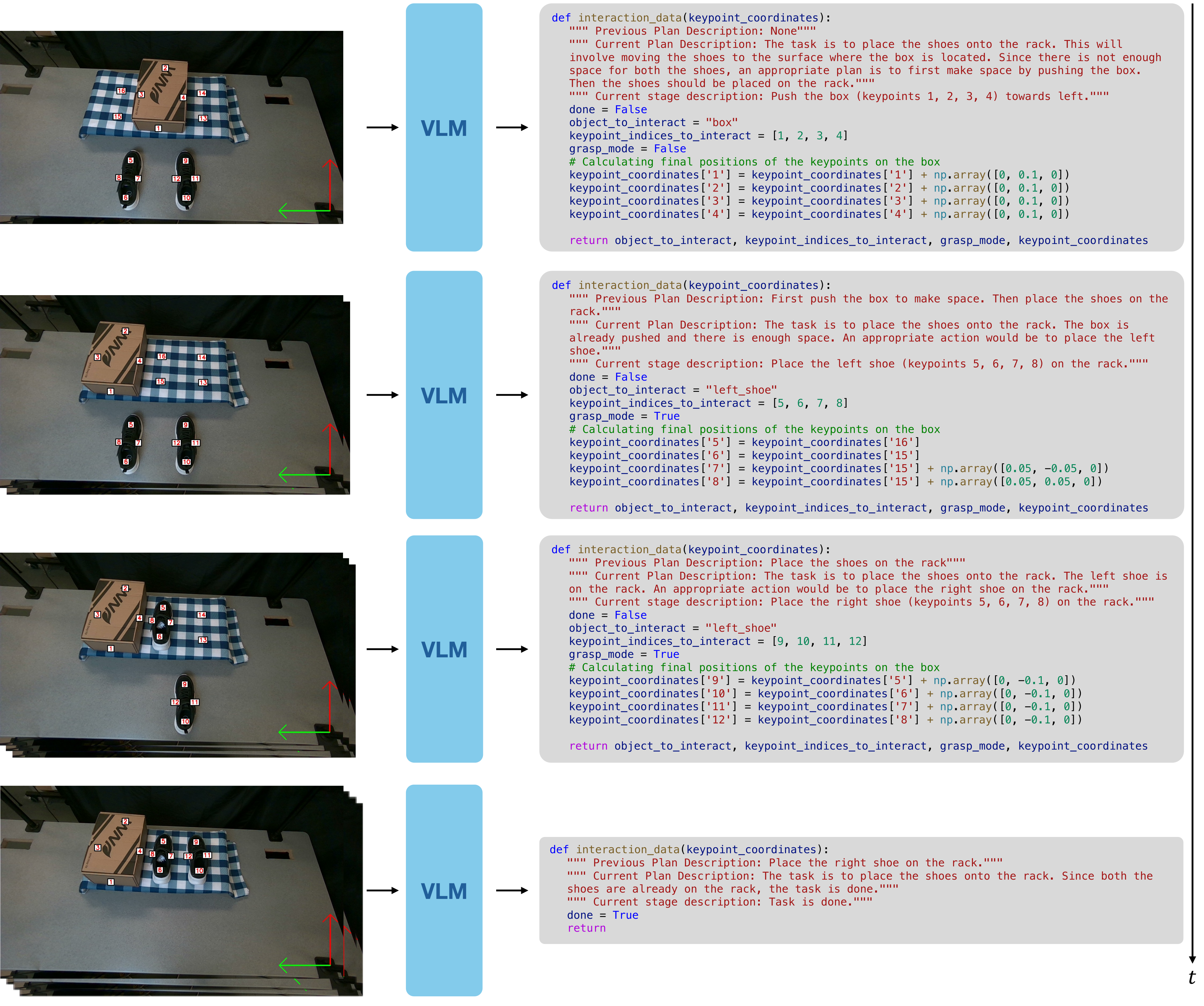
The three complete prompts below cover single-stage keypoints, multi-stage keypoints, and the pose-based baseline. They prescribe image coordinates, metric offsets, object selection, grasp mode, and Python return structure. The multi-stage version additionally supplies history, permits plan revision, restricts each stage to one object, and asks for visual confirmation before declaring completion. The main experiments use no in-context examples; Appendix D explicitly changes that setting. Figure 7 retains all four observation/code pairs, including the final done decision. Prompt text and code indentation are preserved from the exact embedded source files.
## Instructions
Your job is to help with moving rigid objects in real-world by writing code in python.
The task is given as an image of the environment, overlayed with keypoints marked with their indices, along with a text instruction.
These keypoints are in 3D space, and are projected onto the 2D image. They are attached with the objects, and move along with them.
So to determine where a specific point should go, you should specify where its corresponding keypoint should go.
The coordinate system is marked at the bottom right in the image, with a vertical arrow pointing forward in the positive x direction and the horizontal arrow pointing to the left in the positive y direction.
The code should predict the final keypoint locations relative to their matching keypoints. Use all matching keypoints to determine the final position of the moving object, not just a single reference point.
Note:
- You should determine if you need to grasp or push the object. You should output a boolean grasp_mode for that.
- Some objects should not be moved. Hence, the final location of key points on them should be the same as the initial locations.
- If you need to interact with an object, the final location of only the keypoints marked on it should change.
Hence, you should first try to understand which object should move.
- You should try to understand where the moving object should go relative to other stationary objects and use all the matching keypoints for alignment. Then you can give the final locations of keypoints of moving objects relative to keypoints on stationary objects.
- Positive x direction points towards up and positive y direction points towards left.
- The input to the function is a dictionary of keypoint coordinates. So keys will be strings like "1", "2", ... and their values will be numpy arrays ([x, y, z]) representing the 3D location of the keypoint corresponding to that index.
- To represent coordinates relative to other keypoints, you can make predictions like:
  keypoint_coordinates['1'] = keypoint_coordinates['2'] + np.array([delta_x, delta_y, delta_z]).
  For instance, if keypoint 1 needs to be placed to the left of keypoint 2, then delta_x = 0, delta_y = 0.1, and delta_z = 0.
  So can predict keypoint_coordinates['1'] = keypoint_coordinates['2'] + np.array([0, 0.1, 0]).
  The units here are in meters and left direction corresponds to + y-axis.
- Make use of semantics. Some objects should be placed in a certain way, like a left shoe should be placed on the left of the right shoe.

Structure your output in a single python code block as follows:

def get_interaction_data(keypoint_coordinates):
    """ Put your explanation here. """
    object_to_interact = ?
    keypoint_indices_to_interact = ?
    grasp_mode = ?
    ## final keypoint calculation for each keypoint in keypoint_indices_to_interact
    keypoint_coordinates[`keypoint_indices_to_interact[0]`] = ? # Write calculation here. You may use multiple lines
    # Repeat for other keypoints
    return object_to_interact, keypoint_indices_to_interact, grasp_mode, keypoint_coordinates

## Query
Query Task: '[TASK]'
Query Image: [IMAGE_WITH_KEYPOINTS]
## Instructions
Your job is to help with moving rigid objects in real-world by writing code in python.
The task is given as an image of the environment, overlayed with keypoints marked with their indices, along with a text instruction.
These keypoints are in 3D space, and are projected onto the 2D image. They are attached with the objects, and move along with them.
So to determine where a specific point should go, you should specify where its corresponding keypoint should go.
The coordinate system is marked at the bottom right in the image, with a vertical arrow pointing forward in the positive x direction and the horizontal arrow pointing to the left in the positive y direction.
The code should predict the final keypoint locations relative to their matching keypoints. Use all matching keypoints to determine the final position of the moving object, not just a single reference point.
Note:
- You should determine if you need to grasp or push the object. You should output a boolean grasp_mode for that. Generally, big objects can only be pushed as they are too big to be grasped.
- Some objects should not be moved. Hence, the final location of key points on them should be the same as the initial locations.
- If you need to interact with an object, the final location of only the keypoints marked on it should change.
  Hence, you should first try to understand which object should move.
- You should try to understand where the moving object should go relative to other stationary objects and use all the matching keypoints for alignment.
  Then you can give the final locations of keypoints of moving objects relative to keypoints on stationary objects.
- Positive x direction points towards up and positive y direction points towards left.
- The input to the function is a dictionary of keypoint coordinates. So keys will be strings like "1", "2", ... and their values will be numpy arrays ([x, y, z]) representing the 3D location of the keypoint corresponding to that index.
- To represent coordinates relative to other keypoints, you can make predictions like:
  keypoint_coordinates['1'] = keypoint_coordinates['2'] + np.array([delta_x, delta_y, delta_z]).
  For instance, if the keypoint 1 needs to be placed to the left of keypoint 2, then delta_x = 0, delta_y = 0.1, and delta_z = 0.
  So can predict keypoint_coordinates['1'] = keypoint_coordinates['2'] + np.array([0, 0.1, 0]).
  The units here are in meters and left direction corresponds to + y-axis.
- Make use of semantics. Some objects should be placed in a certain way, like a left shoe should be placed on the left of the right shoe.
- Some tasks involve multiple stages, so you will also predict the overall plan. Then you will write the description and code for the current stage. You will interact with only one object in a stage. Placing or pushing a single object will be considered a single stage. Grasping is not considered as a separate stage.
- You are free to make minor changes to the plan, or change the plan altogether if you think is necessary.
- We will keep adding the previous states of the environment as images and the corresponding code to the description. This will show how the task progressed. At the start, you will only see the task description.
- You should predict done=True when the task is complete, otherwise False. Only predict done=True when you see that the task is completed.

Structure your output in a single python code block as follows:

def get_interaction_data(keypoint_coordinates):
    """
        Previous Plan Description
        Current Plan Description
        Current stage description
    """
    done = ?
    if done:
        return
    object_to_interact = ?
    keypoint_indices_to_interact = ?
    grasp_mode = ?
    ## final keypoint calculation for each keypoint in keypoint_indices_to_interact
    keypoint_coordinates['keypoint_indices_to_interact[0]'] = ?  # Write calculation here. You may use multiple lines
    # Repeat for other keypoints
    return object_to_interact, keypoint_indices_to_interact, grasp_mode, keypoint_coordinates

## Query
Query Task: '[TASK]'
Query Image: [IMAGE_WITH_KEYPOINTS]
## Instructions
Your job is to help with moving rigid objects in a real-world environment by writing code in Python.
The task is given as an image of the environment, along with text instructions.
The coordinate system is marked at the bottom right in the image, with a vertical arrow pointing forward in the positive x direction and the horizontal arrow pointing to
the left in the positive y direction.
The objects are treated as rigid bodies and are labeled with numbers. You need to predict the final pose of the moving object relative to the pose of any object. It can be its own pose or pose of other objects in the image.
Note:
- You should determine if you need to grasp or push the object. You should output a boolean grasp_mode for that.
- Some objects should not be moved. Hence, the final pose of those objects will be the same as the initial pose.
- If you need to interact with an object, the final pose of that object should change.
- You should first try to understand which object should move relative to its pose, or poses of the other objects. Then you can give the final pose of the moving object relative to the other object poses.
- Positive x direction points upwards, and positive y direction points to the left.
- The input to the function is a dictionary of object poses. So the keys will be strings representing object labels like "1", "2", ..., and their values will be numpy arrays [x, y, z, r, p, y], where x, y, z represent the position in meters and r, p, y represent the orientation in radians.
- To represent poses relative to other objects, you can make predictions like: object_poses['1'] = object_poses['2'] + np.array([delta_x, delta_y, delta_z, delta_r, delta_p, delta_yaw]). For instance, if object 1 needs to be placed to the left of object 2, then: delta_x = 0, delta_y = 0.1, delta_z = 0, delta_r = 0, delta_p = 0, delta_yaw = 0. So, you can predict: object_poses['1'] = object_poses['2'] + np.array([0, 0.1, 0, 0, 0, 0]). The units for positions are in meters, and for orientations, they are in radians. The left direction corresponds to the positive y-axis.
- Make use of semantics. Some objects should be placed in a certain way, like a left shoe should be placed on the left of the right shoe.
Structure your output in a single Python code block as follows:

def get_final_poses(object_poses):
    """ Put your explanation here. """
    object_to_interact = ?
    grasp_mode = ?
    ## final pose calculation for each object
    object_poses[`object_to_interact`] = ?  # Write calculation here. You may use multiple lines
    return object_to_interact, grasp_mode, object_poses

## Query
Query Task: '[TASK]'
Query Image: [IMAGE]
-D Case study of a complex task
The additional book demonstration requires using the environment to regrasp from the short edge to the long edge before shelving. A human then changes the destination shelf. Unlike the main prompt setup, this complex case uses in-context examples to guide the VLM. Figure 8 preserves the four illustrated stages. It is a qualitative supported demonstration, not evidence that the same behavior was obtained without examples or a measured generalization success rate.