At a glance
GLiDE grounds a language model’s abstract manipulation modes in unsegmented demonstrations. Perturbed replays create successful and failed trajectories; trajectory-level success labels train a classifier to identify mode boundaries. Mode-conditioned policies or planners then use those boundaries for execution and recovery. Experiments cover planar navigation, simulated manipulation, and real-robot demonstrations, with substantial trial-and-error data collection despite few initial demonstrations.
1 Introduction
A useful plan must connect language-level steps to physical preconditions and motion constraints. GLiDE learns this connection through mode families: regions associated with distinct interaction dynamics. Successful and failed variations of demonstrations reveal boundaries that ordinary clustering or positive demonstrations alone may miss.
2 Method
The pipeline perturbs demonstrations, asks a language model for mode structure and relevant features, learns state-to-mode grounding, and then builds mode-specific behavior. It assumes task-outcome labels and a way to execute or replay the perturbed trajectories. [16], [36], [32].
2.1 Demonstration Data Augmentation with Counterfactual Perturbations
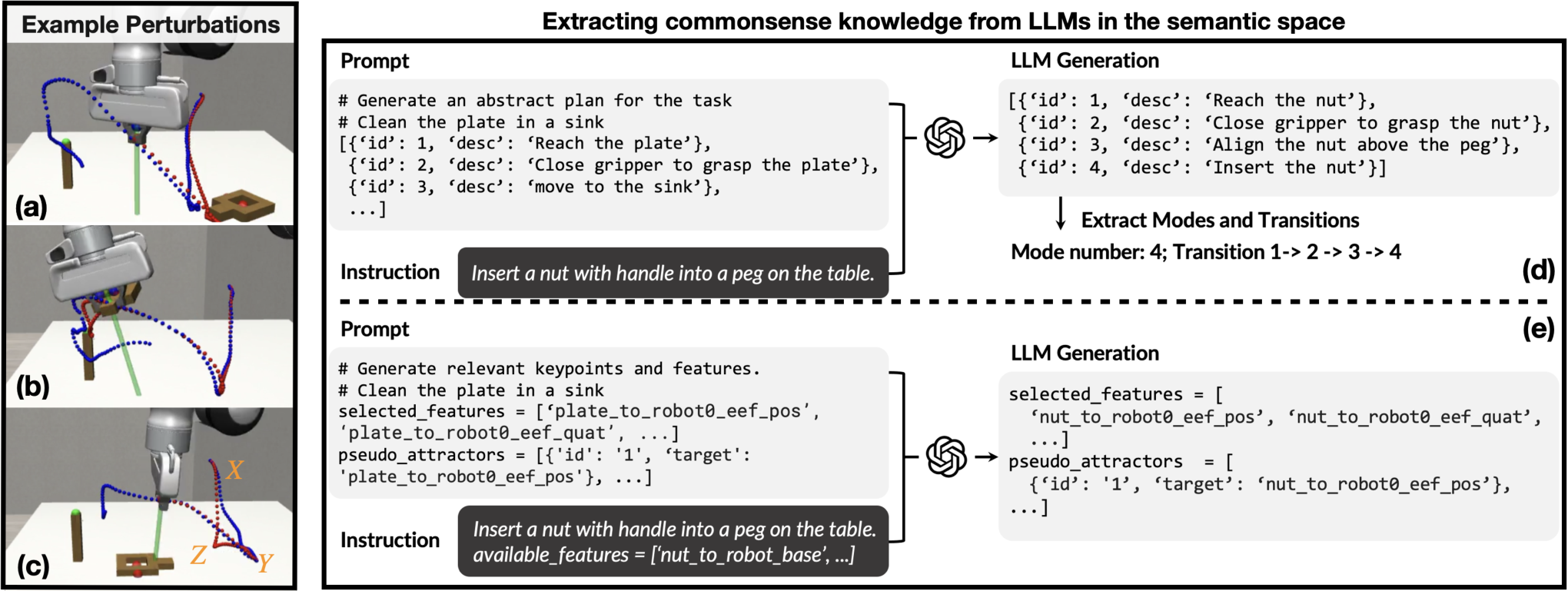
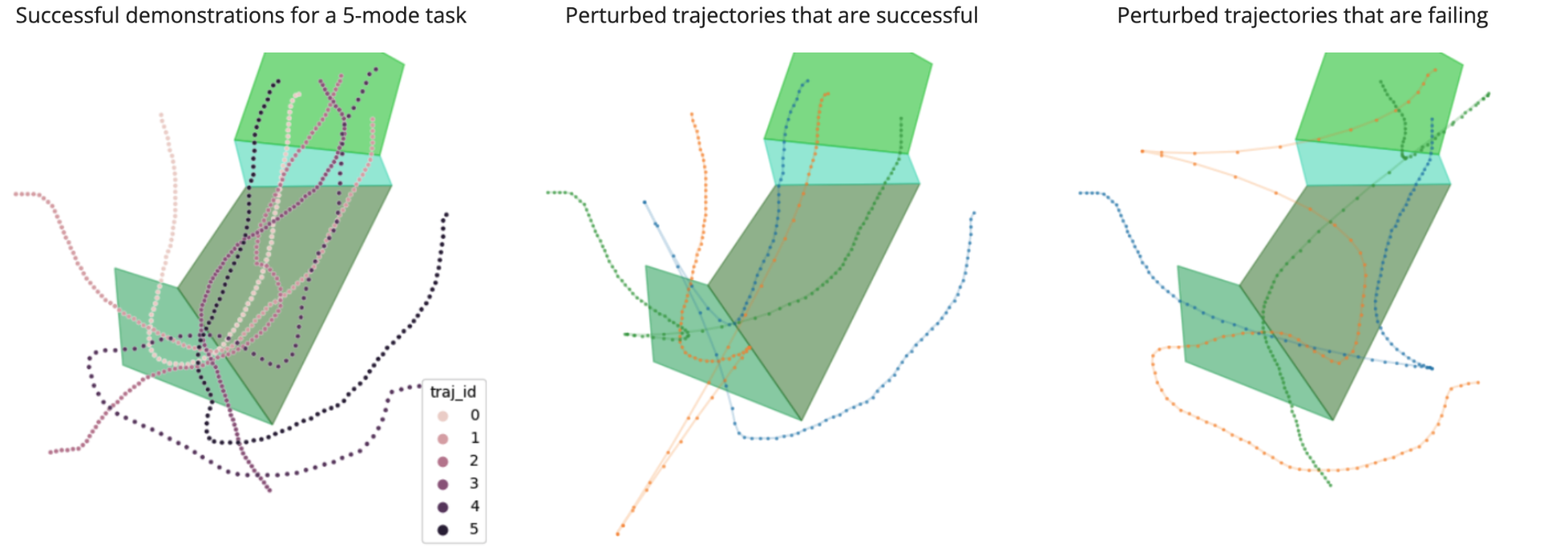
End-effector detours and gripper toggles alter otherwise successful replays. An outcome oracle labels each full trajectory as success or failure. Harmless perturbations expand coverage; failures expose requirements such as maintaining a grasp during transport. These labels are sparse in time but require actual environment interaction.
2.2 Semantic description of demonstrations and task structure from LLMs
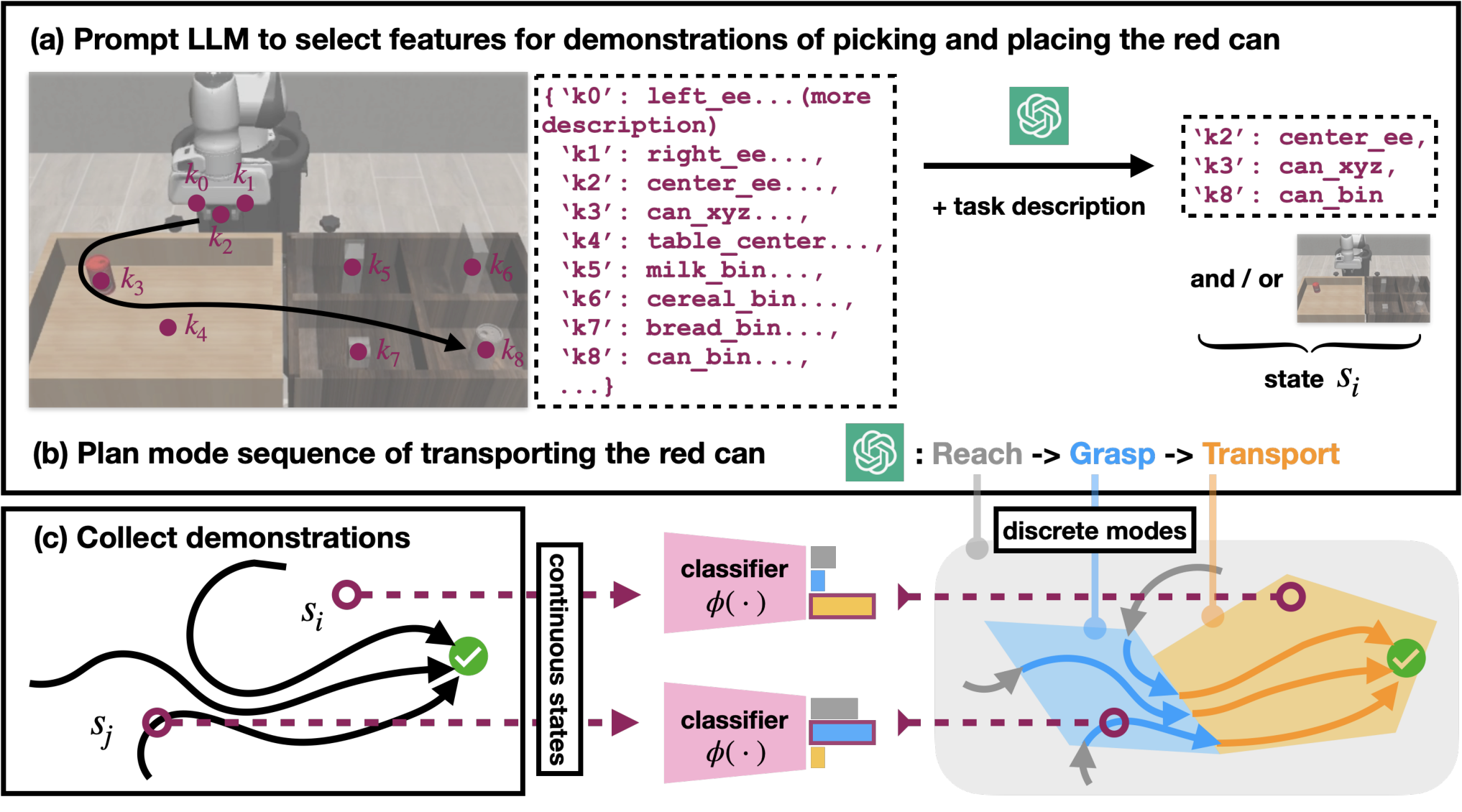
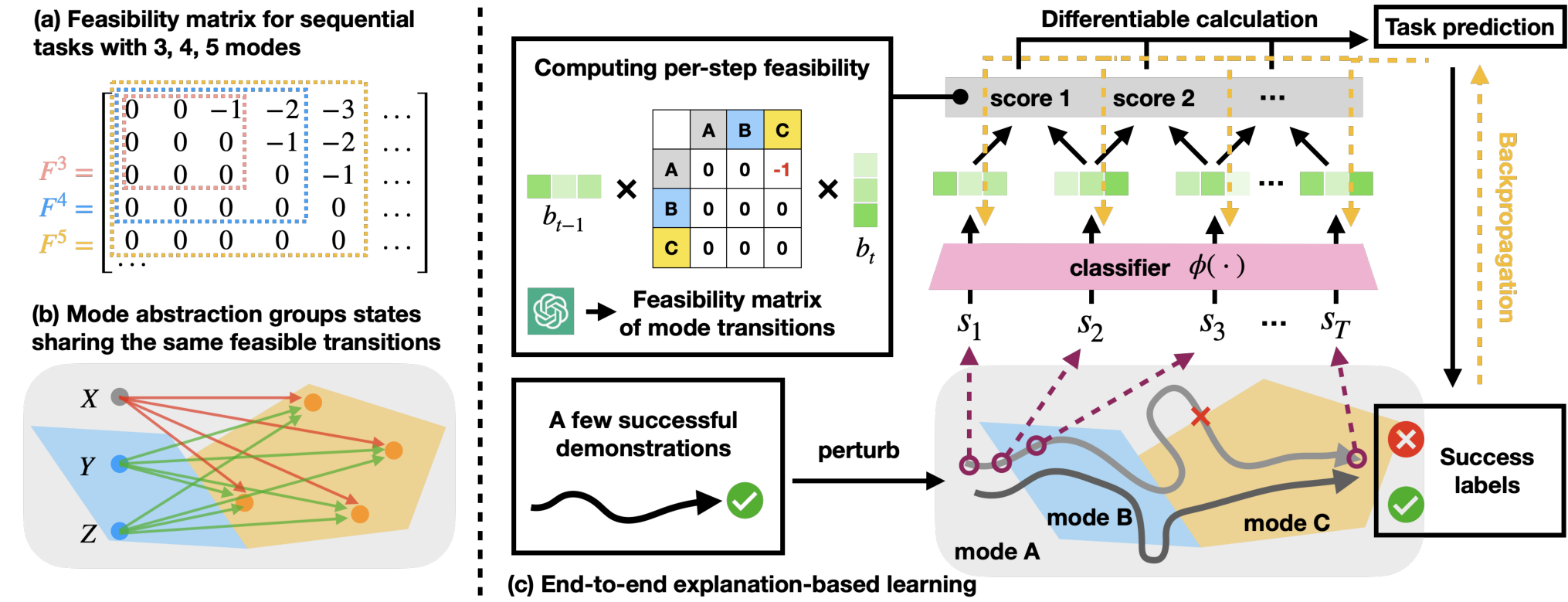
Demonstrations are assumed to share one reduced sequence of modes. A language model proposes that sequence, selects absolute or relative keypoint features from a predefined inventory, and describes feasible transitions. A matrix encodes valid transitions with zero cost and invalid transitions with negative cost; people can inspect and edit it.
2.3 End-to-end explanation-based learning for mode classification
A softmax classifier predicts mode beliefs at each state. Endpoint losses anchor initial and final modes; trajectory losses favor wholly feasible transitions for successes and at least one invalid transition for failures. For underactuated manipulation, an additional mode-conditioned dynamics loss separates states with different motion relationships. Correct structure, informative features, and contrasting trajectory coverage are important assumptions.
Equations 1–3
| (1) |
| (2) |
| (3) |
2.4 Mode-Based Motion Generation
Grounded modes can constrain a planner or segment demonstrations for separate behavior-cloning policies. Manipulation policies add a pseudo-attractor derived from typical transition poses; this term pulls large deviations back toward demonstrated regions before imitation dominates. The reported improvement therefore combines mode conditioning with this additional control mechanism.
| Method | 3-Mode (+perturb) | 4-Mode (+perturb) | 5-Mode (+perturb) |
| Behavior Cloning (BC) | 0.967 (0.908) | 0.814 (0.614) | 0.810 (0.596) |
| GLiDE +BC | 0.963 (0.887) | 0.892 (0.753) | 0.893 (0.753) |
| GLiDE +Planning | 0.996 (0.996) | 0.987 (0.966) | 0.991 (0.974) |
3 Experiment
The evaluation separates mode-classification accuracy from task-execution success, and tests both unperturbed and perturbed execution. [40], [36].
3.1 2D Navigation
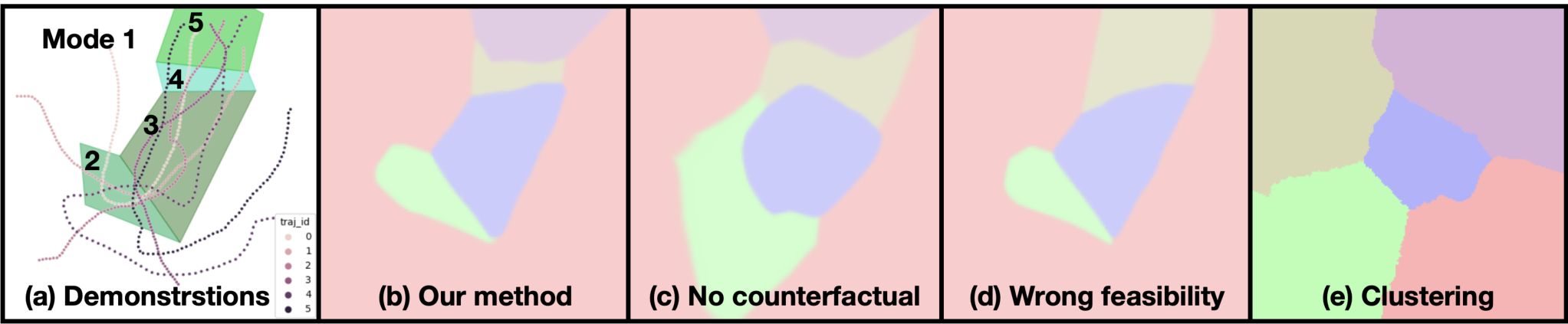
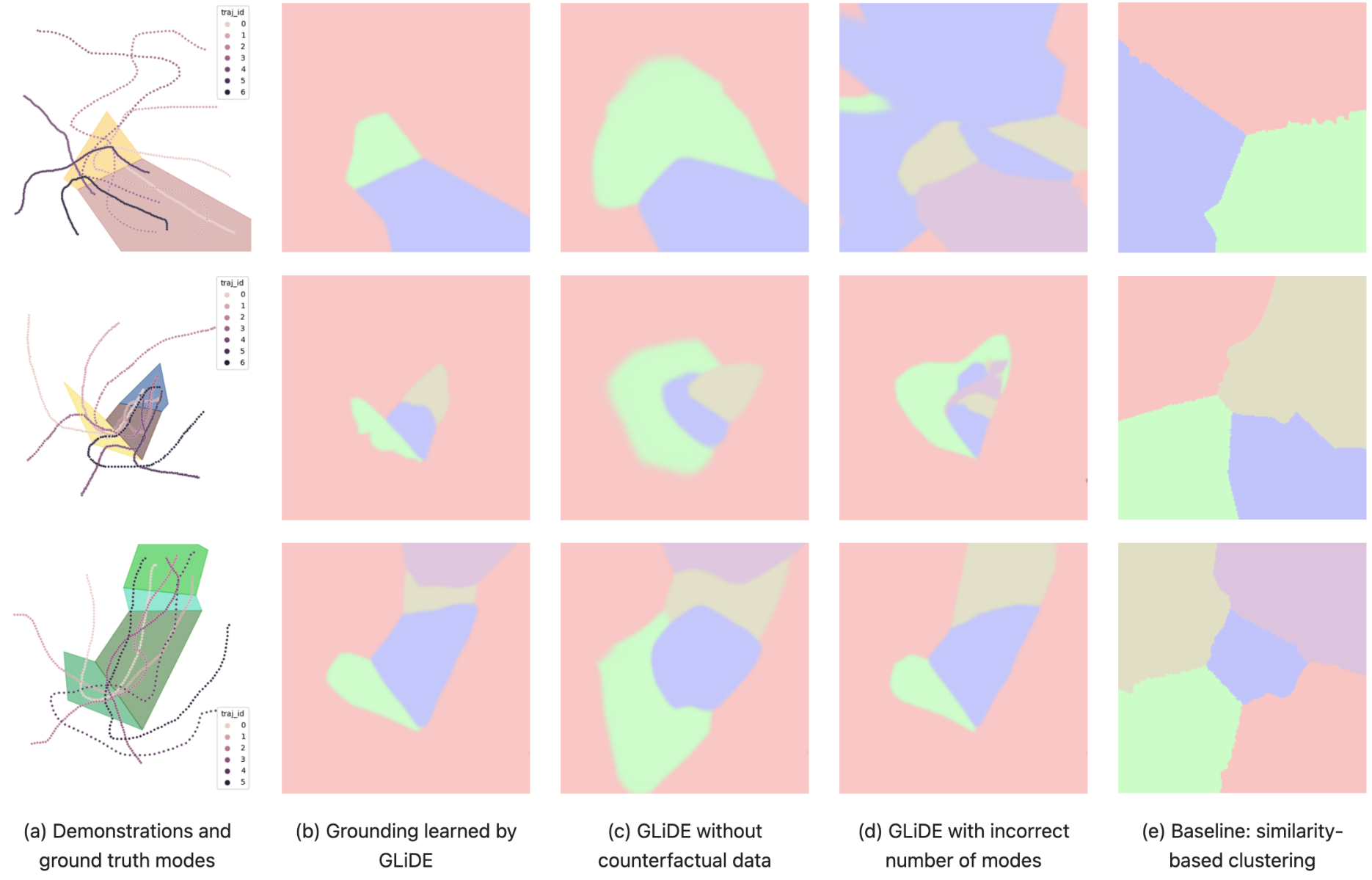
Planar navigation uses fewer than ten successful demonstrations per environment. Counterfactual data, the correct feasibility matrix, and task-prediction loss improve recovered polygon boundaries. Across 1,000 tests, five-mode perturbed success is 59.6% for behavior cloning, 75.3% for mode-conditioned cloning, and 97.4% for mode-based planning. Mode-conditioned cloning does not improve every setting; in the three-mode perturbed case it scores 88.7% versus 90.8%.
3.2 Robosuite
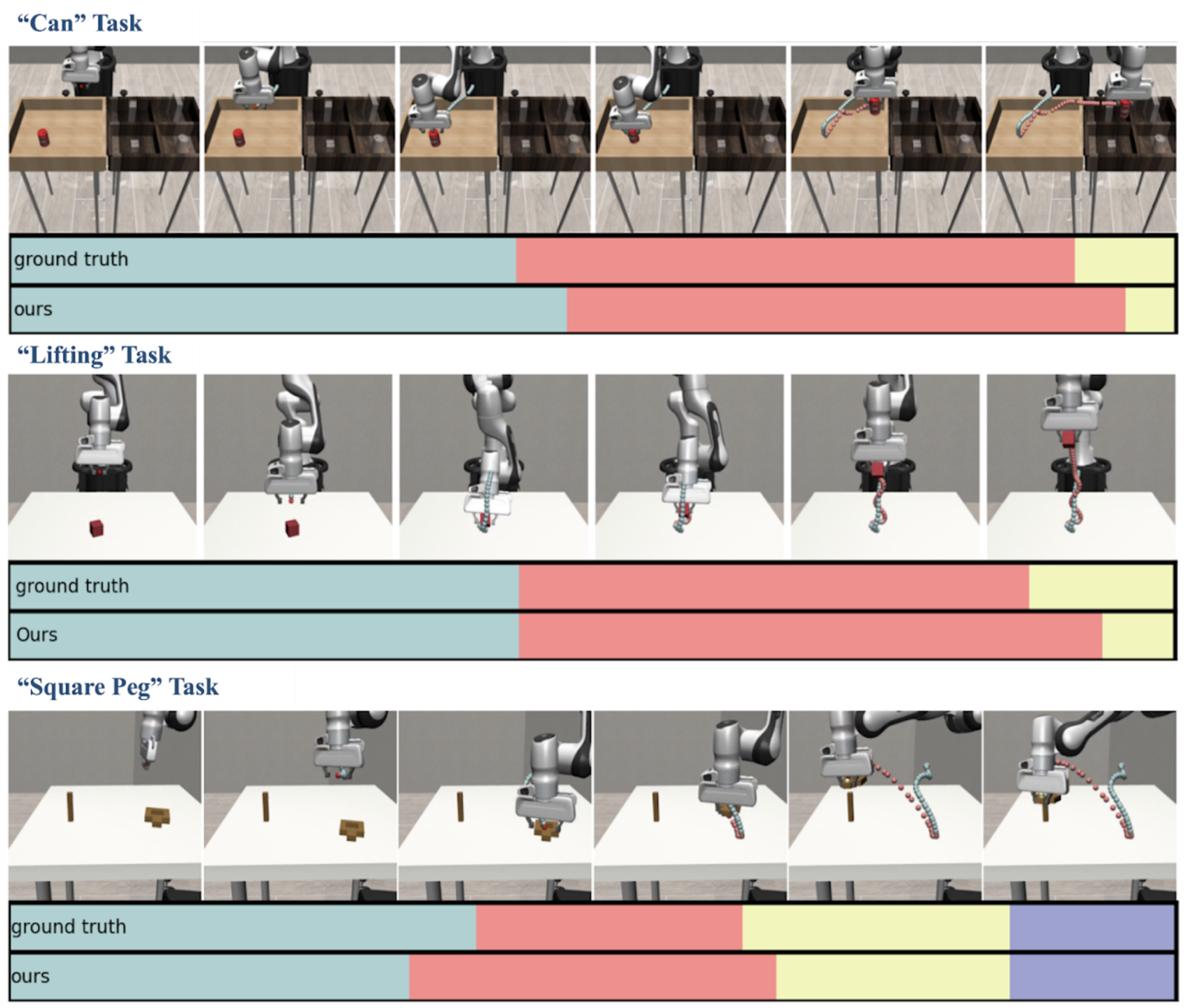
On Can, Lift, and Square, mode classification agrees with heuristic labels on 83%, 83%, and 67% of states. Under perturbations, mode-conditioned cloning scores 40%, 39%, and 15% task success, versus ordinary cloning’s 20%, 18%, and 3%. Without perturbations, ordinary cloning is better on Can and Square and tied on Lift. The method improves recovery in these tests rather than uniformly improving imitation.
| Method | Can | Lift | Square |
| GLiDE | 0.83 | 0.83 | 0.67 |
| GLiDE - Dynamics Loss | 0.67 | 0.75 | 0.46 |
| GLiDE - Prediction Loss | 0.67 | 0.68 | 0.56 |
| GLiDE - Feature Selection | 0.55 | 0.70 | 0.57 |
| Traj. Seg. Baseline | 0.66 | 0.56 | 0.54 |
3.3 Real Robot Experiments: 2D Navigation and Scooping Tasks
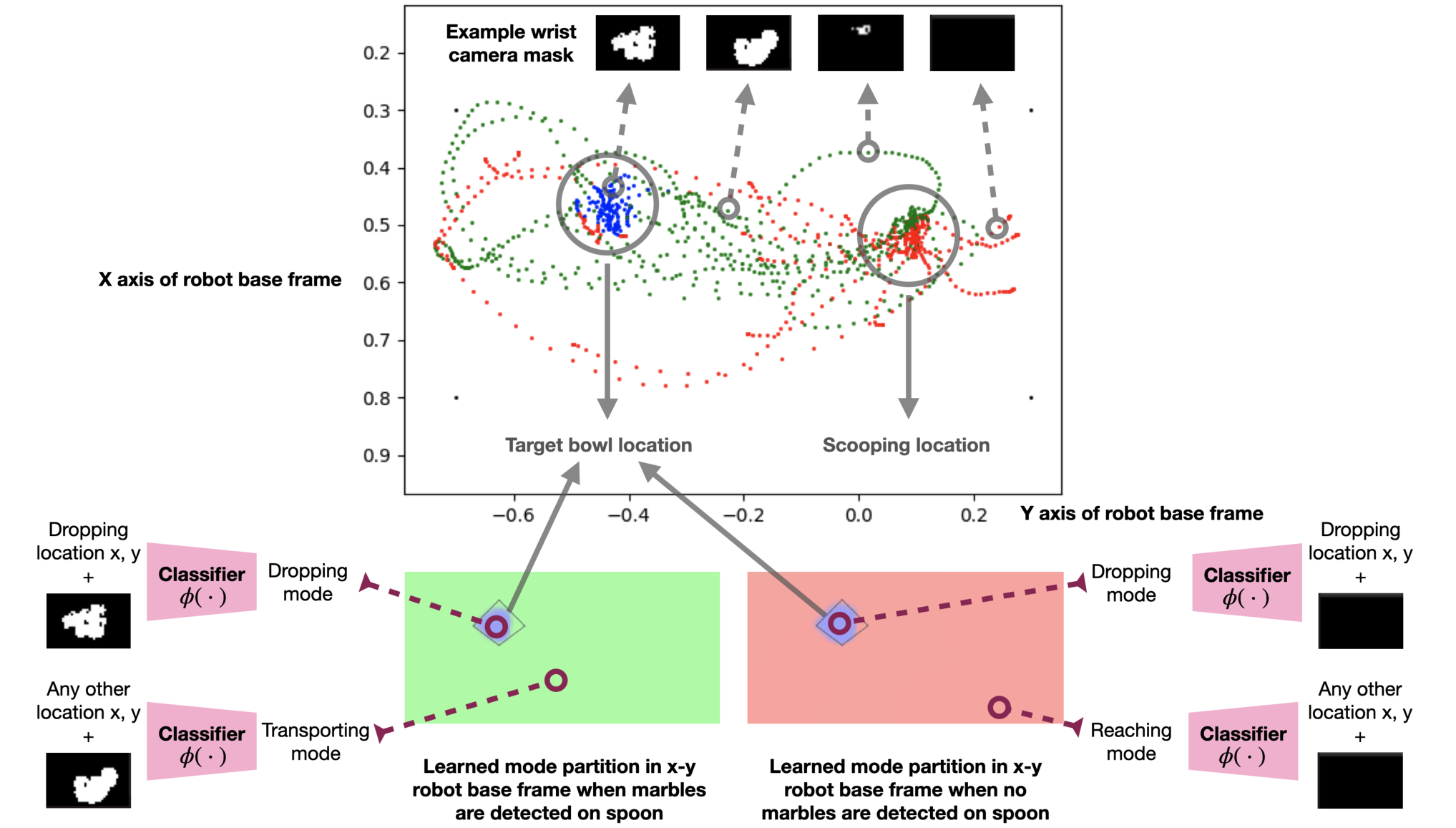
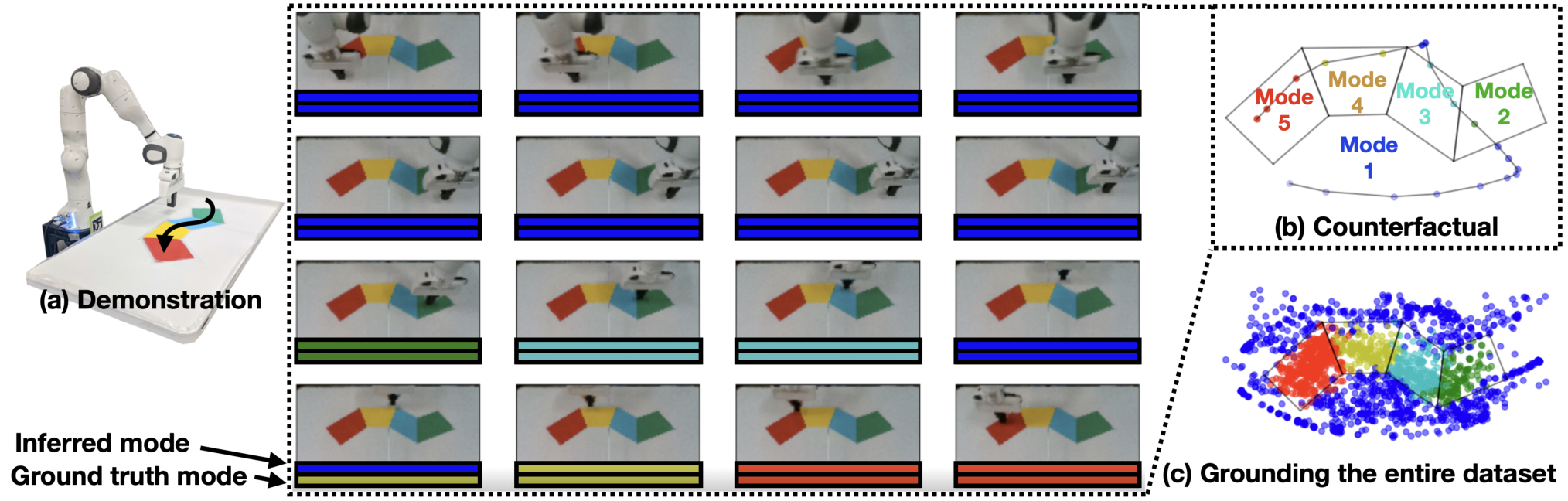
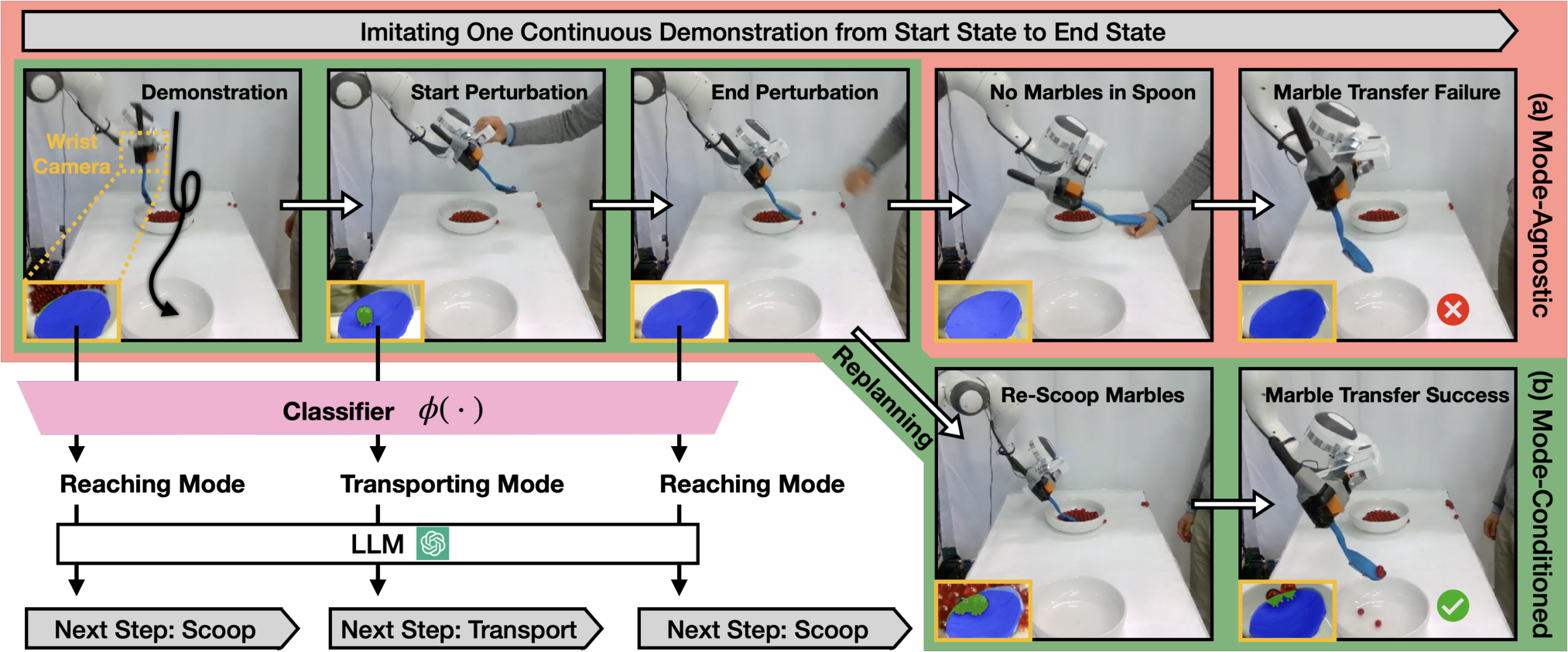
For real-robot planar navigation, 20 human demonstrations seed 2,000 automatically labeled perturbed trajectories collected in two hours. A vision classifier recovers the colored-region modes. In marble scooping, humans also demonstrate failures because automatic reset is difficult; a wrist-camera mask and end-effector pose support a learned mode classifier and illustrated replanning after dropped marbles. The scooping evidence is qualitative.
4 Related Work
The work connects learned abstractions, language grounding, and counterfactual data generation. Its emphasis is discovering mode boundaries that explain task success and failure, rather than treating whole language instructions as indivisible skills or asking a language model alone to generate executable motion.
5 Conclusion
Mode grounding makes imitation more interpretable and can support recovery. Its principal costs are repeated perturbed executions, outcome labels, reset capability, and skilled selection of state features and prompts. Active data collection and joint representation learning are proposed extensions.
Appendix A More Mode Classification Results for 2D Navigation Tasks
Additional navigation visualizations compare learned boundaries with ground truth and ablations. They illustrate the contribution of counterfactual failures, correct mode counts, and task-level prediction losses across three-, four-, and five-mode settings.
Appendix B Heuristic Rules for Mode Family Groundtruth in RoboSuite
Evaluation labels use manually specified event rules: reaching, contact or grasp, transport/lift, alignment, and final placement depending on task. Accuracy is the fraction of states matching these heuristic labels, not a proof that the learned partition uniquely recovers physical modes.
Appendix C Prompt Engineering For RoboSuite Tasks
The original prompt and generated responses are preserved below as experimental artifacts.
C.1 Prompt Example
The prompt asks for an abstract action plan, pairwise transition feasibility, relevant features from an available list, and one goal feature per step. Its plate-cleaning example illustrates the requested output structure.
You are an expert in generating robot action plans and features.

Given a language description of a task, such as "clean the plate in a sink," you should first generate an abstract plan for the task. Put them in <plan></plan>. The plan is a list of steps. You should ignore object finding or localization actions. For example,
<plan>
steps = [{'id': 1, 'desc': 'Reach the plate'},
 {'id': 2, 'desc': 'Close gripper to grasp the plate'},
 {'id': 3, 'desc': 'Move to the sink'},
 {'id': 4, 'desc': 'Turn on the faucet'}]
</plan>

Next, you should generate a feasibility matrix between all the steps. Put them in <feasibility></feasibility>
<feasibility>
feasibility = {
  (1, 2): True,   # after reaching the plate, we can directly close the gripper
  (1, 3): False,  # after reaching the plate, we can't directly move to the sink
  (1, 4): False,  # after reaching the plate, we can't directly turn on the faucet
  (2, 3): True,   # after closing the gripper, we can directly move to the sink
  (2, 4): False,  # after closing the gripper, we can't directly turn on the faucet
  (3, 4): True,   # after moving to the sink, we can't directly turn on the faucet
}
</feasibility>

The user will also give you a list of available features, such as robot poses, object poses. An example is the following:
<available_features>
avaiable_features = ['plate_pos', 'plate_quat', 'plate_to_robot0_eef_pos', 'plate_to_robot0_eef_quat', 'sink_pos', 'sink_quat', 'sink_to_robot0_eef_pos', 'sink_to_robot0_eef_quat', 'faucet_pos', 'faucet_quat', 'faucet_to_robot0_eef_pos', 'faucet_to_robot0_eef_quat', 'robot0_eef_pos', 'robot0_eef_quat', 'gripper_state']
</available_features>
We will use the following convention: XXX_pos and XXX_quat denote the pose of the object. XXX_to_robot_eef denotes the relative pose between the object and the robot end-effector.

You should select a subset of features. Such as:
<selected_features>
features = [ 'plate_to_robot0_eef_pos', 'plate_to_robot0_eef_quat', 'sink_to_robot0_eef_pos', 'sink_to_robot0_eef_quat', 'faucet_to_robot0_eef_pos', 'faucet_to_robot0_eef_quat' ,
' 'gripper_state'']
</selected_features>

For each step, you also need to generate a "goal"  pose, which is either an absolute pose of the robot or a relative pose between the robot and another object. In this case,
<goal>
goals = [
  {'id': '1', 'feature': 'plate_to_robot0_eef_pos'},
  {'id': '2', 'feature': 'plate_to_robot0_eef_pos'},
  {'id': '3', 'feature': 'sink_to_robot0_eef_pos'},
  {'id': '4', 'feature': 'faucet_to_robot0_eef_pos'},
]
</goal>
C.2 LLM Response for Can Task
The can-task response specifies reaching, grasping, moving between trays, and releasing, together with selected pose/gripper features. Some listed feasibility judgments are counterintuitive, illustrating why the matrix is exposed for inspection rather than assumed infallible.
Task: move the can from tray 1 to tray 2. Both trays are fixed. Available features:
<available_features>
available_features= ['can_pos', 'can_quat', 'can_to_robot0_eef_pos', 'can_to_robot0_eef_quat', 'robot0_eef_pos', 'robot0_eef_quat',  'gripper_state']
</available_features>

<plan>
steps = [{'id': 1, 'desc': 'Reach the can in tray 1'},
 {'id': 2, 'desc': 'Close gripper to grasp the can'},
 {'id': 3, 'desc': 'Move to tray 2'},
 {'id': 4, 'desc': 'Open gripper to release the can'}]
</plan>

<feasibility>
feasibility = {
  (1, 2): True,   # after reaching the can in tray 1, we can directly close the gripper
  (1, 3): False,  # after reaching the can in tray 1, we can't directly move to tray 2
  (1, 4): False,  # after reaching the can in tray 1, we can't directly open the gripper
  (2, 3): True,   # after closing the gripper, we can directly move to tray 2
  (2, 4): True,  # after closing the gripper, we can directly open the gripper
  (3, 4): False,   # after moving to tray 2, we can't directly open the gripper
}
</feasibility>

<selected_features>
features = ['can_to_robot0_eef_pos', 'can_to_robot0_eef_quat', 'robot0_eef_pos', 'robot0_eef_quat', 'gripper_state']
</selected_features>

<goal>
goals = [
  {'id': '1', 'feature': 'can_to_robot0_eef_pos'},
  {'id': '2', 'feature': 'can_to_robot0_eef_pos'},
  {'id': '3', 'feature': 'robot0_eef_pos'},
  {'id': '4', 'feature': 'robot0_eef_pos'},
]
</goal>
C.3 LLM Response for Lifting Task
The lifting response selects a three-step reach–grasp–lift plan, object-relative and end-effector pose features, and corresponding goal features.
Task: lift a block from the table. Available features:
<available_features> available_features= ['block_pos', 'block_quat', 'block_to_robot0_eef_pos', 'block_to_robot0_eef_quat', 'robot0_eef_pos', 'robot0_eef_quat',  'gripper_state']
</available_features>

<plan>
steps = [{'id': 1, 'desc': 'Move to the block'},
         {'id': 2, 'desc': 'Close gripper to grasp the block'},
         {'id': 3, 'desc': 'Lift the block'}]
</plan>

<feasibility>
feasibility = {
  (1, 2): True,  # after moving to the block, we can directly close the gripper
  (1, 3): False,  # after moving to the block, we can't directly lift the block
  (2, 3): True,  # after closing the gripper, we can directly lift the block
}
</feasibility>

<selected_features>
features = ['block_to_robot0_eef_pos', 'block_to_robot0_eef_quat', 'robot0_eef_pos', 'robot0_eef_quat', 'gripper_state']
</selected_features>

<goal>
goals = [
  {'id': '1', 'feature': 'block_to_robot0_eef_pos'},
  {'id': '2', 'feature': 'block_to_robot0_eef_pos'},
  {'id': '3', 'feature': 'robot0_eef_pos'},
]
</goal>
C.4 LLM Response For Square Peg Task
The nut-insertion response selects reach, grasp, move-to-peg, and insert steps, with nut/peg relative poses and gripper state. The full feasibility and feature lists remain available in the preserved response.
Task: insert a nut with a handle to a peg. Available features:
<available_features> available_features= ['nut_pos', 'nut_quat', 'nut_to_robot0_eef_pos', 'nut_to_robot0_eef_quat', 'handle_pos', 'handle_quat', 'handle_to_robot0_eef_pos', 'handle_to_robot0_eef_quat', 'peg_pos', 'peg_quat', 'peg_to_robot0_eef_pos', 'peg_to_robot0_eef_quat', 'robot0_eef_pos', 'robot0_eef_quat',  'gripper_state']
</available_features>

<plan>
steps = [{'id': 1, 'desc': 'Reach the nut'},
 {'id': 2, 'desc': 'Close the gripper to grasp the nut'},
 {'id': 3, 'desc': 'Move to the peg'},
 {'id': 4, 'desc': 'Insert the nut into the peg'}]
</plan>

<feasibility>
feasibility = {
  (1, 2): True,
  (1, 3): False,
  (1, 4): False,
  (2, 3): True,
  (2, 4): False,
  (3, 4): True,
}
</feasibility>

<selected_features>
features = ['nut_to_robot0_eef_pos', 'nut_to_robot0_eef_quat', 'peg_to_robot0_eef_pos', 'peg_to_robot0_eef_quat', 'gripper_state']
</selected_features>

<goals>
goals = [
  {'id': '1', 'feature': 'nut_to_robot0_eef_pos'},
  {'id': '2', 'feature': 'nut_to_robot0_eef_pos'},
  {'id': '3', 'feature': 'peg_to_robot0_eef_pos'},
  {'id': '4', 'feature': 'peg_to_robot0_eef_pos'},
]
</goals>
Appendix D Additional Information for Marble Scooping Task
Scooping uses planar end-effector coordinates and a wrist-camera marble mask. Because contact sensing is unavailable, the abstraction omits a separate scooping mode and assumes acquisition when reaching transitions to transporting. The learned dropping region aligns with the destination bowl in the displayed examples.